How to download the OKX app on iPhone: official install guide (2026)
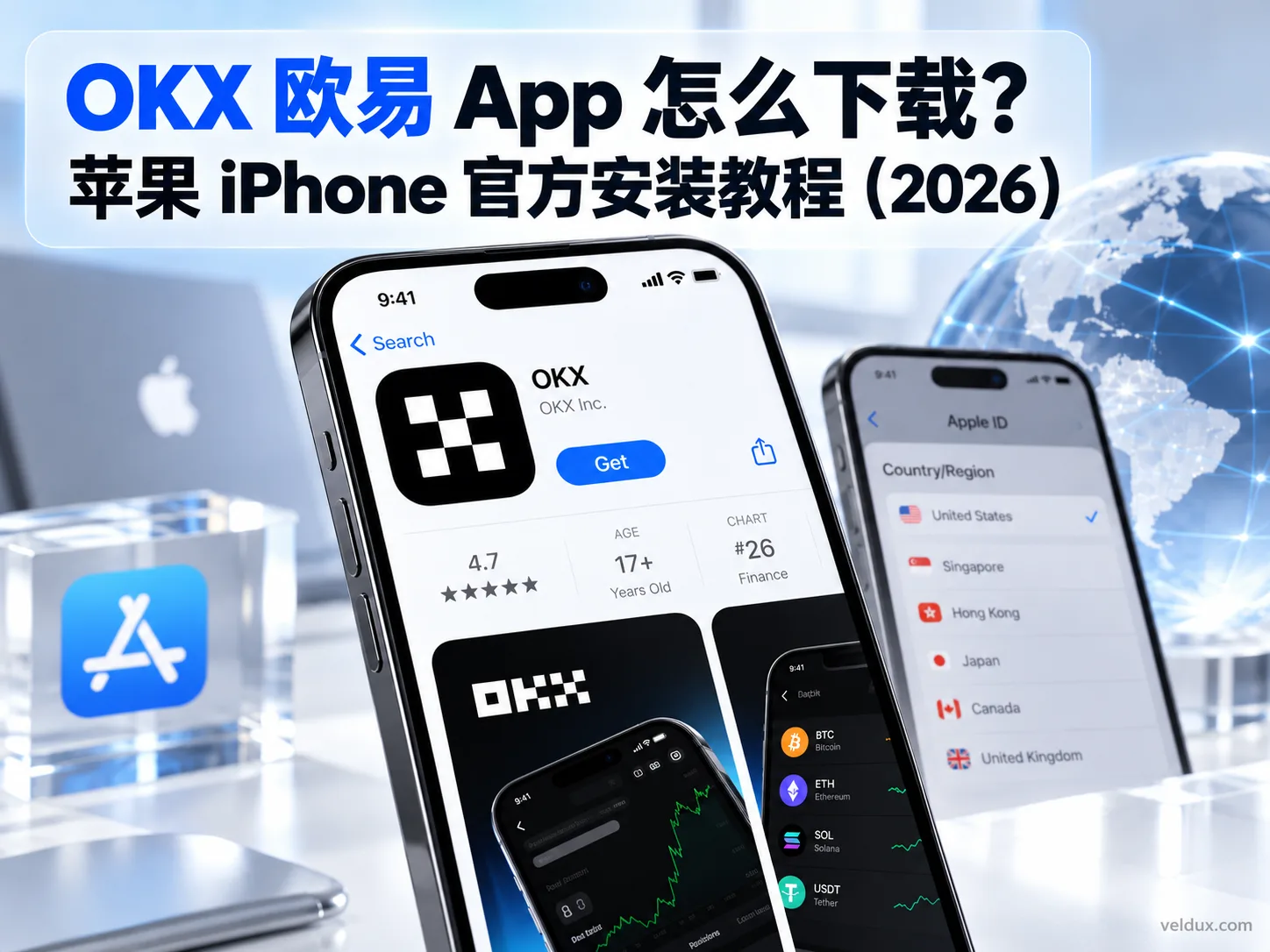
Table of contents
OKX new-user benefit
20% fee rebate
Official OKX sign-up · You must complete identity verification (KYC) to trade and withdraw
Downloading the OKX app on an iPhone in 2026 is not about hunting for an "installer package" somewhere online; it comes down to confirming two things:
First, the download entry point is OKX's official site or Apple's App Store; second, the App Store region tied to your Apple ID is one where OKX is available.
Once the right Apple ID is in place, installing the app takes about two minutes. The two places people trip up most are ending up in the wrong App Store region and mistaking a lookalike app for the real one.
OKX publishes an iOS availability list that includes Hong Kong, Taiwan, Singapore, the US, Japan and Australia, among others, but it does not cover every region — mainland China is not on it, for example. If your Apple ID belongs to a region that isn't listed, the official OKX app may not appear in your App Store.
OKX also states that the developer of the official iOS app should show as OKX Inc.[1] Before downloading, don't judge by name and icon alone; the developer information and the source of the download matter more.
Quick answer:
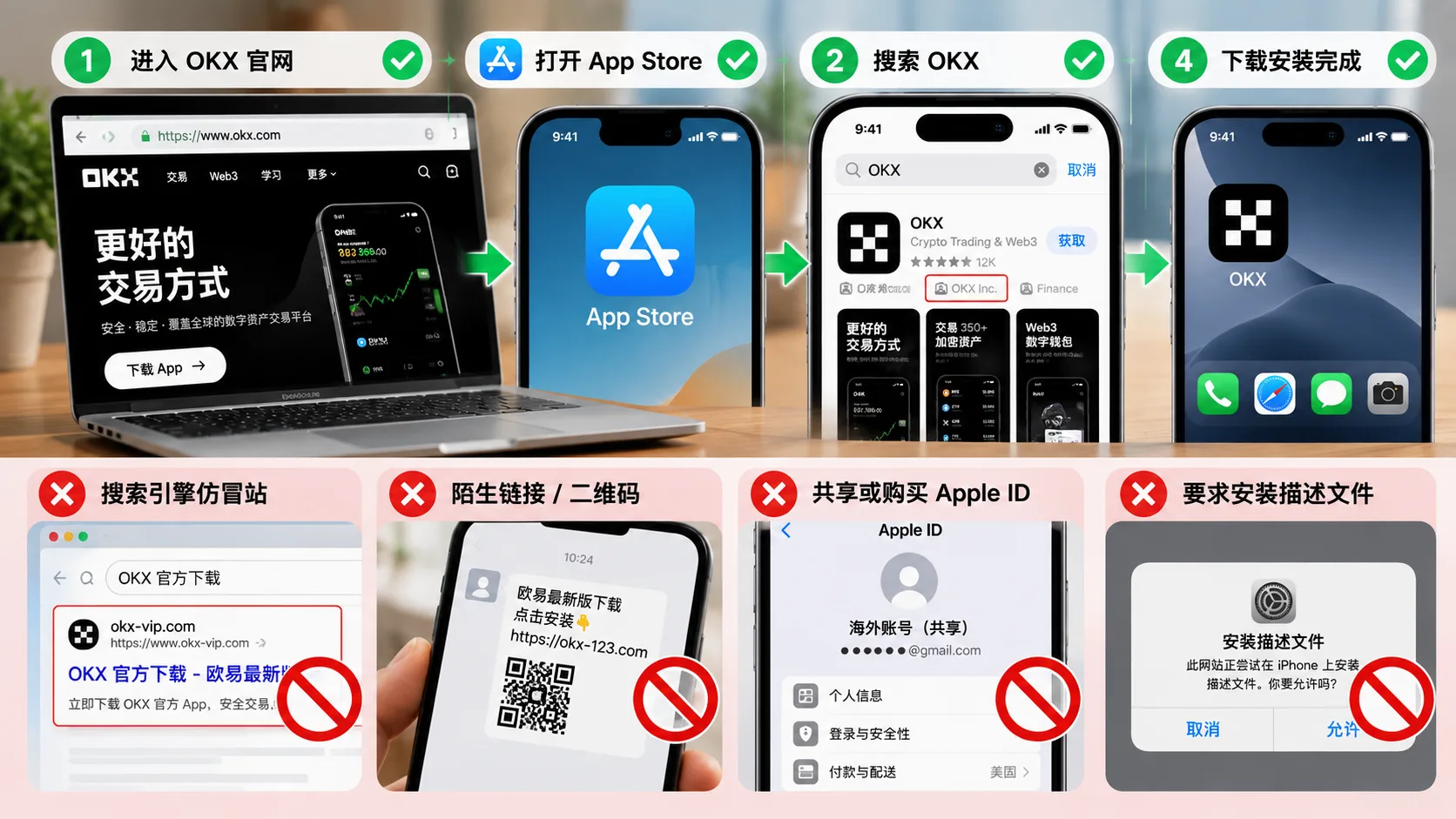
On iPhone, start from OKX's official download page on okx.com, or use an Apple ID from a supported region to search "OKX" in the App Store, confirm the developer is OKX Inc., then install.[2]
Note: this article covers app download, installation and account security only; it is not investment advice. Crypto trading carries high risk; follow the laws of your jurisdiction.
At a glance: how do you download OKX on iPhone?
| Your situation | What to do |
|---|---|
| You already have an Apple ID from a supported region | Sign in to the App Store, search OKX and check the developer |
| Your App Store doesn't show the official app | Confirm whether your region is supported by OKX, then follow Apple's official rules for changing your Apple ID region |
| You plan to use it long term | Use an Apple ID you created and control; don't buy a shared account |
| You find several apps called "OKX" | Check above all whether the developer is OKX Inc. |
| A website asks you to download an "iOS installer package" | Don't continue; go back to OKX's official site and the App Store |
In one sentence: the official route for installing OKX on iPhone is "OKX official site → App Store → confirm OKX Inc.".
Why OKX may not appear in your App Store
Many iPhone users get stuck here on their first install:
You open the App Store, search "OKX", and can't find the official app.
This usually isn't a broken phone or an App Store outage; it's a difference in regional availability caused by the region of your Apple ID.
OKX's published list of "countries and regions where the app can be downloaded" includes, for example:
- Hong Kong
- Taiwan
- Singapore
- Japan
- United States
- Canada
- Australia
- United Kingdom
- United Arab Emirates
- South Korea
and other countries and regions.
Some regions are not on that iOS list — mainland China is one example.
So if your Apple ID's region isn't covered and you can't find the official OKX app, don't keep searching for an "OKX iPhone installer package".
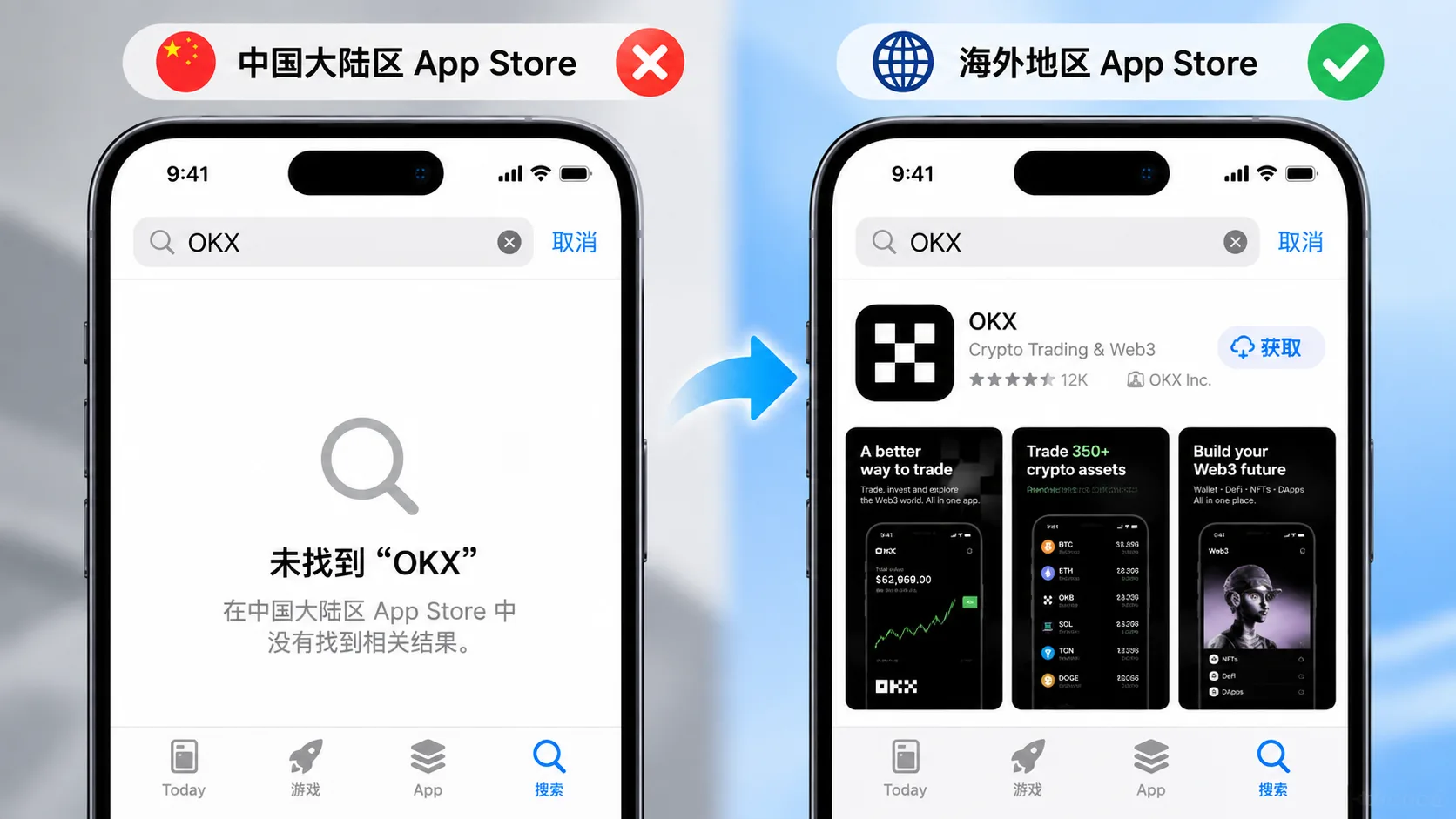
The right approach is to confirm first:
whether your actual region is supported by OKX, and whether the Apple ID region you plan to use complies with Apple's and OKX's rules.
How to recognise OKX's official download entry point
Before downloading, settle one question:
Are you on OKX's official page, or a third-party site that only looks like OKX?
OKX's official main domain is:
okx.com
For example:
okx.comokx.com/en/okx.com/en/download-guide
are all pages under OKX's official domain.
But search results may include third-party pages with "OKX" and "official download" in their titles.
Don't trust a page just because its title says "official".
When judging the source of a download, follow this rule:
Enter okx.com first, then go to the App Store from the official page.
OKX also provides a dedicated iOS download guide that walks users through creating or using an Apple ID from a supported region before going to the App Store.
Downloading OKX on iPhone: the complete process
The whole process breaks into 3 steps:
Prepare an Apple ID from a supported region → sign in to the App Store → search and verify OKX Inc.
Step 1: confirm your Apple ID's region
If you already have an Apple ID, confirm which country or region it belongs to.
Apple provides an official method for changing the account's country or region:
Settings → your name → Media & Purchases → Country/Region.
Note that changing an Apple ID's country or region isn't always a one-tap job.
According to Apple, before changing the region you may need to:
- use up your account balance;
- deal with existing subscriptions;
- wait for some pending items to finish;
- provide a payment method valid in the new region.
So it's not advisable to keep changing the region of your main Apple ID just to download one app.
If you genuinely need a new Apple ID, create it through Apple's official channels and provide real, valid information as Apple's terms of service require.
Apple's official account-creation entry point is:
account.apple.com
Apple also states that when creating a new account you can choose a country or region and verify your email address and phone number.[3]
Don't buy a "ready-made overseas Apple ID"
These offers are common online:
- Hong Kong Apple IDs for sale;
- US Apple IDs for rent;
- shared overseas Apple accounts;
- an "Apple ID just for downloading OKX".
Such accounts may work temporarily for signing in to the App Store, but they are not a good long-term solution.
The biggest risk isn't the small account fee; it's that:
the Apple ID isn't fully under your control.
The seller may still hold:
- the original registration details;
- the recovery method;
- backup verification methods;
- sign-in access from other devices.
So never sign in to your own iCloud with an Apple ID you bought or share.
If you plan to use an exchange app long term, the safer route is an account you registered yourself, control yourself, and that complies with Apple's regional rules.
Step 2: sign in to the App Store
If you already have an Apple ID that meets the conditions, open the App Store and sign in.
OKX's official iOS walkthrough is:
- Open the App Store on your iPhone;
- tap your profile picture in the top right;
- sign in with the relevant Apple ID;
- confirm the account's country or region;
- search for "OKX";
- download the official app.
If you're only switching the App Store purchase account, try not to sign out of your iPhone's main iCloud account just to download an app.
Especially because your:
- photos;
- contacts;
- iCloud Drive;
- Find My iPhone;
- keychain;
may all be tied to your current Apple account.
Step 3: search OKX and confirm the developer OKX Inc.
After signing in to the App Store for the correct region:
Search:
OKX
then open the app details page.
The most important item here isn't the icon or the rating; it's:
Developer: OKX Inc.
OKX's official iOS download guide explicitly notes:
the developer of the official iOS app is OKX Inc.
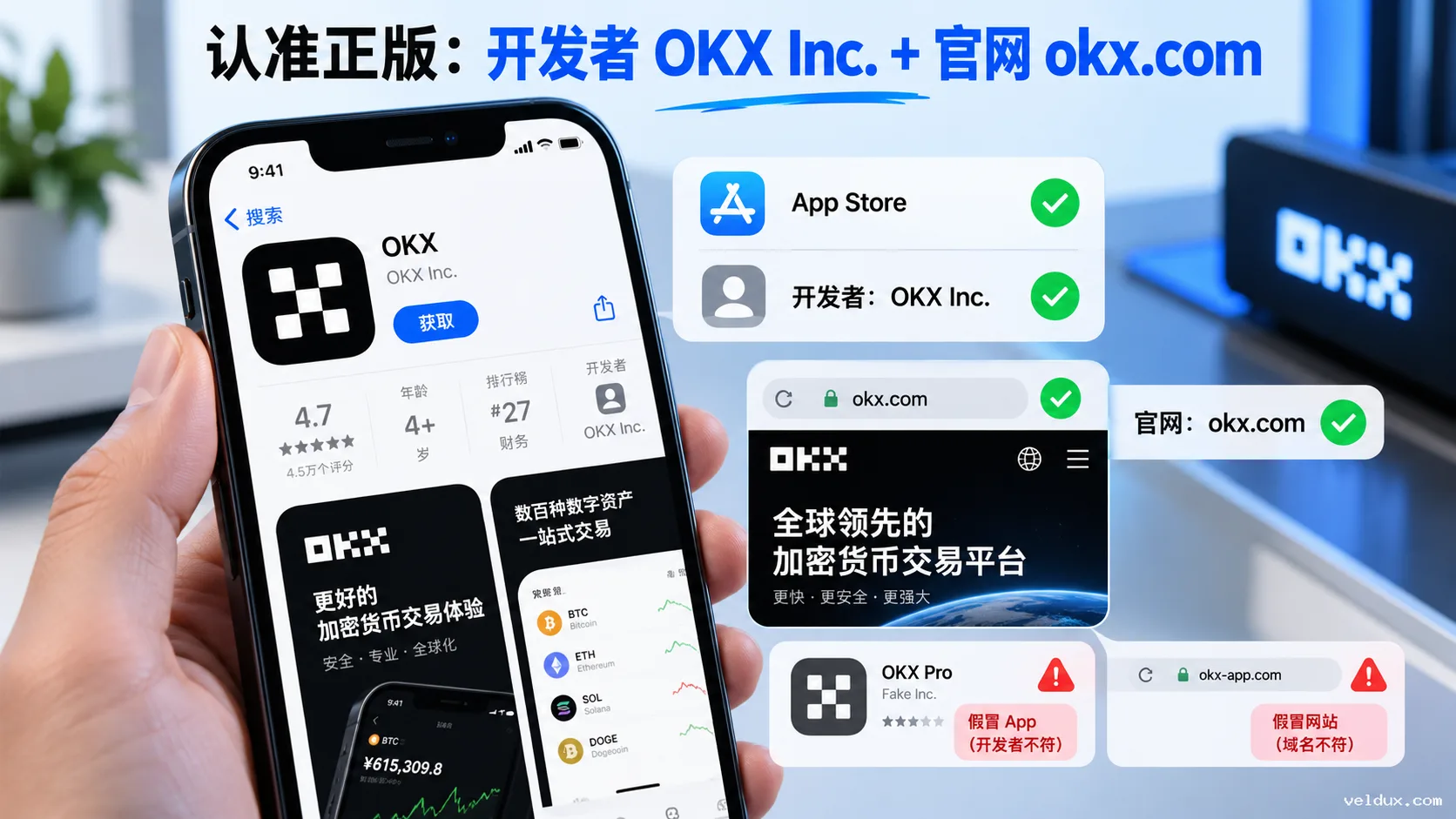
App Store pages for the official OKX app in several regions also show OKX Inc. as the developer.
So you can check it like this:
| What to check | What normal looks like |
|---|---|
| App name | OKX |
| Download platform | Apple App Store |
| Developer | OKX Inc. |
| Official site | okx.com |
| Download method | "Get" in the App Store |
| A website asks you to install a configuration profile | Caution: not part of a normal App Store installation |
The same name and the same logo don't prove the app is genuine.
Developer information plus the credibility of the download source is stronger evidence.
After downloading OKX, check it once more
Once installation is done, don't rush to sign in.
Take a few seconds to confirm these:
| What to check | Recommendation |
|---|---|
| Where you downloaded it | Apple App Store |
| Developer | OKX Inc. |
| Site source | okx.com |
| Did you go through an unknown download site? | Ideally not |
| Did it ask you to install an unknown profile? | Handle with caution |
| Did someone message you to install an "exclusive version"? | Don't use it |
If you can't remember where this OKX app came from, the safest move isn't to keep guessing:
delete the version of unknown origin and reinstall from the official App Store page linked from OKX's site.
How do you register after downloading OKX?
Once the app is installed, the next step is creating an account.
The general flow is:
email or phone number → set up account security → complete identity verification → then decide whether to deposit or trade.
If you plan to register through this site's invitation link, check on the registration page whether the referral code has been filled in correctly.
The OKX referral code this site uses is:
AMY568
Before registering, go by the benefit percentage and conditions actually shown on OKX's registration page.
The fee benefit tied to a referral code can depend on region, campaign, account eligibility and applicable products; don't judge your final benefit from a percentage printed in a third-party article.
Do you have to enter the OKX referral code at registration?
For a new account, the simplest rule is:
confirm the referral code is showing correctly before you register.
If you arrive through an invitation link, check again before submitting the registration.
Don't wait until the account is created and assume you can add it later.
Rules for referral codes, re-binding old accounts and recall campaigns can change by region and campaign; go by the eligibility currently shown on your account page.
If this is the specific problem you want to solve, see OKX referral code: how to enter AMY568 and the 20% fee rebate.
Which OKX download methods should you avoid?
These channels carry clearly higher risk.
| Download channel | Risk |
|---|---|
| "Official OKX download site" in search ads | Titles can be faked; check the domain first |
| Download links sent by private message (WhatsApp, Telegram, SMS) | You can't confirm whether the file was modified |
| "Internal version" or "exclusive version" from a stranger | Official identity can't be verified |
| Shared Apple ID + registration service | Account control may sit with a third party |
| Requests to install an unknown enterprise certificate or configuration profile | Not the normal App Store download route |
| Requests for your OKX password or verification code | High risk |
Pay particular attention to this:
if OKX support, someone in a group or a supposed "mentor" asks you to send your login verification code, Google Authenticator code or password, don't provide it.
A verification code exists precisely to prove that you are the person operating.
The 5 most common mistakes when downloading OKX
1. Searching Google or Bing for "OKX official download"
Search results are only an entry point, not official certification.
The important thing is to check whether the final domain belongs to okx.com.
2. Looking only at the app icon
Icons and interfaces can be copied.
Developer information is more worth checking.
3. Changing your main Apple ID region casually just to download an app
Apple's country or region change can be affected by balance, subscriptions, payment method and other conditions.
4. Buying a shared Apple ID and signing in to iCloud
That creates an unnecessary link between a third-party Apple ID and your phone's data.
It's not recommended.
5. Depositing money immediately after installing the app
First complete:
genuine-app check → password setup → 2FA → anti-phishing settings → then think about moving funds.
Don't treat "installation complete" as "account already secure".
FAQ
Q1: Is the OKX iPhone app free to download?
Yes.
Downloading the OKX app from Apple's App Store costs nothing.
Creating an account normally has no opening fee either, but trading, withdrawing or using certain products may generate fees.
Q2: Why doesn't OKX appear in my App Store?
Because OKX's published iOS availability list doesn't cover every region.
Hong Kong, Taiwan, Singapore, the US and Japan, among others, are on the published list.
Q3: Do I need a foreign Apple ID to download OKX on iPhone?
More precisely, you need an Apple ID / App Store region from a region supported by OKX.
Don't simplify this to "just get any foreign account".
You also need to consider local regulations, Apple's terms of service and whether OKX offers the relevant services in your region.
Q4: Can I buy a Hong Kong or US Apple ID to download it?
Technically these services exist online, but a bought or shared Apple ID is not advisable as a long-term solution.
The seller may recover the account, change the password, or several people may share it.
Above all, don't sign in to your own iCloud with an Apple ID provided by someone else.
Q5: How do I confirm the OKX app is genuine?
Check three things:
- whether the download channel was Apple's App Store;
- whether the App Store developer is OKX Inc.;
- if you came from a web page, whether it was an official okx.com page.
OKX's official Help Center also states that the developer of the official iOS app is OKX Inc.
Q6: Can I switch back to my old Apple ID after downloading?
Once the app is installed, it normally doesn't disappear just because you sign out of the App Store account used to download it.
But future updates, re-downloads or regional availability may be affected by the original download account and App Store policy.
So it's best to use an Apple ID you can control long term, not a temporary bought or borrowed account.
Q7: Does downloading OKX on iPhone require installing a profile?
When you download the official OKX app through Apple's App Store, the main process is simply tapping "Get" and installing.
If a site asks you to install an unknown enterprise certificate, a device-management profile or a so-called "permanently signed version", be on your guard.
Q8: What is OKX's official iOS developer called?
As of this article's October 2026 verification, OKX's official Help Center lists the iOS developer as:
OKX Inc.
App Store pages for the official OKX app in several regions also show OKX Inc.
The one-sentence summary
You don't need to hunt across the web for an "iPhone installer package" to download OKX.
The correct route is:
confirm the official okx.com entry → use an Apple ID / App Store from a region supported by OKX → search OKX → verify the developer OKX Inc. → download and install.
If your Apple ID can't find the app, it is mainly an App Store regional availability issue. Don't switch to "exclusive versions", "enterprise versions" or installer files from strangers because of it.
After downloading, complete account registration, security settings and KYC.
If you're planning to register on OKX
| Your situation | Next step |
|---|---|
| First registration | Check before registering that the referral code has been filled in |
| Using this site's invitation link | Confirm the page shows AMY568 |
| You already have an OKX account | Don't open another account for the code; check your current account's eligibility first |
| You just want to try the app | You can download and install it without depositing immediately |
To register through this site's invitation link, use: Register on OKX (referral code AMY568 fills in automatically).
The code's benefit, eligible regions, eligible products and account eligibility follow what OKX's registration page shows in real time.
This site's registration link is an affiliate link: registering through it may generate income for Veldux, but it does not increase your registration cost. See the site's advertising and affiliate disclosure page for details.
Next steps
- OKX referral code: how to enter AMY568 and the 20% fee rebate — confirm before registering that the code was filled in correctly
- How to register on OKX: account setup and KYC verification — after downloading the app, complete the account and identity verification step by step
- How to buy USDT on OKX: a complete P2P tutorial — after registration and verification, make your first USDT purchase
Data verification note
The key facts in this article were checked on 2026-10-16, one by one:
- iOS availability and developer: OKX's published list of supported iOS regions includes Hong Kong, Taiwan, Singapore, the US and Japan, among others, and does not cover every region; the official iOS app shows OKX Inc. as the developer. Source: OKX official iOS download guide.
- Official download entry: iPhone users go from the official okx.com download page to Apple's App Store to get the OKX app; the official iOS distribution channel is the App Store. Source: OKX official app download page.
- Apple account creation and region: Apple accounts must be created through Apple's official channels; a new account can choose a country or region and verify email and phone number. Source: Apple official account management page.
Disclaimer
This article only explains how to download, install, security-check and use the OKX app on an iPhone. It is not investment advice, financial advice or a trading recommendation.
Crypto asset prices are highly volatile, and there are market, platform, cybersecurity and operational risks.
Get the app only from official channels, protect your account password, verification codes and two-factor authentication, and comply with the laws of your jurisdiction and the relevant platforms' terms of service.
Exchange operations · USDT · Wallet security
Responsible for researching and organizing content on Binance, OKX, USDT transfers, withdrawals and wallet security. The steps and key data in this article are verified according to the content type, using real operation records, official platform documentation and public sources. Interfaces, fees and regional rules may change, so the article is reviewed and updated continuously.
Status: manual review · Last verified 2026-10-16
Reviewed by: Veldux editorial team
- OKX official iOS download guideThe official iOS app is distributed through Apple's App Store; OKX's published iOS availability list does not cover every region, and the official developer is OKX Inc.
- OKX official app download pageiPhone users reach Apple's App Store from the official OKX download page on okx.com; the official iOS distribution channel is the App Store
- Apple official account management pageApple account creation and country/region settings are handled through Apple's official channels
- 2026-10-16UpdateAdded the evidence-chain superscripts and the "Data verification note", and updated the fact-check date.
Editorial principles ineditorial policy,corrections policy。