
How to buy USDT on OKX: a complete P2P tutorial (2026)
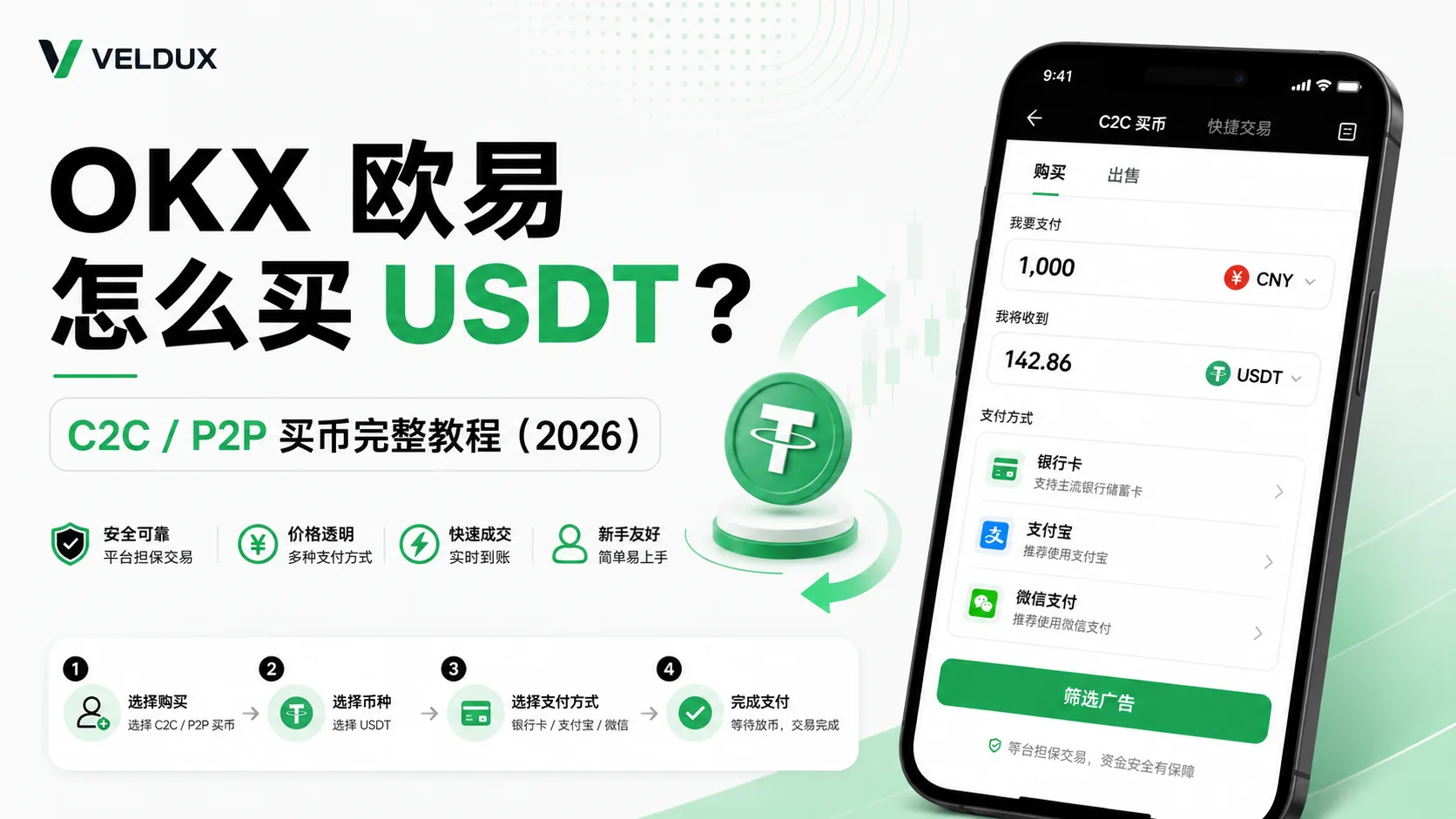
Table of contents
OKX new-user benefit
20% fee rebate
Official OKX sign-up · You must complete identity verification (KYC) to trade and withdraw
To buy USDT (a dollar stablecoin) on OKX, the most widely used and fastest route is P2P fiat trading: pay a verified merchant by local bank transfer, bank card or Apple Pay where supported, and the USDT usually lands within minutes. OKX differs from Binance in two important ways: its buy flow is split into "Express Buy" and "P2P", and the USDT you buy lands in your Funding account, not your Trading account. This article breaks down every step and every trap.
A normal order clears in about 5-15 minutes. The two things that trip people up most are the Funding-to-Trading transfer — the balance looks like it vanished — and a payment note that contains sensitive words.
Note: this article shares experience about the buying process and is not investment advice. Crypto trading carries risk; fiat on-ramps especially require attention to bank risk controls.
The essentials
There are three ways to buy USDT on OKX; read the conclusion first, then decide:
| Method | Speed | Cost | Bank-freeze risk | Best for |
|---|---|---|---|---|
| P2P fiat (choose a merchant) | Minutes | Low (with a premium) | Yes (manageable) | First purchase, small amounts, bank transfer |
| Express Buy (bank card) | Fast | High (from 3-5%) | No | Large amounts, convenience, no merchant selection |
| Spot conversion (crypto you already hold) | Seconds | Lowest (about 0.1%) | No | You already hold BTC/ETH |
If you just registered and this is your first USDT purchase, go straight to "Full P2P buying steps on OKX" below; if you already hold other crypto, jump to "Spot conversion"; if the amount is large and you don't want to choose a merchant, see "Express Buy".
Who needs it / who doesn't
| Your situation | Recommendation |
|---|---|
| You just registered on OKX and are buying USDT for the first time | You need it: use P2P fiat trading |
| You've bought USDT on Binance and want to move to OKX | You need it: pay attention to the account structure section — the transfer naming is different |
| You hold BTC/ETH and want to swap them for USDT | You don't need P2P; spot conversion is cheaper |
| The amount is large and you're worried about a bank freeze | Read "Express Buy" and "Security risks" first |
One more thing: OKX's buy entry has an extra "Express Buy" tab that Binance doesn't, and beginners often tap it by mistake and pay more. That's one of the points this article highlights.
Table of contents
- 3 things to understand before buying USDT
- Full P2P buying steps on OKX
- Besides P2P, two alternatives
- The 4 criteria for choosing a merchant
- Mistakes I made
- Security risks: frozen accounts, phishing apps and off-platform deals
- FAQ
3 things to understand before buying USDT
1. P2P isn't "sending money straight to the merchant" — it's platform escrow
Many first-time P2P users think they're transferring money directly to a stranger. In reality, OKX P2P is platform-guaranteed matching:
- When you place the order, OKX first freezes the merchant's USDT (in escrow)
- You pay the bank account the merchant specifies
- Once the merchant confirms receipt, OKX releases the frozen USDT to you
So as long as you operate inside the platform, "the money went out but the crypto never arrived" normally shouldn't happen. Almost all the risk comes from taking the trade off-platform. The specific P2P rules follow OKX's official P2P explainer.[1]
2. P2P USDT lands in your Funding account — transfer it to Trading before you buy crypto
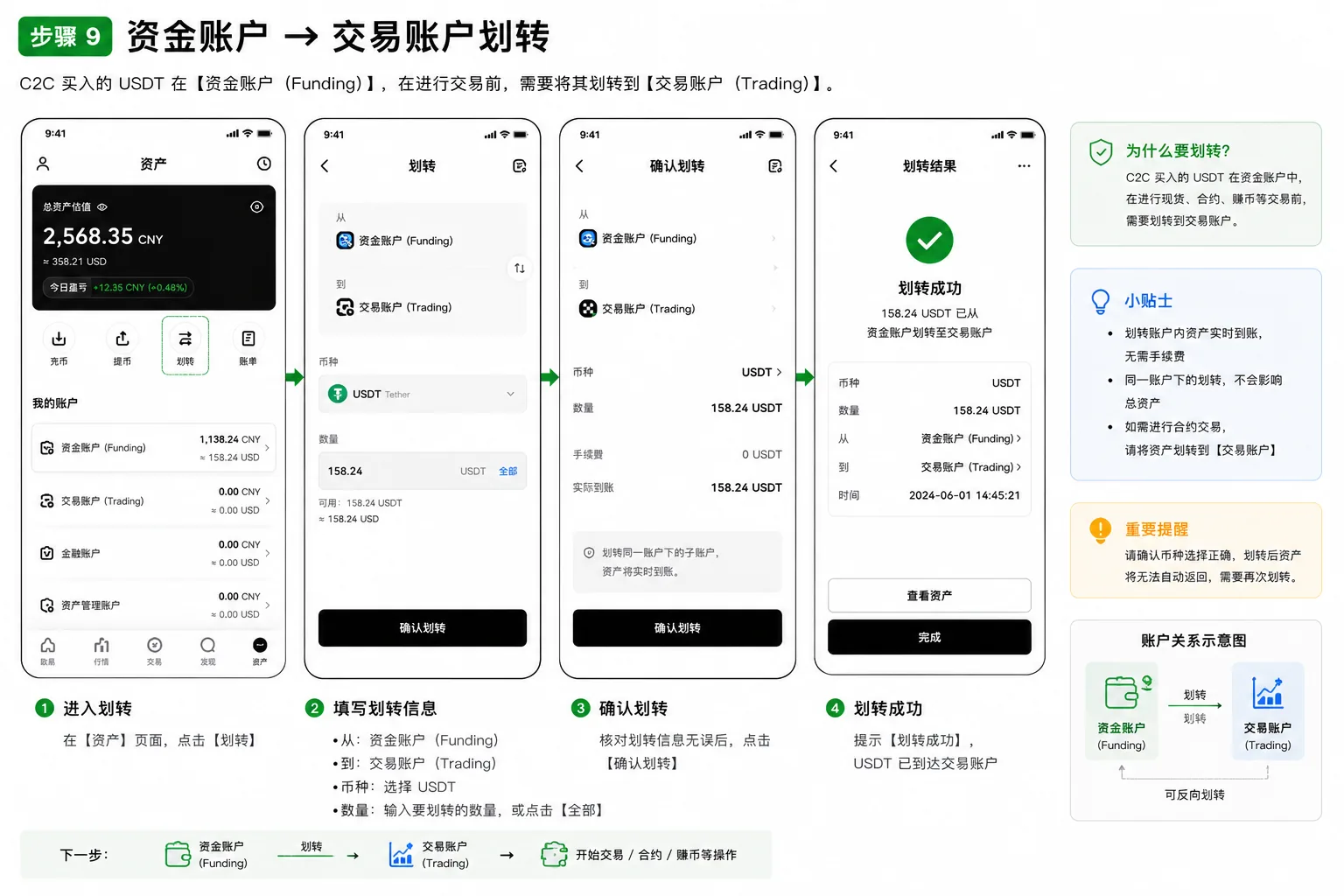
This is the most confusing point for OKX beginners, and the naming differs from Binance: Binance uses "Funding account → Spot account", while OKX uses "Funding account → Trading account". After buying USDT via P2P, you go to the trading page to buy BTC and see "insufficient balance". The reason is that the money is still in your Funding account, while buying crypto uses the Trading account, so you need to transfer it once:
Funding account → Trading account; tap "Transfer" and it arrives instantly, free.
I got stuck here for 10 minutes on my first OKX purchase, thinking the purchase had failed. Remember this account structure and you'll avoid one trap.
3. The price you pay isn't the FX rate — the premium is the real cost
In P2P, the USDT price is set by the merchant and is usually a little higher than the live spot price (that's the premium). What you actually pay in local currency = USDT amount × the merchant's unit price; don't calculate it directly with the FX rate. The premium differs by merchant and payment method, so factor it in when choosing.
Full P2P buying steps on OKX
Step 1: open the buy entry
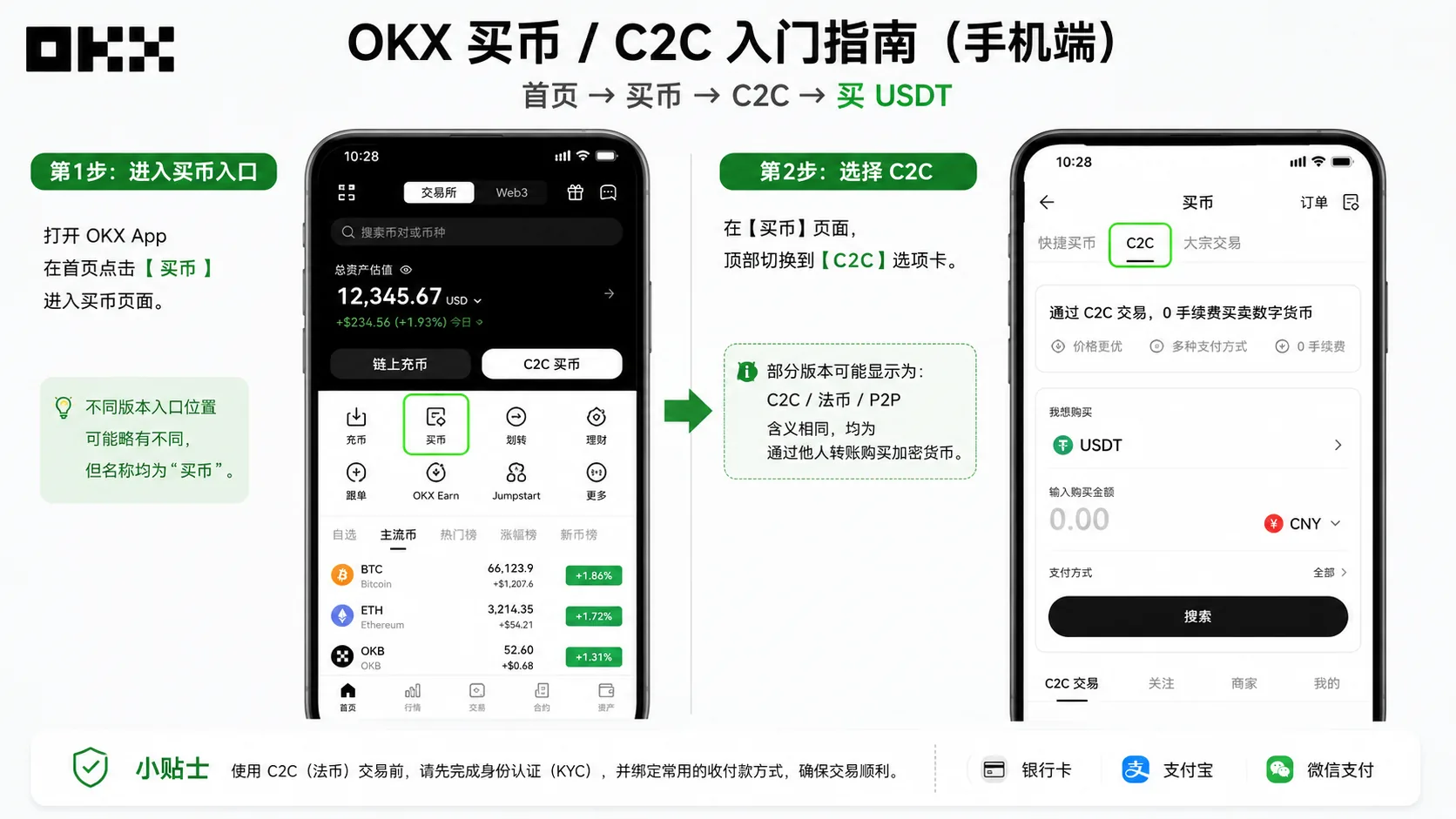
OKX app home → tap "Buy" → choose the "P2P" tab (some versions label it "Fiat" or "Express Buy") → choose "Buy USDT".
Step 2: enter the amount and choose a payment method
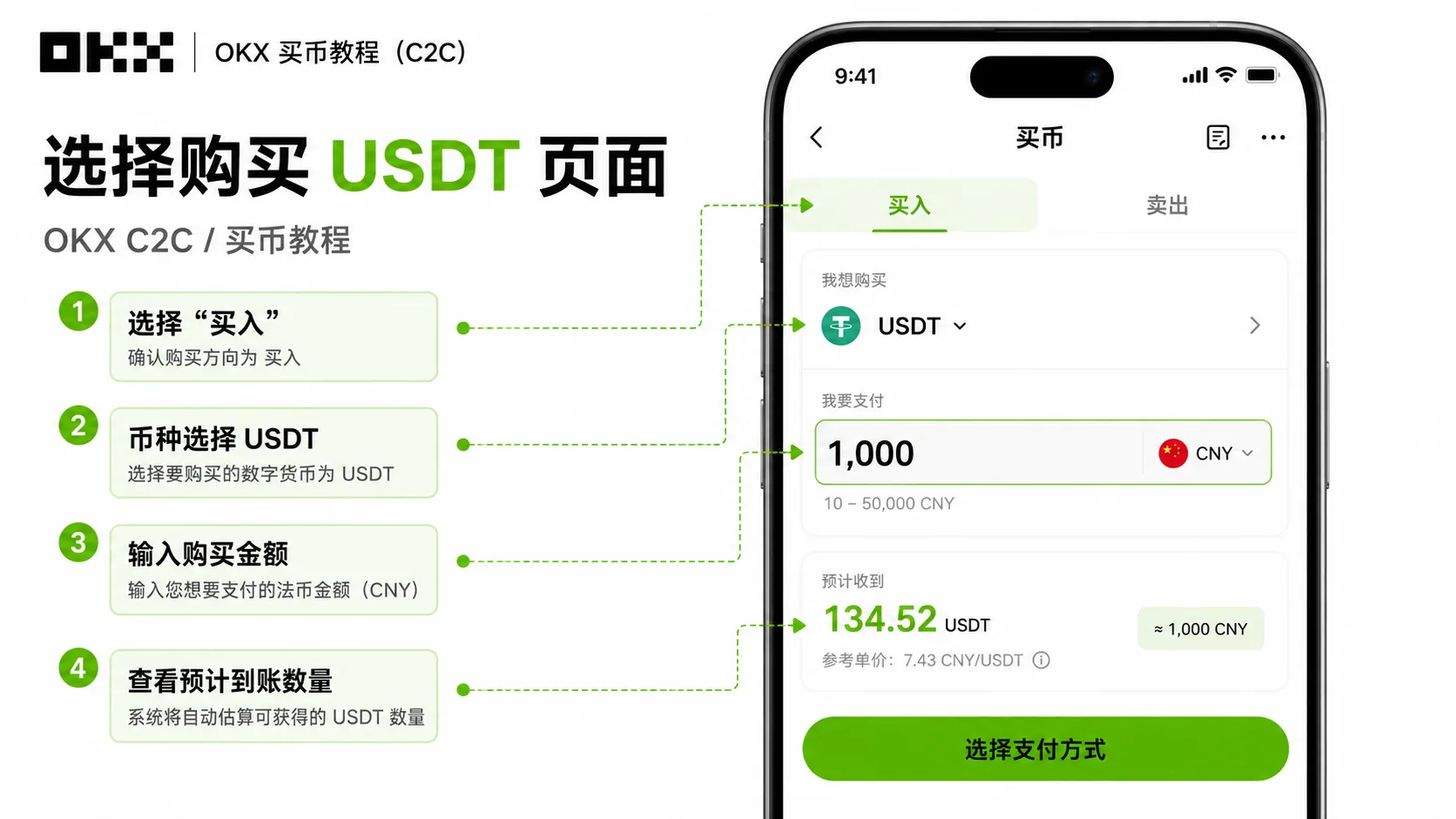
- Enter the amount in your local currency (for example USD); the system calculates how much USDT you get
- Choose the payment method: bank transfer / bank card / Apple Pay (whatever the merchant supports)
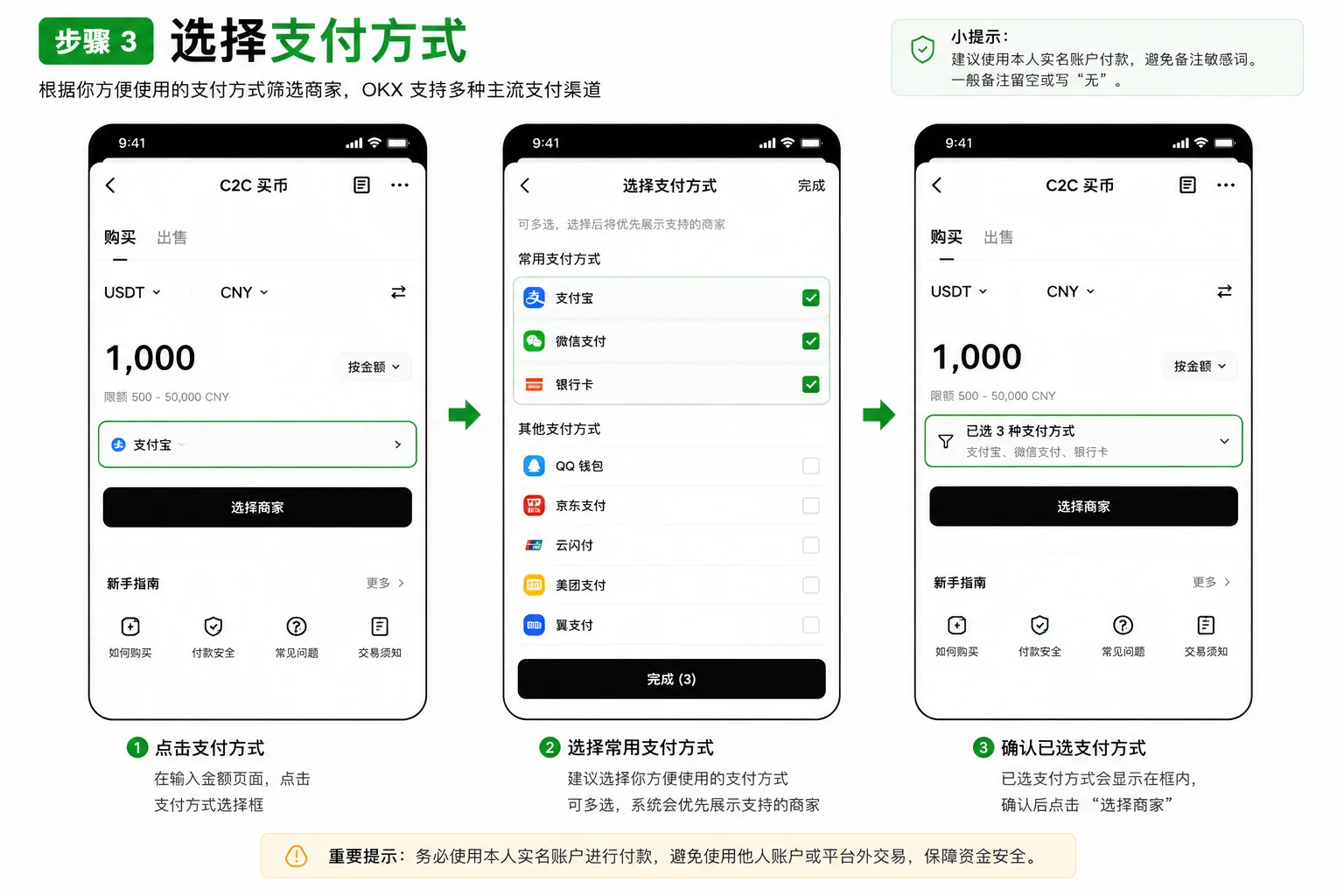
- The system sorts the ad list by price and merchant terms
Step 3: choose a merchant and place the order
Don't look only at the lowest price. Filter with the "4 criteria for choosing a merchant" below, pick one with a high completion rate and fast release, and tap "Buy".
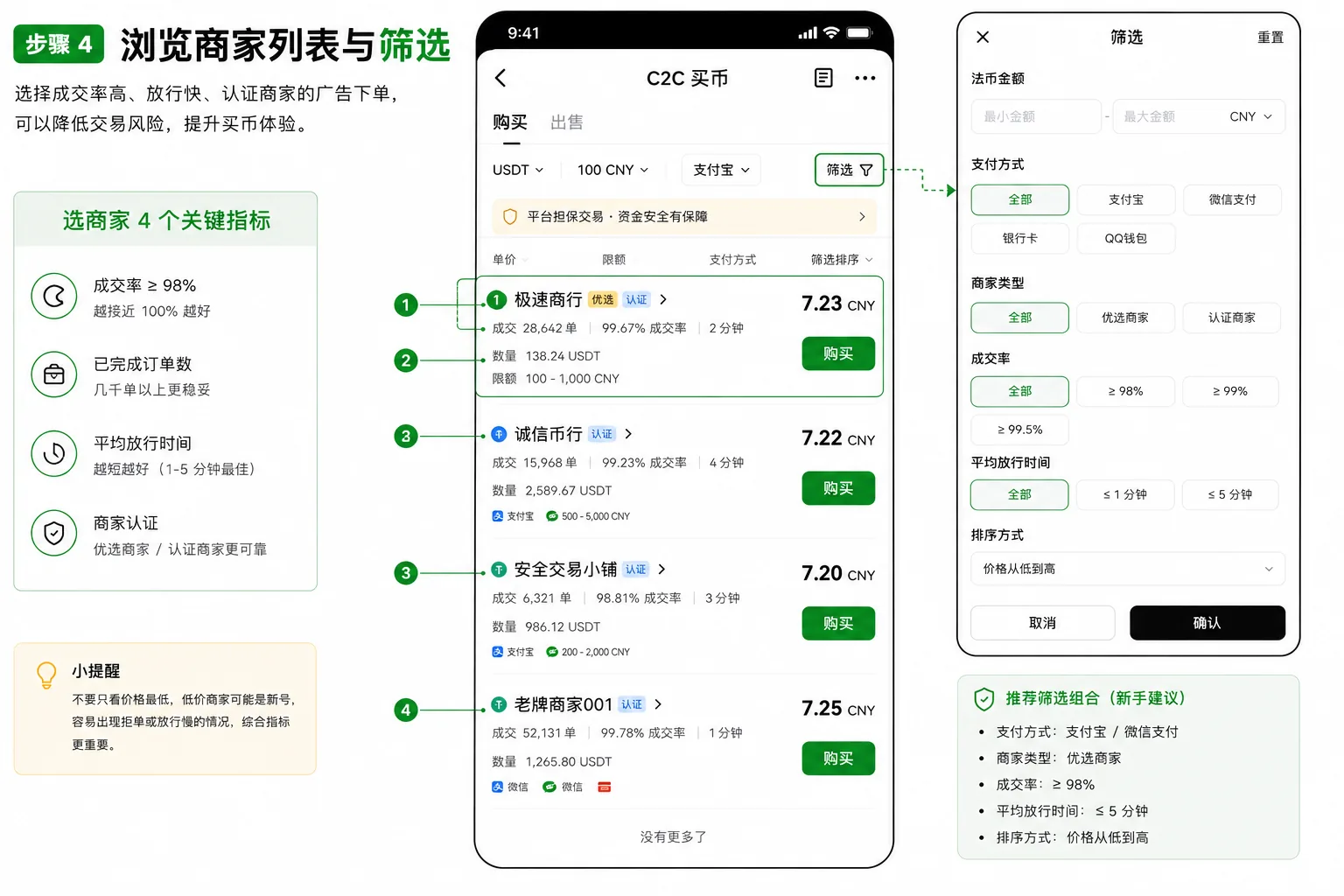
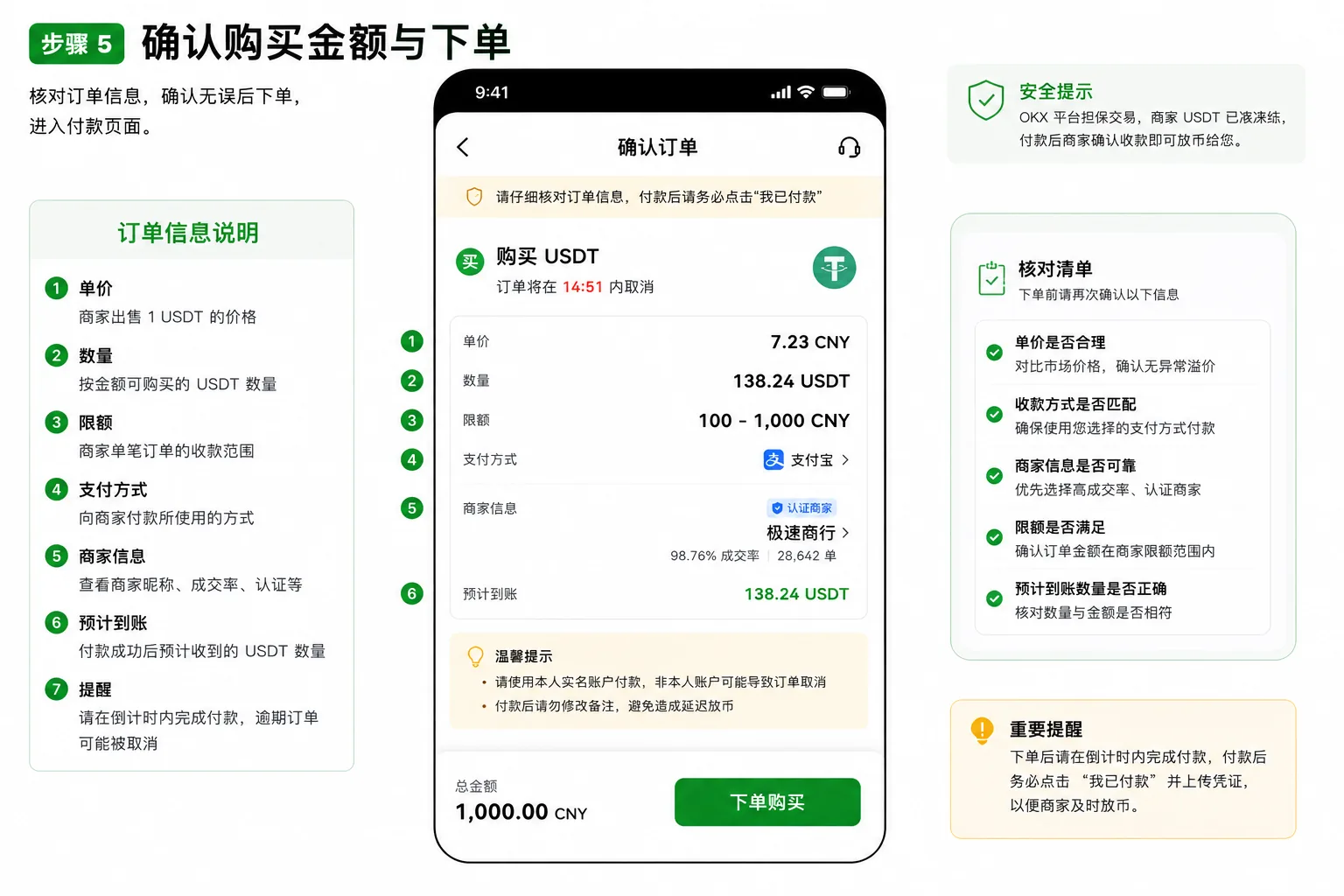
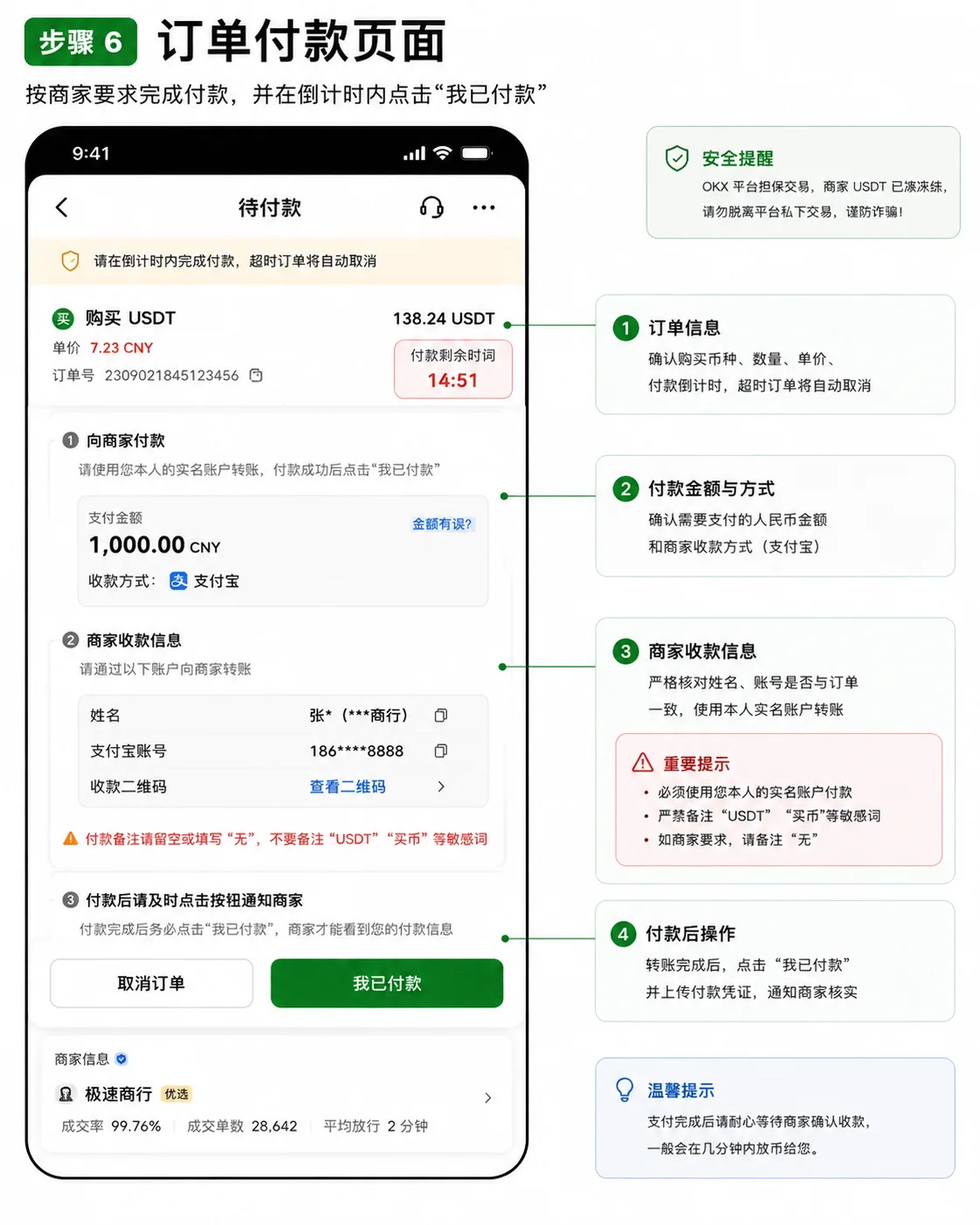
Step 4: pay (the most important step)
- Within the order countdown, transfer from an account in your own name to the account the merchant shows[2]
- Don't write "crypto", "USDT" or "Bitcoin" in the payment note; merchants usually ask you to leave it blank or write "none"
- After paying, return to OKX, tap "I have paid" and upload a screenshot of the receipt
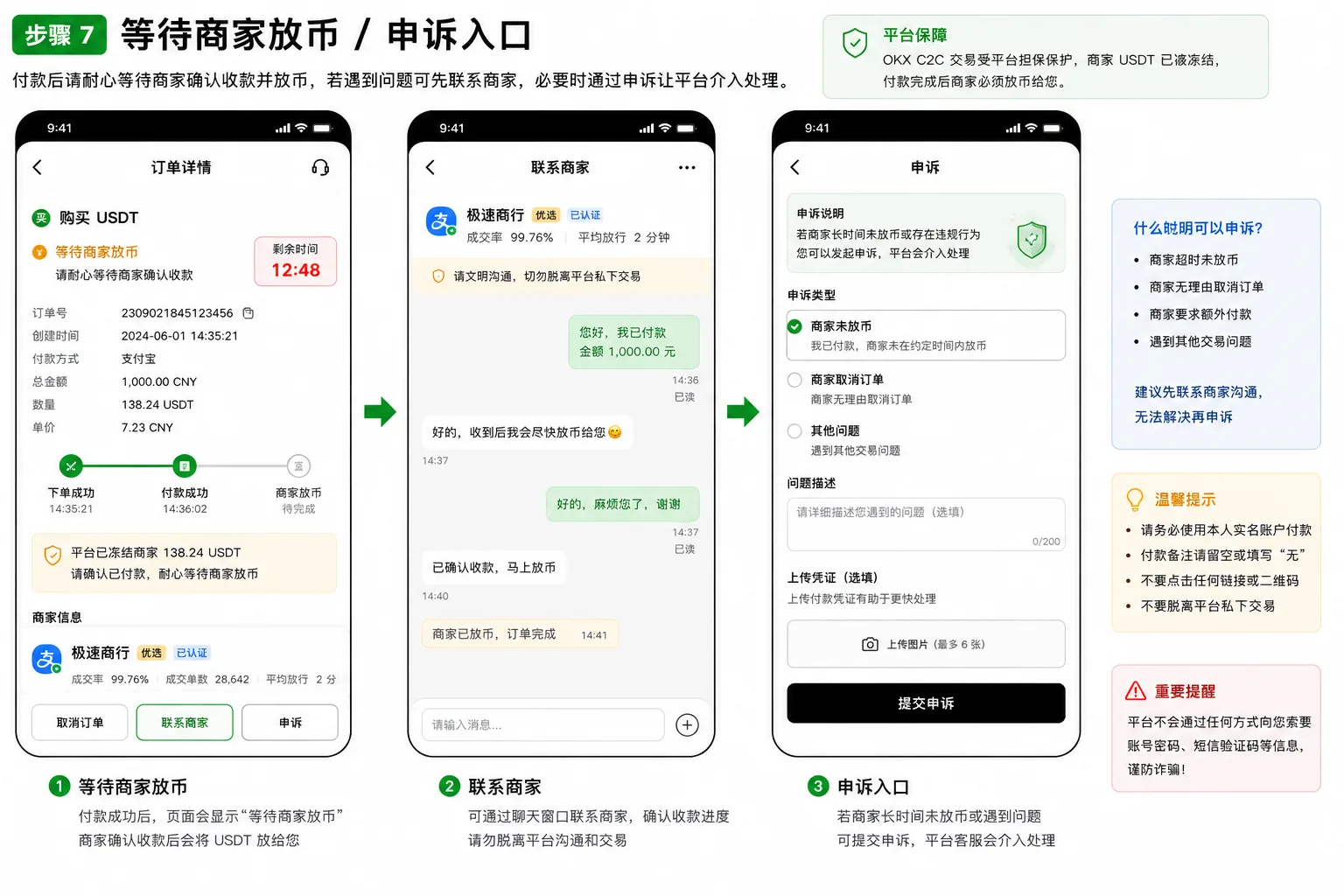
Step 5: wait for the merchant to release
The merchant releases the crypto after confirming receipt, and the USDT enters your Funding account. Most merchants release within minutes; if it takes a long time, first check the order status and chat history, confirm you actually paid, then contact the platform through the "Appeal" entry on the order page.
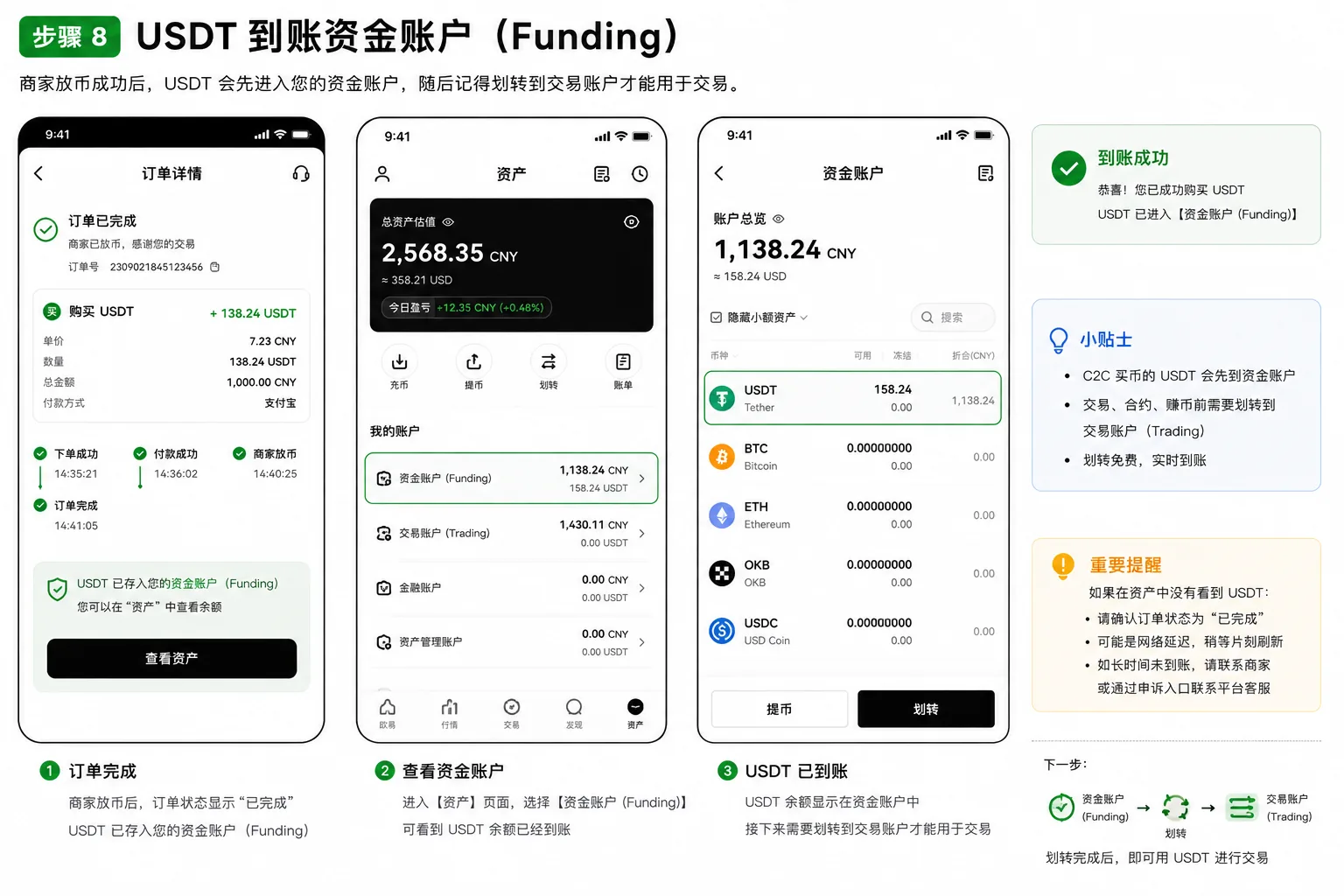
Step 6: transfer to your Trading account
On the assets page, transfer the USDT from your Funding account to your Trading account; after that you can use USDT to buy BTC, ETH and other coins. Transfer direction: Funding → Trading, select USDT, enter the amount and confirm.
Besides P2P, two alternatives
Option A: Express Buy (bank card / third party)
OKX's "Express Buy" is the entry many people use by mistake the first time. You don't choose a merchant — the system matches the price — and you can pay by bank card or a third-party service, but the spread and fees are higher than P2P (usually from 3-5%). It makes more sense when you want convenience, the amount is large, or you're worried about a bank freeze.
Option B: Spot conversion (crypto you already hold)
If you already hold BTC/ETH, swap it for USDT directly in the spot market: the fee is very low (maker 0.08% / taker 0.10%), settlement is instant, and it's the cheapest route.[3]
| Dimension | P2P | Express Buy | Spot conversion |
|---|---|---|---|
| Settlement | Minutes | Fast | Seconds |
| Cost | Low (with a premium) | High (from 3-5%) | Lowest (about 0.1%) |
| Bank-freeze risk | Yes | No | No |
| Prerequisite | Verified identity + account in your name | Supported bank card / third party | You already hold other crypto |
The 4 criteria for choosing a merchant
Four indicators that matter more than "the lowest price":
| Indicator | What to look at | Why it matters |
|---|---|---|
| Completion rate | The closer to 100%, the better | A low rate usually means frequent rejections and slow release |
| Completed orders | Thousands or tens of thousands is more stable | An established merchant is less likely to disappear |
| Average release time | Shorter is better (minutes) | It determines how soon you get the crypto |
| Merchant verification | Verified / preferred > ordinary | More verification usually means a larger platform deposit |
The cheapest merchant is often a new account with a low completion rate and slow release, which ends up costing you time. Paying a little more premium for an established, verified merchant usually gives a much better experience.
Mistakes I made
Mistake 1: wrote "USDT" in the payment note and nearly got my account frozen
Scenario: on my first USDT purchase on OKX, I wrote "buying crypto" in the transfer note out of habit; the merchant delayed the release and asked me to send the transfer again.
Cause: bank risk systems can treat notes such as "crypto", "USDT" or "Bitcoin" as sensitive transactions — at best the merchant rejects it, at worst the bank card gets frozen.
Lesson: always leave the payment note blank or write "none". Follow what the merchant asks and don't improvise.
Mistake 2: tapped "Express Buy" by mistake and paid several percentage points more
Scenario: for convenience I tapped the most visible "Express Buy" on the home page and paid directly by bank card, without checking the spread; afterwards the math showed I had paid about three percentage points more than P2P would have cost.
Cause: Express Buy doesn't require choosing a merchant, but its spread and fees are higher; on my first purchase I ordered without comparing.
Lesson: for small amounts and the best price, use P2P and choose a merchant; use Express Buy only for large amounts and convenience.
Mistake 3: bought USDT and couldn't find the money, thought I'd been scammed
Scenario: after my first P2P purchase, I went to the trading page to buy BTC and the balance showed 0; I panicked for a moment.
Cause: on OKX the P2P money goes into the "Funding account", not the "Trading account" — and the naming differs from Binance too.
Lesson: after buying, transfer first from Funding to Trading; it's instant and free.
Security risks: frozen accounts, phishing apps and off-platform deals
- Never take the trade off-platform: any "merchant" who asks you to move to WhatsApp or Telegram and pay privately is a scam. Off-platform trades have no escrow, and you can lose both the money and the crypto.
- Pay from your own verified account and leave the note blank: using someone else's account or writing sensitive notes can lead to a freeze or a rejected order.
- Bank-freeze risk is real: P2P involves fiat transfers, and some banks apply strict controls; large or frequent transfers may trigger a block. Prefer established verified merchants and, if needed, split a large amount into several orders.
- Beware fake "OKX" phishing apps: download only from the official site okx.com or an official app store, and don't open installer links sent by private message or SMS.
- Don't believe "zero premium" or "buying on your behalf": prices clearly below the market are usually a scam.
FAQ
Q1: Is buying USDT through OKX P2P safe?
Operating inside the platform is safe — OKX escrows the merchant's USDT and releases it after you pay. The main risks come from taking the trade off-platform and from bank freezes: don't transfer privately, and choose verified merchants.
Q2: What's the difference between OKX's "Express Buy" and "P2P"?
Express Buy doesn't require choosing a merchant — the system matches automatically — but its spread and fees are higher; P2P lets you choose the merchant, with a lower premium, but you have to select one and pay yourself. For the lowest price use P2P; for convenience use Express Buy.
Q3: Why is my balance still 0 after buying USDT?
The money is in your "Funding account". Go to the assets page and transfer the USDT from Funding to Trading and you'll see it.
Q4: Should I pay by bank transfer, card or Apple Pay?
For small amounts, a local bank transfer is usually fastest; for larger amounts or if you're worried about a freeze, a bank card plus a verified merchant is steadier. All three can work; check what the merchant supports.
Q5: What can I write in the payment note?
Usually nothing, or "none". Don't write sensitive words such as "crypto", "USDT" or "Bitcoin".
Q6: Does OKX charge a fee for buying USDT?
P2P itself has no platform fee — what you pay is the merchant's "premium". Express Buy has a spread and a fee; spot conversion pays the spot fee (maker 0.08% / taker 0.10%).
The one-sentence summary
On OKX, buying USDT usually means P2P: choose an established verified merchant, pay from an account in your own name, leave the note blank, and after the USDT arrives in minutes remember to transfer it from Funding to Trading. If you already hold crypto, use spot conversion; for large amounts and convenience, use Express Buy.
If you're planning to register
| Your choice | What to do |
|---|---|
| Register through this site's link (20% rebate) | Register on OKX; referral code AMY568 fills in automatically |
| No referral code | Go directly to okx.com and register; the features are the same, just without the rebate |
The first row of the table is an affiliate link: registering through it may generate income for us, but it doesn't affect this article's objective conclusions. More in affiliate disclosure.
Next steps
- How to buy USDT on Binance: a complete P2P tutorial — to compare Binance's P2P process, read this
- Binance vs OKX: which is better for you — if you haven't decided which exchange to use, start with the comparison
Data verification note
The key facts in this article were checked on 2026-10-16, one by one:
- P2P escrow mechanism: OKX P2P is platform-guaranteed matching — after the order is placed, the platform first escrows the merchant's assets, and the trade completes only after the buyer pays and the merchant confirms and releases. The specific rules follow the official P2P explainer. Source: OKX official P2P trading explainer.
- Verified-name payment requirement in P2P: P2P payment methods must be bound to your own account, and payment must be made from an account matching the account's verified identity; using someone else's account may lead to a rejected order or trigger risk controls. Source: OKX Help Center — how to bind and change a payment method.
- Spot conversion fee: for a regular OKX user, spot maker is 0.08% and taker 0.10%; fees fall as trading volume or VIP level rises. Source: OKX official fee announcement.
Disclaimer
This article only shares experience and explains the process of buying USDT on OKX. It is not investment advice, financial advice or a trading recommendation.
Crypto asset prices are highly volatile, and fiat on-ramps involve bank risk controls and compliance risks. Assess your own risk tolerance, comply with the laws of your jurisdiction, and never use someone else's account or take trades off-platform. People under 18 should not trade crypto.
Exchange operations · USDT · Wallet security
Responsible for researching and organizing content on Binance, OKX, USDT transfers, withdrawals and wallet security. The steps and key data in this article are verified according to the content type, using real operation records, official platform documentation and public sources. Interfaces, fees and regional rules may change, so the article is reviewed and updated continuously.
Status: manual review · Last verified 2026-10-16
Reviewed by: Veldux editorial team
- OKX official P2P trading explainerP2P is platform-escrowed matching — the merchant's assets are frozen when the order is placed, and the trade completes after the buyer pays and the merchant releases the crypto
- OKX Help Center — how to bind and change a payment methodP2P payment methods must be bound to your own account, and the paying account must match the account's verified identity
- OKX official fee announcementRegular users pay 0.08% maker / 0.10% taker on spot; fees fall as trading volume or VIP level rises
- 2026-10-16UpdateAdded the evidence-chain superscripts and the "Data verification note", and updated the fact-check date.
Editorial principles ineditorial policy,corrections policy。