
How to spot trade on Binance (2026): buying, selling and using market and limit orders

Table of contents

Binance new-user benefit
20% fee rebate
Official Binance sign-up · You must complete identity verification (KYC) to trade and withdraw
How does Binance spot work? Open the Binance app, go to "Trade → Spot", pick a pair like BTC/USDT, enter the buy amount and submit the order as a market or limit order. Once it fills, you'll see the purchased coins on the assets page; if it hasn't filled yet, check "Open Orders" or cancel it.
The first time you spot trade on Binance, what you really need to understand isn't the candlestick chart but three questions:
- How to buy: if you already have USDT, how do you exchange it for BTC or ETH?
- How to place an order: what's the difference between a market and a limit order, and why does an order sometimes not fill?
- How to sell: after buying, how do you get back to USDT and where do you see your trade history?
This article uses the BTC/USDT pair in the Binance app as an example and shows the complete flow: entering the trading page, buying, selling, leaving open orders, canceling and reviewing results. It also calculates the fee on 100 USDT.
Before you start: here we cover regular spot trading, without leverage; it does not include margin accounts or futures. Spot doesn't suffer forced liquidation like futures for not adding margin, but a price drop can still cause significant losses. Available features also depend on your region and account permissions.
How does Binance spot work? The complete flow
If your account has completed the required identity verification and has assets available for spot, the core flow is:
Prepare USDT → enter spot → choose BTC/USDT → choose buy → pick the order type → submit the order → review the trade history.
First, a table to understand the most important operations.
| Operating question | Direct answer |
|---|---|
| Spot trading access | App "Trade → Spot" |
| How to buy BTC | Choose BTC/USDT and tap Buy |
| How to buy immediately | Choose a market order; it fills at available quotes |
| How to set a price | Choose a limit order and set price and amount |
| Where to see what you bought | Asset balance and trade history |
| What to do if the order doesn't fill | Check open orders; you can cancel or adjust |
Rule of thumb: if you care about executing fast, look at the market order; if you care about the execution price, look at the limit order. Neither type guarantees the market won't move or that everything fills at the amount you expected.
Spot, Convert and futures: what's the difference?
Binance has several features that involve buying and selling crypto, but they aren't the same.
| Way of trading | Main use | Key difference |
|---|---|---|
| Spot | Buy and sell crypto assets directly | Lets you see the order book and set limit orders |
| Convert | Quickly swap one asset for another | Executes at the offered conversion quote |
| Futures | Trade derivatives | Involves margin and forced-liquidation risk |
If you just want to quickly swap one coin for another, compare the Convert quote; if you want to set your own price, see the order book and follow execution, use spot trading.
This article only covers regular spot; it does not expand on registration, buying through P2P, or futures trading.
Before you place an order: trading pair, USDT and available balance
1. What does BTC/USDT mean?
BTC/USDT is a spot trading pair. BTC is the base asset and USDT the quote asset.
- Buy BTC/USDT: you pay USDT and receive BTC.
- Sell BTC/USDT: you sell BTC and receive USDT.
For example, if the page shows BTC/USDT = 70,000, it means that, at that hypothetical quote, 1 BTC equals roughly 70,000 USDT.
If you have 100 USDT, in theory you can buy about 0.00142857 BTC; the real amount depends on the execution price, the fee and the amount precision.
Note: the 70,000 USDT is only a calculation example for this article, not the real BTC price on October 18, 2026.
2. Do you need USDT to buy BTC?
Not necessarily.
BTC/USDT requires USDT as the payment asset; if you choose another supported pair, for example BTC/USDC, you'll need the corresponding quote asset.
If you don't have USDT yet, read how to buy USDT on Binance: a complete P2P tutorial first.
Don't mix buying USDT through P2P and buying BTC on spot into a single step.
3. If the USDT is in the Funding account, can I spot trade directly?
Some versions of the Binance app let you choose the Spot account, the Funding account or an eligible savings account as the funding source for trading.
Before placing an order, check "Available balance" or the funding-source option.
If the asset you need isn't in the available range, then you do need to transfer it first from the assets page.
The available accounts depend on the app and your account's current permissions.
How to buy on spot from the Binance app: 6 steps to buy BTC
Below is the regular spot buying flow using BTC/USDT as an example.[1]
Requirement: the account must have spot trading permission and available USDT. Button names and positions may differ slightly by country, region and app version.
Step 1: open the spot trading page
Sign in to the Binance app. Tap "Trade" in the bottom bar and look for "Spot". If futures or another trading mode appears, switch to spot first.
Once inside, you'll usually see:
- The current pair and last price
- The candlestick chart
- The buy and sell order book
- The buy and sell area
- Access to open orders and order history
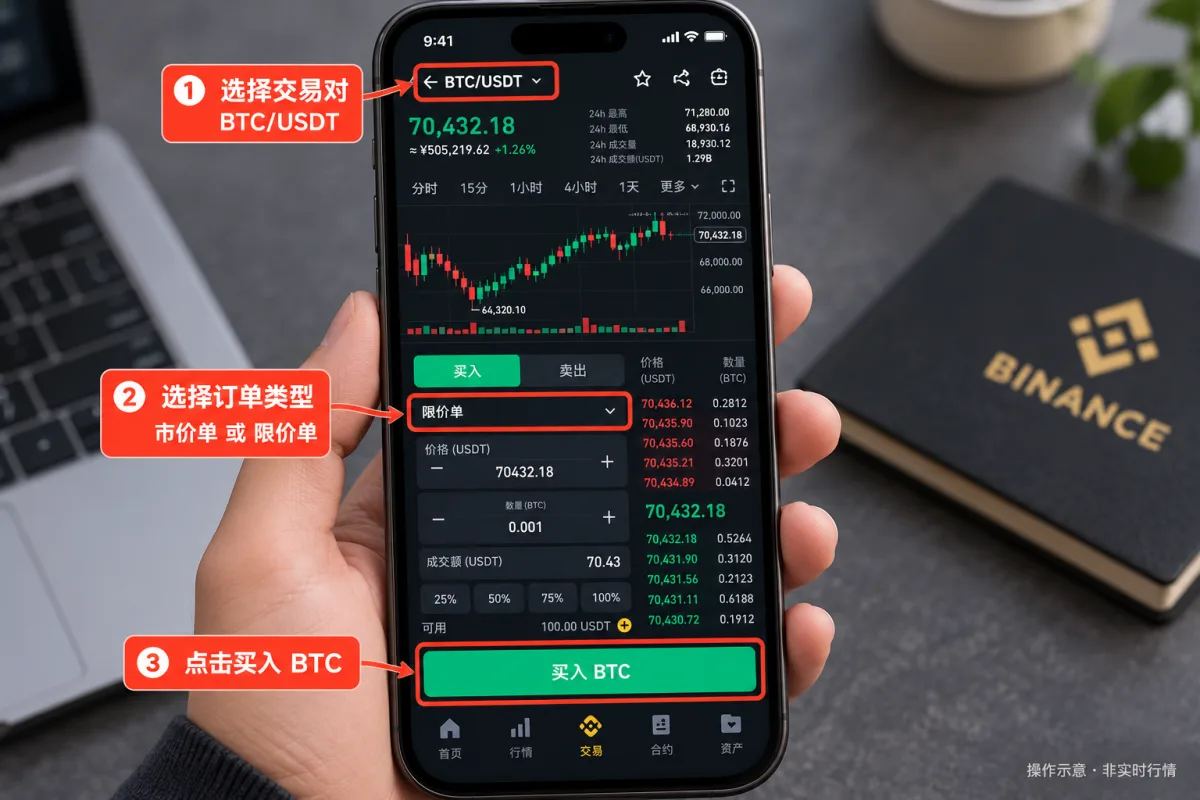
The first time, confirm the page says "Spot" and don't accidentally enter margin or futures.
Step 2: find the BTC/USDT pair
Tap the pair name at the top of the trading page. Type BTC in the search box and enter BTC/USDT.
The most common mistake here is choosing the wrong pair. BTC/USDT, BTC/USDC and BTC/ETH have different quote assets and use a different balance when you place an order. This tutorial always uses BTC/USDT.
Step 3: choose buy and the order type
After entering the pair, choose "Buy". The order type usually defaults to "Limit" and you can switch it to "Market".
The main difference between the two is:
Market order: you don't set an execution price; the system executes against the available sell quotes in the order book.
Limit order: you enter the price you're willing to accept and it only fills if it can do so at that price or better.
A beginner can first learn the risks of both types and practice the flow with a small amount within the rules, instead of rushing an order for fear of missing the move.
Step 4: enter the buy amount or quantity
If you choose a market order, the page may let you enter the total in USDT or the quantity in BTC. For example, if you enter a 100 USDT total, you plan to use about 100 USDT to buy BTC; the real amount and quantity depend on the execution result.
If you choose a limit order, you must set the limit price (for example 69,000 USDT) and the quantity (for example 0.001 BTC). The corresponding amount would be about 69 USDT, excluding possible fees.
Distinguish "price", "quantity" and "total"; don't type 100 BTC when you mean 100 USDT.
Step 5: submit the buy order
Review the pair, the direction (buy/sell), the order type, the price and the quantity, and tap "Buy BTC". The system may submit the order directly or show a confirmation page, depending on the app's current settings.
Placing an order isn't the same as executing it.
- A market order usually fills as soon as possible, but may not fill entirely due to market conditions, trading rules or other factors.
- A limit order may fill immediately, fill partially, or remain unfilled.
Don't assume you already bought BTC just because "submitted successfully" appeared.
Step 6: review the result
After buying, check the order status in the orders area.
| Orders page | What you check |
|---|---|
| Open orders | Orders still active |
| Order history | Filled, canceled and past orders |
| Trade history | Actual price, quantity and fee |
| Assets page | Current BTC balance |
Key difference: an order not appearing in open orders doesn't mean it didn't fill. A fully filled market order usually no longer stays in open orders; you have to check the order history and the trade details. This is the most important step to know whether the spot trade succeeded.
Buying BTC with 100 USDT: how amount and fees are calculated
Suppose you'll use 100 USDT to buy BTC. For easier calculation, we start from these conditions:
- Hypothetical average BTC execution price: 70,000 USDT
- Trade amount: 100 USDT
- Standard spot fee for a regular user: 0.10%
- No slippage or extra benefits
The result is as follows.
| Concept | Example result |
|---|---|
| Planned buy amount | 100 USDT |
| Hypothetical BTC price | 70,000 USDT |
| Theoretical quantity bought | 0.00142857 BTC |
| 0.10% fee | 0.10 USDT equivalent |
| Fee with BNB discount | 0.075% if you meet the conditions |
Calculation: BTC quantity bought = USDT amount ÷ actual average BTC price; that is, 100 ÷ 70,000 ≈ 0.00142857 BTC.
If the fee is deducted from the BTC you receive, the BTC arriving in your account will be less than the theoretical quantity. If you meet the BNB discount conditions, enabled the option and have enough BNB, the fee can be paid directly in BNB.
The asset used to charge the fee isn't always the same; the final amount must be confirmed in the trade history.
Also, the exchange may set a minimum order amount, a quantity increment and a price precision. Having some USDT doesn't guarantee that any amount can be ordered.
What's the difference between a market order and a limit order?
These are the two order types a Binance spot beginner most needs to understand.[2]
| Order type | How it executes | Main risk |
|---|---|---|
| Market order | Executes against available quotes | Slippage and price changes |
| Limit order | Executes at the set price or better | Not filling or filling partially |
| Stop-limit order | When triggered, submits a limit order | Even when triggered, it may not fill |
| Stop-market order | When triggered, executes as a market order | Can have significant slippage |
The availability of conditional orders depends on the pair, the account region and the current interface.
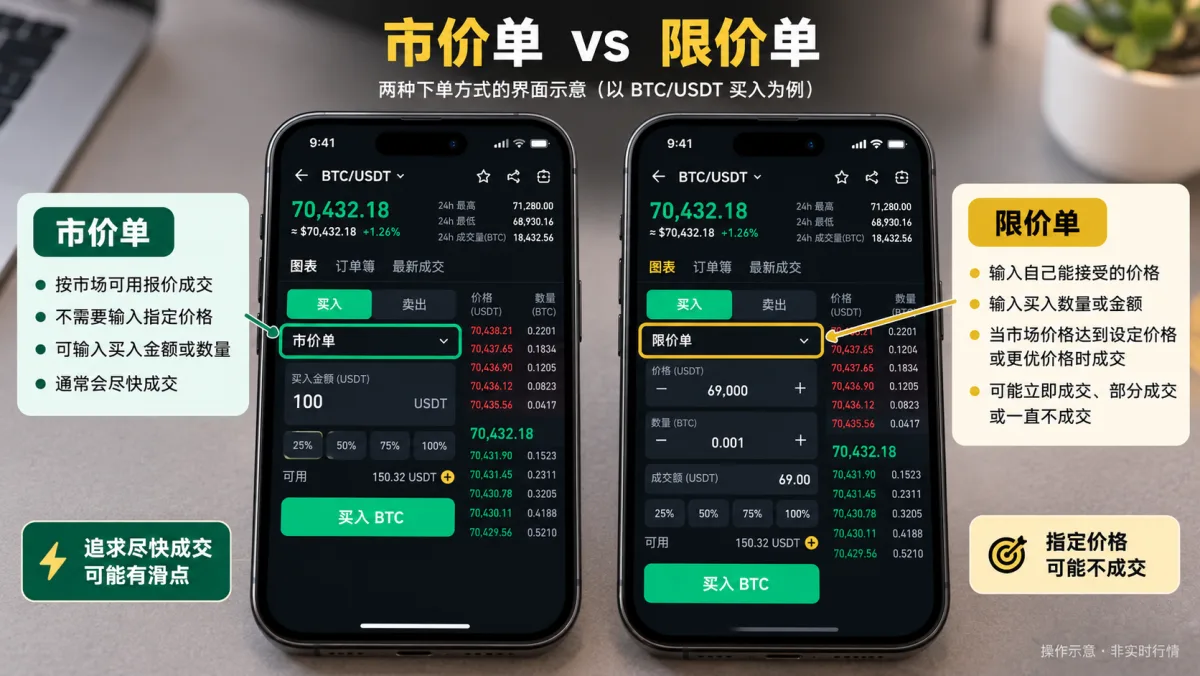
Market order: you want to execute as soon as possible
Suppose BTC shows 70,000 USDT and you choose to buy 100 USDT at market. The system executes against the sell quotes in the order book and does not guarantee everything fills at the 70,000 you just saw. The final average price may be 70,010, 70,050 or something else.
The reason:
- The last price on the page isn't equal to the price of all available sells at that instant.
- Between submitting and executing, the market price can change.
- If the order book depth is insufficient, the order can consume several price levels in a row.
The difference between the execution price and the expected price is called slippage. That's why a market order aims for speed, not for fixing the price.
Limit order: you want to control the execution price
Suppose BTC is at 70,000 USDT and you want to buy at 69,000. You can set a 69,000 USDT buy price and a 0.001 BTC quantity.
After submitting, if the market has no sells meeting that limit, the order may stay pending.
But be careful: a limit order doesn't always wait, nor does it guarantee execution. For example, if the lowest sell is at 70,000 USDT and you place a limit buy at 70,100 USDT, the order may fill immediately at 70,000 or another available quote that doesn't exceed the limit. If the available quantity is insufficient, it can also fill partially.
A limit buy never fills above the set price; a limit sell never fills below it. That's the core mechanism of a limit order.
Stop orders: when the price triggers, the order is sent automatically
Binance spot supports several conditional order types. Using a stop-limit order as an example: suppose you already hold BTC and want to trigger a sale if the price falls. You can set a 68,000 USDT trigger price and a 67,900 USDT sell limit price.
When the condition is met, the system sends the corresponding limit sell order. But if the market falls quickly below the limit and there are no buys meeting the conditions, the order may not fill. That's why placing a stop doesn't guarantee selling at the expected price.
The stop-market order uses a different execution logic: it can speed up execution but also produce significant slippage.
For someone just starting on spot, first understanding the regular market and limit orders makes it easier to later grasp stop-limit, OCO and other advanced orders.
How to sell on Binance spot: converting BTC back to USDT
Spot isn't only for buying, it's also for selling. Suppose you already hold BTC and want to sell it for USDT. The process is:
- Open the Binance app at "Trade → Spot".
- Choose the BTC/USDT pair.
- Switch the order direction to "Sell".
- Choose a market or limit order.
- Enter the BTC quantity you want to sell, review and submit.
- Once it fills, check the result in the trade history and on the assets page.
Example: suppose you have 0.001 BTC and sell it all at 72,000 USDT. The theoretical sell amount is 0.001 × 72,000 = 72 USDT. With a 0.10% fee, the fee would be about 0.072 USDT equivalent. If it's deducted from the USDT received and other factors aren't considered, the net would be about 71.928 USDT.
Selling isn't withdrawing. After selling BTC and getting USDT, the assets are still inside your Binance account; to take them off the platform, you need to complete a withdrawal or another funds operation. More detail in how to convert USDT to local currency.
Why doesn't a spot order fill? 5 common cases
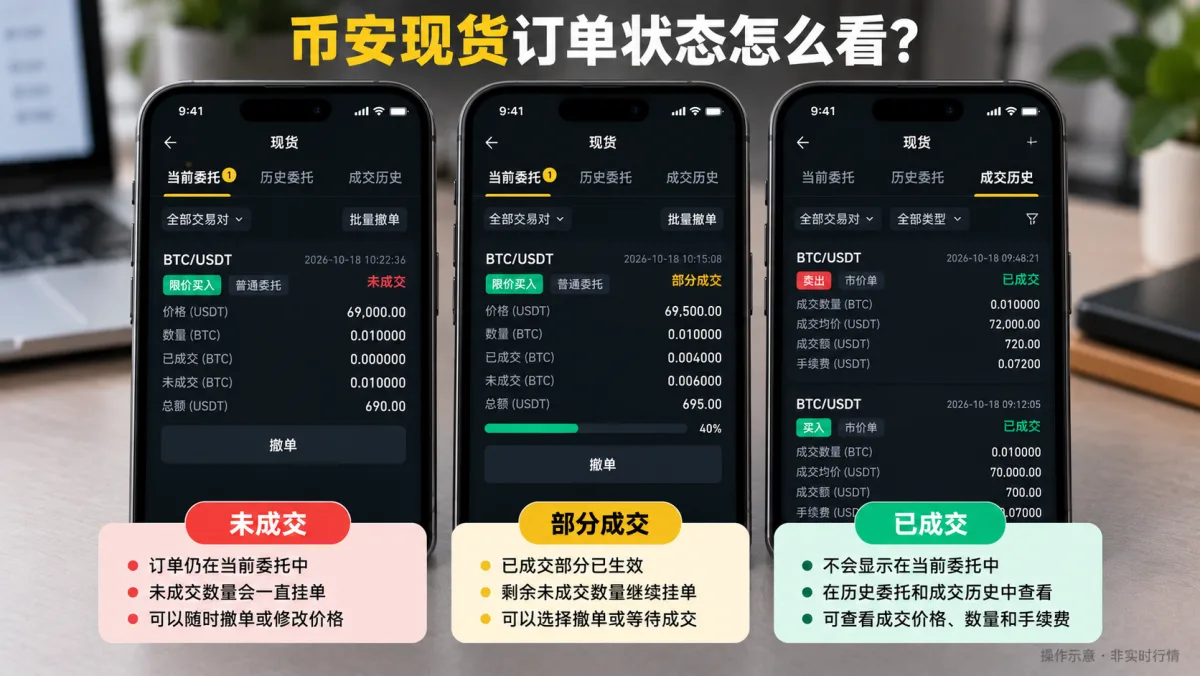
1. The limit order price doesn't meet the condition
For example, BTC is around 70,000 USDT and you place a 65,000 USDT limit buy. If the market never offers sells meeting that limit, the order doesn't fill.
What to do: go to "Open orders" and review your order's price and quantity. If you no longer need it, cancel it; if you want to change the buy price, reassess the price and the risk you accept instead of chasing the market blindly.
2. The order filled partially and the rest is still pending
For example, you want to buy 0.01 BTC, but only 0.004 BTC crosses with sells. 0.004 BTC filled and 0.006 BTC remained unfilled. The unfilled part may stay in open orders.
Don't assume the whole order is done because you already received part of the BTC. The real status depends on the order type and its time-in-force setting.
3. "Insufficient balance" appears
Common causes:
- The USDT isn't in the currently available funding source.
- Other orders are holding part of the available balance.
- The amount plus fees exceeds the available funds.
- The entered quantity doesn't meet the account or pair limits.
Check the available balance and funding source on the spot page first, then confirm whether pending orders are holding funds.
4. A warning that the quantity or amount doesn't meet the rules
Every spot pair has a minimum order amount, minimum quantity and price precision. For example, the system may require orders in defined increments; if you type too many decimals, it may reject it.
Review the limits the pair shows and adjust according to the page's rules; don't resubmit the same order over and over.
5. You bought BTC and can't find the order in open orders
If a market order filled completely, it usually already left open orders. Check in this order: order history → trade history → asset balance.
If the order history shows "filled" and the trade history records price and quantity, the trade happened. If the order was canceled, rejected or only partially filled, review each status separately.
How do you cancel a spot order? Does it cost anything?
If a limit order doesn't fill and you don't want to keep waiting, you can cancel it. Process:
- Enter the spot trading page.
- Look for "Open orders".
- Choose the order you want to cancel.
- Tap "Cancel" and confirm the order status.
Under normal conditions, canceling an order that hasn't filled doesn't generate a spot execution fee. But if the order already filled partially, the filled part still generates a fee.
Example: an order to buy 0.01 BTC already filled 0.004 BTC. If you cancel it, only the pending 0.006 BTC is canceled; the filled part isn't automatically returned or converted back into the original USDT.
When the market moves fast, sending the cancellation doesn't guarantee it's processed before the rest fills. So after canceling, it's worth checking the final status again.
How much does Binance spot cost? How to tell maker from taker
According to Binance's spot fee schedule, the standard maker and taker fee for a regular user is 0.10% in both cases. If you meet the BNB fee-discount conditions, the fee can drop to 0.075%.[3]
| Fee type | Example for a regular user |
|---|---|
| Standard maker fee | 0.10% |
| Standard taker fee | 0.10% |
| With BNB discount | 0.075% |
| Standard fee on 100 USDT | 0.10 USDT equivalent |
| Discounted fee on 100 USDT | 0.075 USDT equivalent |
Two concepts are easy to confuse here.
Maker isn't the same as a limit order, and taker isn't the same as a market order
Maker is the side that adds liquidity to the order book. Taker is the side that immediately crosses with existing orders and consumes liquidity.
A market order normally executes as taker. A limit order that immediately crosses with existing orders can also produce a taker execution. So don't assume that by choosing a limit order you'll always pay the maker fee.
The BNB discount and the referral-code rebate aren't the same
The BNB discount is a fee benefit Binance offers to users who meet the conditions. The referral-code rebate belongs to the referral mechanism: if you get it, the percentage, the applicable markets, the operation types and the settlement method depend on the campaign conditions your account shows.
Don't add percentages from different benefits together to calculate a final fee without verifying it in the account. More detail in how much does Binance charge? 4 ways to pay lower fees.
Also, some pairs may have special fees or promotions, and VIP users may have different fees. Before placing an order, check Binance's live fee page.
4 risks beginners overlook on Binance spot
1. Spot has no forced liquidation like futures, but that doesn't mean you can't lose almost everything
Suppose you buy BTC at 70,000 USDT and it later drops to 50,000 USDT. Without considering fees, your position's value would fall about 28.57%.
If you buy low-liquidity, high-risk small coins, the drop can be even larger and you may lose almost all the value. So "buying the coin itself" doesn't equal "having your capital protected".
2. Market orders can suffer significant slippage
With low liquidity, sharp moves or large amounts, the real average price can clearly drift from what you saw when ordering. Don't take the last price on the page as a fixed price at which the whole order will fill.
3. The more you trade, the higher the accumulated cost
Suppose a normal 0.10% fee paid on every buy and sell. Buying once and selling once charges on each executed amount, and the accumulated cost is usually higher than a single trade. Add the bid-ask spread and slippage, and trading frequently raises the cost even more.
4. Don't put in your whole balance at once
When you're just starting on spot, first understand the order types, the minimum amount, the quantity limits and cancellation. Practicing the flow with an amount you can afford to lose matters more than increasing the position to recover a price that moved.
FAQ
Q1: How does Binance spot work? What should I learn first?
First learn the trading pair, the buy/sell direction, the market order, the limit order, and the difference between open orders and trade history. When you have trading permission and available assets, practice the complete flow.
Q2: What's the minimum amount to buy spot on Binance?
There's no single minimum amount for all spot pairs. Each pair has its own minimum order amount, quantity and precision; check the real trading page and the pair's rules.
Q3: Do I need USDT to buy BTC on spot?
Not necessarily. BTC/USDT uses USDT and BTC/USDC uses USDC. What matters is the quote asset of the pair you choose, not that every purchase first requires buying USDT.
Q4: Which is better, a market order or a limit order?
There's no better type for every trade. A market order aims to execute fast but has slippage; a limit order lets you control the price but may not fill or may fill partially.
Q5: Why does my Binance limit order never fill?
Usually because there are no counterparties meeting your price and quantity, or due to market depth and order status. Check open orders and the order book; don't only look at the last price.
Q6: How soon can I sell BTC bought on spot?
BTC that has already filled and is available as an asset can normally be sold on supported pairs. If the account has trading, risk-control or other restrictions, what the account shows applies. An unfilled buy order can't be sold as if you already held BTC.
Q7: After selling on spot, where does the USDT go?
It normally appears in the corresponding available asset balance. The exact display depends on the configured funding source, other held funds and the account's features; check the assets page.
Q8: Does canceling a spot order lose money?
Canceling a normal unfilled spot order usually doesn't charge an execution fee. If it already filled partially, the filled part settles normally and may generate a fee. Canceling doesn't reverse previous executions.
Q9: Can you set stop loss and take profit on spot?
You can use stop-limit, stop-market and other conditional orders supported by the account. Each type triggers and executes differently, and none guarantees executing at a specific price.
Q10: Does spot trading require KYC?
Spot trading permission depends on Binance's KYC, the account status and your region's rules, among other factors. Completing KYC doesn't mean all trading features are available in every country; local regulations and the account's actual permissions apply.
Summary
The key to Binance spot trading is choosing the right pair, distinguishing a market order from a limit order, and checking the real execution status after submitting the order.
Buying BTC: prepare the quote asset → choose BTC/USDT → tap Buy → choose the order type → submit → review execution.
Selling BTC: choose BTC/USDT → tap Sell → enter the quantity → submit → review execution and balance.
Remember three criteria:
- If you want speed, a market order can be faster but doesn't guarantee the price.
- If you want to control the price, a limit order sets a limit but doesn't guarantee execution.
- Submitting correctly isn't executing correctly; the final status is confirmed in the orders and history.
Related articles
- How to buy USDT on Binance: a complete P2P tutorial — don't have USDT for spot yet? First understand how to prepare the assets
- How do Binance futures work? An intro to futures trading 2026 — understand the differences between spot and futures in holding, margin and forced liquidation
- How much does Binance charge? 4 ways to pay lower fees — understand maker, taker, the BNB discount and the different fee conditions
- How to buy Bitcoin? A complete tutorial for your first BTC purchase — compare channels and routes for buying BTC
Data verification note
This article cross-checks the spot trading steps, order types and base fees against official Binance material; the review was done on 2026-10-18, point by point:
- Spot trading steps in the Binance app: the entry is "Trade → Spot"; after choosing the pair you can place market or limit orders; status is checked in "Open orders", "Order history" and "Trade history"; the Spot account, the Funding account and some savings accounts can serve as the funding source. Source: Binance official Help Center "How to Spot Trade on the Binance App?".
- Spot order types and execution mechanics: the market order executes against available quotes (with slippage), the limit order at the set price or better (may not fill or may fill partially), and stop-limit and stop-market orders have different execution logic when triggered. Source: Binance Academy "What Order Types Can You Use on Binance?".
- Spot fees: for a regular user, the standard spot maker and taker fee is 0.10% each; with the 25% BNB discount, 0.075% each. Fees may vary by pair, VIP level, campaigns and region. Source: Binance Spot Trading Fee Rate.
Additional note: the values BTC 70,000 / 69,000 / 72,000 USDT and the 100 USDT order are hypothetical teaching figures; they don't represent real historical trades, the market price of 2026-10-18, or an investment recommendation. This article does not present the example calculations as proof of a real account.
Disclaimer
This article only explains the mechanics of crypto spot trading and the operating flow in the Binance app. It is not investment advice, a trading recommendation, legal advice or a promise of returns.
Crypto assets have high volatility, liquidity risk and platform risk; even regular spot trading can cause significant losses. Trading features can change due to regional regulation, KYC status, account restrictions and platform policies.
Each user should learn the law applicable in their jurisdiction and confirm whether the services are legal and available. You must not declare a false residence, use someone else's documents, or obtain trading permissions by bypassing restrictions.
People under 18 should not participate in these operations.
Exchange operations · USDT · Wallet security
Responsible for researching and organizing content on Binance, OKX, USDT transfers, withdrawals and wallet security. The steps and key data in this article are verified according to the content type, using real operation records, official platform documentation and public sources. Interfaces, fees and regional rules may change, so the article is reviewed and updated continuously.
Status: manual review · Last verified 2026-10-18
Reviewed by: Veldux editorial team
- Binance official Help Center: How to Spot Trade on the Binance App?Spot trading access, pair selection, placing market/limit orders, open orders and history, and setting the funding source
- Binance Academy: What Order Types Can You Use on Binance?Execution mechanics of market, limit, stop-limit and take-profit/stop-loss orders
- Binance official: Spot Trading Fee RateFor a regular user, the standard spot maker and taker fee is 0.10% each; with the 25% BNB discount, 0.075% each
- 2026-10-18UpdateFirst publication; reinforces the "how does Binance spot work" search intent and adds the selling flow, the 100 USDT example, unfilled-order review, maker/taker fees and the cancellation explanation.
Editorial principles ineditorial policy,corrections policy。