
How to buy USDT on Binance: a complete P2P tutorial (2026)
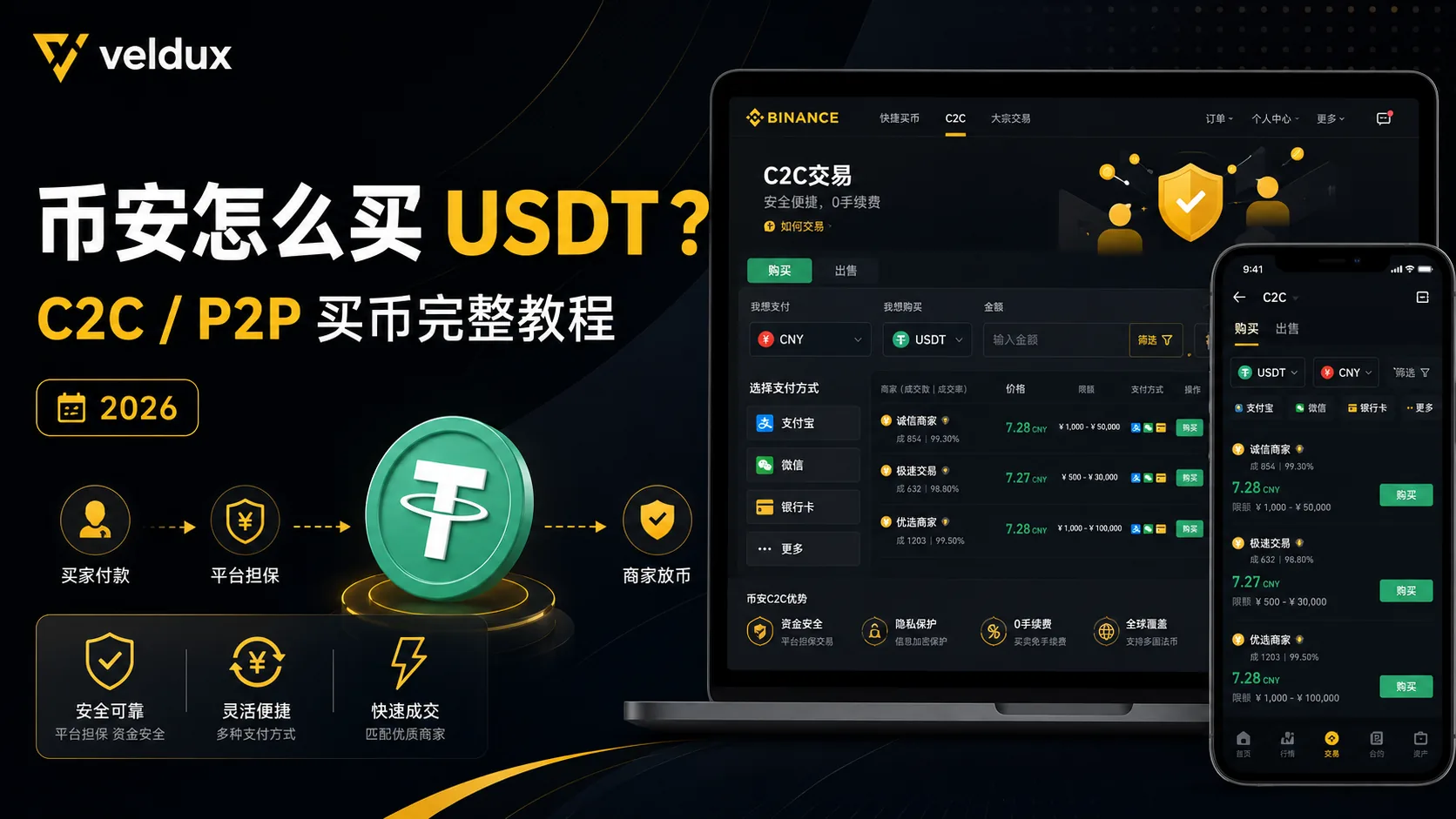
Table of contents

Binance new-user benefit
20% fee rebate
Official Binance sign-up · You must complete identity verification (KYC) to trade and withdraw
To buy USDT (a dollar-pegged stablecoin) on Binance, the most common and fastest route is P2P trading with fiat: you pay a verified merchant by bank transfer — SEPA in the eurozone, a local bank transfer, or whichever method the merchant accepts — and receive the USDT in minutes. There are three points where beginners usually stumble: the bank freezing your account because the payment reference contains a sensitive word, being rejected for paying from an account that isn't in your own name, and not seeing the balance after buying. This article separates every step and every trap.
Note: this article shares experience about the buying process and is not investment advice. Trading crypto carries risk; when moving fiat in, pay special attention to your bank's controls.
At a glance
There are three ways to buy USDT; look at the conclusion first, then decide which to use:
| Method | Crediting speed | Cost | Bank-freeze risk | Best for |
|---|---|---|---|---|
| P2P with fiat | Minutes | Low (with premium) | Yes (controllable) | First purchase, small amounts, local bank transfer |
| Card deposit (credit/debit) | Fast | Higher (about 2%, up to 3–5% via third parties) | No | Large amounts, convenience |
| Spot conversion (crypto you already hold) | Seconds | Lowest (≈0.1%) | No | You already hold BTC/ETH or other coins |
If you've just registered and this is your first USDT purchase, go straight to "Full P2P buying steps". If you already hold other crypto, jump to "Spot conversion". If the amount is large and you're worried about a bank freeze, read "Card deposit".
Who needs it / who doesn't
| Your situation | Recommendation |
|---|---|
| You just registered and are buying USDT for the first time | Yes, use P2P with fiat |
| You hold BTC/ETH and want to swap them for USDT | No P2P needed; spot conversion is cheaper |
| You only want to move in a small amount to try things out | Yes; a local bank transfer P2P is the fastest |
| Large amount and you're worried about the bank freezing your account | Read "Card deposit" and "Security risks" first |
Table of contents
- 3 things to understand before buying USDT
- Full P2P buying steps
- The 4 criteria for choosing a merchant
- Besides P2P, two alternatives
- My decision logic: what to use by situation
- Mistakes I made
- Security risks
- FAQ
3 things to understand before buying USDT
1. P2P is not "transferring money directly to the merchant" — it's platform escrow
Many people using P2P for the first time think they're sending money to a stranger. In fact, Binance P2P is a platform-escrowed match:
- When you place the order, Binance first locks the merchant's USDT (in escrow)
- You pay by the method the merchant indicates (SEPA, a local bank transfer, or another available method)
- When the merchant confirms receipt, Binance releases the locked USDT to you
As long as you stay inside the platform, in normal conditions "I sent the money but no crypto arrived" shouldn't happen. Almost all the risk comes from stepping outside the platform and trading privately; I cover this in "Security risks". The specific P2P rules are governed by the Binance P2P Help Center.[1]
2. After buying USDT, which account does it land in? Check your account type first
This is the point that confuses newcomers most: they buy USDT via P2P, go to the spot page to buy BTC, and see "insufficient balance".
In the old flow, USDT bought via P2P went into the Funding Wallet, and you had to transfer it to the Spot Wallet before buying. But since September 29, 2026, Binance has been rolling out the Spot Wallet as the default trading account for regular P2P users; after updating the app, eligible users usually no longer need to transfer manually when buying USDT.
After buying, check the Spot Wallet balance first; if the assets still show in the Funding Wallet, transfer them as the page indicates. Merchant accounts may follow a different transition schedule.
3. The effective price is not the exchange rate: the premium is the real cost
In P2P, the USDT price is set by the merchant and is usually a little higher than the live spot price (that's the premium). What you actually pay in fiat = USDT amount × the merchant's unit price; don't calculate it directly with the exchange rate. The premium varies by merchant and payment method; take it into account when choosing (more detail in Binance Academy's explanation of the P2P premium).[2]
Full P2P buying steps
Step 1: enter the P2P buying entry
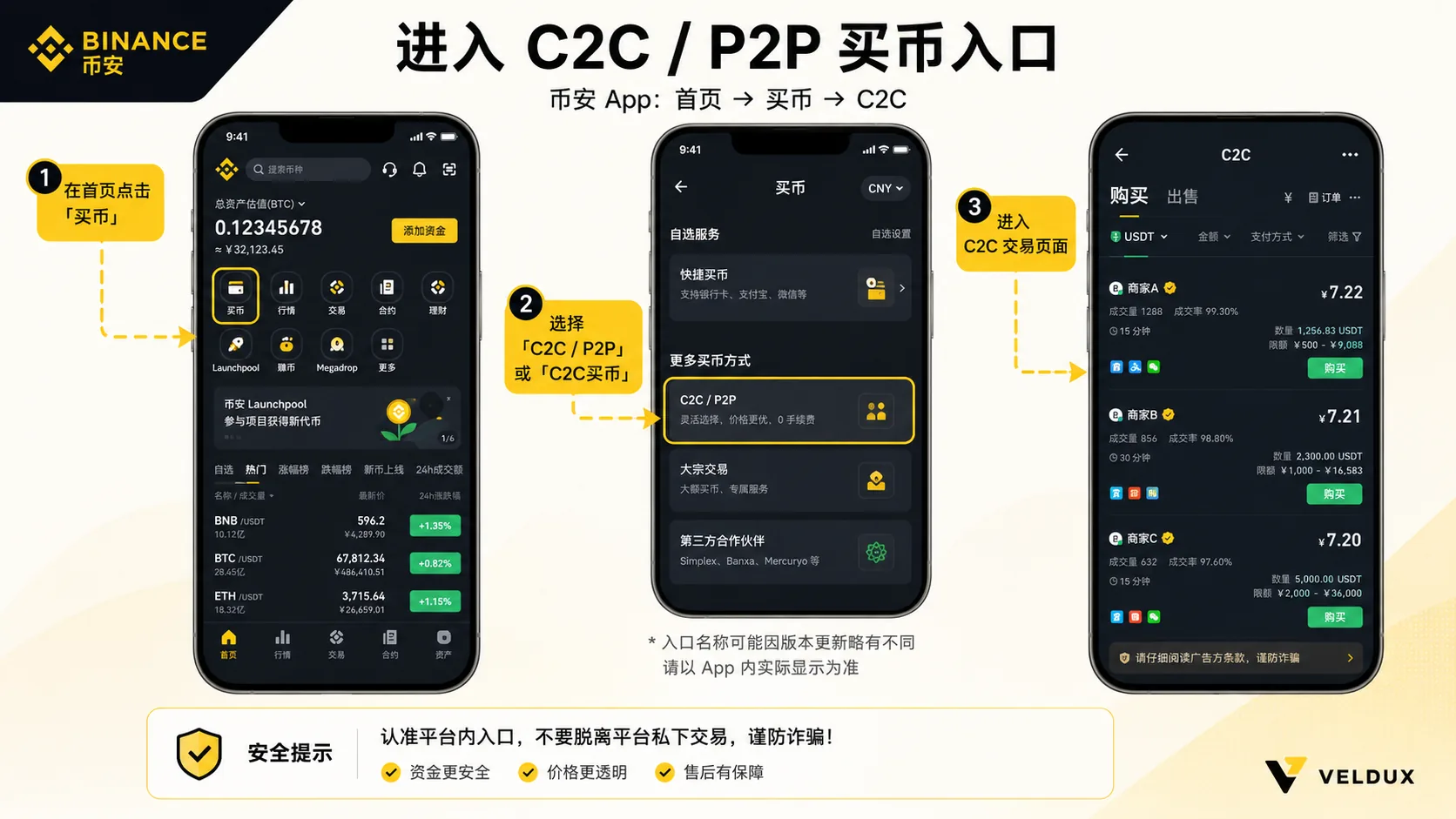
In the Binance app, home → tap "Buy" or "P2P" (in some versions it shows as "Fiat") → choose "I want to buy USDT".
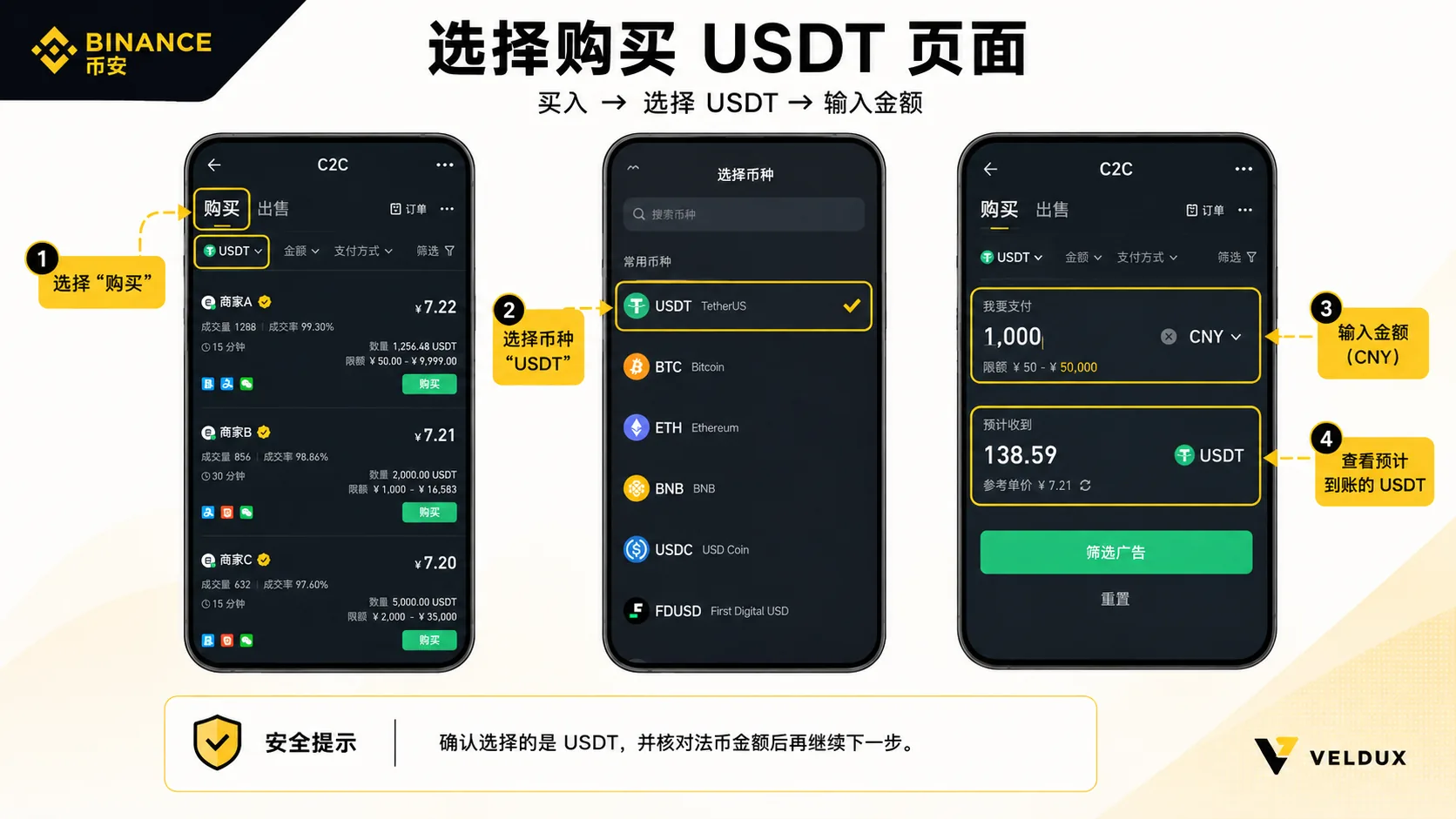
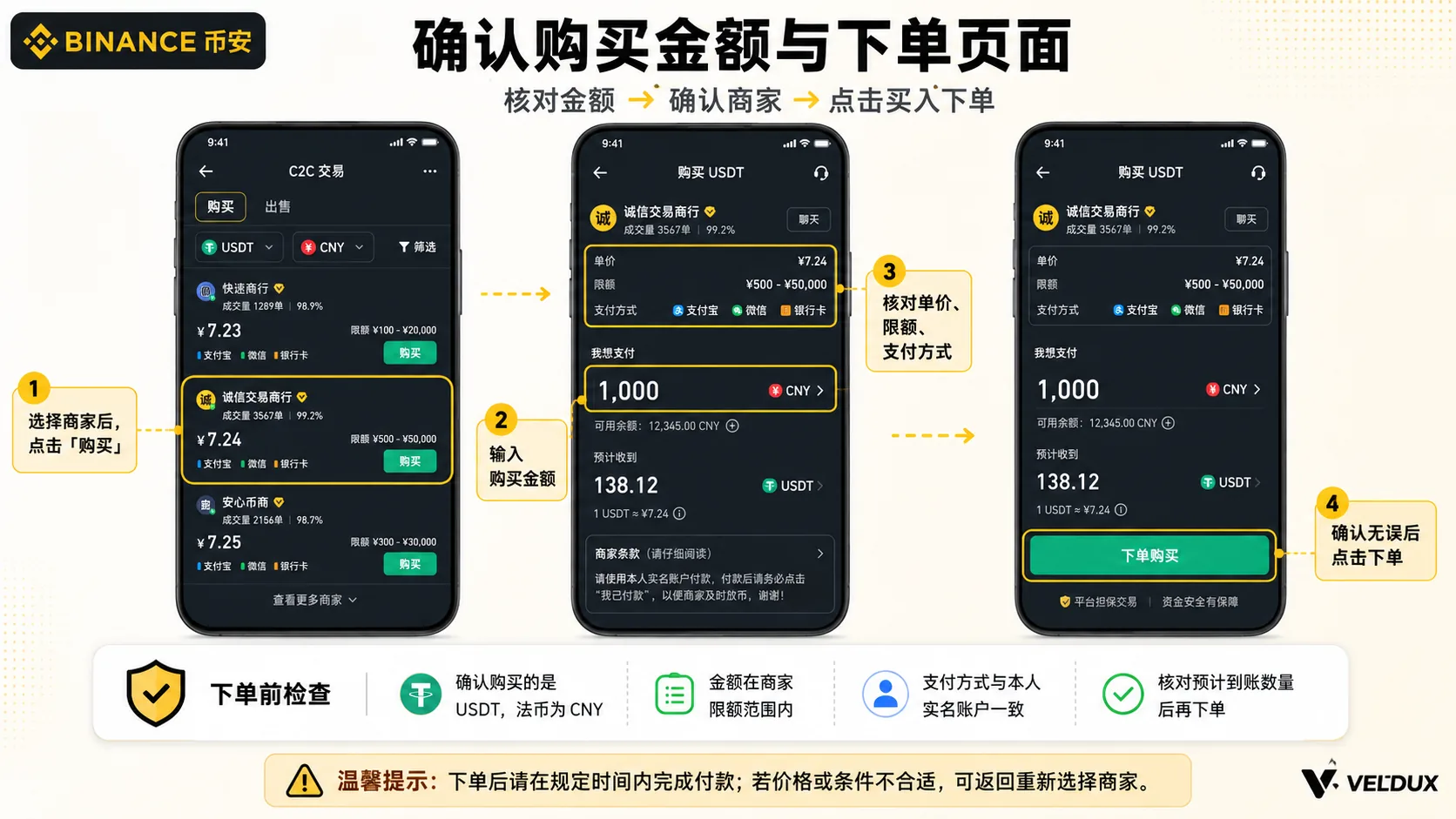
Step 2: enter the amount and choose the payment method
- Enter the amount in your local currency; the system calculates how much USDT you can buy
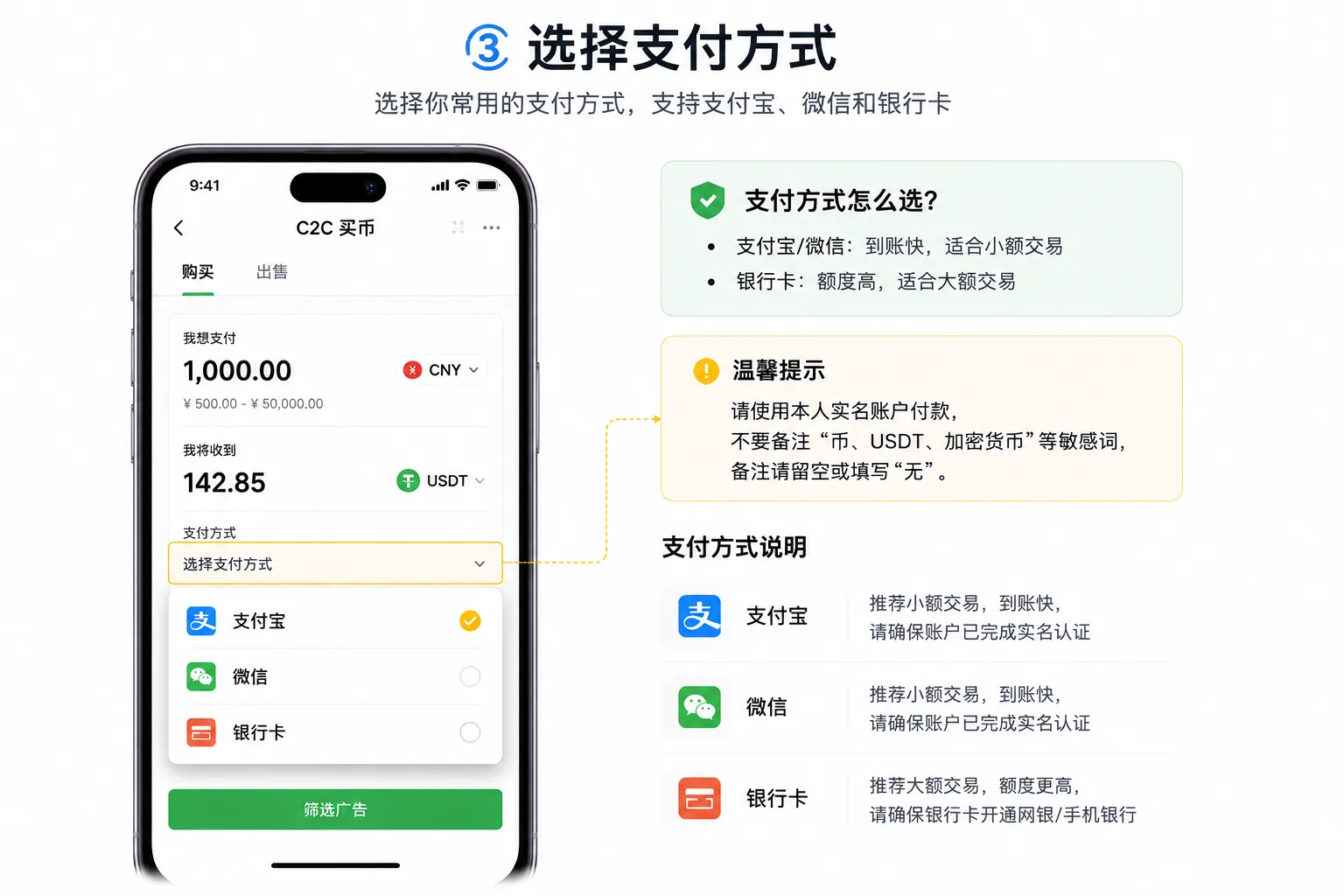
- Choose the payment method: bank transfer (SEPA in the eurozone, a local bank transfer, or another method the merchant accepts)
- The system sorts the advertisements by price and merchant conditions
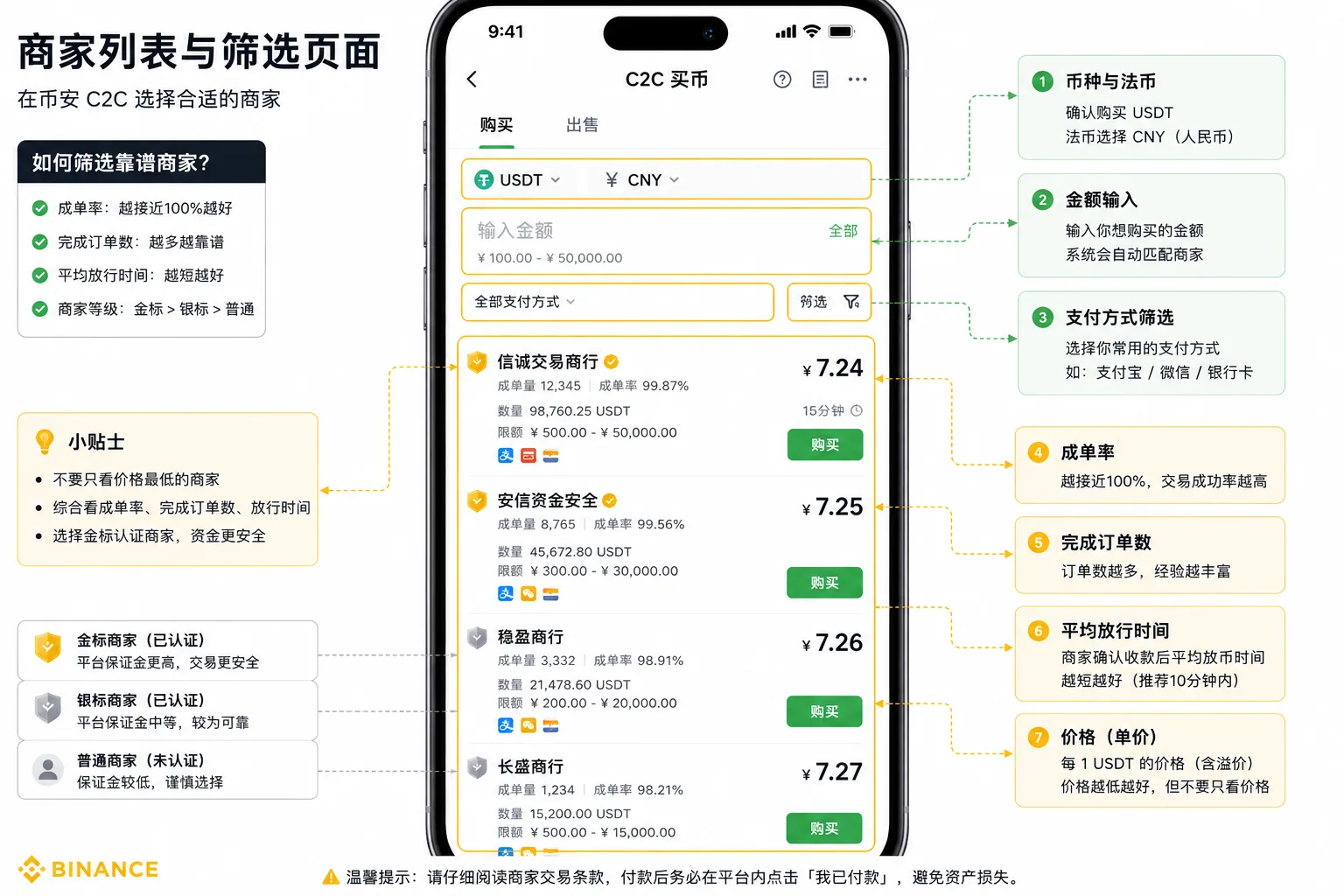
Step 3: choose a merchant and place the order
Don't just look at the lowest price. Filter with the "4 criteria for choosing a merchant" below, pick one with a high completion rate and fast release, and tap "Buy USDT".
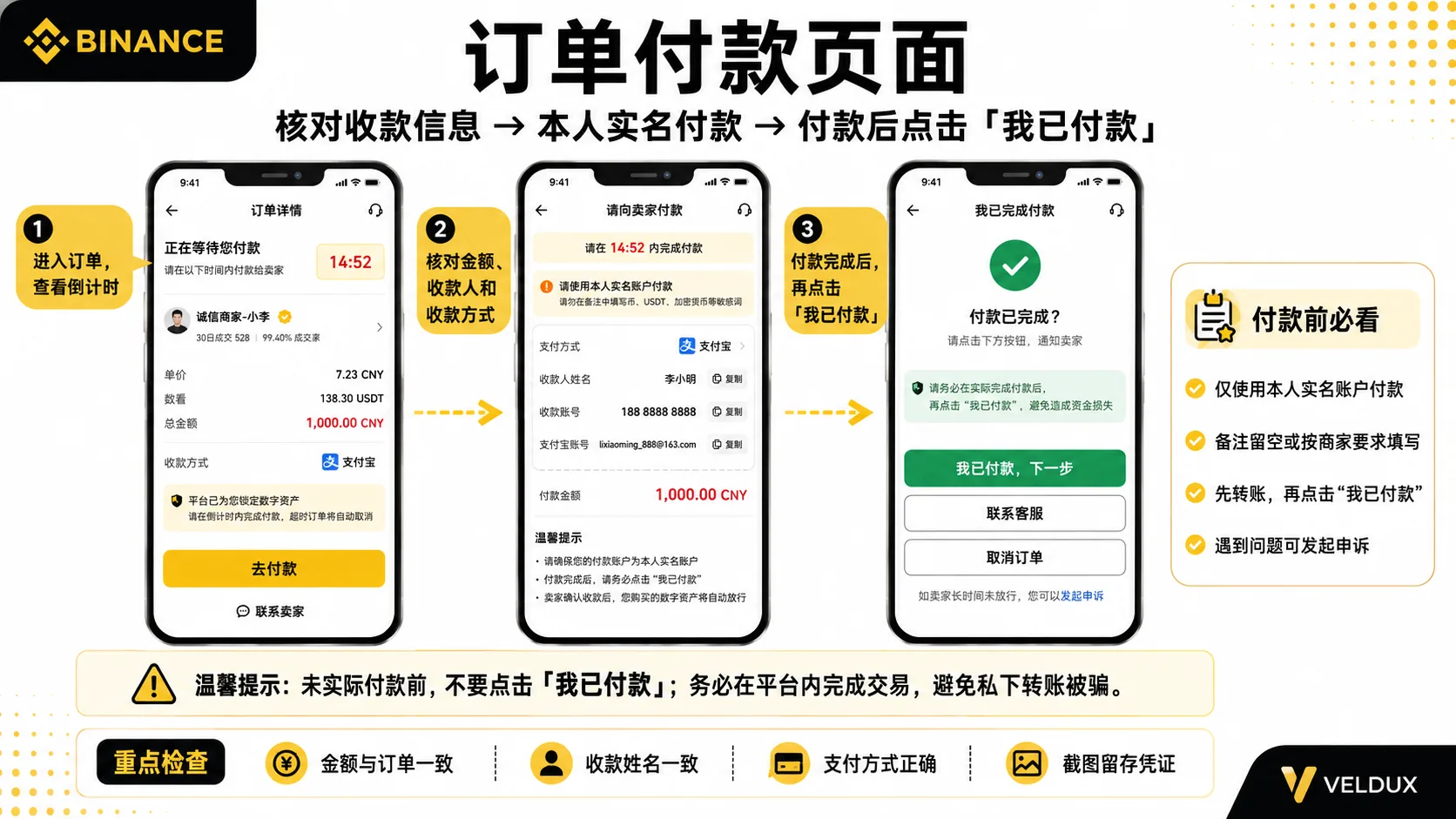
Step 4: pay (the most important step)
- Within the order's time limit, transfer from an account in your own name to the account the merchant shows
- Don't write sensitive words like "crypto", "USDT" or "Bitcoin" in the payment reference; merchants usually ask you to leave it blank or write "no reference"
- After paying, return to Binance, tap "I've paid, next" and upload a screenshot of the receipt
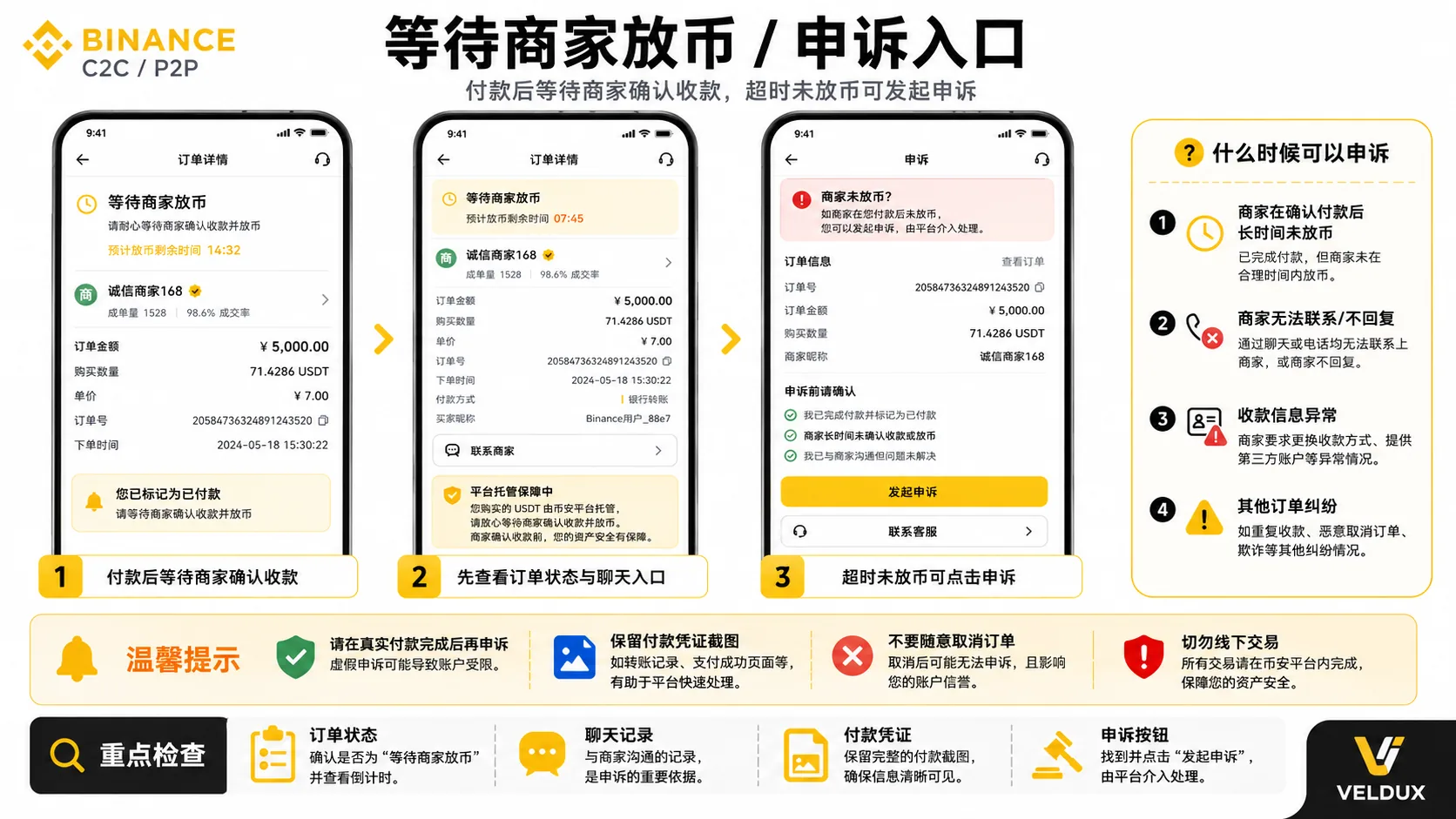
Step 5: wait for the merchant to release
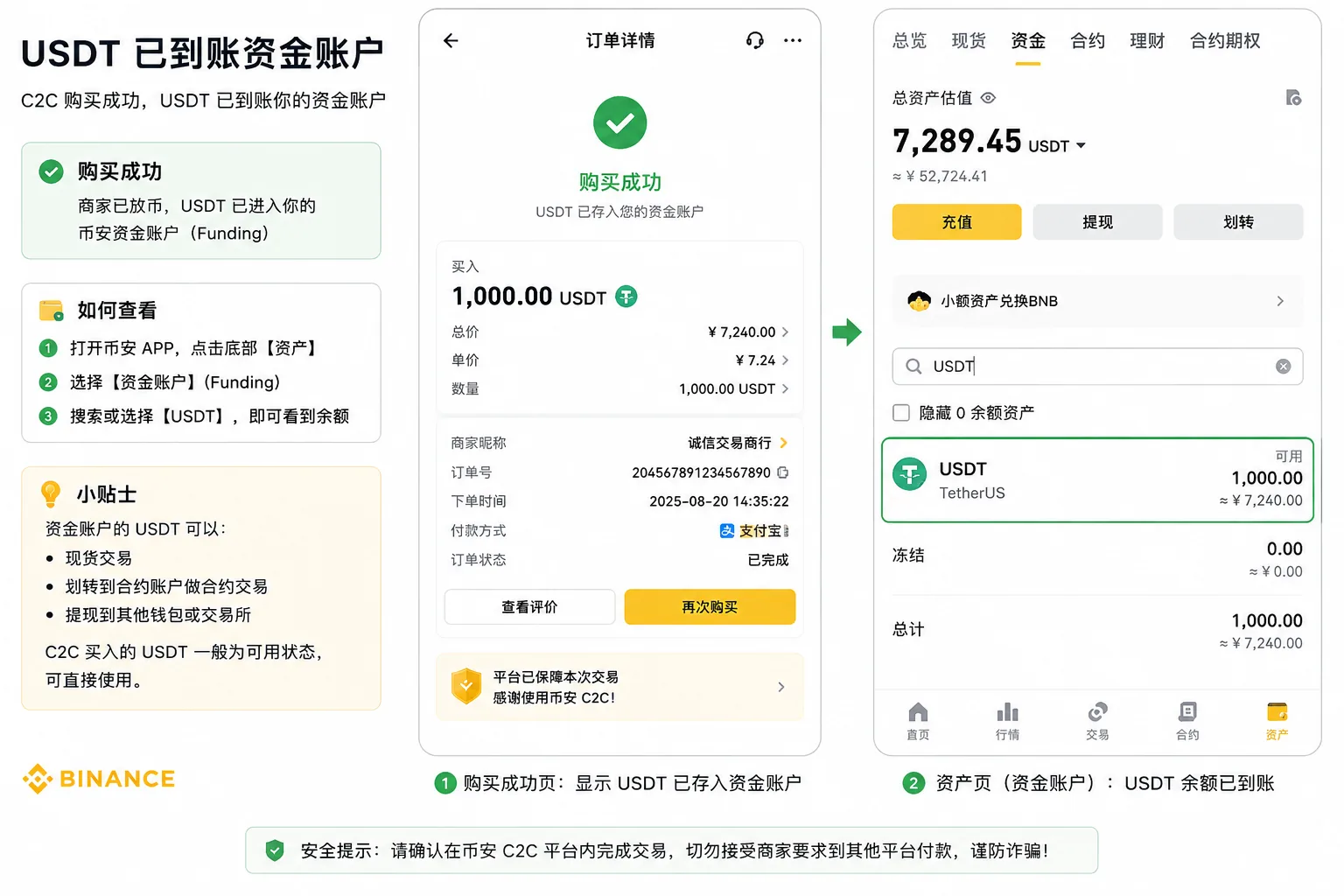
When the merchant confirms receipt, they release the USDT and it lands in your account (after the 2026 account migration, regular P2P users usually receive it directly in the Spot Wallet). Most release within a few minutes. If it's taking a long time, first check the order status and the chat, confirm you actually paid, then contact the platform from "Appeal" on the order page.
Step 6: confirm the balance
After buying USDT, open the assets page and confirm the balance. Since September 29, 2026, Binance has been rolling out the Spot Wallet as the default trading account for regular P2P users; after updating the app, eligible users usually receive the USDT directly in the Spot Wallet and no longer need the manual transfer described in older tutorials.
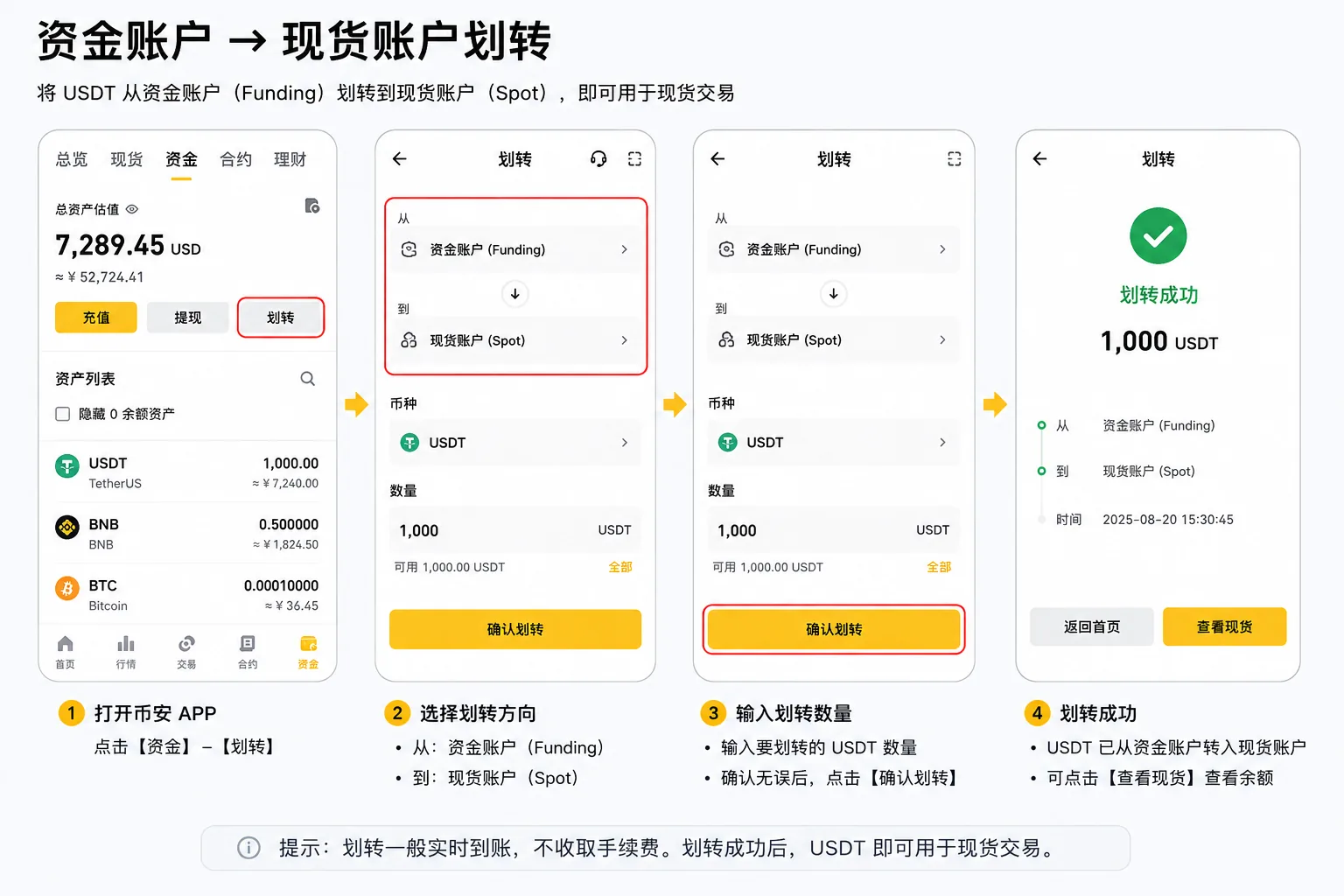
If the assets still show in the Funding Wallet, transfer the USDT to the Spot Wallet as the page indicates: Funding Wallet → Spot Wallet, choose USDT, enter the amount and confirm.
That completes the buying process. In the other direction, if you later want to convert USDT back to fiat, use P2P selling.
The 4 criteria for choosing a merchant
Four indicators that matter more than "the lowest price":
| Indicator | What to look at | Why it matters |
|---|---|---|
| Completion rate | The closer to 100%, the better | A low rate usually means frequent rejections and slow release |
| Completed orders | Thousands or tens of thousands is more stable | An established merchant is less likely to disappear |
| Average release time | The shorter the better (minutes) | Determines how soon you receive the crypto |
| Merchant level | Gold badge > silver > regular | A higher level means a larger guarantee deposit on the platform |
The cheapest merchant is often a new account with a low completion rate and slow release, and ends up wasting your time. Paying a little more premium for an established merchant with a gold badge usually gives a much better experience.
Besides P2P, two alternatives
Option A: direct card deposit (credit or debit)
You buy USDT directly with a card through a third-party service. It's fast and has none of the P2P bank-freeze risk, but the fee is higher — commonly cited around 2%, and up to 3–5% when routed through a third-party processor.[4] It makes sense when the amount is large, you want convenience, or you're worried about a freeze.
Option B: spot conversion (crypto you already hold)
If you already hold BTC/ETH, swap them directly for USDT on the spot market. The fee is very low (≈0.1%), crediting is instant, and it's the cheapest way.[3]
| Dimension | P2P | Card deposit | Spot conversion |
|---|---|---|---|
| Crediting | Minutes | Fast | Seconds |
| Cost | Low (with premium) | Higher (≈2%, up to 3–5% via third parties) | Lowest (≈0.1%) |
| Bank-freeze risk | Yes | No | No |
| Prerequisite | Verification + a payment account in your name | A supported international card | You hold other crypto |
My decision logic: what to use by situation
| Your situation | Recommended method | Why |
|---|---|---|
| First purchase, small amount | P2P with a local bank transfer | Fast and low barrier |
| Large amount, worried about a freeze | Bank-transfer merchant (with escrow) or card | Platform escrow + a gold-badge merchant |
| You already hold BTC/ETH | Spot conversion | Cheapest and instant |
| Priority: receive as soon as possible | A merchant with a short average release time | Released in minutes |
Mistakes I made
Mistake 1: I wrote "USDT" in the payment reference and nearly got my account frozen
Scenario: on my first USDT purchase I wrote "crypto purchase" in the reference out of habit; the merchant was slow to release and asked me to repeat the transfer.
Cause: the bank's controls can treat references like "crypto", "USDT" or "Bitcoin" as sensitive transactions; at best the merchant rejects it, at worst your bank account is frozen.
Lesson: leave the reference blank or write "no reference". Follow what the merchant asks and don't improvise.
Mistake 2: I paid with someone else's card and was rejected
Scenario: for convenience I paid from a family member's account and the merchant rejected the payment and reported it to the platform's risk control.
Cause: Binance requires the payment account to match your KYC details to prevent money laundering and disputes.
Lesson: only ever pay from a bank account in your own name.
Mistake 3: I bought USDT and couldn't find the money; I thought I'd been scammed
Scenario: on my first P2P purchase I went to the spot page to buy BTC and the balance showed 0; I panicked.
Cause: in the old flow, P2P money went into the "Funding Wallet", not the "Spot Wallet". After the late-September 2026 migration, regular P2P users usually receive it directly in spot, but some accounts may still land in the Funding Wallet during the transition.
Lesson: first confirm the order is completed, then check the spot and funding balances separately; if the assets are in the Funding Wallet, transfer them as the page indicates.
Security risks
- Never trade outside the platform: any "merchant" who asks you to add them on WhatsApp or Telegram and transfer privately is a scam. Without the platform's escrow, you can lose both your money and the crypto.
- Always pay in your own name and leave the reference blank: using someone else's account or writing a sensitive reference can trigger a freeze or a rejection.
- The bank-freeze risk is real: P2P involves fiat transfers and some banks apply strict controls; large amounts or frequent transactions can trigger a freeze. Prefer established merchants with a gold badge and, if needed, split a large amount into several orders.
- Withdrawals may have a T+1 limit: newly bought USDT, or a transaction that triggers risk controls, may be non-withdrawable for 24 hours. If you need it urgently, plan ahead.
- Don't believe "zero premium" or "purchase on your behalf": prices well below the market are usually a scam.
Also note that P2P and certain services aren't available in every region — for example, P2P is not available to US residents — and Binance restricts access in some jurisdictions. Confirm what's available and legal where you are before you start.
FAQ
Q1: Is it safe to buy USDT via P2P on Binance?
Trading inside the platform is safe in the sense that Binance escrows the merchant's USDT and releases it when you pay. The main risk comes from stepping outside the platform and from bank freezes: don't transfer privately, and choose gold-badge merchants.
Q2: What is P2P?
P2P (peer-to-peer) is fiat trading directly between users, with the platform acting as escrow. It's the same feature some regional interfaces call "C2C" (customer-to-customer); on Binance's English interface you'll see it labeled "P2P".
Q3: Which payment method should I use to buy USDT via P2P?
For small amounts, a local bank transfer is usually fastest. For large amounts, or if you're worried about a freeze, a gold-badge merchant who accepts bank transfer is usually more stable. Any of the methods the merchant accepts works.
Q4: Why is my balance still 0 after buying USDT?
First confirm the order is completed, then check the Spot Wallet and the Funding Wallet separately. Since September 29, 2026, Binance has been rolling out the Spot Wallet as the default for regular P2P users; if you qualify, the USDT lands directly in spot. If it's still in the Funding Wallet, one transfer fixes it.
Q5: What can I write in the payment reference?
Usually nothing, or "no reference". Don't write sensitive words like "crypto", "USDT" or "Bitcoin".
Q6: How much does buying with a card cost?
Commonly cited around 2% on Binance's own card flow, and up to 3–5% when routed through a third-party processor — pricier than P2P, but with no freeze risk and fast crediting; for large amounts it can end up worth it.
Summary
To buy USDT on Binance, prioritize P2P: an established merchant with a gold badge, pay from an account in your own name, and leave the reference blank. The USDT arrives in minutes; then confirm the balance on the assets page (after the 2026 account migration it usually lands directly in the Spot Wallet, and a few accounts still need a transfer from the Funding Wallet). If you already hold crypto, use spot conversion; if the amount is large and you fear a freeze, use a card deposit.
If you're about to register
| Your choice | What to do |
|---|---|
| Register through this site's link (20% fee rebate) | Register on Binance; the code AMY568 is filled in automatically |
| Don't use a code | Go directly to binance.com and register; the features are the same, just without the rebate |
The first row of the table is an affiliate link: registering through it may generate income for us, but it doesn't affect the objective conclusions of this article. More detail in Advertising and interest disclosure.
Related articles
- How to use the Binance referral code: the 20% rebate and what to check (2026) — enter AMY568 at registration for the 20% rebate
- Binance vs OKX: which one should you use? (2026) — if you haven't decided which exchange to use, read the comparison
- How to register on Binance in 2026: account setup and KYC step by step — not registered yet? Start here
Data verification note
The key facts in this article were checked on 2026-10-18, one by one:
- P2P platform escrow: when you place a P2P order, the platform first locks the merchant's USDT; the buyer pays and, when the merchant confirms receipt, the platform releases the crypto. The specific rules are governed by the Binance P2P Help Center. Source: Binance P2P Help Center.
- P2P premium: in P2P the USDT price is set by the merchant and usually differs from the live spot price (the premium); the real cost is calculated with the merchant's unit price, not the exchange rate. The platform fee is 0% and the merchant's spread is the real cost. Source: Binance Academy.
- Spot conversion cost: if you already hold BTC/ETH or other assets, you can swap them for USDT on the spot market; a regular user's fee is about 0.1%, normally below the P2P premium and the card-deposit cost. Source: Binance spot trading fee schedule.
- Card deposit fee: card purchases carry a processing fee that is commonly cited around 2% on Binance's own card flow, and higher (3–5%) when routed through a third-party processor; it's higher than P2P but has no bank-freeze risk and credits quickly. Source: Binance buy-crypto fee guidance.
Additional note: available payment methods, supported currencies and P2P availability vary by region. This article uses "P2P" because that is Binance's English-interface label; some regional interfaces call the same feature "C2C". The card and bank-transfer fees above are indicative — always confirm the current fee on Binance's official page before transacting.
Disclaimer
This article only shares experience and explains the process of buying USDT on Binance. It is not investment advice, financial advice or a trading recommendation.
Crypto asset prices are highly volatile, and moving fiat in involves bank controls and compliance risk. Each person should assess their own risk tolerance and comply with the laws of their jurisdiction; don't use third-party accounts or trade privately outside the platform. People under 18 should not trade crypto.
Exchange operations · USDT · Wallet security
Responsible for researching and organizing content on Binance, OKX, USDT transfers, withdrawals and wallet security. The steps and key data in this article are verified according to the content type, using real operation records, official platform documentation and public sources. Interfaces, fees and regional rules may change, so the article is reviewed and updated continuously.
Status: manual review · Last verified 2026-10-18
Reviewed by: Veldux editorial team
- Binance P2P Help CenterP2P is a platform-escrowed match — when you place the order the merchant's USDT is locked first, and the platform releases it after you pay and the merchant confirms receipt
- Binance AcademyIn P2P the USDT price is set by the merchant and usually differs from the live spot price (the premium); the platform fee is 0% and the real cost is the merchant's spread
- Binance spot trading fee scheduleA regular user's spot fee is about 0.1%, the cost reference for converting crypto you already hold into USDT
- Binance buy-crypto fee guidanceCard purchases carry a processing fee that is commonly cited around 2%, and higher (3–5%) when routed through a third-party processor
- 2026-10-18UpdateLocalized for the English (international) market — renamed C2C to P2P, replaced LatAm payment rails (SPEI/PSE/MEP) with international bank transfer and card, and hedged the card fee to the reported 2% (3–5% via third-party processors); added the evidence-chain superscripts and the "Data verification note".
Editorial principles ineditorial policy,corrections policy。