
How to register on Binance in 2026: account setup and KYC step by step (code AMY568)
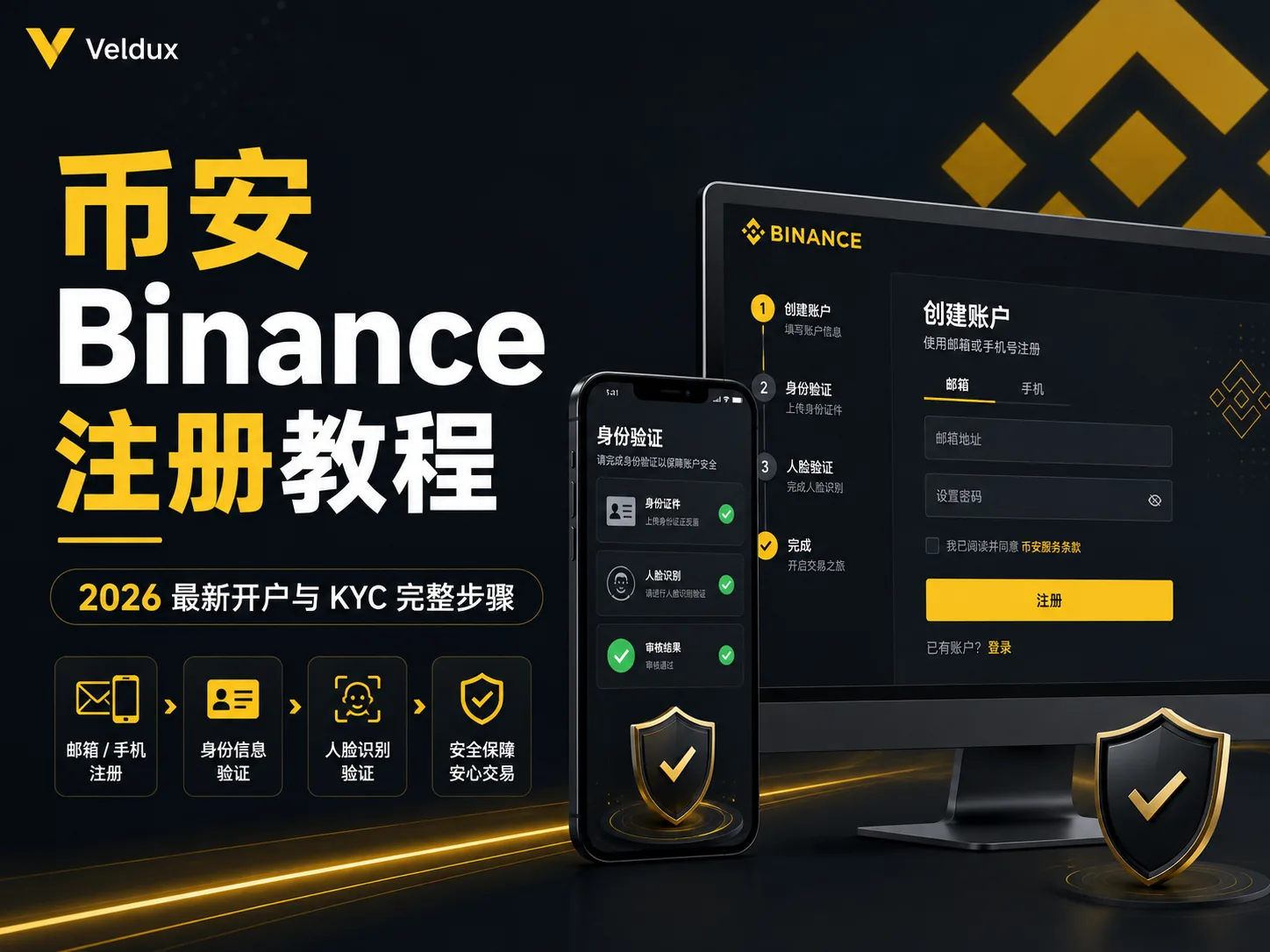
Table of contents

Binance new-user benefit
20% fee rebate
Official Binance sign-up · You must complete identity verification (KYC) to trade and withdraw
How do you register on Binance in 2026? Use a single entry point: the official site binance.com or the official app. Open your account with an email or phone number, complete the 6-digit code, set a password, confirm the referral code, and finally pass KYC. The full order is: email/phone → code → password → referral code → KYC. Creating a standard account normally takes a few minutes.
What holds most beginners up isn't deciding whether to register — it's two small details: the verification code that never arrives, and worrying that your document or the facial check will be rejected during KYC. Binance's guidance says identity verification is usually completed in minutes, but in some cases it can take longer — up to 24–48 hours.
This article follows the order of the 2026 official registration page and breaks down each step: entry point, code, password, referral code and KYC. The focus is on the two most common problems — the code not arriving and the KYC being rejected — so you can finish in one pass instead of retrying documents and codes.
Note: this article shares experience about the registration process and is not investment advice. Trading crypto carries risk; act with caution.
At a glance
Registration is three steps, plus one key reminder:
| Step | What to do | Approximate time |
|---|---|---|
| 1. Create the account | Email/phone → code → password → confirm referral code | 3-5 minutes |
| 2. KYC verification | Upload a document + facial check and submit for review | 5-10 minutes + review |
| 3. Set up security | Enable 2FA and an anti-phishing code | 2-3 minutes |
Key reminder: put the referral code in during the registration step. Adding it later is not available to every account: if it is offered, the window and conditions depend on the current rebinding rules and your account's actual eligibility. If you want the fee rebate, enter AMY568 when you sign up.
Official Binance registration entry: website and app
As with downloading, registration requires an official entry point. Prioritize the Binance website or official app; you can also register from a verified official invitation link that carries the referral-code parameter.[1]
| Entry | Address / source | Detail |
|---|---|---|
| Desktop | Official site binance.com |
"Register" button in the top right; the login page is accounts.binance.com |
| Mobile | Official app (developer Binance Switzerland AG) | Get it from the official download page, not third-party sites |
| Invitation link | A valid link with a referral parameter | The page may auto-fill the code; still check that the domain is official |
When you search "Binance register", third-party sites with titles like "Binance official" appear in the results. They may be second-hand redirects or phishing, and you can't tell at a glance. The safest approach is to type binance.com into the address bar, or download the app from the official page and register from there.
In one sentence: register from the official site and app, not from third-party pages in search results.
Table of contents
- Official Binance registration entry: website and app
- Before you start
- Full registration steps
- KYC identity verification steps
- Security settings to enable after registering
- The most common beginner mistakes
- How to decide: two small choices
- Security risks
- FAQ
- Pre-flight checklist
Before you start
You need three things; if one is missing, the process stalls halfway:
- An email that receives codes reliably (Gmail/Outlook) or a phone number
- A valid ID document (one the Binance verification page accepts: national ID, passport or driver's license)
- A phone with a camera (used for the facial check)
There's also an implicit requirement: a stable connection to reach the Binance site or app. The official site is binance.com. Verify that domain and don't open "Binance download links" sent in private messages or SMS — those are almost always phishing pages.
Full registration steps
The following follows the order of Binance's 2026 official app documentation and website guidance: email/phone first → then code → password → confirm referral code → KYC. Button positions may differ by device, but the core order is the same.
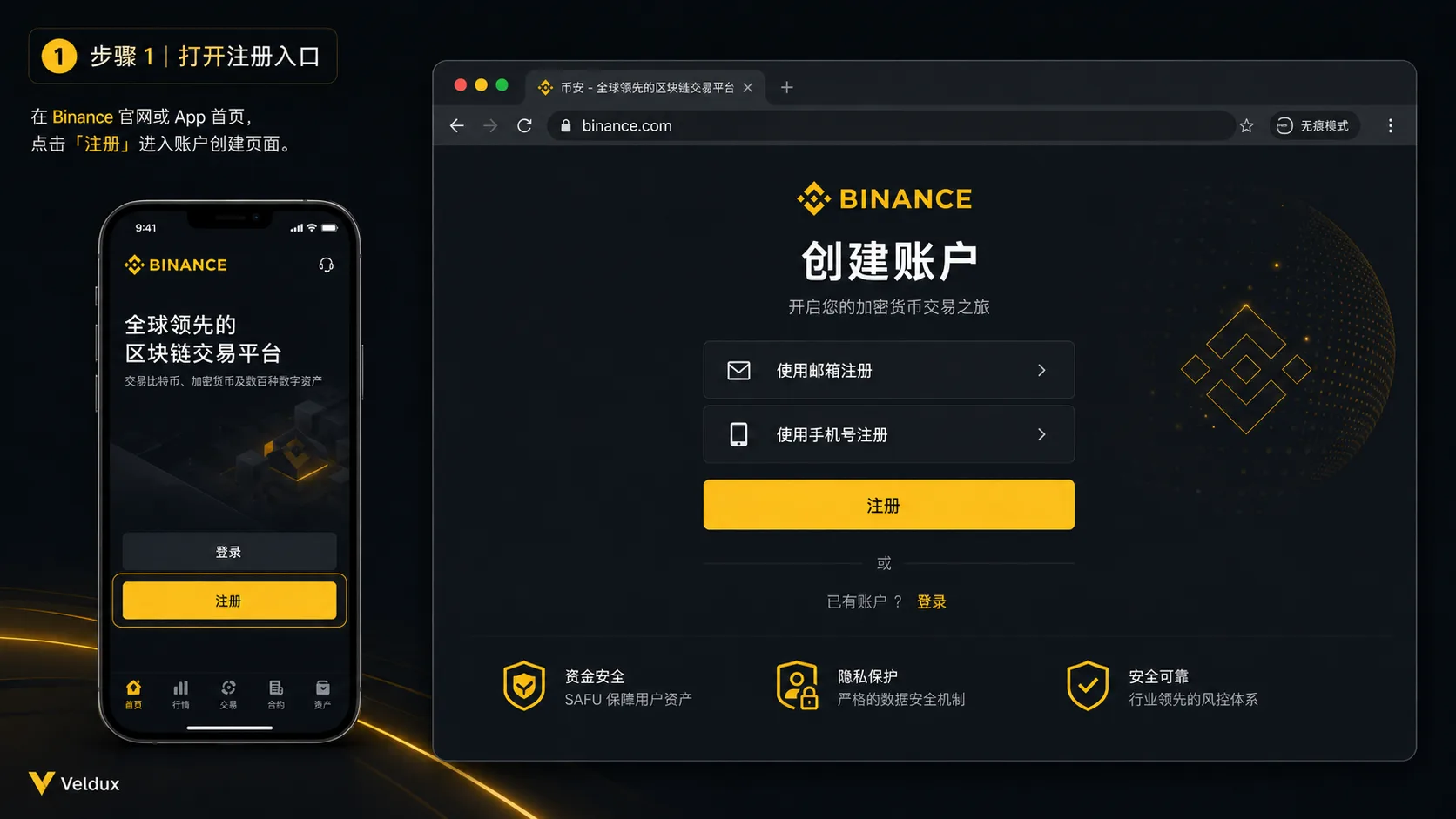
Step 1: open the registration entry
- Mobile: download the Binance app first (download tutorial) and tap "Register"[2]
- Desktop: open binance.com in a browser and tap "Register" in the top right[3]
Step 2: enter your email or phone number
Enter the email or number you plan to use. Besides email or phone, Binance also supports one-click sign-up with Apple, Google or Telegram.[4]
If you use a phone number, confirm the country code is correct first. If you use email, pick one you can access long-term and that has protection enabled. When done, tap "Next".
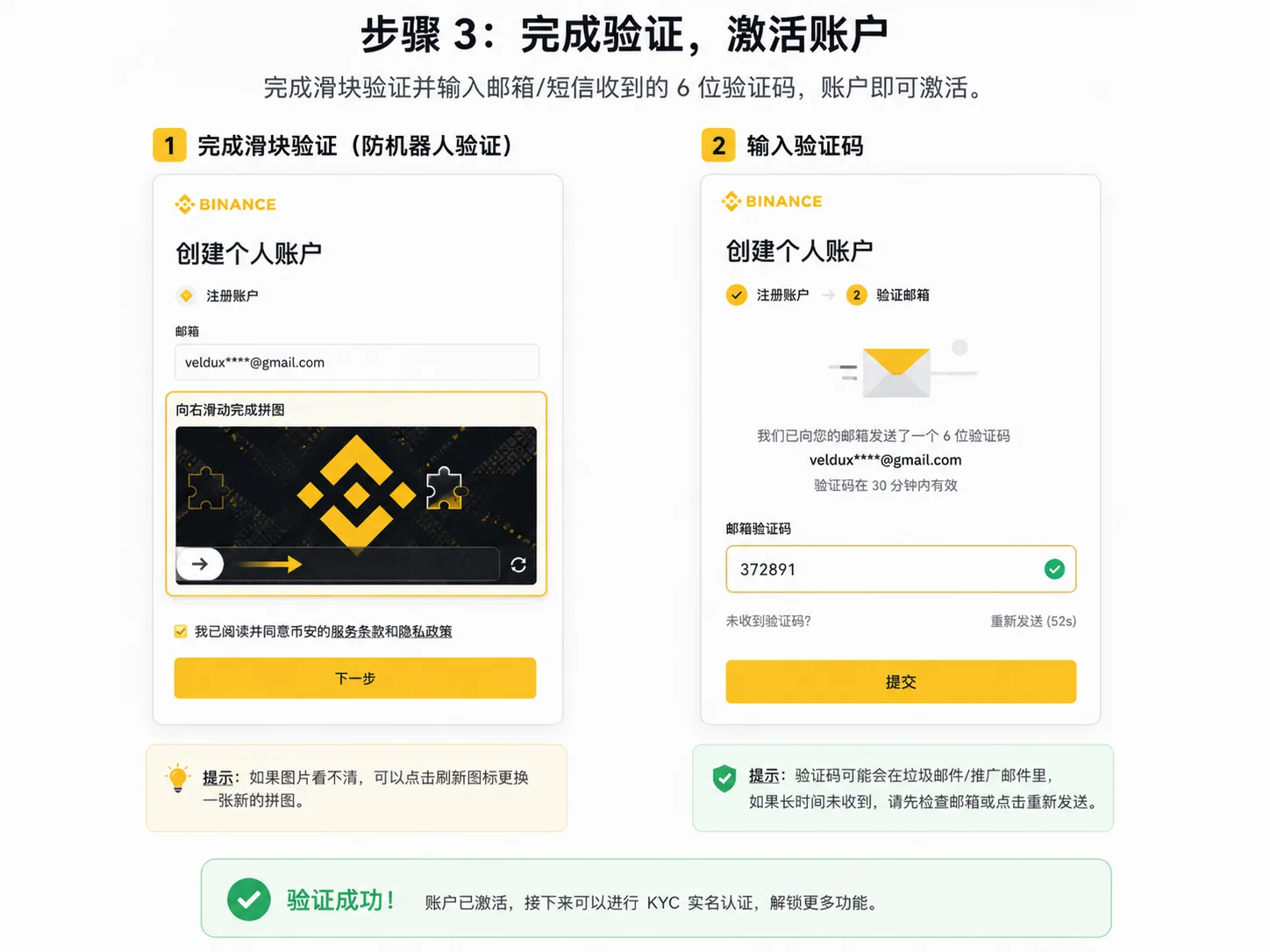
Step 3: enter the 6-digit code
Binance sends a one-time code to the email or phone you registered; you normally have 30 minutes to enter it.[4]
If it doesn't arrive, check first: whether the email landed in spam or the promotions tab, whether the country code and number are correct, whether you used an older code, and whether requesting it repeatedly triggered a temporary sending limit.
Step 4: set your login password
After verifying the code, set your password as the screen asks. Binance requires at least 8 characters including uppercase letters and numbers; for safety use 12 or more and don't reuse a password from elsewhere.[4]
Step 5: confirm referral code AMY568
During account creation, Binance may show "Referral ID" on a later screen. If you entered through a valid registration link that carries the parameter, the page may auto-fill the code.
Whether AMY568 was recorded correctly is shown on the page: it should display the correct code and its binding status. If it shows "Linked" (a green checkmark), the referral relationship is established and, once linked, it normally can't be changed directly. To know whether you receive the fee rebate, check the rules of the relevant referral campaign (more detail in how the Binance referral code works).[6]
Step 6: enter identity verification (KYC)
After creating the account, the system usually takes you to the identity verification page. If you closed it, sign in and look for "Identity verification" in the account center. At this point the account exists, but trading permissions are still limited by KYC, region and account status.
KYC identity verification steps
Registering only means "opening the account". To buy crypto, withdraw or trade with fiat, you also need to complete KYC.[5]
Step 1: enter identity verification
Account center → Identity verification (or "Real-name verification") → Start.
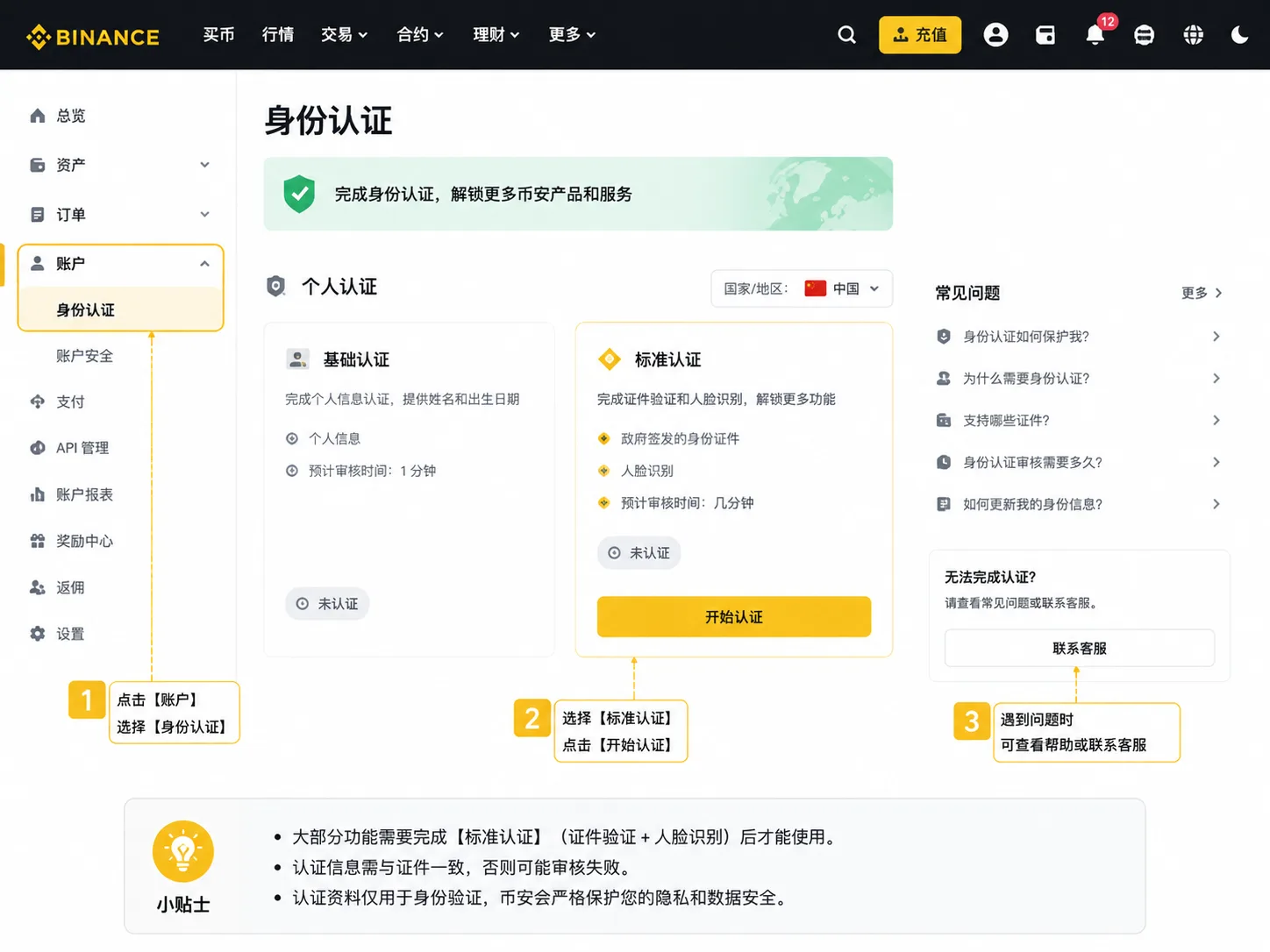
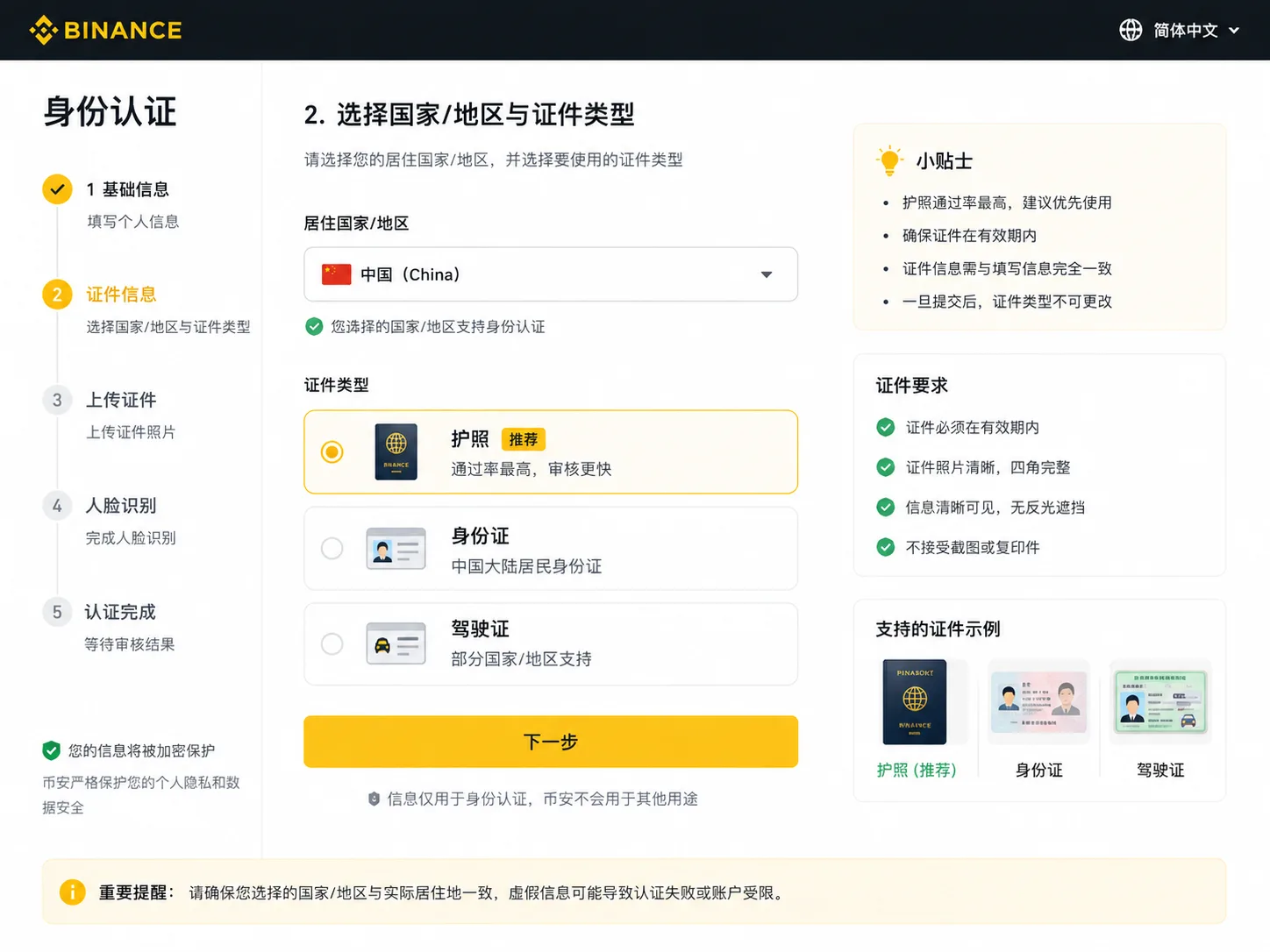
Step 2: choose your region and document type
Select your country or region, then the document (national ID, passport or driver's license). Prioritize a document the page accepts, that is valid, clearly readable and yours. The passport is an internationally accepted document and you can choose it if the page allows, but there's no uniform official data showing it gets approved faster everywhere.
Step 3: fill in your details
Your name, date of birth and other details must match your document. For the residential address, enter where you actually live and, if asked, provide a matching proof of address. Don't confuse your nationality, the place your document was issued and your current residence.
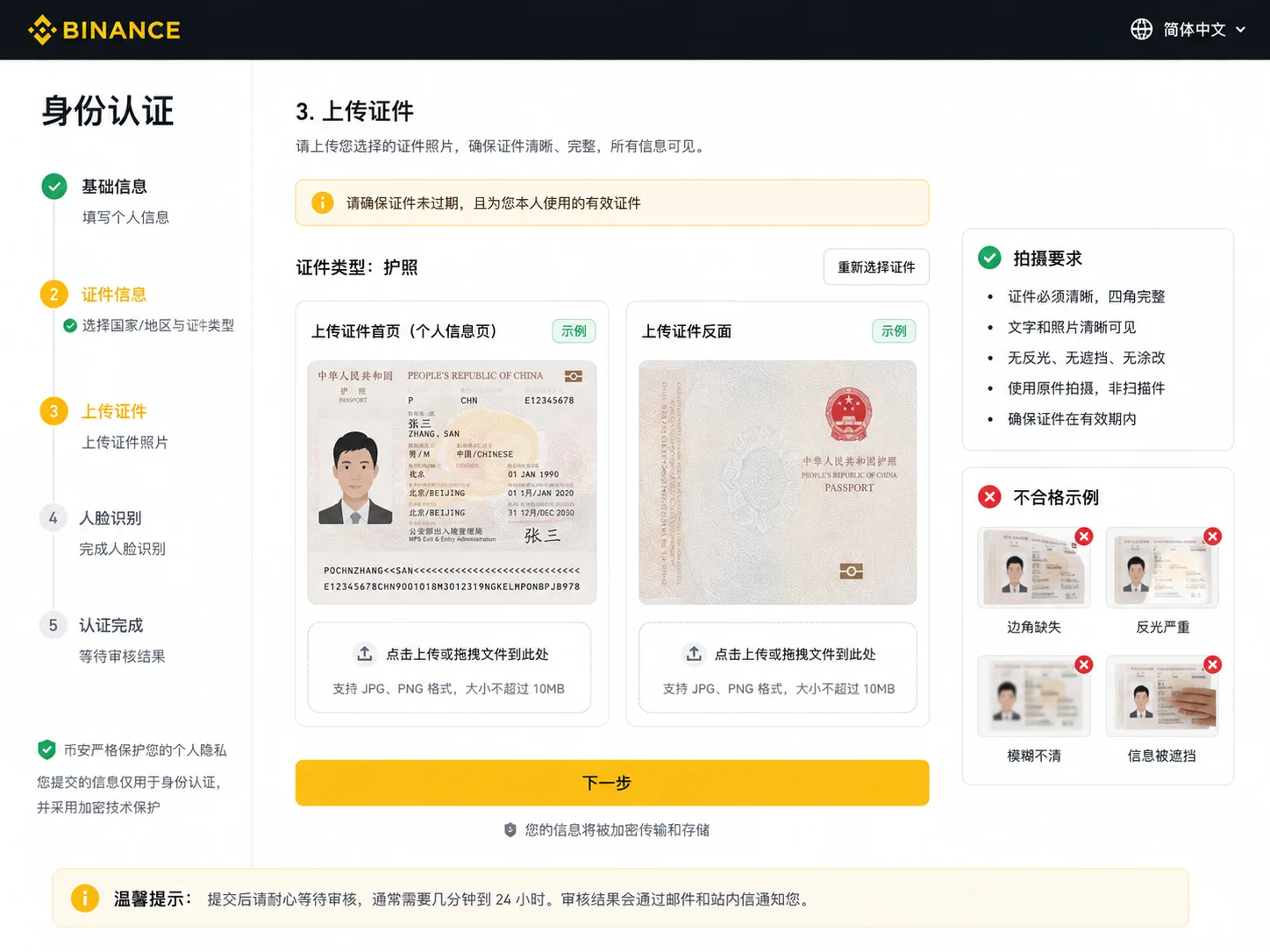
Step 4: upload your document + facial check
- Front and back photos: all four corners visible, sharp, no glare and no obstructions
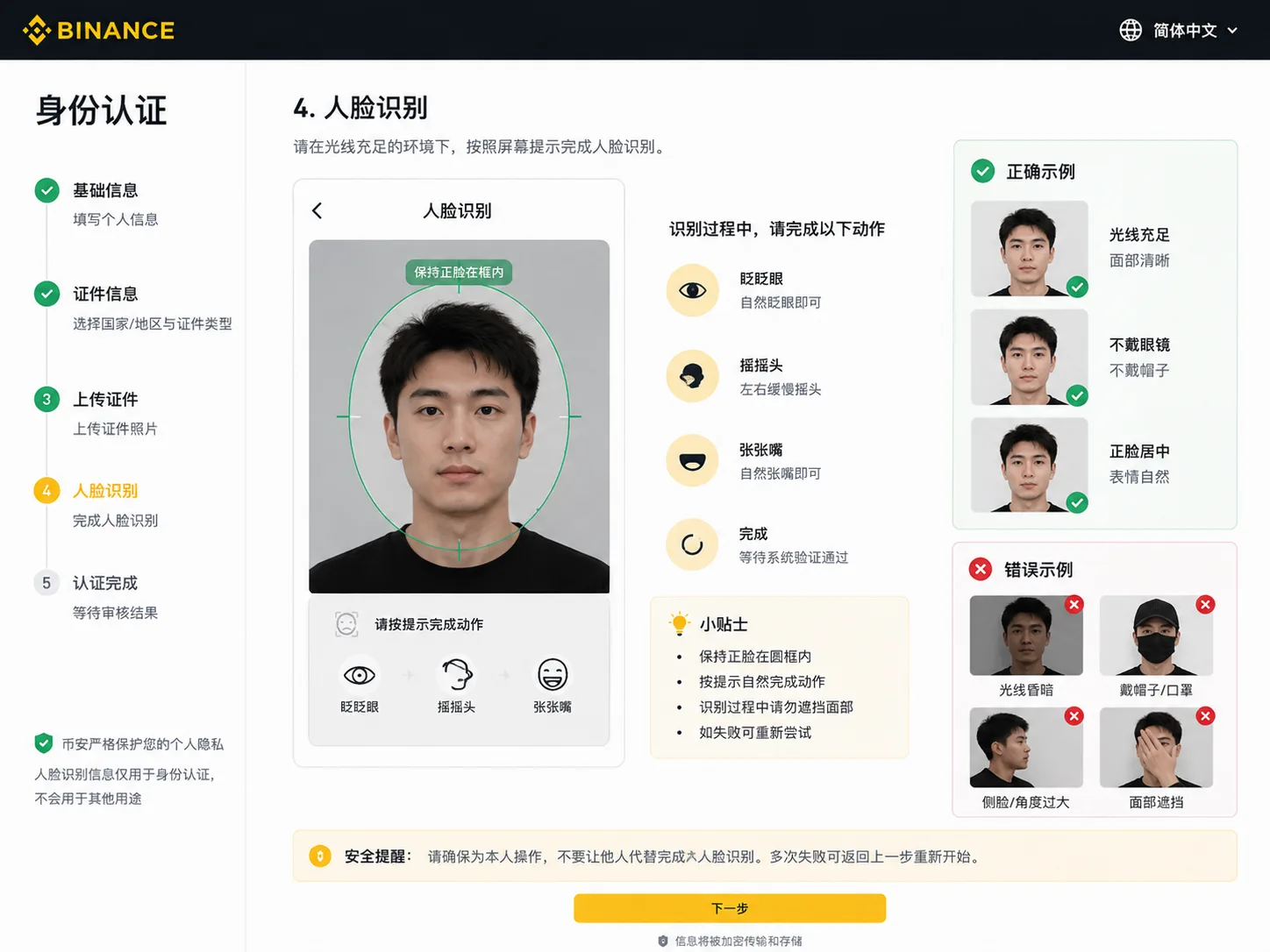
- Facial check: good lighting, remove hats, masks and glasses, and follow the prompts to blink or turn your head
Step 5: submit for review
After submitting, wait for the result; if approved, you'll get an email notice. Binance's guidance says identity verification is usually completed in minutes, but in some cases it can take longer — up to 24–48 hours. Treat this as a reference: it doesn't mean every account must wait the full time, nor does it guarantee approval.[5]
Verification levels and permissions are not one identical system for every user: depending on the region and product, different level names and limits may appear. As a common reference:
| Verification status | Account permissions and next step |
|---|---|
| Not verified | Complete identity verification to use services that require KYC |
| Under review | Wait for the platform's review or a notice to submit more information |
| Verified | Check the trading and withdrawal features enabled for your account |
| Extra verification required | Submit the documents the account asks for, such as proof of address |
The actual permissions, limits and whether extra verification is required depend on what your account shows.
Security settings to enable after registering
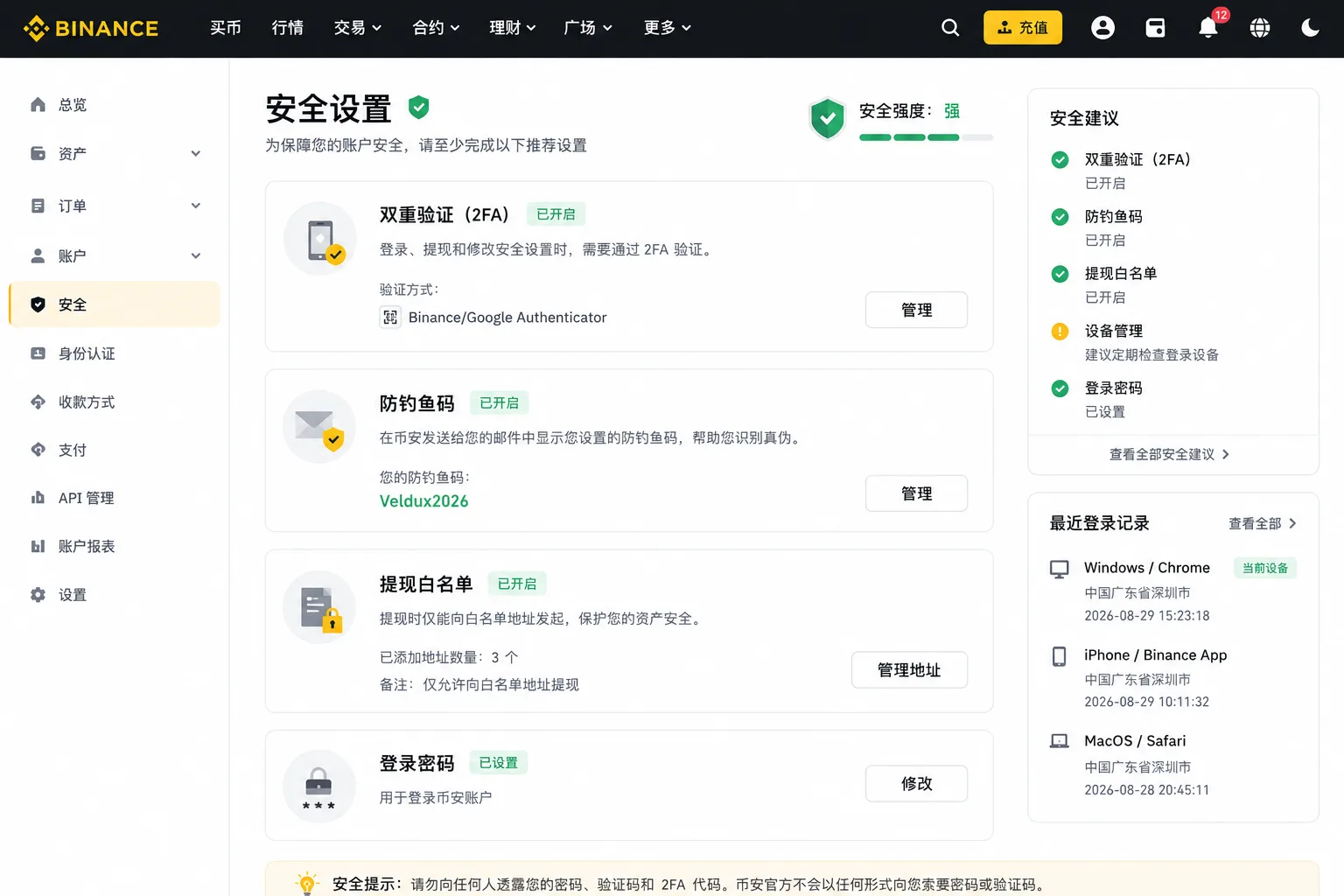
| Setting | What it does | Where to enable it |
|---|---|---|
| Two-factor authentication (2FA) | Prevents theft if your password leaks | Security → 2FA |
| Anti-phishing code | Helps tell real emails from fake ones | Security → Anti-phishing code |
| Withdrawal whitelist | Withdrawals only go to authorized addresses | Security → Address management |
The most common beginner mistakes
Mistake 1: the verification code never arrives
This is the most common registration problem, and almost every beginner gets stuck here the first time.
Cause: the email code landed in spam or promotions; the SMS was blocked; the connection is unstable.
Fix: check the spam folder first; for SMS, switch networks or wait a few minutes and retry; confirm the email or number is entered correctly; if nothing works, register with a different email.
Mistake 2: KYC rejection
Most common causes: a blurry document photo, glare or cut-off corners; a facial check with glasses or poor lighting; a name that doesn't match the document.
Fix: retake the photo with all four corners visible and no glare; remove glasses and find good lighting for the facial check; make sure your name matches the document.
Don't retry over and over: after several failed attempts, the system may limit resubmissions. Follow the retry timing the page shows and don't resubmit without first correcting the information.
Mistake 3: you didn't enter the referral code and want to add it later
Conclusion: once registration is complete, you can't add a referral code directly inside the account. If you missed it, some eligible accounts can request binding from the official rebinding page (binance.com/activity/referral/bind-ref), but whether it's available, the window and whether it requires having no deposits or trades depend on the current rules and your account's actual eligibility. Accounts that already have a referrer normally can't change it freely.
That's why the safest approach is still to enter AMY568 during registration, not gamble on adding it later.
How to decide: two small choices
| Choice | Recommendation | Why |
|---|---|---|
| Mobile app vs desktop web | Mobile app for beginners | The facial check and slider verification work better on a phone |
| Email vs phone number | Prefer email | You still receive codes when changing devices or traveling; SMS can be blocked |
Security risks
- Verify the official domain: Binance's site is binance.com. Any private message, SMS or unknown site asking you to download a "Binance installer" may be phishing; don't open it.
- Local compliance: some countries or regions restrict Binance or crypto trading. Before registering, confirm the legality and permitted access in your jurisdiction; don't use proxies of unknown origin to register, and don't hand your identity details to third parties offering to "do the process for you".
- Under 18: don't participate: Binance requires users to be at least 18 years old.
- Beware of "registration on your behalf" or "KYC on your behalf": anyone asking for your account, document or verification code wants to control your account and your funds.
FAQ
Q1: Is registering on Binance free? Yes. Registration and KYC are free; fees only apply when you trade.
Q2: What is the Binance registration process in 2026? Email/phone → code → password → confirm referral code → KYC. The detail is above, in "Full registration steps".
Q3: Where is the official registration entry for Binance? There are only two: the site binance.com (desktop) and the official app (mobile). Don't register from third-party sites that appear in search results.
Q4: Can I register with a phone number from my country? Binance has clear restrictions by supported region. Whether a number from your country can register and receive codes depends on the supported regions and the account status. Confirm your location complies with the rules first, and don't use proxies or agents of unknown origin.
Q5: Can I do Binance KYC with my local ID document? Whether a document type is accepted depends on the verification page's support for your region and the compliance requirements. Confirm your local situation is compliant first, and don't hand documents to third parties.
Q6: Can I trade without completing KYC? You can't buy, withdraw or trade with fiat. To trade you must first complete KYC.
Q7: What do I do if I don't receive the registration code? Check spam and SMS blocking, confirm the number is correct and retry later; the detail is in "Mistake 1".
Q8: How long does KYC review take? Binance's guidance says identity verification is usually completed in minutes, but in some cases it can take longer — up to 24–48 hours. This is a reference, not a guarantee of approval.
Q9: Where do I enter the referral code AMY568? In the "Referral ID" field during registration. Before submitting, confirm the page shows the correct code and the "Linked" status.
Q10: What if I didn't enter a referral code during registration? Some eligible accounts can request it on the official rebinding page, depending on the rules and eligibility; the detail is in "Mistake 3".
Q11: Why can't I buy crypto after registering? Usually because KYC isn't complete, your region is restricted, or the account lacks sufficient permissions. Complete verification and try again.
Summary
The core order of Binance registration is: email/phone → code → password → confirm code AMY568 → KYC. Remember two things: enter the referral code during registration, and do KYC with your own document that the page accepts.
Pre-flight checklist
Prepare these before registering to save yourself back-and-forth:
- An email or phone number that receives codes reliably
- A valid document (one the Binance verification page accepts)
- A phone with a camera and adjustable lighting
- A stable connection that can reach binance.com
- The referral code AMY568 handy (if you want the fee rebate)
- A password of 12+ characters you don't use elsewhere
Related articles
- How to buy USDT on Binance: a complete P2P tutorial (2026) — after opening your account and verifying your identity, review the USDT buying process and its risks
- How to use the Binance referral code: the 20% rebate and what to check (2026) — confirm the code at registration and, if you missed it, how to tell whether you qualify for rebinding
- Binance KYC failed? 6 causes and how to fix them (2026) — the full troubleshooting version of "Mistake 2: KYC rejection"
- Not receiving your Binance code? Check SMS, email and Google Authenticator (2026) — the full troubleshooting version of "Mistake 1: the code never arrives"
- How to download Binance: official entry and installation on three devices (2026) — before registering on mobile, confirm you installed the official app and not a third-party package
Data verification note
The key facts in this article were checked on 2026-10-18, one by one:
- Official registration entry: Binance's registration entries are the site binance.com (desktop), the official app (mobile, developer Binance Switzerland AG) and verified official invitation links; third-party sites and imitations in search results are not official entries. Source: Binance official website / official download page.
- Registration and verification on mobile: to register on mobile you must first get the official app from Binance's download page; registration, verification and KYC are completed inside the app. Source: Binance official download page.
- Desktop registration entry: it's on the official site binance.com; you can open an account free with an email or phone number. Source: Binance official website.
- Registration order and rules: in 2026 the core order is email/phone → code → password → confirm referral code → KYC; the password must be at least 8 characters with uppercase letters and numbers; the code is valid about 30 minutes; sign-up with Apple, Google and Telegram is supported; the account type (personal/business) can't be changed afterwards. Source: Binance official Help Center "How to register an account on the Binance website".
- KYC requirement: KYC verifies identity and fulfills anti-money-laundering and other compliance obligations; new users must complete verification to use deposits, trading and other platform-defined services. Source: Binance identity verification for personal accounts.
- Referral code and referral program: the code links a referral relationship and the reward depends on the campaign type; later rebinding requires meeting platform-specific conditions. Source: Binance official referral program description.
Additional note: verification level names, available features and limits vary by region, product and account policy. This article does not present "basic/standard/advanced" as a single three-level system common to all users; whether resubmission is limited after a failure and how long to wait depends on what the page shows.
Disclaimer
This article only shares experience and explains the Binance registration process. It is not investment advice, financial advice or a trading recommendation.
Crypto asset prices are highly volatile, and trading carries platform, market, cybersecurity and human-error risks. Each person should assess their own risk tolerance and comply with the laws of their jurisdiction. People under 18 should not trade crypto.
Exchange operations · USDT · Wallet security
Responsible for researching and organizing content on Binance, OKX, USDT transfers, withdrawals and wallet security. The steps and key data in this article are verified according to the content type, using real operation records, official platform documentation and public sources. Interfaces, fees and regional rules may change, so the article is reviewed and updated continuously.
Status: manual review · Last verified 2026-10-18
Reviewed by: Veldux editorial team
- Binance official download pageTo register on mobile you must first get the official app from the download page; registration, verification and KYC are all completed inside the app
- Binance official websiteThe desktop registration entry is on binance.com; you can open an account free with an email or phone number
- Binance official app page on the App StoreThe developer is Binance Switzerland AG, the detail that identifies the official mobile app
- Binance official Help Center — how to register an account on the websiteRegistration order (email/phone → code → password → referral code), password rules, the code is valid for 30 minutes, Apple/Google/Telegram sign-up and the account type that cannot be changed afterwards
- Binance official — identity verification for personal accountsKYC verifies identity and fulfills anti-money-laundering and other compliance obligations; new users must complete it to use deposits, trading and other services
- Binance official — referral program descriptionThe referral code links a referral relationship; the reward depends on the campaign type and the binding and rebate rights follow what the account shows
- 2026-10-18UpdateReviewed against competitors and official documentation — corrected the registration order (email → code → password → referral code → KYC), removed claims without official backing, added the official review-time guidance and softened the KYC-level wording; added official identity-verification and referral-program sources.
- 2026-10-16UpdateAdded the evidence-chain superscripts and the "Data verification note", and updated the fact-check date.
Editorial principles ineditorial policy,corrections policy。