
How to download Binance in 2026: official entry and installation on iPhone, Android and PC

Table of contents

Binance new-user benefit
20% fee rebate
Official Binance sign-up · You must complete identity verification (KYC) to trade and withdraw
Downloading the Binance app in 2026 isn't about "finding where the installer is" — it's about first confirming you're entering through the official source.
The safest method is simple: open the official site binance.com and, from the official page, go to the download channel that matches your device. On iPhone you normally install from the App Store; on Android, if Google Play in your country shows the official version, install it directly, and if it doesn't appear, use the APK that Binance's website provides. On desktop you can use the web version or install the official client for Windows, macOS or Linux.[1]
What does require caution are third-party download sites, APKs sent in chats, links sent privately and fake ads. For an exchange app, where you install it from matters more than how closely the interface resembles the official one.
Note: this article shares experience about downloading and installing, and is not investment advice. Trading crypto carries risk; act with caution.
At a glance
Three device types and their recommended download method:
| Device | Recommended method | If you can't find it |
|---|---|---|
| iPhone / iPad | Go from the Binance website to the matching App Store | Check iPhone availability for your region on the official site |
| Android | Google Play or the official Binance download page | If Google Play isn't available, get the APK from the official site |
| Windows / macOS / Linux | Web version or the official desktop client | Choose your system on the Download page of the official site |
In one sentence: every download starts at binance.com. If the store has the app, use the store version; if not, use the APK the official site provides.[2]
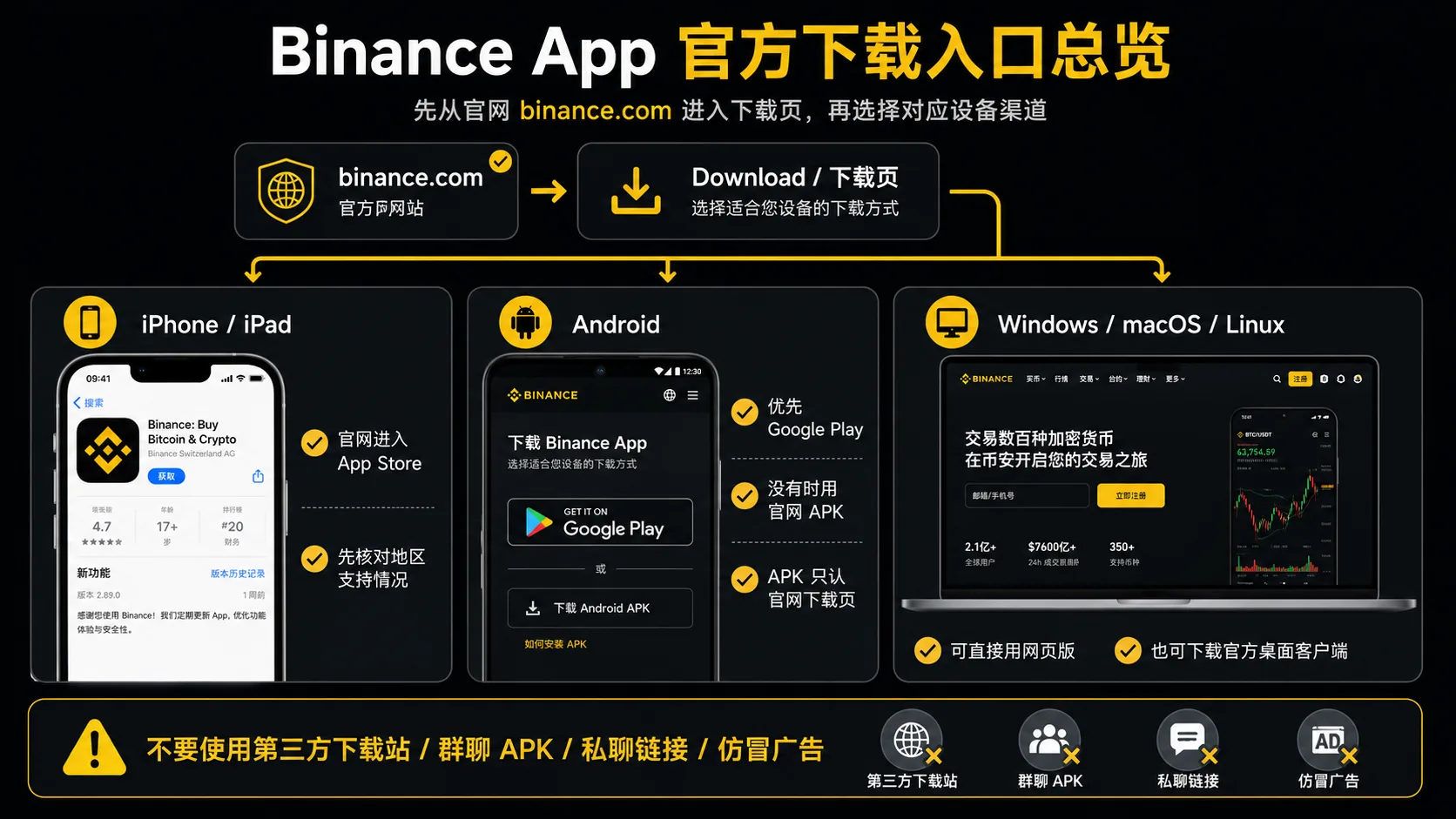
Official download entry: one address
The conclusion first: there is only one official download entry for the Binance app — the download page of binance.com. Memorize that address; every other channel is "second-hand". Even a page that appears high in search results can be a third-party intermediary, an imitation or an ad.[3]
| Entry | Address | Detail |
|---|---|---|
| Home page | binance.com |
Every download starts here; there's a "Download" entry on the home page |
| Direct download page | binance.com/en/download |
A single page for iOS, the Android APK and the Windows / macOS / Linux clients |
Why I emphasize "one address": when you search "download Binance", several third-party sites with "Binance" and "download" in their titles appear (goto-binance, apkpure and similar). They aren't all necessarily fake, but you can't tell at a glance which one was re-packaged. The simplest and safest move is to skip them and go straight to the official site.
If your phone is next to your computer, type
binance.comdirectly into the browser address bar. If typing on your phone is awkward, use the QR code on the official download page — don't scan "Binance download codes" from unknown sources.
Who needs this / who doesn't
| Your situation | Recommendation |
|---|---|
| You're about to register on Binance | Yes; install the app first, then register. KYC on a phone is usually smoother |
| You use a computer a lot | You can stick with the web version; the desktop client is optional |
| You just want to learn about Binance and haven't decided | Read the Binance vs OKX comparison first; don't install in a hurry |
| The app doesn't appear in your country's app store | Confirm the local rules and permitted access first; don't use APKs of unknown origin |
Table of contents
- Official download entry: one address
- Why downloading is a high-risk step
- How to download on iPhone and iPad
- How to download on Android
- How to download on desktop (Windows and macOS)
- How to confirm you have the official version: three verifiable signals
- How to choose between the three devices
- Common mistakes and risk notices
- FAQ
Why downloading is a high-risk step
Downloading is where the most people get caught with Binance — more than at registration or trading. The reason is simple: many people who "can't find the app" panic and tap links in search results or accept APKs passed to them in groups and private chats.
Those channels carry clearly higher risk: search results may include ads, fake sites and third-party download pages, and today's fake apps can copy the official interface almost perfectly. You can't tell the difference at a glance.
So the rule is one: open binance.com first and, from the official page, go to the download channel for your device. Don't judge whether it's official by the search ranking or the look of the interface; confirm the domain and the source.
How to download on iPhone and iPad
- Open the official site binance.com and go to the download page.
- Choose iPhone / iOS; the page will take you to the matching App Store (or tell you the availability in your region).
- Once in the App Store, check that the name, icon, developer and page all match, then tap "Get" to install.
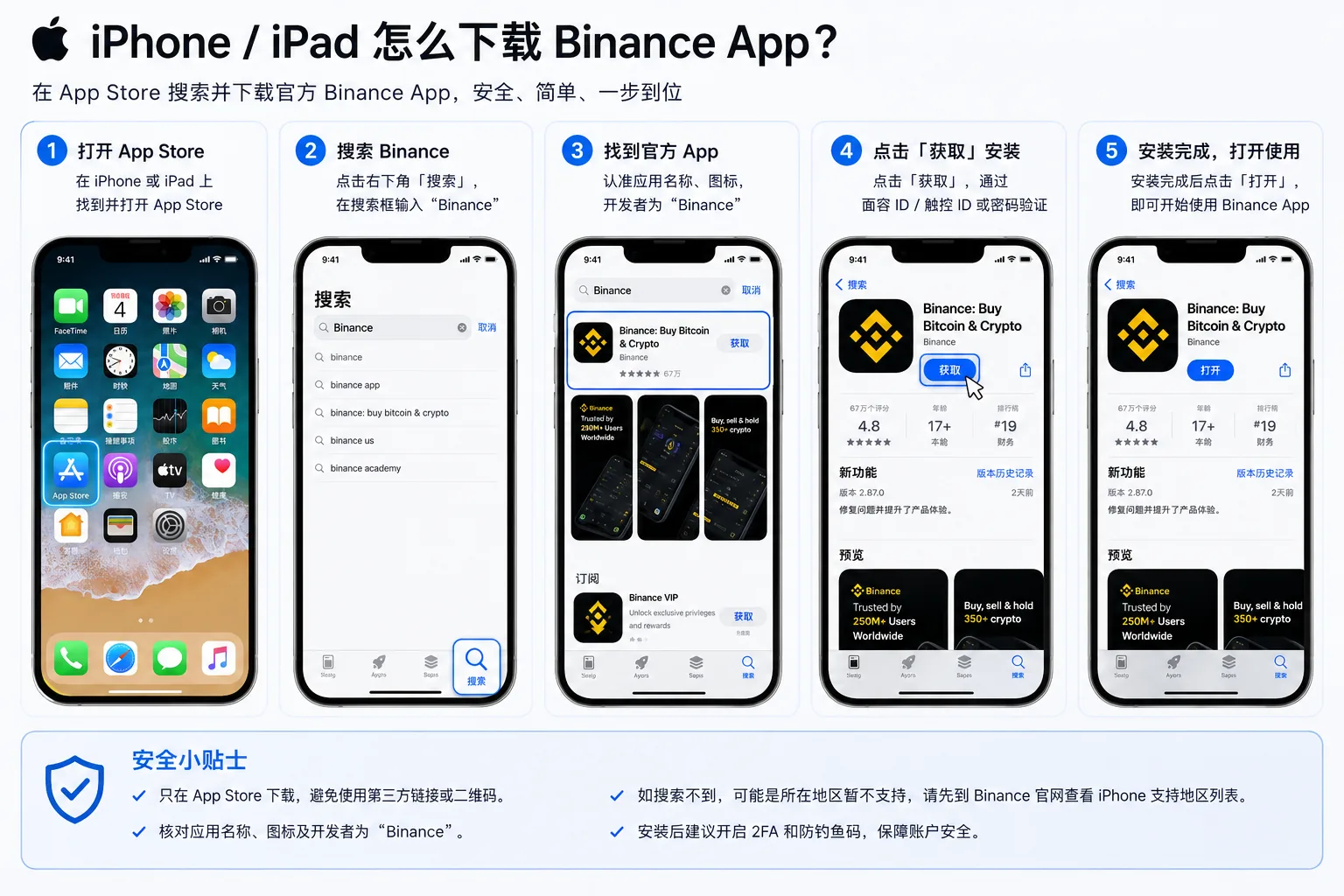
Why Binance doesn't appear in your App Store
Many people search "Binance" in their country's App Store and can't find it, or only see imitations with similar names. It's not a problem with your phone: the Binance app isn't listed the same way in every country's App Store, and in some stores it simply isn't there.
The correct response is one step: go back to binance.com and check iPhone availability in your country, following what the official site says. When it doesn't appear, the most dangerous move is to accept "iOS installation packages" or "enterprise-signed versions" sent in private chats or groups. iOS doesn't allow third-party packages the way Android does, and those "certificate versions" are often a hotbed of account theft.
In one sentence: if it isn't in the App Store → go back to the official site, not hunting for "a package you can install" elsewhere.
How to download on Android
Android has more traps than iOS: many people can't find Binance in Google Play and, for convenience, look for the APK somewhere else. That's where fake apps concentrate.
How to do it right:
- First check whether Google Play in your country shows the official Binance app; if it does, use it (the store version is simplest and updates itself).
- If local Google Play doesn't offer it, open binance.com in the phone browser and download the APK from the official page.
- When installing, the system may ask to "allow installing apps from unknown sources"; accept it as prompted.
- When you're done, you can turn the "allow unknown apps" permission back off in the browser or file manager; there's no need to leave it on.
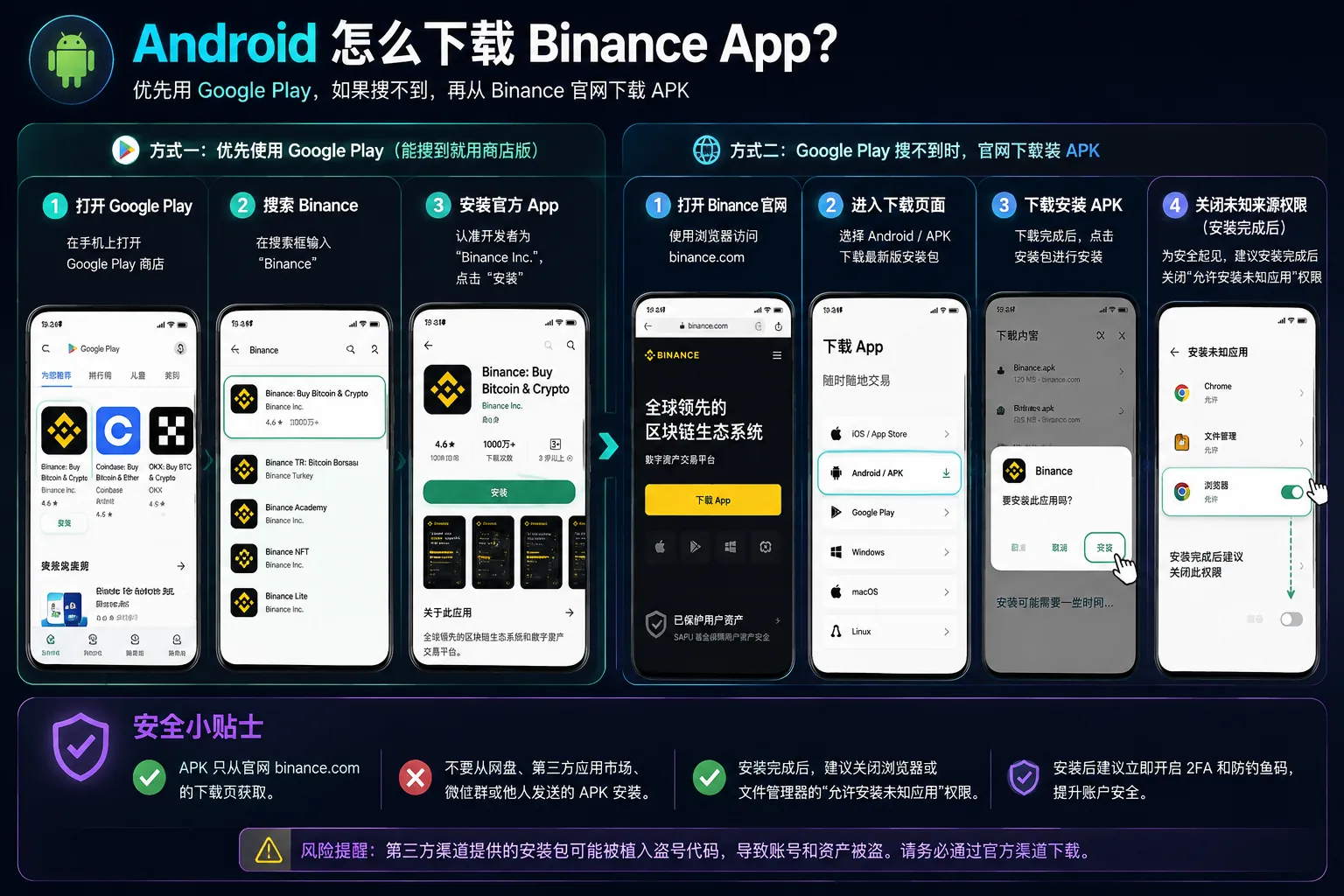
Again: the APK is downloaded only from the official binance.com page. Don't accept APKs from cloud storage, messaging groups or third-party app stores; they very likely carry code to steal accounts.
How to download on desktop (Windows and macOS)
Desktop is the simplest. I recommend using the web version directly:
- Open binance.com in the browser; it needs no installation and has full functionality.
If you prefer a standalone client, the official Binance download page also offers a desktop version (Windows / macOS / Linux):
- Open the official site and go to the Download page.
- Choose your system version, download and install.
For most people, the web version is enough; the desktop client isn't required.

How to confirm you have the official version: three verifiable signals
Don't sign in the moment you install. Check these three signals first. A fake app can copy the interface in detail, but these points are hard to forge all at once:
| Signal | The official version looks like this | How to check |
|---|---|---|
| iOS developer | It must be Binance Switzerland AG | In the App Store, open Binance's page and scroll to "Developer"; the ID is 1436799971[4] |
| Download source | Only from the official binance.com page, the App Store or official Google Play |
Recall where you downloaded it from; if you're unsure, download it again |
| APK checksum | The official page publishes a value (for example SHA256) | Compare it against the downloaded file; don't skip this step[5] |
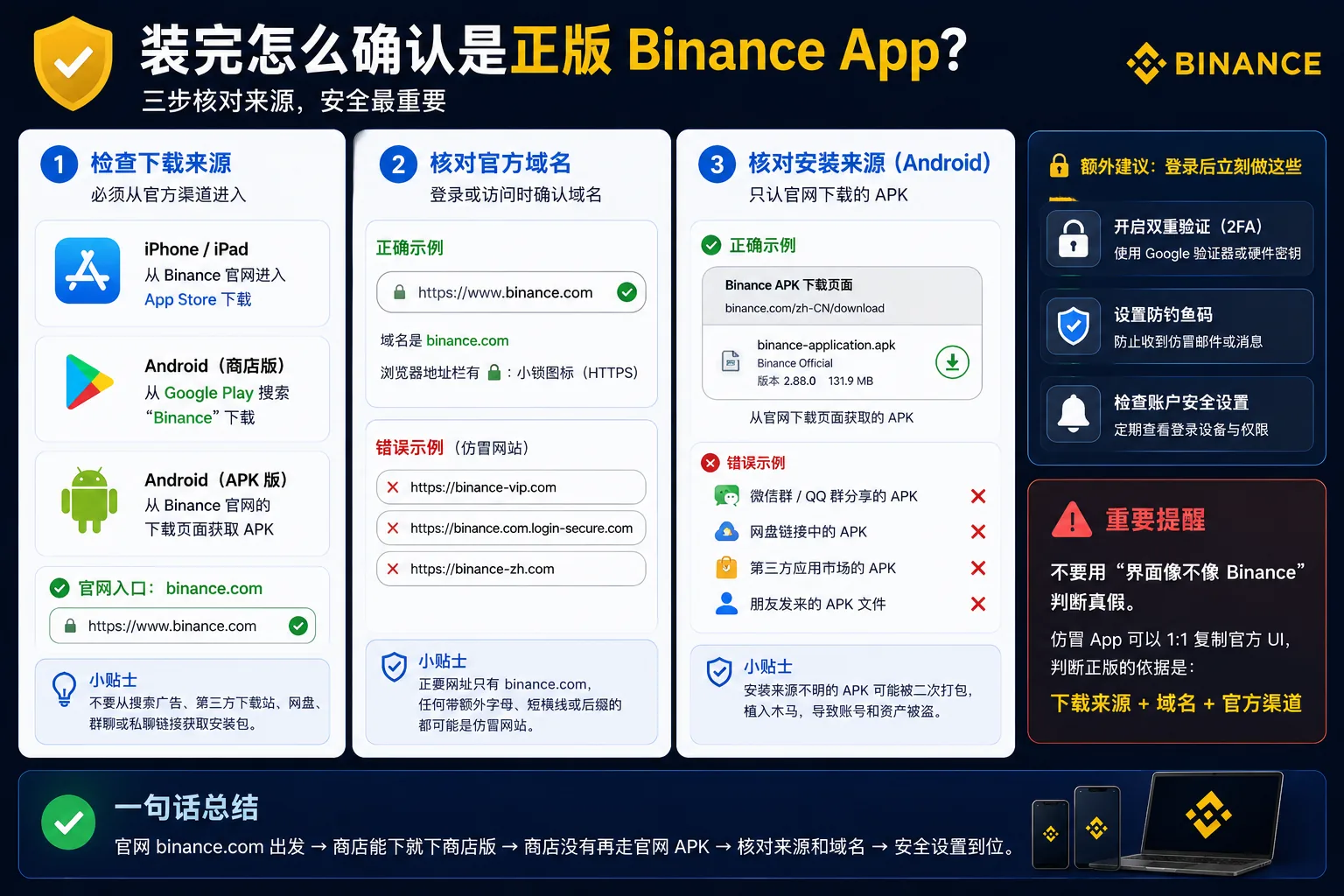
The official version is recognized by verifiable signals, not by how the interface looks. Developer name, app ID, domain and checksum are concrete facts you can check; "the screen looks the same" proves nothing.
If you downloaded it somewhere else and can't explain its source, the safest move is to uninstall and reinstall from the official site or store. Don't risk your account.
How to choose between the three devices
| Your situation | Recommendation | Why |
|---|---|---|
| You're a beginner and will do KYC | Mobile app | Facial recognition and the slider check work best on a phone |
| You mostly check prices and trade occasionally | Mobile app + web version | The phone goes with you; the web is a backup |
| You trade heavily and watch charts | Web version or desktop client | A bigger screen and clearer charts |
| You want to install as little as possible | Web version | Everything works in one browser |
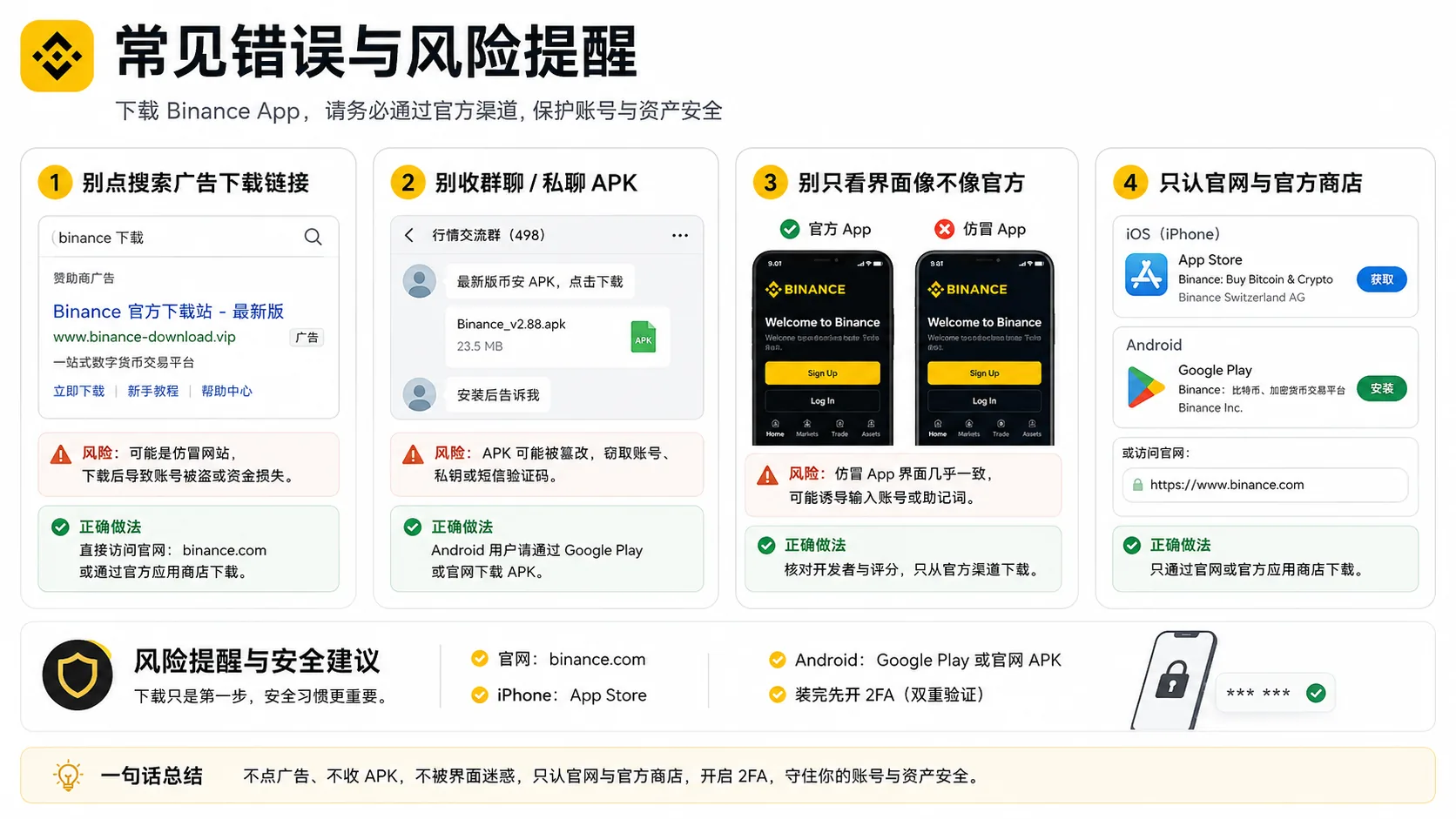
Common mistakes and risk notices
Mistake 1: tapping a "download link" in search results when the store doesn't show the app
Search results may include ads, fake sites and third-party pages. The right move is to go back to binance.com and find the entry there, not follow the search ranking.
Mistake 2: accepting APKs from groups or private chats
The "latest Binance APK" someone passes you may carry account-stealing code; once installed, the interface looks identical and you won't notice. The APK is downloaded only from the official page.
Mistake 3: deciding it's official because "the interface looks the same"
A fake app can copy the official interface in detail. The reference is the source and the domain, not the appearance.
Mistake 4: judging whether an APK is real by whether its name includes "binance"
The file name, icon and even the domain shown during install can be forged. An "official package" forwarded by an acquaintance or shared in the cloud may also be re-packaged. There's only one criterion: that you downloaded it yourself from the official binance.com page.
Risk notice: local rules
Some countries or regions restrict Binance or crypto, and an app being removed from a store is something that can happen. Before downloading, confirm the legality and permitted access in your jurisdiction; don't use network tools of unknown origin, and don't hand your account to third parties offering to "do the process for you". Turn on 2FA and the anti-phishing code as soon as you finish; don't wait for a problem to appear.
FAQ
Q1: Is the Binance app free? Yes. Downloading, registering and doing KYC are free; fees only apply when you trade.
Q2: What do I do if Binance doesn't appear in the App Store? iOS availability changes by country. Check the iPhone situation for your region on binance.com and follow the guidance; don't download third-party packages of unknown origin.
Q3: On Android, is the APK required? Can I use Google Play? Yes, you can. If Google Play in your country shows the official version, use it first; if it doesn't appear, download the APK from binance.com.
Q4: Do I need to install a client on desktop? No. The web version of binance.com has full functionality. The desktop client is optional and suits people who follow charts daily.
Q5: How do I confirm I installed the official app? Check three signals: that the iOS developer is Binance Switzerland AG (ID 1436799971), that the source is binance.com / the App Store / official Google Play, and that the APK matches the checksum published on the site. Don't decide by how the interface looks.
Q6: Do I need a VPN to download the app? It depends on your network conditions and local rules, which vary by region. Confirm the legality and permitted access first; don't use network tools of unknown origin to download.
Summary
To download the Binance app, remember one rule: go to binance.com first and open the official download page. If the store has the app, use the store version (App Store / Google Play); if not, use the APK from the official site. On desktop, the web version is simplest. If you can't find the app, go back to the official site: don't touch "installers" from chats, groups or ads, and don't decide by how the interface looks.
If you're about to download
| Your choice | What to do |
|---|---|
| Register through this site's link (20% fee rebate) | Register for Binance, then download the app from the official site; code AMY568 is filled in automatically |
| Download and register directly | See the registration tutorial; the full process takes 10-15 minutes |
The rebate percentage, applicable products and eligibility depend on what the registration page shows at that moment. The promotional benefits in the table may generate income for us, but they don't affect this article's objective conclusions. More in affiliate disclosure.
Related articles
- How to use the Binance referral code: rebate and what to check — don't forget code AMY568 when registering
- How to buy USDT on Binance: a complete tutorial — buy USDT after your registration is approved
- OKX registration tutorial: account setup and identity verification — if you prefer OKX, start here
Data verification note
The key facts in this article were checked on 2026-10-16, one by one:
- Official download channels: the Binance app for iOS, Android (APK) and the Windows / macOS / Linux desktop clients are all provided from Binance's official download page. Source: Binance official download page.
- Reference domain: web login and the download entry are governed by the official domain binance.com; the official version is recognized by source and domain, not by appearance. Source: Binance official website.
- Single official entry: the official download entry for the Binance app is the download page of binance.com (binance.com/en/download); third-party download sites and imitations in search results are not the first official entry. Source: Binance official download page.
- Official iOS version signal: the developer of the Binance app on the App Store is Binance Switzerland AG and the App Store ID is 1436799971; this is the main basis for verifying the official iOS version. Source: Binance official app page on the App Store.
- APK verification: Binance's official download page publishes verification values (for example SHA256) for the Android APK and the desktop client, to compare after download. Source: Binance official download page.
Disclaimer
This article only shares experience about downloading and installing the Binance app. It is not investment advice, financial advice or a trading recommendation.
Crypto asset prices are highly volatile, and trading carries platform, market, cybersecurity and human-error risks. Always download the app from official channels and avoid installers of unknown origin. Each person should assess their own risk tolerance and comply with the laws of their jurisdiction. People under 18 should not trade crypto.
Exchange operations · USDT · Wallet security
Responsible for researching and organizing content on Binance, OKX, USDT transfers, withdrawals and wallet security. The steps and key data in this article are verified according to the content type, using real operation records, official platform documentation and public sources. Interfaces, fees and regional rules may change, so the article is reviewed and updated continuously.
Status: manual review · Last verified 2026-10-16
Reviewed by: Veldux editorial team
- Binance official download pageThis page is the single entry point for the Binance app on iOS, Android (APK) and the Windows / macOS / Linux desktop clients, and publishes the verification values for the APK and desktop client
- Binance official websiteThe official domain is binance.com, the reference for checking the download entry and the web login
- Binance official app page on the App StoreThe developer is Binance Switzerland AG and the App Store ID is 1436799971, the main basis for identifying the official iOS version
- 2026-10-16UpdateAdded the evidence-chain superscripts and the "Data verification note", and updated the fact-check date.
Editorial principles ineditorial policy,corrections policy。