
Binance fees in 2026: spot, futures and 4 ways to pay less
Table of contents

Binance new-user benefit
20% fee rebate
Official Binance sign-up · You must complete identity verification (KYC) to trade and withdraw
Most people remember one number about Binance fees — 0.10% on spot — and assume that's the whole bill. It isn't. The amount that actually leaves your account also includes a funding rate that settles on a schedule and, if you buy USDT with local currency on P2P, the gap between the merchant's quote and the market price.
Spot and futures commissions are published and easy to look up. The funding rate moves with the contract and the market, and the P2P spread has no fixed percentage.
This guide puts Binance's spot, futures, deposit and withdrawal rates into one table, turns a few of them into dollar amounts, and then explains how the BNB discount, a referral code's rebate, VIP level and order type each change what you actually pay. Reading it takes about 9 minutes; checking your own tier on the fee page takes about 2 minutes in the app. The two places people overpay most are the funding rate on perpetual futures and the P2P quote spread — neither appears as a line item called "fee".
Note: this article shares experience about fee mechanics and is not investment advice. Crypto trading carries risk. Rates, rebates and product rules may change by region, account eligibility and VIP level, and Binance's live account pages are the final reference.
The essentials
The short version first.
A regular Binance user pays 0.10% maker / 0.10% taker on spot. Turning on BNB fee payment applies a discount of up to 25%, which brings that to roughly 0.075% / 0.075%.[1]
On USDⓈ-M futures (USDT-margined perpetual contracts), a regular user pays 0.02% maker / 0.05% taker. The BNB discount of up to 10% brings that to roughly 0.018% / 0.045%.[2]
Crypto deposits are normally free on Binance's side, although the sending side may charge a network fee. On-chain withdrawals are priced by coin + network, and the exact amount is shown on the withdrawal screen.[3]
Two more costs are easy to miss:
- the funding rate on perpetual futures;
- the spread between a P2P merchant's quote and the market reference price.
| Item | Standard rate | With BNB |
|---|---|---|
| Spot maker (adds liquidity) | 0.10% | ~0.075% |
| Spot taker (removes liquidity) | 0.10% | ~0.075% |
| USDⓈ-M futures maker | 0.02% | ~0.018% |
| USDⓈ-M futures taker | 0.05% | ~0.045% |
| Crypto deposit | Usually free on Binance's side | — |
| Crypto withdrawal | By coin + network | — |
If your account carries a 20% spot rebate and you also use the 25% BNB discount, the math on the standard rate works out as:
0.10% × 75% × 80% ≈ 0.06%
So the net spot cost can fall from 0.10% to about 0.06% — roughly 40% below the base rate.
Your actual rebate eligibility and payout depend on what the sign-up page and account dashboard show.
Who this is for
| Your situation | Recommendation |
|---|---|
| You trade frequently or in large size, and fees are already a visible cost | Focus on "4 ways to pay less in fees" and the worked examples |
| You just registered and are buying your first crypto | Don't over-optimize fees yet; get the buying flow right first |
| You trade futures and want the real cost | Focus on trading fees plus the funding rate |
| You want to check whether you've been overcharged | Focus on "How to check your own Binance fees" |
| You withdraw on-chain often | Focus on withdrawal fees by network |
Table of contents
- Binance fees at a glance
- What the fees cost in real money
- Spot fees and the 25% BNB discount
- Futures fees and the funding rate
- Deposits and withdrawals: on-chain and P2P
- Four fee claims that are out of date
- 4 ways to pay less in fees
- Risks that cost more than fees: slippage and P2P quote spreads
- How to check your own Binance fees
- FAQ
Binance fees at a glance
Based on Binance's publicly listed Regular User rates as of September 2026, the four stages can be read like this:
| Stage | How it's charged | Regular-user reference |
|---|---|---|
| Spot | maker or taker at execution | 0.10% / 0.10% |
| Spot + BNB | pay the fee in BNB | ~0.075% / 0.075% |
| USDⓈ-M futures | charged when opening and when closing | maker 0.02% / taker 0.05% |
| USDⓈ-M futures + BNB | pay the fee in BNB | ~0.018% / 0.045% |
| Perpetual funding | settles on the contract's schedule | variable |
| Crypto deposit | usually free on Binance's side | 0 |
| Crypto withdrawal | by coin and network | changes live |
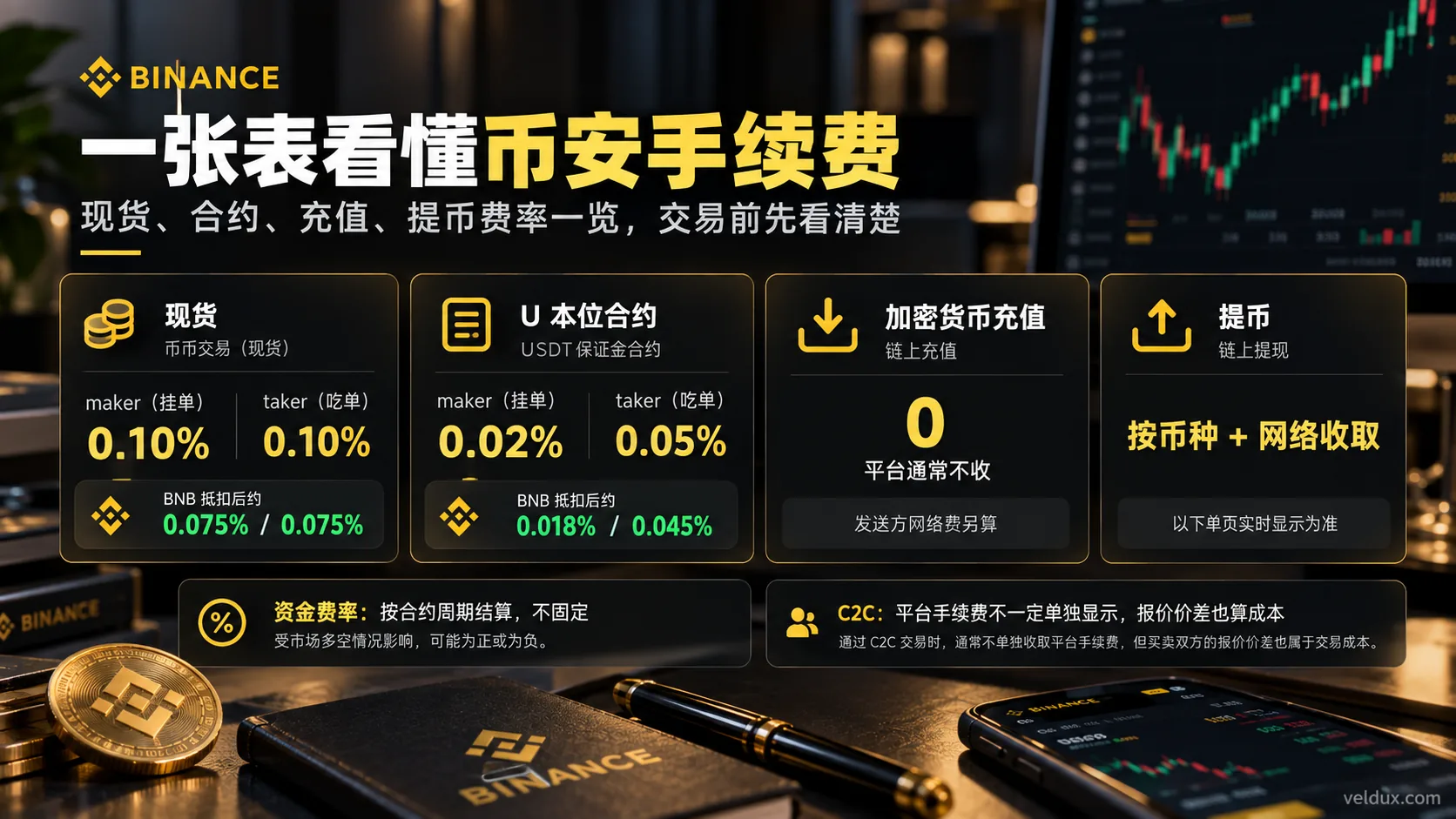
Figure: the main fee components for Binance spot, USDⓈ-M futures, deposits, withdrawals and funding, verified as of September 2026.
The pair that gets confused most often is trading fees versus the funding rate.
Maker/taker fees are charged when an order fills.
The funding rate is a periodic payment between longs and shorts on a perpetual contract — not an extra commission Binance takes on each trade.
Also, many Binance perpetuals settle funding every 8 hours, but not every contract is permanently on 8 hours.
Some contracts settle every 4 hours, 1 hour or another interval, so when you trade perpetuals, read the "Next funding" rate and countdown on that contract's page.
What the fees cost in real money
Example 1: buying $10,000 of BTC on spot
The spot fee formula is simple:
Fee = traded amount × fee rate
Suppose the traded amount is 10,000 USDT.
At the standard 0.10%:
10,000 × 0.10% = 10 USDT
With the 25% BNB discount:
10,000 × 0.075% = 7.5 USDT
If the account also carries a 20% fee rebate, the arithmetic estimate becomes:
7.5 × 80% ≈ 6 USDT
| Spot trade size | Standard 0.10% | With BNB 0.075% | With a further 20% rebate |
|---|---|---|---|
| 1,000 USDT | 1.0 | 0.75 | ~0.60 |
| 10,000 USDT | 10 | 7.5 | ~6.0 |
| 100,000 USDT | 100 | 75 | ~60 |
"After rebate" here means an estimate of the net cost, not a guarantee that only 0.06% is deducted the moment you place the order.
Some rebate mechanics charge the full fee first and return the rebate according to their rules; your account records show which applies.
Example 2: what is a 10x futures position actually charged on?
Futures fees aren't calculated on the margin you deposit. They're calculated on the notional value of the position that actually fills.
For example:
- Margin: 1,000 USDT
- Leverage: 10x
- Notional position value: about 10,000 USDT
If you execute as a taker at market, the base rate is 0.05%.
The fee on one side is about:
10,000 × 0.05% = 5 USDT
If you open and close as a taker and the notional value stays roughly the same, the round trip is about:
5 + 5 = 10 USDT
With the 10% BNB discount, taker is about 0.045%, so the round trip is about:
10,000 × 0.045% × 2 = 9 USDT
| Position notional | taker 0.05%, one side | Round trip | With BNB 0.045%, round trip |
|---|---|---|---|
| 10,000 USDT | 5 | ~10 | ~9 |
| 100,000 USDT | 50 | ~100 | ~90 |
The real result also depends on the entry and exit prices, partial fills and whether each execution was maker or taker.
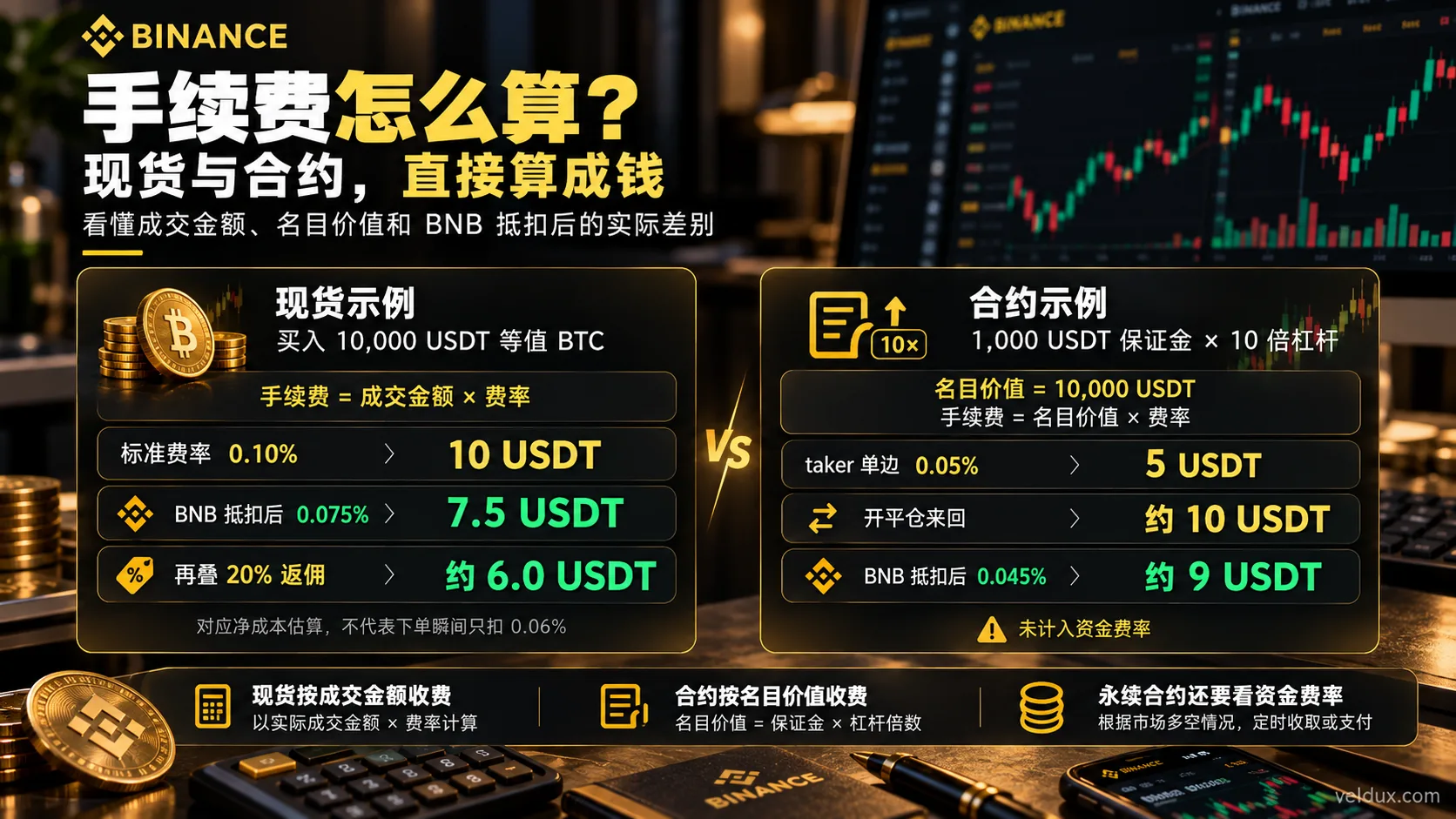
Figure: spot is charged on the traded amount, futures on the position's notional value. On 10,000 USDT, a standard spot fee is about 10 USDT; a 10x futures taker fill is about 5 USDT per side, or about 10 USDT for the round trip.
Example 3: why the funding rate is easy to miss
The funding rate isn't a fixed commission.
It's a mechanism that keeps a perpetual contract's price close to the spot market by moving money between longs and shorts.
Broadly:
- positive funding rate: longs pay shorts;
- negative funding rate: shorts pay longs.
Suppose you hold a perpetual position with a notional value of 10,000 USDT and the funding rate for that settlement is 0.01%.
The funding payment is about:
10,000 × 0.01% = 1 USDT
If you hold through several settlement times, you may pay or receive it several times.
So when you judge the cost of a futures position, don't look only at maker 0.02% / taker 0.05%.
The number to watch is:
trading fees + the actual funding rate + slippage
Spot fees and the 25% BNB discount
The current Regular User spot base rate on Binance is:
| Spot | Standard rate | Paying in BNB |
|---|---|---|
| maker | 0.10% | ~0.075% |
| taker | 0.10% | ~0.075% |
For a regular user, spot maker and taker are both 0.10% at the base tier.
Turning on "Use BNB to pay fees" applies a discount of up to 25%, which corresponds to about 0.075%.
Two things to note.
First, holding BNB doesn't switch the discount on
You have to enable it yourself in the fee settings:
Use BNB to Pay for Fees
The account also needs enough BNB to cover the charge.
If the BNB balance is short, the discount may not apply as expected.
Second, VIP users may already pay less than 0.10%
0.10% is the Regular User tier.
If your 30-day trading volume and BNB holdings meet a VIP threshold, your base maker/taker rates can be lower.
High-volume users should check their own fee page rather than budget at 0.10% indefinitely.
Futures fees and the funding rate
The current Regular User base rate on Binance USDⓈ-M futures is:
| USDⓈ-M futures | Standard rate | Paying in BNB |
|---|---|---|
| maker | 0.02% | ~0.018% |
| taker | 0.05% | ~0.045% |
BNB gives up to about a 10% discount on USDⓈ-M futures trading fees.
But the fee table isn't the whole cost of a futures position.
There's also the funding rate
Perpetuals have no fixed expiry like traditional futures, so the funding mechanism keeps the contract price close to the underlying market price.
To put it precisely:
A perpetual contract settles funding on the schedule that contract currently specifies — 8 hours for many contracts, but some are set to 4 hours, 1 hour or another interval.
The futures trading page usually shows:
- the current predicted funding rate;
- a countdown to the next funding settlement;
- historical funding rates.
If you still hold the position when settlement arrives, you may pay or receive funding.
Deposits and withdrawals: on-chain and P2P
There are two very different ways to "deposit" on Binance:
- Send crypto on-chain;
- Buy crypto with local currency, for example through P2P.
Their cost structures have almost nothing in common.
On-chain deposits
Sending USDT, BTC, ETH or another coin from an external wallet or another exchange into Binance is normally free on Binance's side.
That doesn't make the whole transfer free.
The sending side may charge:
- the blockchain network fee;
- the sending exchange's withdrawal fee.
For example, if you withdraw USDT from another exchange to Binance, the side that actually charges you is usually the sender.
On-chain withdrawals
From Binance to an external wallet, the fee depends on:
coin + network
And it isn't fixed forever.
USDT is the clearest example: fees can differ substantially between networks.
| USDT network | Typical order of magnitude, September 2026 |
|---|---|
| BNB Smart Chain (BEP20) | Very low; at times around 0.01 USDT |
| Ethereum (ERC20) | Usually higher than BSC; changes live |
| TRON (TRC20) | Commonly above 1 USDT; changes live |
This table shows order of magnitude only. Don't treat it as a permanent quote.
Before you confirm, read what the withdrawal page displays:
- minimum withdrawal amount;
- network;
- Network Fee;
- the amount actually received.
One rule matters more than the fee:
Confirm which networks the receiving platform supports before comparing fees. Don't pick a chain just because it's cheap.
If the destination only supports ERC20, you can't force BEP20 to save money.
A network mismatch can leave the assets uncredited, and in the worst case they may be unrecoverable.
Is buying on Binance P2P really "zero fee"?
Many people see "0 fee" on the Binance P2P page and conclude there's no cost at all.
That's not accurate.
The platform fee may be zero, or the page may not show a separate trading commission, but the merchant's quote can already differ from the market reference price.
For example:
Market reference price:
1 USDT = $1.00
A P2P merchant selling to you at:
1 USDT = $1.005
There's no line item called "fee", yet your effective purchase cost is already higher.
So when you compare P2P costs, compare:
- the merchant's quote;
- the market reference price;
- the payment method (bank transfer, card, Apple Pay, etc.);
- the order limits;
- the merchant's completion rate;
- the amount you actually receive.
For anyone buying USDT with a local bank transfer, this spread is often worth more attention than the 0.10% spot fee.
Four fee claims that are out of date
Claim 1: "Binance charges 0.1%, and there's no way around it"
Not accurate.
0.10% is the Regular User spot base rate.
Turn on BNB fee payment and the discount is up to 25%:
0.10% → 0.075%
If the account also qualifies for a 20% fee rebate and the two can be combined, the arithmetic gives:
0.075% × 80% ≈ 0.06%
That's about 40% below the 0.10% base rate.
Claim 2: "Futures fees are lower than spot, so futures are cheaper"
Not accurate.
On paper:
- spot taker: 0.10%
- USDⓈ-M futures taker: 0.05%
But a futures trade normally involves two executions — opening and closing — and perpetuals can add funding costs.
Leverage also multiplies your notional value.
With 1,000 USDT of margin at 10x, the position may already be 10,000 USDT.
The fee is charged on the 10,000 USDT of traded value, not on the 1,000 USDT of margin.
Claim 3: "Funding settles every 8 hours, always"
No longer accurate.
8 hours is the default on many Binance perpetuals, but some contracts may be set to:
- 4 hours;
- 1 hour;
- another interval set by the platform.[4]
The reliable method isn't memorizing a number; it's reading the live countdown on that contract's trading page.
Claim 4: "The site says 40% rebate, so I get 40% off"
Not necessarily.
Two different numbers get mixed up here:
how much commission the referrer earns
and
how much fee rebate the invited user actually receives
They aren't the same thing.
A 30%, 40% or 50% figure in an affiliate program doesn't mean the person who registers gets the same percentage.
The only number worth confirming is:
what the sign-up page or account dashboard shows as the rebate actually granted to you as the invited user.
4 ways to pay less in fees
1. Confirm the referral code's rebate at sign-up
If you're about to register on Binance, check the fee benefit linked to the referral code during registration.
This site currently uses:
AMY568
At the time of verification, the promotional entry tied to it displayed spot and futures fee-rebate benefits. The current listing is 20% on spot and 20% on futures.
The exact percentage and scope follow what the registration page shows — don't rely on third-party marketing numbers.
Confirm the code during registration.
Once a referral relationship is established, it normally can't be swapped the way you change a nickname.
2. Turn on BNB fee payment
This is the easiest rate discount for a regular user to access.
Under the current rules:
- spot / margin: up to 25% off;
- futures: up to 10% off.
Spot for a regular user:
0.10% → ~0.075%
USDⓈ-M futures taker:
0.05% → ~0.045%
If your account also holds a qualifying rebate benefit, the two may stack further.
3. Raise your VIP level
For a new retail trader, VIP usually isn't the first priority.
But if your volume is large, Binance assigns VIP tiers based on trading volume, BNB holdings and other conditions.
The higher the tier, the lower the base trading fees usually are.
So for high-frequency or institutional users, the figure that matters isn't the generic line online:
"Binance fees are 0.1%."
It's your own:
Fees / Fee Rate / VIP Level
page.
4. Choose the order type: post limit orders as a maker
On spot, maker and taker are both 0.10%, so choosing a limit or market order doesn't change the rate.
USDⓈ-M futures are different:
- maker: 0.02%
- taker: 0.05%
On the same 10,000 USDT notional, a taker execution costs about 5 USDT per side, while a maker limit order costs about 2 USDT — less than half as much on that side.
So when you trade futures and don't need an immediate fill, posting limit orders and letting others take them is itself a fee saving.
Two caveats: a limit order may not fill immediately, or may not fill at all; and not every limit order counts as maker — if it crosses immediately with an existing order, it's still a taker.
That makes this method suitable for traders who can wait and have a clear price target, not for situations that demand an immediate market fill.
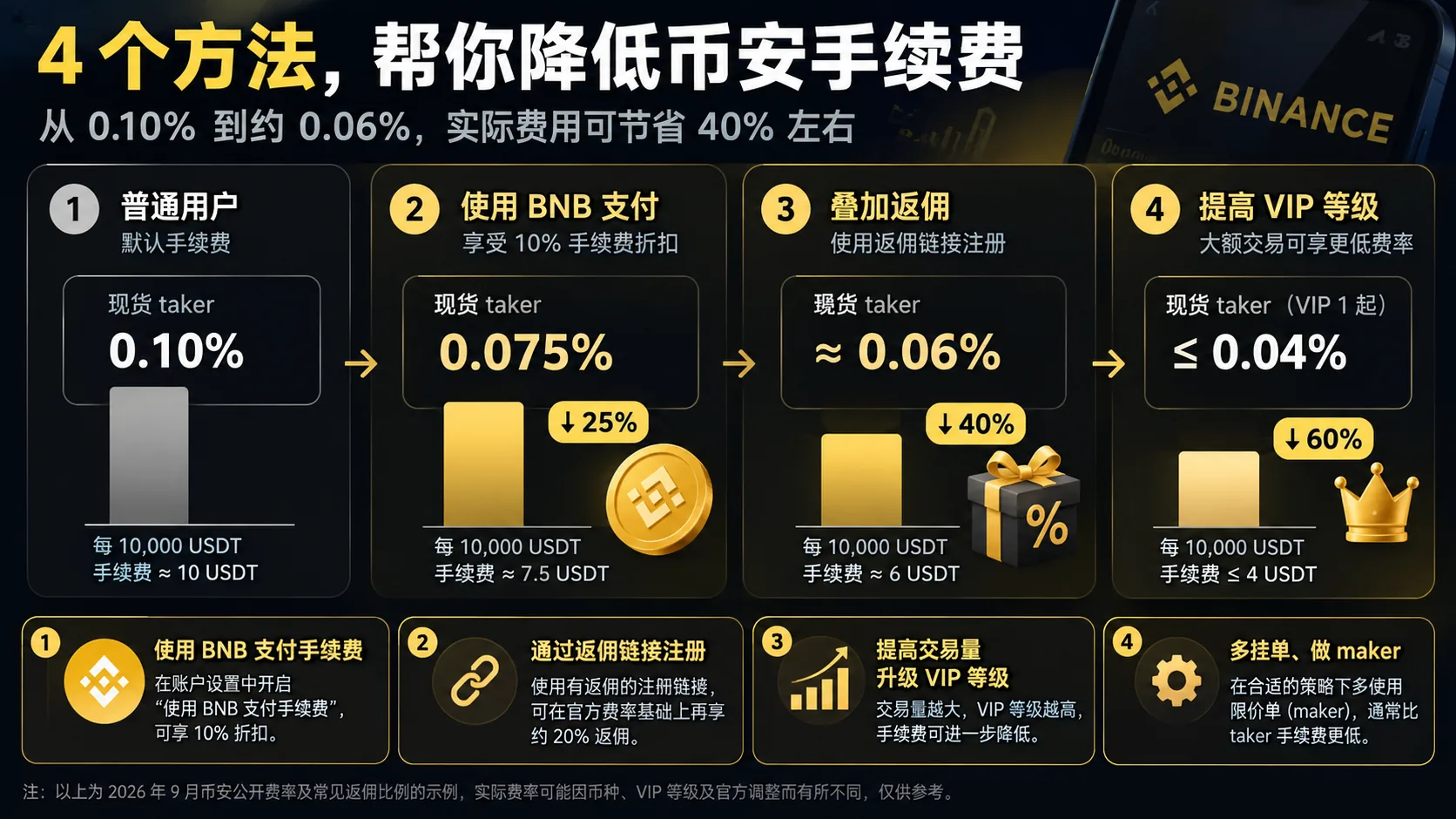
Figure: the four common ways to reduce Binance fees — BNB discount, referral rebate, VIP level and order type. Actual rates vary by account, region and campaign; Binance's live pages are the reference.
How much do BNB + a 20% rebate actually save?
Take the 0.10% Regular User spot base rate.
| Combination | Estimated net rate | Versus the base rate |
|---|---|---|
| Standard rate | 0.10% | — |
| + 25% BNB discount | 0.075% | ~25% lower |
| + 20% rebate | ~0.060% | ~40% lower |
The calculation isn't:
25% + 20% = 45%
It's:
0.10% × 75% × 80% = 0.06%
So the final saving is about 40%.
For USDⓈ-M futures, with:
- a 10% BNB discount;
- plus a 20% rebate;
the arithmetic gives:
0.9 × 0.8 = 0.72
which is about 28% below the base rate.
Note: these are arithmetic estimates assuming you qualify for the corresponding rebate. Whether both can be used together, and at what percentage, depends on what your account shows.
Risks that cost more than fees: slippage and P2P quote spreads
Plenty of users spend hours working out how to move the spot fee from 0.10% to 0.075%, then lose more than that on the two items below.
Slippage
What it is: the gap between the price you saw and the average price you actually got.
Why it happens: thin order books, fast market moves, small-cap pairs and large market orders. If you meant to buy at 100 USDT and the average fill comes in at 100.5, that 0.5% gap is already several times the spot fee.
How to reduce it: use limit orders when price matters more than speed, split large orders, and check order-book depth before sending a market order.
If it already happened: the fill is final; there's no "undo". The correction is to review the average execution price in Trade History before placing the next order.
P2P quote spreads
What it is: the gap between the merchant's price and the market reference price when you buy USDT with local currency.
Why it happens: merchants price in the payment method, order size, competition and demand, so there's no fixed percentage.
How to reduce it: compare several merchants, check the quote against a spot reference, prefer merchants with a high completion rate, and factor in the payment method — a bank transfer is usually cheaper than a card purchase.
If it already happened: a completed P2P order can't be repriced. If the merchant hasn't released the crypto yet and the terms weren't as described, use the platform's appeal process before releasing funds; never release early on a promise.
The table below is a math illustration only; it doesn't represent Binance's actual fixed spread:
| Trade size | 0.25% spread | 0.5% spread | 1% spread |
|---|---|---|---|
| $10,000 | $25 | $50 | $100 |
| $100,000 | $250 | $500 | $1,000 |
For example, on a $100,000 trade:
A 0.06% spot fee is about $60 equivalent.
But if a P2P quote is 1% away from the reference price, the spread is about $1,000.
Of course, P2P doesn't always carry a 1% spread.
The real gap can be tiny, or it can widen with the payment method, volatility, order size and supply and demand.
So the more sensible order of operations is:
Find the stage where you actually spend the most, then optimize the fee there.
How to check your own Binance fees
Don't trust the numbers in a tutorial, including this one.
The most accurate source is your own account.
Method 1: read your fee page
After logging in to Binance, open the Fees page to see your current:
- VIP level;
- Spot maker / taker;
- USDⓈ-M Futures maker / taker;
- rates after the BNB discount.
If your account has reached a VIP tier, these numbers may already be below the Regular User rates.
Method 2: read your actual trade history
For orders that have filled, go to:
Orders → Trade History
and check:
- the traded amount;
- the Fee;
- which asset the fee was charged in.
If BNB fee payment is enabled, this is where you confirm that BNB was actually used.
Method 3: check whether the BNB discount is on
Open the BNB Discount / fee payment settings in your account.
Confirm whether:
Use BNB to Pay for Fees
is enabled.
Simply holding BNB doesn't mean the discount is active.
FAQ
Q1: How much does Binance charge?
A regular user pays 0.10% maker / 0.10% taker on spot, or about 0.075% with BNB fee payment.
USDⓈ-M futures for a regular user:
- maker: 0.02%
- taker: 0.05%
With BNB:
- maker: 0.018%
- taker: 0.045%
Crypto deposits are normally free on Binance's side; withdrawals are priced dynamically by coin and network.
Q2: What's the spot fee on $10,000?
On a 10,000 USDT trade:
- standard 0.10%: about 10 USDT;
- with the 25% BNB discount: about 7.5 USDT;
- with a further 20% rebate: a net estimate of about 6 USDT.
Actual charges and rebate records follow what your account shows.
Q3: How is the Binance futures fee calculated?
The basic formula is Fee = notional value of the filled position × fee rate.
For example, 1,000 USDT of margin at 10x leverage gives a notional value of about 10,000 USDT.
As a taker at 0.05%, the one-side fee is about 5 USDT; if both opening and closing are taker, the round trip is roughly 10 USDT.
Perpetuals also add funding and slippage.
Q4: How do I turn on the BNB fee discount?
Open the fee or BNB Discount settings in your Binance account, enable "Use BNB to Pay for Fees" and make sure the account holds enough BNB.
For a regular user, spot can get up to about a 25% BNB discount, and USDⓈ-M futures up to about 10%.
Q5: How much rebate does the referral code give?
This site currently uses the code AMY568.
The exact fee-rebate percentage and applicable products follow what the registration page and account dashboard show.
If the account actually carries a 20% spot fee rebate and the 25% BNB discount is also enabled, the net spot cost on the 0.10% base rate can fall to about 0.06%.
In one sentence
Binance's headline trading rates aren't complicated:
- Spot: 0.10% / 0.10%
- Spot with BNB: about 0.075% / 0.075%
- USDⓈ-M futures: maker 0.02% / taker 0.05%
- Futures with BNB: about 0.018% / 0.045%
- Crypto deposits: usually free on Binance's side
- On-chain withdrawals: priced dynamically by coin and network
To genuinely lower your cost, check first:
referral-code rebate + BNB discount + VIP level + posting limit orders as a maker
But don't chase 0.01% off the headline fee while ignoring the bigger items:
slippage, the perpetual funding rate and P2P quote spreads.
If you're about to register
| Your choice | What to do |
|---|---|
| Register on Binance through this site's promotional link (fee rebate) | Sign up for Binance and confirm AMY568 plus the fee-rebate benefit shown on the page |
The row above is an affiliate link. Registering through this site's promotional entry may generate income for Veldux, but it doesn't increase your registration cost. The fee-rebate percentage and campaign eligibility follow what the Binance sign-up page and your account actually show.
See the affiliate disclosure for details.
Next steps
- How to use the Binance referral code: the 20% rebate and key points — how to enter the rebate code and confirm it after registration
- How existing users can re-bind a Binance referral code — skipped the code at sign-up? Check whether the official re-binding paths apply to you
- Binance vs OKX fees: 2026 spot and futures comparison — put Binance and OKX spot and futures rates side by side
- How to withdraw from Binance to a wallet: steps, fees and network choice — if withdrawal cost is the real concern, first confirm which networks the receiving side supports
- How to buy USDT on Binance: a complete P2P tutorial — the P2P quote spread described here happens at the moment you buy USDT
- How to cash out USDT to your local currency: selling on P2P and the risks — if you need the off-ramp flow, continue with the selling tutorial
Data verification note
The key facts in this article were checked on 2026-10-16, one by one:
- Spot fees: a regular user pays 0.10% maker / 0.10% taker on spot; with BNB fee payment, about 0.075% / 0.075% (up to a 25% discount). Source: Binance spot fee schedule.
- USDⓈ-M futures fees: a regular user pays 0.02% maker / 0.05% taker; with BNB fee payment, about 0.018% / 0.045% (up to a 10% discount). Source: Binance USDⓈ-M futures fee schedule.
- Withdrawal fees: on-chain withdrawals are priced by coin + network and change with network conditions; the withdrawal page's live figure is the reference. Source: Binance crypto withdrawal fees.
- Funding interval: perpetual funding is mostly every 8 hours, but some contracts may be set to 4 hours, 1 hour or another interval; the live countdown on the contract page is the reference. Source: Binance funding rate history.
Disclaimer
This article only explains exchange fees, rates and the related mechanics. It is not investment advice, financial advice or a trading recommendation.
Crypto asset prices are highly volatile, and trading carries market, platform, cybersecurity, liquidity and operational risk.
Using leverage and perpetual contracts further amplifies both gains and losses.
Fees, funding rates, rebates and platform rules can change at any time; Binance's official pages and your own account display are the final reference.
Users should make independent judgments based on their own circumstances and comply with the laws of their jurisdiction.
People under 18 should not trade crypto.
Exchange operations · USDT · Wallet security
Responsible for researching and organizing content on Binance, OKX, USDT transfers, withdrawals and wallet security. The steps and key data in this article are verified according to the content type, using real operation records, official platform documentation and public sources. Interfaces, fees and regional rules may change, so the article is reviewed and updated continuously.
Status: manual review · Last verified 2026-10-16
Reviewed by: Veldux editorial team
- Binance spot fee scheduleRegular-user spot maker/taker at 0.10% each; the BNB fee discount is up to 25% (about 0.075%)
- Binance USDⓈ-M futures fee scheduleRegular-user USDⓈ-M futures maker 0.02% / taker 0.05%; the BNB fee discount is up to 10%
- Binance crypto withdrawal feesOn-chain withdrawals are priced by coin and network and change with network conditions
- Binance funding rate historyPerpetual funding settles on each contract's schedule — often 8 hours, with some contracts at 4 hours, 1 hour or another interval
- 2026-10-16UpdateAdded the evidence-chain superscripts and the "Data verification note", and refreshed the verification date for the key fee figures.
Editorial principles ineditorial policy,corrections policy。