
How to withdraw crypto from Binance to a wallet (2026)
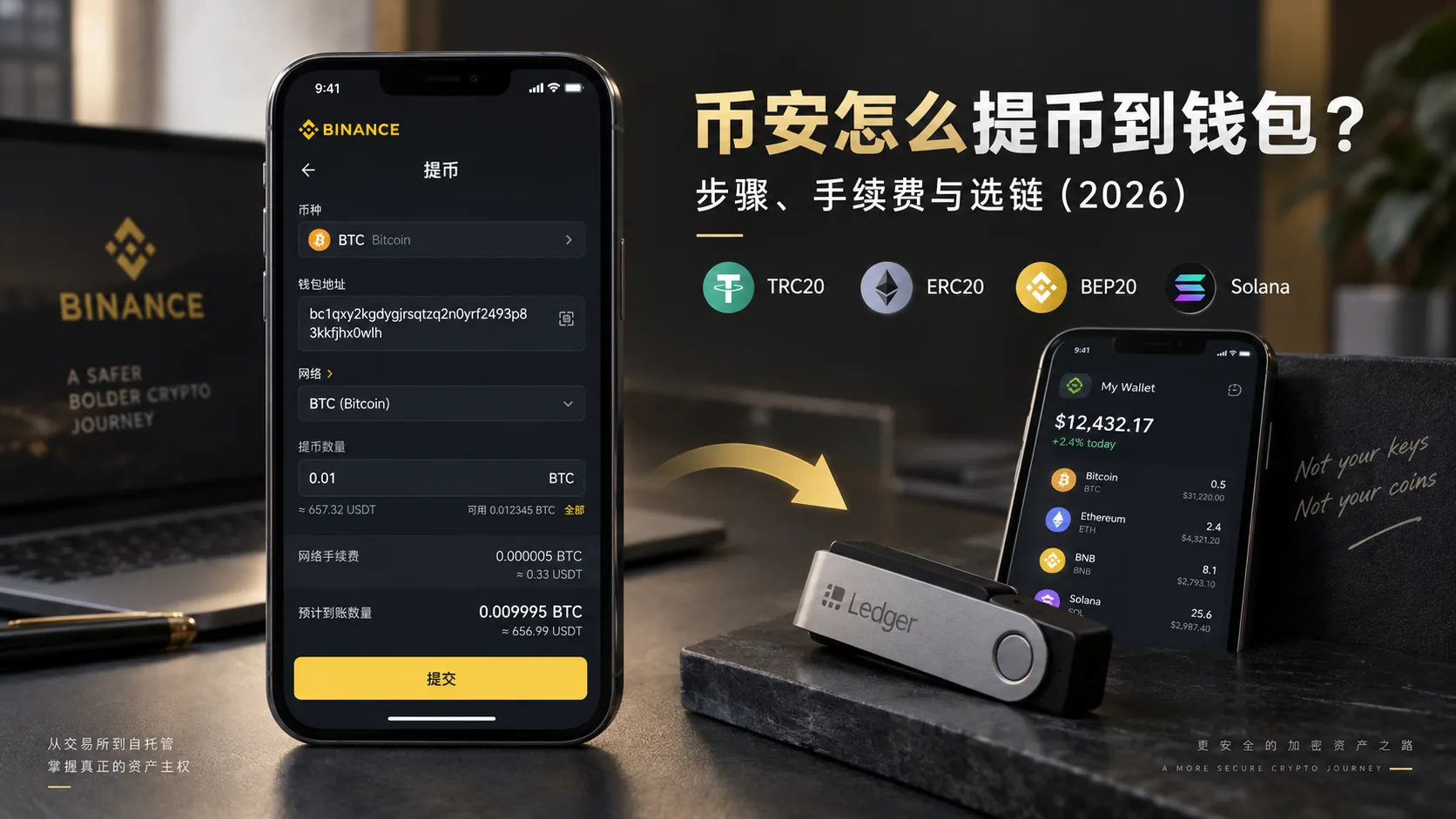
Table of contents

Binance new-user benefit
20% fee rebate
Official Binance sign-up · You must complete identity verification (KYC) to trade and withdraw
When moving coins from Binance to your own wallet, most beginners don't actually get stuck on "where is the withdraw button". They get stuck on two things: confirming which network the receiver supports, and why the fee is sometimes expensive and sometimes cheap.
The withdrawal itself isn't complicated: open the assets/wallet page and find the coin → withdraw → enter the address, choose the network, enter the amount → complete 2FA. The in-app part takes about five minutes. What deserves the attention is checking the network and address before submitting — an on-chain transfer is irreversible, and if you pick the wrong network the coins can "disappear", with recovery far from guaranteed.
Note: this article shares experience with the Binance withdrawal flow and is not investment advice. On-chain withdrawals are irreversible; before operating, check the address and network, test with a small amount first, and be cautious.
Quick overview
First, clear up a concept that gets mixed up easily: an on-chain withdrawal and a fiat withdrawal are not the same thing.
- Crypto (on-chain) withdrawal: moving coins from the exchange to an on-chain wallet (your cold wallet, hot wallet or another exchange), over a blockchain network, arriving at another "coin address".
- Fiat withdrawal: selling coins for fiat currency and sending the money to your bank account or bank card, through P2P or a fiat channel, arriving in your local-currency account.
This article is about crypto withdrawals (to a wallet). If you want to convert USDT into local currency, that's a different flow.
Here is the conclusion up front:
| Your situation | What to choose |
|---|---|
| Withdrawing to your own cold wallet | First check which USDT networks the wallet explicitly supports, then compare fees within that set |
| Withdrawing to another exchange | Go by the coin + network shown on the recipient's deposit page |
| Planning to use Ethereum DeFi | Choose the Ethereum / ERC20 network the recipient explicitly requires |
| Planning to use BNB Smart Chain | Choose BSC / BEP20 |
| First withdrawal to a new address | Do a small test transfer first |
| Not sure which network to choose | Pause, confirm what the receiving side supports, and don't just pick the cheapest |
In one sentence: withdrawing isn't complicated in itself; what's complicated is "confirming which network the receiver supports first" and "not skipping that one small test transfer".
5 things to understand before withdrawing
These five are worth settling before you submit, especially the network, address and Memo — getting any one wrong can affect whether the funds arrive.
1. The network must match the receiving address; don't guess the network from the address prefix
The same USDT can travel over TRON (TRC20), Ethereum (ERC20), BNB Smart Chain (BEP20), Solana and dozens of other chains. The "network" you choose on Binance must be exactly the same as the chain the receiver uses. Even if the address is correct, a mismatched network can mean the funds don't arrive properly, or even that the assets are lost.
Don't judge the network only by how the address starts. TRON addresses usually begin with T, while Ethereum, BNB Smart Chain and other EVM networks can all start with 0x — and may even show an identical address.
The reliable method is: first open the receiving wallet's or exchange's "Deposit / Receive" page, explicitly select USDT and the corresponding network, copy the address that network generates or displays, then go back to Binance and choose the same network. For the deeper logic of choosing a chain, see the USDT transfer guide.
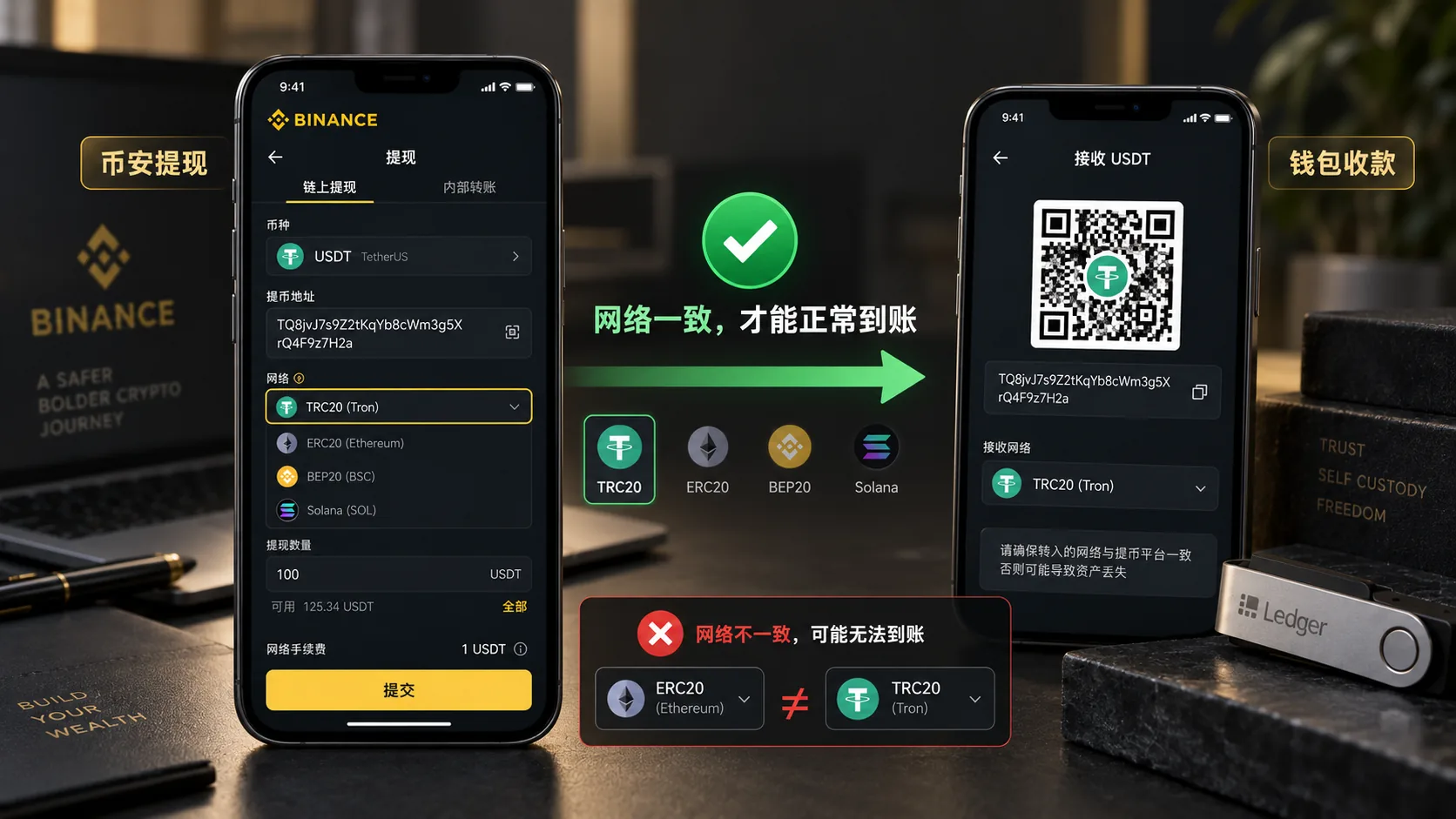
When withdrawing, the network you pick on Binance must match the network the receiving wallet supports. No matter how cheap the fee is, don't choose a mismatched network.
2. The Binance withdrawal fee is deducted from the coin you're withdrawing
This is the difference between "withdrawing from an exchange" and "transferring from a wallet":
- Transferring from a wallet: the fee (gas) must be paid in that chain's native coin — ETH on Ethereum, TRX on TRON, BNB on BSC. Without the matching gas coin, you can't send.
- Withdrawing from an exchange: Binance shows the network fee and the estimated amount to be received directly on the withdrawal page. Unlike sending from your own on-chain wallet, you don't need to prepare native gas separately to start the withdrawal.
But note: once the coins are in your self-custody wallet, sending them out later will require that network's native coin for gas. So after withdrawing to a wallet, it's wise to keep a little of the native coin there if you want to move funds out easily later.
3. Some coins need a Memo / Tag on top of an address
With USDT or BTC you usually just check the address and network, but for assets such as XRP, XLM and EOS, some exchanges also require a Memo / Tag when depositing.
If the receiving page provides both "address + Memo/Tag", fill in both as the receiver requires. Don't ignore the Memo just because the address is right, or the funds may not be credited automatically, and you'll have to contact the receiving platform's support — with some risk of never recovering them.
4. On-chain withdrawals are irreversible; there is no undo button
A mistaken bank transfer can still be chased by phone. An on-chain withdrawal, once sent, is in the network. All you can do is "check carefully before sending", which is why the steps below keep repeating: test with a small amount first.
5. For multi-chain tokens, also check the contract address
For some multi-chain tokens, confirming that "the network name matches" isn't enough: if the receiving platform lists a token contract address, check that it supports the same contract. This matters especially when the name is identical but different versions of the token exist on different chains — don't go by the ticker alone.
How Binance calculates the withdrawal fee
First, a counter-intuitive point: search for a "Binance withdrawal fee table" and different articles often contradict each other. It's not that someone got it wrong; the fee is dynamic — Binance states officially that withdrawing to an external address charges a network/transaction fee that adjusts with blockchain conditions, and the figure shown on the order page is the current one.
So don't memorise any old table: before submitting, read the "network fee" and "amount received" shown live on Binance's withdrawal confirmation page.[1]
Below is "characteristics + what to confirm", to help you decide which network to choose — not a price table:
| Network | General characteristics | What to confirm before withdrawing |
|---|---|---|
| TRON / TRC20 | Widely used for USDT transfers | Whether the receiver supports TRON |
| BNB Smart Chain / BEP20 | Usually lower cost | Whether the receiver supports BSC |
| Ethereum / ERC20 | Network fee can be high | Whether you really need Ethereum |
| Solana | Usually fast confirmation | Whether the wallet/exchange supports Solana USDT |
| Arbitrum / Base / Optimism | L2 networks, usually lower cost | The receiver must support the same L2 |
Don't use this table to estimate the actual fee. The "network fee" and "amount received" on Binance's withdrawal confirmation page are what count.
Two more points:
- For an ordinary on-chain withdrawal, Binance usually shows a network fee per withdrawal for the current coin and network, rather than a simple percentage of the amount. That's why the fee weighs proportionally more on small withdrawals; go by the confirmation page.
- Each coin has a minimum withdrawal amount, below which you can't withdraw; go by what the app shows.[2]
The complete withdrawal steps
I'll use "withdrawing USDT from Binance to a cold wallet" as the example (BTC and ETH follow the same flow, just a different coin; on OKX and other exchanges the process is almost identical, only the entry names differ).
Step 1: confirm the supported network in the receiving wallet first
Open your cold wallet, find "Receive USDT", explicitly select USDT and the corresponding network, then copy the address that network generates or displays. This step decides which network you'll choose later, so don't skip it.
If you don't have a cold wallet yet and don't know where to keep your coins, read where to store crypto safely after buying first.
Step 2: open Binance and start the withdrawal
Open the Binance app and go to Assets → Overview → Send → Withdraw Asset. The interface may differ slightly by region or app version; what matters is reaching the USDT on-chain withdrawal page.
Step 3: paste the address, choose the network
Paste the full address the wallet gave you in Step 1 (don't type it by hand). The system will ask you to choose a network — the network you choose here must match the chain the wallet gave you in Step 1.
Step 4: enter the amount and read the fee carefully
Enter the withdrawal amount; the screen will show that network's fee and the actual amount to be received. Don't confirm yet — check three things again: is the address right, is the network right, is the received amount right.
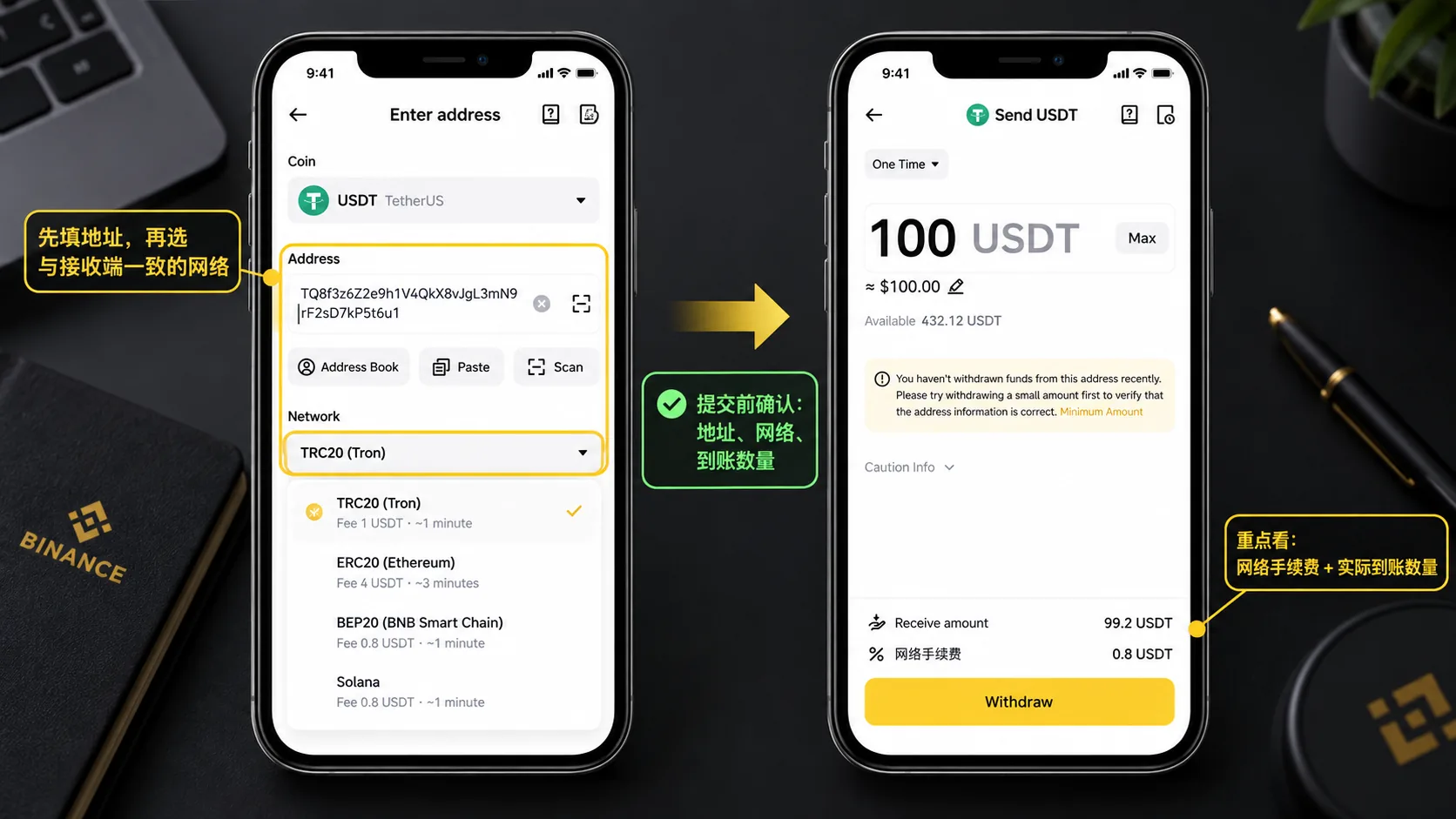
Before submitting, check three things: the withdrawal address, whether the network matches the receiver, and the amount received after the network fee. The first time you withdraw to a new address, do a small test transfer first.
Step 5: test with a small amount, then send the rest
The first time you withdraw to this address, or when the amount is large, withdraw the minimum as a test first, confirm it arrives and the network was right, then send the remainder. You pay one extra fee in exchange for peace of mind.
Step 6: two-factor verification
Withdrawals require two-factor verification (SMS / email / Google Authenticator). After approval, the order moves to "Processing".[3]
Step 7: track progress with the TxID
After submitting, the "Withdrawal history" shows the transaction hash (TxID); copy it into the corresponding block explorer to follow confirmation progress. Arriving within minutes is normal; if it hasn't arrived, check "How long does a withdrawal take" and the pitfalls section below first.
How long does a withdrawal take?
The arrival time depends on the network, not on Binance's speed alone. The ranges below are experience-based for common cases, not times Binance promises; actual speed depends on Binance's processing status, block production and the confirmations the receiver requires.
| Network | Typical arrival time |
|---|---|
| TRC20 / BEP20 / Solana | Within minutes |
| ERC20 | 10–30 minutes, longer when Ethereum is congested |
| BTC | 10–60 minutes (depends on block confirmations) |
If it's past the usual time and hasn't arrived, do two things: (1) check the TxID's confirmation status in a block explorer; (2) check whether the address and network were chosen correctly. If you confirm the network was wrong, see Q6 in the FAQ below.
My decision logic: how to choose a network before withdrawing
| Your situation | What to choose | Why |
|---|---|---|
| Withdrawing to your own cold wallet | Check which USDT networks the wallet supports first, then compare within that set | Compatibility first; don't just look at cheap |
| Withdrawing to another exchange | Choose by the chains the recipient's deposit page supports | Getting the chain right matters most |
| Planning to use Ethereum mainnet | Ethereum / ERC20 | The receiver explicitly requires Ethereum mainnet |
| Using BSC on-chain projects | BEP20 | Native to the Binance ecosystem |
| Large amount | Don't fix on a network in advance; confirm receiver support + small test first | The fee is not the first criterion |
| Complete beginner, first withdrawal | Do a small test transfer first | The cost of a mistake is low |
The core criterion is always "which network the receiver supports", not "which is cheapest". So when choosing a network, compatibility always matters more than the fee.
Where withdrawals most often go wrong
What actually goes wrong usually isn't "not knowing how to click withdraw", but not looking carefully in the seconds before submitting.
A normal-looking address isn't necessarily your intended address
After copying an address, don't submit just because the system didn't flag an error.
Addresses with obviously missing or extra characters are usually detected as invalid; the real danger is pasting an address that is perfectly well-formed but is not the one you meant to receive into.
The system won't necessarily block that address for you. Binance officially recommends using copy-paste or a QR code rather than typing the address manually.[4]
So my own habit is to check the first 6 and last 6 characters after pasting. If it's the first transfer to that address, or the amount is large, I add a small test transfer.
The biggest problems usually come from the wrong network
For example, the receiving wallet is set to receive USDT on Ethereum, but you chose TRON on Binance.
The address may look fine, and Binance may send normally, but the receiving wallet simply can't see the asset. Because ERC20 and TRC20 are not the same network at all.
So don't build the habit of "whichever fee is cheapest".
The correct order is: first see which network the receiving side supports, then go back to Binance and choose the same one.
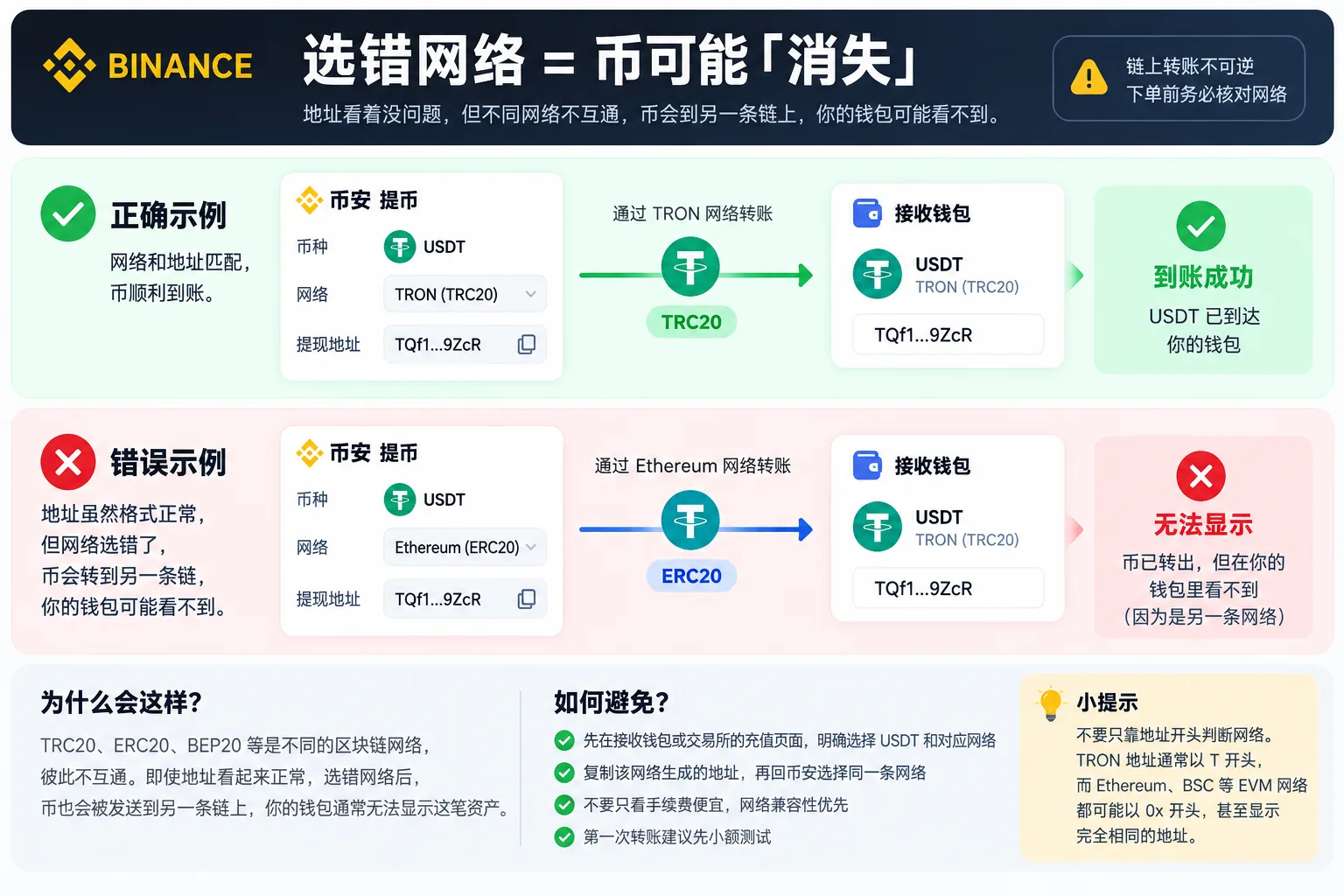
The same USDT can exist on different blockchains. When withdrawing, the network chosen on Binance must match the one supported by the receiving wallet or exchange; don't look only at the fee.
First transfer to a new address: don't skip the test
Many incidents happen on the first transfer.
The address was just copied, you believe the network is right, and you send the entire amount in one go. When it works, it saves time; but if anything is wrong with the address, the network or the Memo, the cost is large.
The safer approach is to send a small amount first, confirm it arrives in the wallet, and only then send the rest.
That costs one extra withdrawal fee, but compared with the whole amount, it's usually worth it.
After enabling the whitelist, a new address may not work immediately
The withdrawal whitelist is a genuinely useful security feature, but first-time users often hit this:
You just added a new wallet address, want to withdraw right away, and the system says the operation isn't available for now.
It isn't necessarily an account problem. Some whitelist security settings impose a waiting period on new addresses; changing related security settings can also trigger a temporary withdrawal restriction.
If the page shows a 24, 48 or 72-hour countdown, wait it out as instructed; don't repeatedly delete and re-add the address or keep changing settings.
If you already know you'll be transferring to a new wallet later, add the address in advance.
Just changed your password or 2FA and can't withdraw — also common
There's another case that has nothing to do with the address or network.
For example, you just reset your password, or just replaced Google Authenticator, your phone number or another verification method, and then immediately try to withdraw: the system may restrict withdrawals.
This is Binance's account-protection mechanism, not a broken withdrawal function.
After changing or resetting a password, withdrawals are commonly paused for about 24 hours; after changing some verification methods, the restriction can last longer. Don't memorise exact times; go by the countdown shown on your account page.
If you've only just changed a security setting, read the notice first; contact Binance support to check the account status only if you still can't withdraw after the restriction time the page gives.
A few actions that lower withdrawal risk
- Enable the withdrawal address whitelist (Settings → Withdraw → Withdrawal whitelist) so you can only withdraw to addresses you've added, up to 200.[5]
- Save the transaction hash (TxID) for every withdrawal; if something goes wrong, it's your only proof.
- Operate only through entries you know and that are official; be wary of fake wallets and phishing sites.
FAQ
Q1: Is a crypto withdrawal the same as a fiat withdrawal?
No. A crypto withdrawal moves coins to an on-chain wallet (over a blockchain network); a fiat withdrawal sells the coins for fiat currency and sends the money to a bank account or card. This article is about crypto withdrawals.
Q2: Does Binance charge a fee for withdrawals?
Yes. Binance charges a network/transaction fee for withdrawals to an external address; when you submit, the withdrawal page shows the network fee and the estimated amount to be received, and you don't need to prepare native gas separately. The exact amount fluctuates in real time; go by the "network fee" and "amount received" shown on the app's withdrawal page.
Q3: Which network should I choose to withdraw USDT from Binance?
Go by the network the receiver supports; compatibility first, don't just pick the cheapest. For your own wallet, check which USDT networks it supports; for an exchange, choose by the chains its deposit page supports; if you'll later use Ethereum mainnet, choose the Ethereum / ERC20 network the receiver explicitly supports.
Q4: How long does a withdrawal take?
It depends on the network: TRC20 / BEP20 / Solana usually arrive within minutes; ERC20 generally 10–30 minutes; BTC depends on block confirmations. If it's overdue, check the TxID confirmation status first, then the address and network.
Q5: Why does my withdrawal keep saying "temporarily unavailable"?
There are several common causes, handled differently:
- You just changed or reset your password: withdrawals are usually paused for 24 hours;
- You just changed your authenticator, phone number or another verification method: this can trigger a 24–48 hour security restriction, as the account page indicates;
- The whitelist or withdrawal security settings changed: there may be another waiting period, per the account countdown.
Wait for the countdown to finish; if withdrawals remain blocked for a long time, contact Binance support to verify the account status.
Q6: I chose the wrong network — can the funds be recovered?
Not necessarily. It depends on where the funds ended up, whether you control that address's private key, and whether the receiving wallet supports the network you mistakenly chose.
If it's a wallet where you control the seed phrase/private key — for example, an ERC20 asset was sent to BNB Smart Chain but the same address works on the corresponding EVM network — recovery is often possible; switching to the network where it actually arrived and adding the correct token can sometimes reveal the asset.
If you withdrew to an exchange or another custodial platform, you don't have the private key, so you can only contact the receiving platform's support and provide the TxID, coin, network and address. Whether the platform can recover it, and whether it charges, is uncertain.
Don't assume "a wrong chain can always be recovered". A mismatched network can mean the assets are lost with no way back.
Q7: Is there a minimum withdrawal amount?
Yes. Each coin and each network has a minimum withdrawal amount; below it you can't withdraw. Go by what the app shows.
In summary
Withdrawing from Binance is three steps: open the assets/wallet page and find the coin → withdraw, paste the address and pick the right network, confirm the network fee and complete 2FA. What really needs repeated checking comes down to two things: which network the receiver supports, and whether the address you entered belongs to that network.
Fees fluctuate in real time; don't memorise old tables, read the live number in the app before submitting. The withdrawal fee is deducted from the amount, so you don't need to prepare gas separately. For some coins (XRP, XLM and others) don't miss the Memo/Tag. Whether a wrong network can be recovered depends on the case; don't assume it always can.
Related articles
- How to buy USDT on Binance: a complete P2P tutorial — haven't bought USDT yet? Start here to get the coins in hand
- Binance vs OKX: which is better? — haven't decided which exchange to use? Read the comparison first
- How to download the Binance app — haven't installed the app yet? Start here
If you haven't registered on Binance yet
Withdrawing assumes you already have a Binance account with registration and identity verification (KYC) completed.
Register on Binance with the referral code AMY568 →
The full registration steps are in the Binance registration guide.
The link above is an affiliate link. Registering through it costs you nothing, but a share of the commission from your later trading goes to this site to keep the content updated. See the affiliate disclosure.
Data verification note
The key facts in this article were checked on 2026-10-16, one by one:
- Withdrawal network fees are dynamic: Binance states officially that withdrawing to an external address charges a network/transaction fee that adjusts with blockchain conditions, and the order page shows the current figure. Source: Binance withdrawal fee explanation.
- Minimum withdrawal amount: each coin and each network has its own withdrawal fee and minimum withdrawal amount; below the minimum the order can't be submitted, and the live figure is on the withdrawal page. Source: Binance crypto withdrawal fee page.
- Withdrawals require two-factor verification: on-chain withdrawals must pass SMS / email / Google Authenticator verification, after which the order moves into processing. Source: Binance official withdrawal guide.
- Copy-paste the address: Binance recommends entering the withdrawal address by copy-paste or QR code rather than typing it manually, to avoid losses from a mistyped address. Source: Binance FAQ on unsuccessful withdrawals.
- Withdrawal whitelist limit: the whitelist entry is "Settings → Withdraw → Withdrawal whitelist", and one account can add up to 200 addresses. Source: Binance withdrawal whitelist management guide.
Disclaimer
This article only shares experience and explains the Binance withdrawal flow; it is not investment, financial or trading advice.
On-chain withdrawals are irreversible, and an operational mistake can cause asset loss. Users should act cautiously according to their own risk tolerance, check the address and network before withdrawing, test with a small amount first, and comply with the laws of their jurisdiction. People under 18 should not trade crypto.
Exchange operations · USDT · Wallet security
Responsible for researching and organizing content on Binance, OKX, USDT transfers, withdrawals and wallet security. The steps and key data in this article are verified according to the content type, using real operation records, official platform documentation and public sources. Interfaces, fees and regional rules may change, so the article is reviewed and updated continuously.
Status: manual review · Last verified 2026-10-16
Reviewed by: Veldux editorial team
- Binance withdrawal fee explanationWithdrawing to an external address charges a network/transaction fee that adjusts with blockchain conditions; the confirmation page shows the current figure
- Binance crypto withdrawal fee pageEach coin and network lists its withdrawal fee and minimum withdrawal amount separately
- Binance official withdrawal guideOn-chain withdrawals require two-factor verification; once approved the order moves into processing
- Binance FAQ on unsuccessful withdrawalsBinance recommends copy-paste or a QR code for the withdrawal address rather than typing it manually
- Binance withdrawal whitelist management guideThe whitelist entry and limit for withdrawal addresses; one account can add up to 200 addresses
- 2026-10-16UpdateAdded the evidence-chain superscripts and the "Data verification note", and updated the key-fact verification date.
Editorial principles ineditorial policy,corrections policy。