
USDT transfer: TRC20, ERC20 or BEP20 — which network to use (2026)
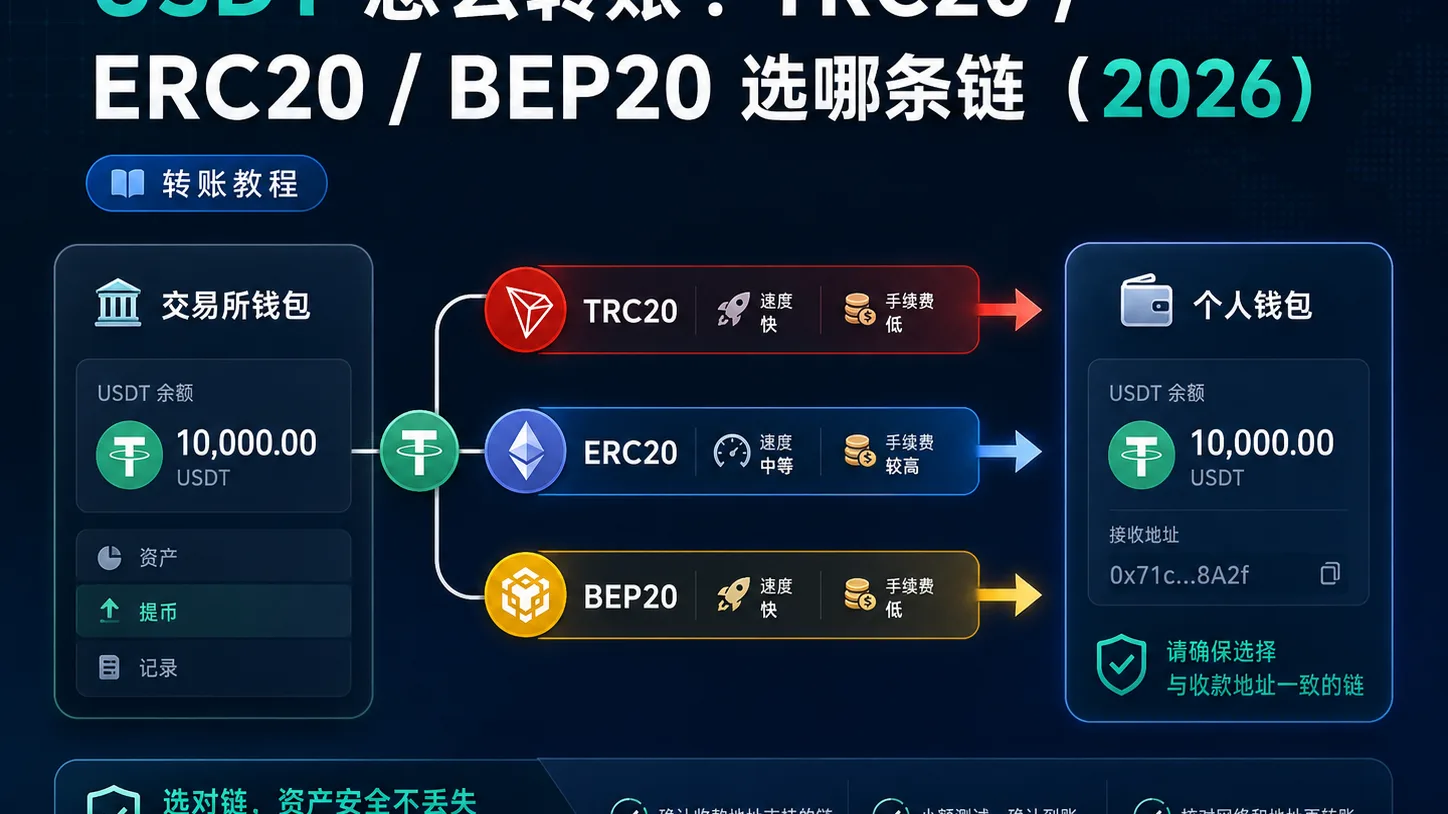
Table of contents

Binance new-user benefit
20% fee rebate
Official Binance sign-up · You must complete identity verification (KYC) to trade and withdraw
When you transfer USDT, what stops most beginners isn't "how to operate" — it's "which network to use". The same USDT sent over TRC20, ERC20 or BEP20 takes three completely different routes: the fee can differ by tens or even hundreds of times, and if you choose wrong the coins can appear to "disappear". This article skips the concepts and answers the three things you actually have to do: check which network the receiver supports, know which coin pays the fee, and know how to rescue a transfer sent on the wrong network.
A normal transfer confirms in seconds to a few minutes. What actually goes wrong is almost always one of two things: the network doesn't match the receiving address, or the wallet has no native coin to pay the fee with.
Note: this article shares experience about the USDT transfer process and is not investment advice. On-chain transfers are irreversible, so check the address and the network before you send, and treat crypto with caution.
Quick overview
The first step in a USDT transfer is never "choose a network" — it's checking which network the receiver (an exchange or a wallet) supports. The conclusion first:
| Your transfer scenario | Which network to choose | Approximate fee |
|---|---|---|
| Deposit to Binance / OKX | Whatever network their deposit page supports — don't improvise | Depends on the network |
| To a cold wallet for long-term holding | TRC20 | About 1 USDT (or less) |
| To the Ethereum ecosystem / DeFi | ERC20 | A few dollars to tens of dollars (ETH gas) |
| To the Binance ecosystem (on BSC) | BEP20 | A few cents (BNB gas) |
In one sentence: if you don't use on-chain apps and only move funds between exchanges, TRC20 is the cheapest choice in most cases; you only need ERC20 once you enter the Ethereum ecosystem. And never treat "wallet address" and "network" as the same thing — a correct address on the wrong network still loses the coins.
Who needs this / who doesn't
| Your situation | Suggestion |
|---|---|
| You bought USDT and want to move it to another exchange or wallet | Yes; start with "the 3 things to understand before you transfer" below |
| You only move funds inside Binance/OKX and never withdraw to an external address | You don't need to choose a network; internal transfers go "Funding Wallet → Spot Wallet" and never touch a chain |
| First transfer, and the amount isn't small | Yes; send a small test amount first, then the rest |
| You already picked the wrong network and the coins haven't arrived | Jump straight to "How to recover if you picked the wrong network" |
Table of contents
- The 3 things to understand before you transfer
- Fee and speed comparison across the three main networks
- The full USDT transfer process
- My decision logic: which network in each situation
- Mistakes I've made
- How to recover if you picked the wrong network
- Security risks
- FAQ
The 3 things to understand before you transfer
1. "Network" and "wallet address" are two different things — a wrong network loses coins even with a right address
USDT doesn't live on a single network; it is "issued" on dozens: TRC20 (TRON), ERC20 (Ethereum), BEP20 (BNB Smart Chain), Solana, TON and more.[1] Your wallet address is usually generated per network: a TRC20 address starts with T, an ERC20 address starts with 0x, and the two are not interchangeable.
When you transfer, the "network / chain" you select on the exchange must be exactly the same as the one on the receiving side. Copy the address perfectly but pick the wrong network, and the coins still won't reach your account.
2. The fee is paid in "that network's native coin", not in USDT
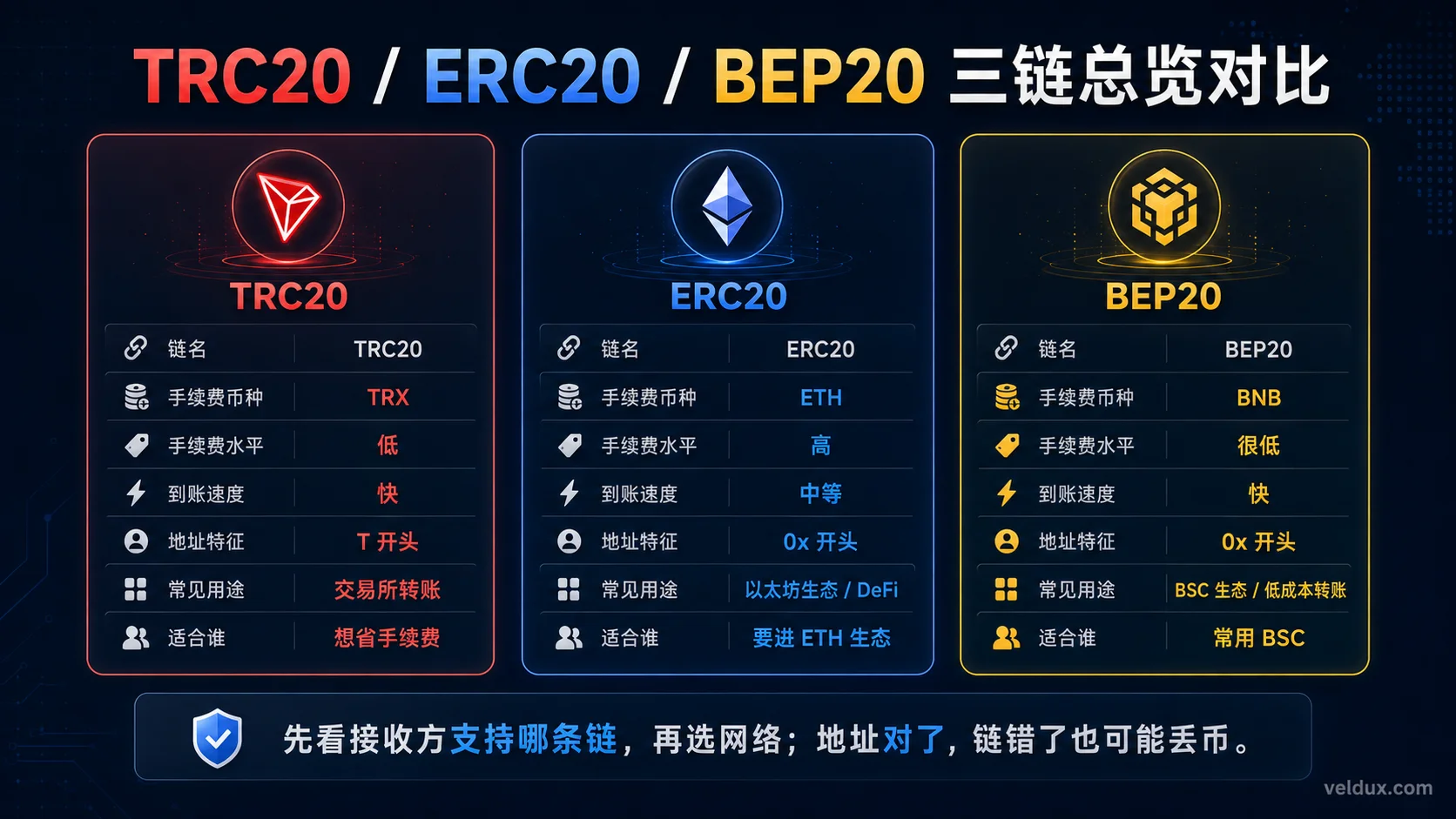
This is the invisible trap that stops most beginners: having USDT in your account doesn't mean you can send it. The fee (gas) has to be paid in the native coin of that network:
| Network | What coin pays the fee |
|---|---|
| TRC20 | TRX (or offset with "energy / bandwidth")[2] |
| ERC20 | ETH |
| BEP20 | BNB |
For example, you want to send USDT over ERC20 but your wallet holds no ETH — you get stuck at "balance is sufficient, but the transfer won't go through". Before sending, confirm that the target network's gas coin is available; the exact rules are on the Ethereum site and the TRON site.[3]
3. On-chain transfers are irreversible — there is no "undo" button
With a bank transfer, a mistake can still be chased with a phone call. An on-chain transfer, once broadcast, is in the network and cannot be undone. All you can do is "check before you send". That's why I repeat it in the steps below: send a small test first.
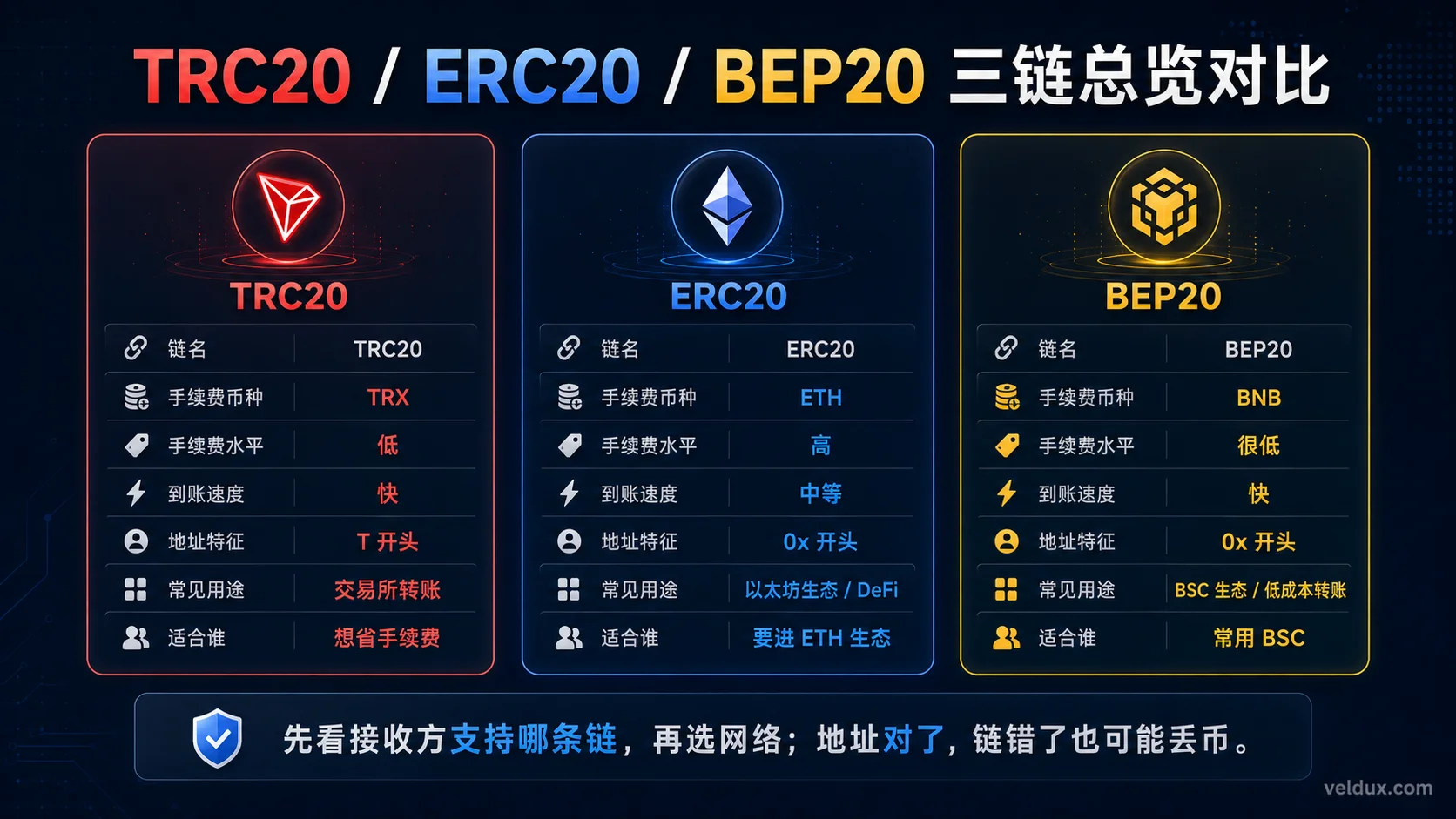
Fee and speed comparison across the three main networks
| Dimension | TRC20 (TRON) | ERC20 (Ethereum) | BEP20 (BNB Chain) |
|---|---|---|---|
| Fee coin | TRX / energy | ETH | BNB |
| Fee level | Low (about 1 USDT, sometimes less) | High (a few dollars to tens of dollars) | Very low (a few cents) |
| Confirmation speed | Fast (seconds to minutes) | Medium (minutes, slower when congested) | Fast (seconds to minutes) |
| Degree of decentralization | Medium | High (the most secure) | Low (21 validator nodes) |
| Main use | Between exchanges, holding coins | DeFi, the Ethereum ecosystem, large amounts | The Binance ecosystem, apps on BSC |
Fees move in real time; the figures above are magnitudes, not exact numbers. Before sending, go by the actual gas shown by the exchange or wallet.[4]
The full USDT transfer process
Using "withdrawing USDT from Binance to a cold wallet" as the example (OKX and other exchanges work almost the same way, only the entry names differ):
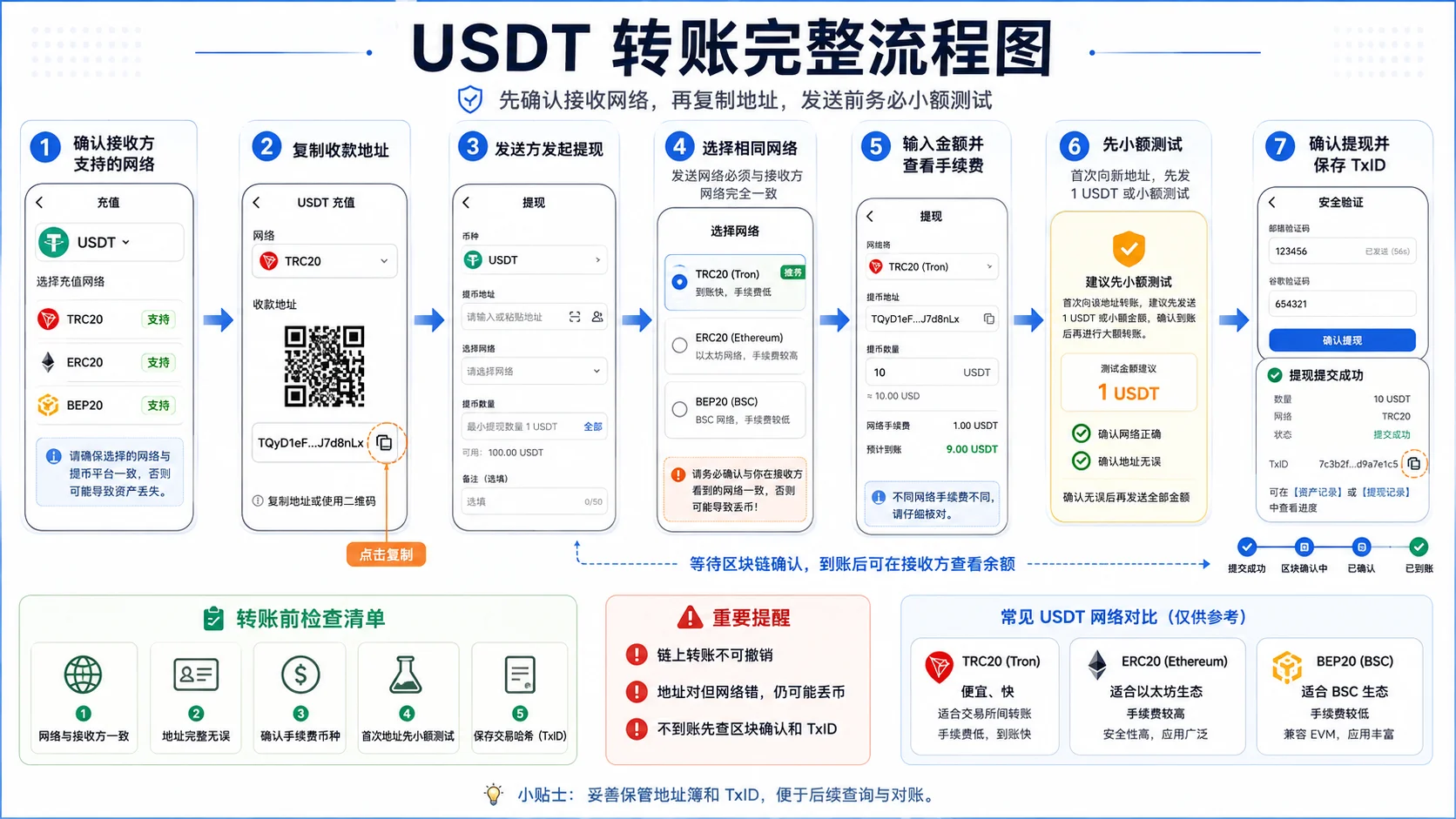
Step 1: confirm on the receiver which network it supports
Open your cold wallet, find "Receive USDT" and look at which network the address it gives you belongs to (TRC20 / ERC20 / BEP20). This step decides which network you'll pick later — don't skip it.
Step 2: start the withdrawal on the exchange and choose the network
Binance App → Wallet → Spot account → find USDT → tap "Withdraw" → paste the address → the system asks you to "select network". The network you choose here must be the same as the one the wallet gave you in Step 1.
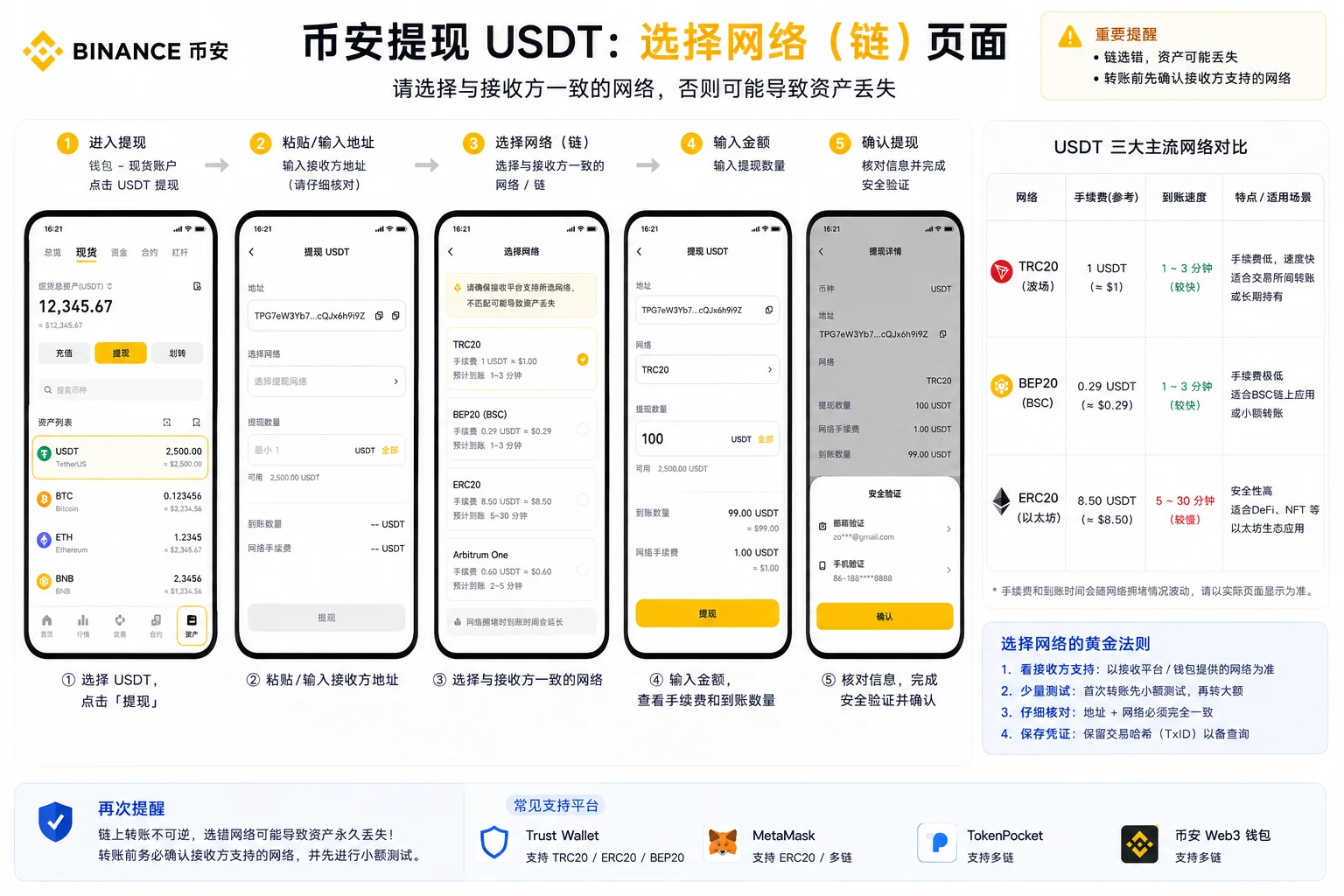
Step 3: enter the amount, check the fee, don't rush to confirm
After you enter the amount, the screen shows that network's fee and how much will arrive. Don't confirm yet — check the fee, the network and the address once more.
Step 4: send a small test first, then the full amount
The first time you send to an address, or when the amount is large, send 1 USDT first (or the minimum) as a test. Once you confirm it arrived and the network was right, send the rest. You pay one extra fee and buy peace of mind.
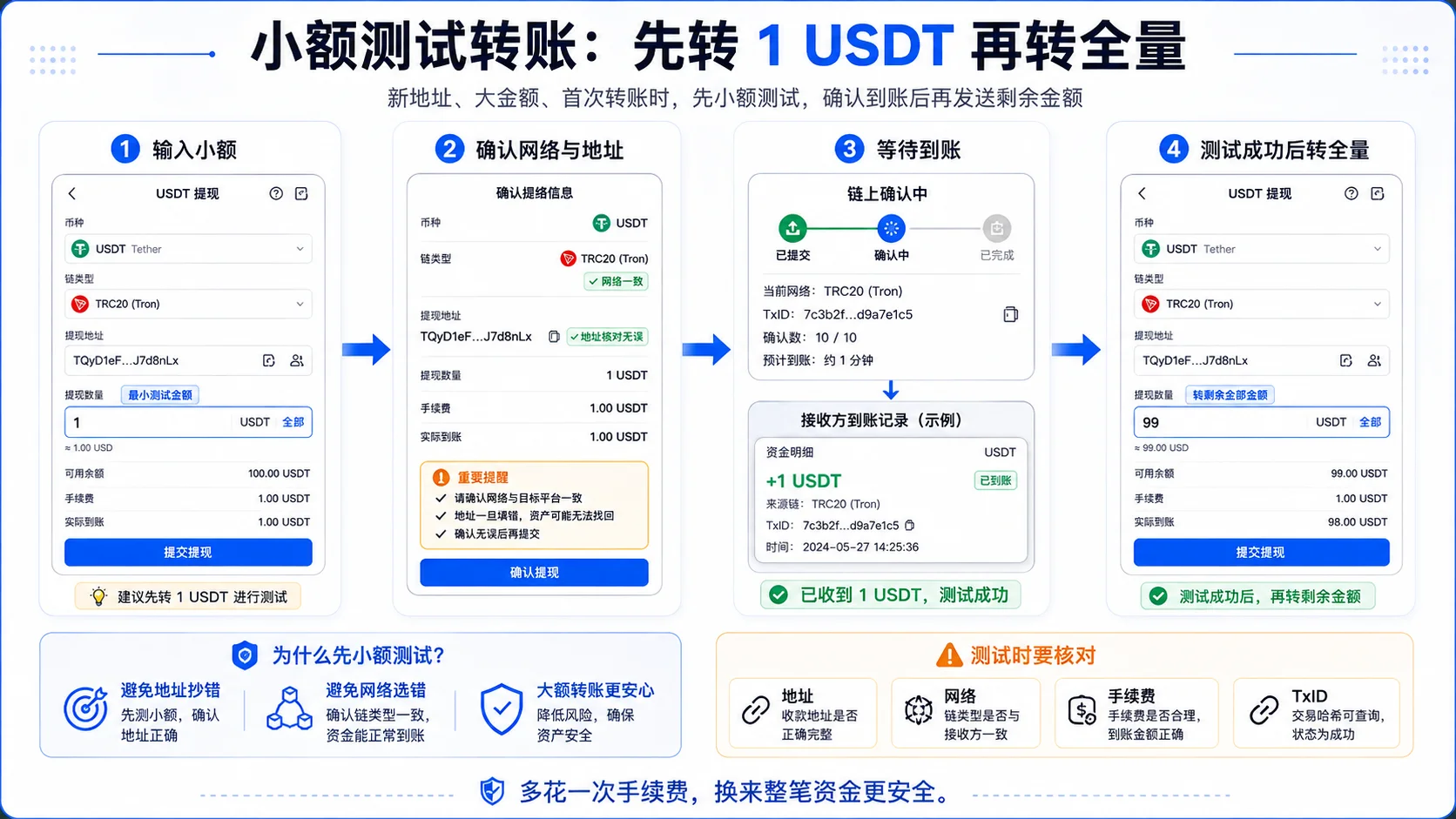
Step 5: wait for block confirmations, don't keep pushing
After sending, a normal "pending" status is expected, and arriving within minutes is usual. The transfer record shows a "block confirmations" count you can follow. If it hasn't arrived, don't panic — check "How to recover if you picked the wrong network" below first.
Once the coins arrive, if you want to convert them to your local currency, sell them through P2P; the full process is in how to cash out USDT.
My decision logic: which network in each situation
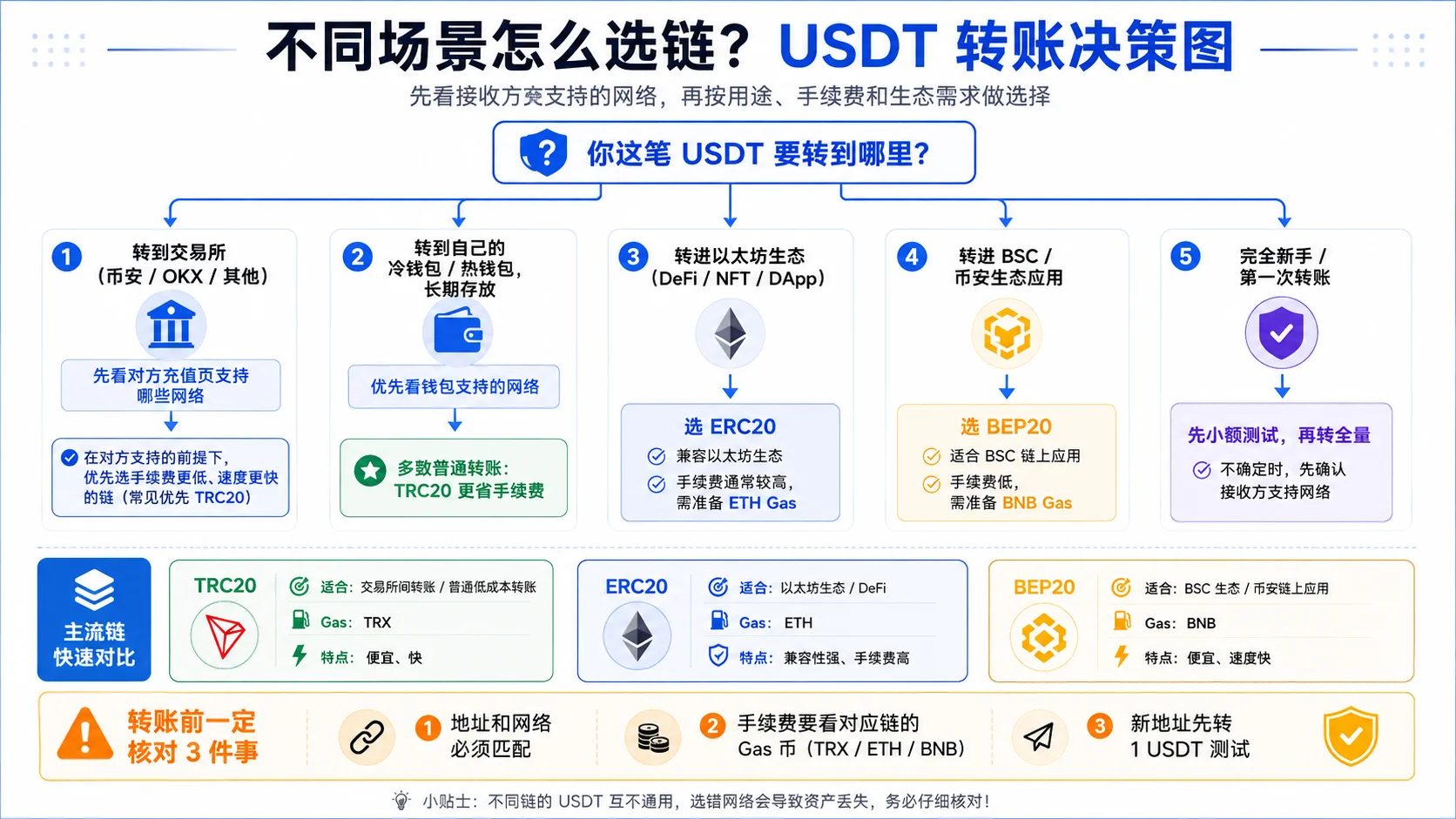
| Your situation | Recommended network | Reason |
|---|---|---|
| Between exchanges (Binance ↔ OKX) | Whatever the receiver supports; TRC20 if available | Low fee, fast, and choosing the network right matters most |
| To a cold wallet for long-term holding | TRC20 | Cheap, fast, and you don't touch on-chain apps while holding |
| Into the Ethereum ecosystem / DeFi / NFT | ERC20 | The ecosystem requires it; ERC20 is the only option |
| BSC projects / the Binance ecosystem | BEP20 | Lowest fee, native to the Binance ecosystem |
| A very large amount, maximum security | ERC20 | Ethereum is the most decentralized, the highest security level |
| Complete beginner, first transfer | TRC20 (small test first) | Simple, cheap, low cost of mistakes |
Mistakes I've made
Mistake 1: picked the wrong network and the coins "vanished" for half an hour
Scenario: the first time I moved USDT from Binance to a cold wallet, the wallet gave me an ERC20 address, and out of habit I selected TRC20 on Binance (because it's cheap). The coins were sent, but the wallet never received them.
Cause: TRC20 and ERC20 are two different networks. The coins went to "another network", and my Ethereum wallet obviously couldn't see them.
Lesson: the network and the address have to match. I eventually got them back with the method in "How to recover if you picked the wrong network", but it took two days.
Mistake 2: I had USDT but kept getting "insufficient balance" and couldn't send
Scenario: I wanted to send USDT over ERC20. There was plenty of USDT in the account, but it kept saying the gas was insufficient, and I assumed the exchange had a bug.
Cause: the ERC20 fee is paid in ETH, and my wallet held only USDT, no ETH — so I couldn't pay for the gas.
Lesson: before sending, confirm you have enough of the target network's native coin. TRC20 needs TRX, BEP20 needs BNB, ERC20 needs ETH.
Mistake 3: to save on fees, I sent a large amount in one go
Scenario: my first large transfer, I skipped the test for convenience and sent everything at once — and copied the address one character short. Fortunately it went to another wallet of mine, but sorting it out took real effort.
Cause: I saved a couple of dollars on the test fee and gambled the safety of the whole amount.
Lesson: new address, large amount — send 1 USDT first. Testing never costs you.
How to recover if you picked the wrong network
First work out where the transfer went wrong, because the treatment is completely different:
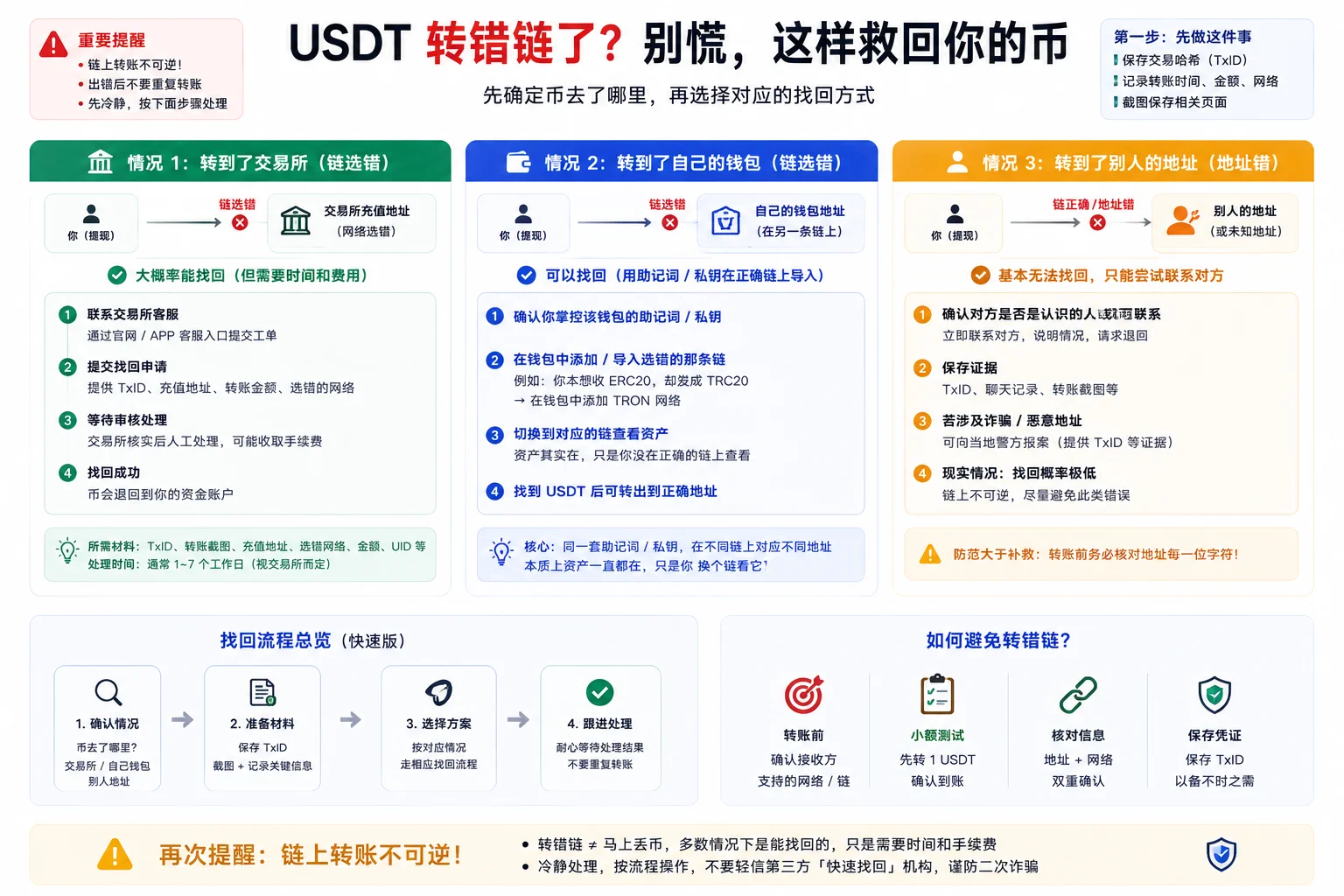
| Sent wrong to | Can it be recovered? | What to do |
|---|---|---|
| An exchange (wrong network, but the address belongs to the exchange) | Very likely yes, but tedious | Contact the exchange's support, give them the transaction hash (TxID), and use the "self-service recovery / appeal" route; a fee may apply |
| Your own cold wallet (wrong network) | Yes | With the same seed phrase, add or export the wallet on "the network you picked by mistake"; the coins are there, just viewed on another network |
| Someone else's address (wrong address) | Practically no | On-chain is irreversible; you can only hope the other side is willing to return it |
Key action: at the first sign of trouble, screenshot and save the transaction hash (TxID). That hash is the only proof of your transfer, and exchange support and wallet recovery both work from it. Don't just say "my coins didn't arrive" — with the hash, the other side can actually look it up.
Security risks
- Network and address must match: check "network" and "address" together before sending; a mistake in either can lose the coins.
- Send a small test first: for a new address or a large amount, always send 1 USDT and confirm it arrived before sending the rest.
- Save the transaction hash: keep the TxID after every transfer; if something goes wrong, it's your only proof.
- Don't "authorize" transfers from unfamiliar links: only operate from official entries you know, and beware of fake wallets and phishing sites.
- Fees move in real time: ERC20 gas spikes when Ethereum is congested; check the actual fee before deciding whether to send.
FAQ
Q1: For a USDT transfer, should I choose TRC20 or ERC20?
If you don't use on-chain apps and only move between exchanges or hold coins, choose TRC20 (cheap and fast); you need ERC20 only to enter the Ethereum DeFi ecosystem. The criterion is "which network the receiver requires", not "which one is cheaper".
Q2: What's the difference between TRC20 and ERC20?
They are "versions" of the same USDT on different networks. TRC20 lives on TRON (cheap, fast, addresses start with T); ERC20 lives on Ethereum (expensive, secure, addresses start with 0x). Different network, different fee and different address format.
Q3: How much does a USDT transfer cost?
It depends on the network: TRC20 about 1 USDT (sometimes less), BEP20 a few cents, ERC20 from a few dollars to tens of dollars (ETH gas, moving in real time). Before sending, go by what the exchange shows.
Q4: Why do I have enough USDT but it says insufficient balance and won't send?
Because the fee is paid in that network's native coin: ERC20 needs ETH, TRC20 needs TRX, BEP20 needs BNB. If the matching gas coin is missing, the transfer can't go through.
Q5: If I sent USDT on the wrong network, can it be recovered?
Very likely yes, but it depends on the case: to an exchange, go through support with the transaction hash; to your own cold wallet, export it with the seed phrase on the network you picked by mistake; to someone else's address, there's practically no way. See "How to recover if you picked the wrong network" for details.
Q6: How long does a transfer usually take?
TRC20 and BEP20 usually arrive in seconds to minutes; ERC20 takes minutes, slower when Ethereum is congested. If more than half an hour has passed, check the block confirmations first, then work through "How to recover if you picked the wrong network".
In one sentence
Before transferring USDT, check which network the receiver supports — between exchanges and for holding, TRC20 is usually cheapest, and ERC20 is only needed inside the Ethereum ecosystem. The fee is paid in the network's native coin (TRX/ETH/BNB), the network and the address must match, test new addresses with a small amount, and save the transaction hash the moment something goes wrong.
Next steps
- How to buy USDT on Binance: a complete P2P tutorial — haven't bought USDT yet? Start here and get the coins first
- How to buy USDT on OKX: a complete P2P tutorial — the buying flow on the OKX side
- USDT transfer tool — not sure which network to use? Price the fee with the tool first
- USDT vs USDC: which to transfer with — torn between USDT and USDC? Compare the differences first
- Binance vs OKX: which exchange is better — haven't decided on an exchange yet? Read the comparison first
Data verification note
The key facts in this article were checked on 2026-10-16, one by one:
- Multi-network issuance of USDT: USDT doesn't exist on a single network; it has been issued on TRC20 (TRON), ERC20 (Ethereum), BEP20 (BNB Smart Chain), Solana, TON and several other networks, which is why you must first confirm which network the receiver supports. Source: Tether official site.
- TRC20 fee coin: TRC20 transfer fees are paid in TRX, and can also be offset with energy / bandwidth. Source: TRON official documentation.
- ERC20 fee coin: transfer fees (gas) on Ethereum are paid in ETH and move in real time with network congestion, so "having USDT in the wallet" doesn't equal "being able to send it". Source: Ethereum official documentation.
- Order of magnitude of the three networks' fees: exchange withdrawal fees are listed per network — TRC20 commonly around 1 USDT, BEP20 a few cents, ERC20 moving with ETH gas; the article gives magnitudes only, and before sending you should go by what the exchange / wallet page shows in real time. Source: Binance official withdrawal fee page.
Disclaimer
This article is only an experience-based walkthrough of the USDT transfer process, and does not constitute any investment, financial or trading advice.
On-chain transfers are irreversible, and an operational mistake can cause asset loss. Users should act prudently according to their own risk tolerance, verify the address and network before transferring, test with a small amount first, and follow the laws of their jurisdiction. People under 18 should not trade crypto.
Exchange operations · USDT · Wallet security
Responsible for researching and organizing content on Binance, OKX, USDT transfers, withdrawals and wallet security. The steps and key data in this article are verified according to the content type, using real operation records, official platform documentation and public sources. Interfaces, fees and regional rules may change, so the article is reviewed and updated continuously.
Status: manual review · Last verified 2026-10-16
Reviewed by: Veldux editorial team
- Tether official site (USDT)Verifies "the network and the wallet address are two different things": USDT is issued on TRC20, ERC20, BEP20, Solana, TON and several other networks
- TRON official documentationVerifies the gas-coin table: TRC20 transfer fees are paid in TRX, and can also be offset with energy / bandwidth
- Ethereum official documentationVerifies the gas explanation: transfer fees (gas) on Ethereum are paid in ETH and move in real time with network congestion
- Binance official withdrawal fee pageVerifies the order of magnitude of the three networks' fees: withdrawal fees are listed per network (TRC20 commonly around 1 USDT); the article gives magnitudes only, and the exact figure is whatever the page shows at the time
- 2026-10-16UpdateAdded the evidence-chain superscripts and the "Data verification note"; moved the official links from the old "sources and notes" section into sources, and refreshed the fact-check date.
Editorial principles ineditorial policy,corrections policy。