
How to choose a cold wallet: Ledger, Trezor, OneKey or Tangem (2026)
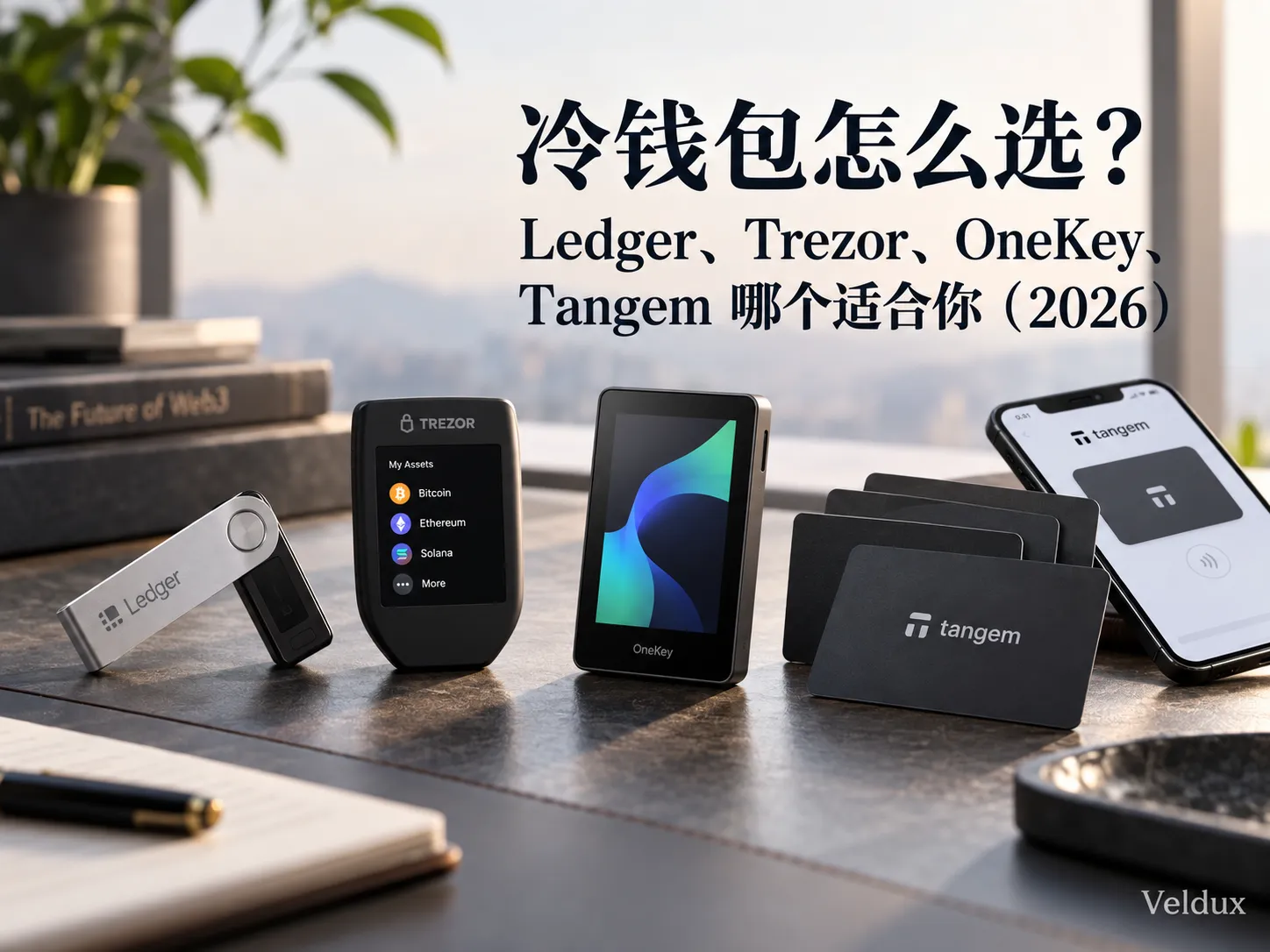
Table of contents

Binance new-user benefit
20% fee rebate
Official Binance sign-up · You must complete identity verification (KYC) to trade and withdraw
How to choose a cold wallet: the short answer
Choosing a cold wallet comes down to four things: the size of your holdings, whether open source matters to you, whether you need to verify transactions on the device itself, and which backup method you're willing to use.
If you just want a quick pick among Ledger, Trezor, OneKey and Tangem:
- Want a mature ecosystem, third-party wallet compatibility and multi-chain use: look at Ledger.
- Care most about open-source transparency and long-term cold storage: look at Trezor.
- Want open firmware plus a large screen or QR Air-Gap: look at OneKey.
- Don't want the traditional hardware-wallet workflow and prefer phone + NFC card to be as simple as possible: look at Tangem.
But one thing needs saying up front:
No hardware wallet can simply be labelled "absolutely the safest".
Ledger, Trezor, OneKey and Tangem use different security models.
Ledger emphasises a secure chip, on-device confirmation and a mature ecosystem; Trezor emphasises open-source transparency; OneKey adds a large screen and QR Air-Gap on top of open source; Tangem takes a completely different card-based route, using NFC and multiple cards to lower the barrier to use.
Ledger, Trezor, OneKey or Tangem: how to choose?
| Your need | Prioritize |
|---|---|
| Heavy multi-chain, DeFi and third-party wallet use | Ledger |
| Open source and auditability above all | Trezor |
| Local-language support, large screen, QR Air-Gap | OneKey |
| Phone-first, as simple as possible | Tangem |
If you don't yet know what you care about, don't start with brand rankings. First decide whether what worries you most is "software that isn't transparent", "signing the wrong transaction", "losing the recovery phrase", or "a device too complicated to use".
If you first need to work out "do I even need a cold wallet, and should I move my coins off the exchange?", read this first: where is the safest place to store crypto after buying.
Table of contents
- What exactly is a cold wallet?
- Core differences between Ledger, Trezor, OneKey and Tangem
- Who is Ledger for?
- Who is Trezor for?
- Who is OneKey for?
- Who is Tangem for?
- Open source, Secure Element or a large screen: which matters most?
- Why does the 2025 Bybit incident make "trusted screen" more important?
- Do your holdings need a cold wallet yet?
- So how do you choose among the four?
- What should international buyers watch for when buying a cold wallet?
- The 6 most common cold-wallet mistakes
- After buying: backup matters more than brand
- Final answer: Ledger, Trezor, OneKey or Tangem?
- FAQ
1. What exactly is a cold wallet?
A cold wallet is a wallet that keeps the private key away from internet-connected devices as much as possible and signs transactions inside dedicated hardware.
The familiar Ledger, Trezor, OneKey and Tangem devices are all hardware wallets.
But "cold wallet" does not mean:
once you buy one, your coins can never be lost.
What a hardware wallet mainly reduces is the risk of the private key being exposed directly to computers, browsers, malware and malicious apps.
It cannot protect you from every mistake.
For example:
- Your recovery phrase is photographed and uploaded to the cloud;
- You enter your recovery phrase into a phishing site;
- You choose the wrong network when sending funds;
- You sign a malicious smart contract;
- The recipient address is swapped by clipboard malware;
- You buy a device someone else has already initialised.
So choosing a hardware wallet really means choosing a system for private-key storage + transaction confirmation + backup and recovery.
Device security is only the first layer; how you back up and how you sign decides the final risk.
2. Core differences between Ledger, Trezor, OneKey and Tangem
Don't just compare "how many coins are supported".
When choosing a hardware wallet in 2026, these are the dimensions worth comparing.
| Dimension | What to confirm |
|---|---|
| Private-key protection | Where the private key is generated and stored |
| Transaction confirmation | Whether you can verify the address and transaction details on an independent device |
| Recovery method | Recovery phrase, multiple backups or another recovery scheme |
| Code transparency | How much of the firmware and software can be publicly reviewed |
| Connectivity | USB, Bluetooth, NFC or QR codes |
| Ecosystem compatibility | Whether your target coins, networks and third-party wallets are supported |
If you only look at the most obvious differences among the four:
| Brand | Core characteristics |
|---|---|
| Ledger | Mature ecosystem, Secure Element, on-device confirmation |
| Trezor | Open-source transparency, a clear long-term cold-storage path |
| OneKey | Open source, local-language support, large-screen and Air-Gap models |
| Tangem | NFC card, no screen, seedless mode available by default |
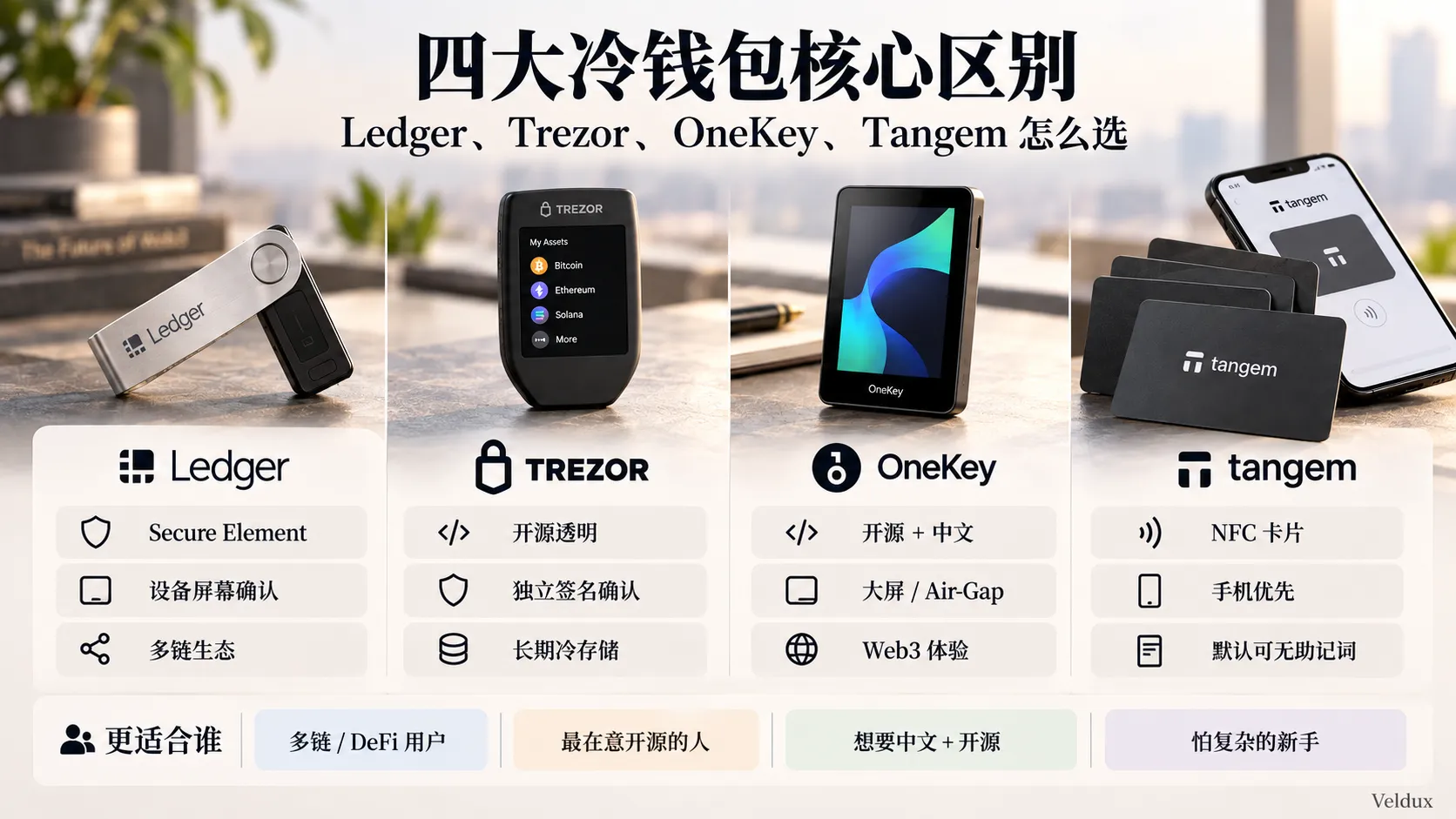
The core difference among Ledger, Trezor, OneKey and Tangem isn't just the brand — it's the security model, the way you use it and who it suits.
Note that Tangem's second-generation products are not "always without a recovery phrase".
Tangem officially offers several initialisation methods: the private key can be generated directly inside the card's Secure Element and backed up across multiple cards, or you can choose to generate or import a 12/24-word recovery phrase.
So a more accurate wording is:
Tangem can use a seedless mode (no traditional recovery phrase) by default, rather than "not supporting recovery phrases".
3. Who is Ledger for?
Ledger: for people who prioritise ecosystem and multi-chain use
Ledger's biggest advantage isn't "being number one" — it's ecosystem maturity.
If your assets aren't only BTC and ETH, but you also use:
- MetaMask;
- Third-party Web3 wallets;
- DeFi;
- NFTs;
- Multiple EVM networks;
- Solana;
- Tokens on different chains;
then Ledger usually makes it easy to find the right connection method.
Its product line has also expanded from the Nano series to larger-screen devices such as Flex and Stax.
Ledger's strengths
| Feature | What it means in practice |
|---|---|
| Secure Element | Stronger protection of the private key against physical attacks |
| Device screen | Verify transactions without trusting the computer screen |
| Third-party ecosystem | Suits multi-chain and Web3 use |
| Broad product line | From small button-screen devices to large-screen models |
Ledger's biggest controversy: it is not "fully closed source"
One common claim needs correcting here.
Ledger Live, the device apps, the SDK and some system components are open source or publicly auditable, but Ledger OS and the underlying Secure Element components are not fully open source.[1]
So rather than simply writing:
Ledger is a closed-source wallet.
the accurate statement is:
Ledger uses a "partly open + closed Secure Element components" security model, and is not on the same fully-open-firmware path as Trezor or OneKey.
That's also why open-source advocates and Ledger supporters reach completely different conclusions.
The former focus on:
"Can I review the code myself?"
The latter focus on:
"Can the secure chip, the OS and hardware isolation resist real-world attacks?"
They aren't discussing the same question.
Should you worry about Ledger Recover?
Ledger Recover is an optional recovery service from Ledger; it is not automatically forced on after you buy a Ledger.
If you don't use it, you can still store your recovery phrase yourself.
So the real controversy is more about:
whether users accept a hardware-wallet vendor designing an architecture that can export encrypted recovery material after the user authorises it.
That is a security-philosophy question, not something that can be summed up as "Ledger automatically uploads your recovery phrase".
If you need a mature multi-chain ecosystem and accept Ledger's hardware/software trust model, Ledger is well worth a look; if "all core firmware must be fully public" is a hard requirement, prioritise Trezor or OneKey.
4. Who is Trezor for?
Trezor: for people who put open-source transparency first
Trezor's biggest label for a long time has been:
Open source.
It doesn't win by supporting the most coins; it tries to make the wallet's software and hardware design inspectable by outsiders.
By 2026, Trezor's lineup is no longer "only old-style small USB devices".
The main current-generation products include:
- Trezor Safe 3;
- Trezor Safe 5;
- Trezor Safe 7.
Safe 7 has added a colour touchscreen, wireless connectivity and a new Secure Element architecture.
So the old line often found in articles:
Trezor = no secure chip, open source only.
no longer describes the whole 2026 lineup.
Trezor's core strengths
| Feature | Who it suits |
|---|---|
| Emphasis on open source | People who want the code to be externally auditable |
| Mature recovery scheme | Long-term holders |
| On-device confirmation | People who value independent transaction verification |
| Secure Element in new models | People who care about both transparency and hardware protection |
Trezor Safe 7 also emphasises a new auditable Secure Element and a "quantum-ready" architecture used for device boot, authentication and firmware-update processes.[2]
Don't over-read that either.
It does not mean:
BTC already needs a "quantum-resistant wallet".
A more grounded statement is:
Trezor uses post-quantum cryptography in parts of its device security and authentication mechanisms, preparing in advance for future threat models.
If you mainly hold BTC, ETH and similar assets long term, trade infrequently, and put public auditability ahead of feature count, Trezor is the easiest of the four to understand.
5. Who is OneKey for?
OneKey: for people who want both "open source" and features
OneKey's positioning isn't quite like Ledger's or Trezor's.
It tries to deliver all of these at once:
- Open source;
- Secure Element;
- A local-language interface;
- Multi-chain;
- A large screen;
- Web3;
- Air-Gap.
For example, OneKey Pro uses a large touchscreen and supports QR Air-Gap signing; Classic 1S is closer to a traditional hardware wallet.
How to understand OneKey Pro vs Classic?
| Need | Better fit |
|---|---|
| Just long-term storage of assets | Classic series |
| Frequent Web3 transaction signing | Pro |
| Want to see transaction details clearly | Pro |
| Budget first | Classic series |
On OneKey's official pages in 2026, the Classic 1S Pure, Classic 1S and Pro have clearly separated positioning.
The Pro's value isn't just "being more expensive".
The real differences are:
Large screen + QR Air-Gap + fingerprint + richer connectivity.
OneKey also publishes its firmware source code and a way to verify that the public code matches the released firmware.[3]
So describing OneKey only as:
"a cheaper Ledger clone".
is inaccurate.
On the open-source path it is actually closer to Trezor, while its product experience and multi-chain direction lean more toward Web3 users.
If you want a well-localised interface while also putting open source and a device screen near the top of your list, OneKey is one of the four worth comparing closely.
6. Who is Tangem for?
Tangem: for people who dislike complicated operations
Tangem's biggest feature isn't the price, it's:
it doesn't feel like a traditional hardware wallet at all.
A traditional hardware wallet is usually:
wallet device → USB/Bluetooth connection → screen confirmation → recovery-phrase backup.
Tangem is closer to:
phone app → tap the card with NFC → the card signs.
It has no:
- Screen;
- USB;
- Bluetooth;
- Battery.
That makes Tangem very simple, and it also brings completely different trade-offs.
Tangem's strengths
| Feature | Practical impact |
|---|---|
| NFC card | Tap with your phone and use it directly |
| No battery | No charging needed |
| Multi-card backup | You can skip a traditional paper recovery phrase |
| Simple operation | Easier for first-time hardware-wallet users |
Tangem's biggest trade-off: no independent screen
The Tangem card itself has no screen.
So transaction details are mainly displayed through the phone app.
That's an important difference from most mainstream Ledger, Trezor and OneKey models:
the latter let you re-check key details on the screen of an independent hardware device.
If your phone is controlled by malware, an independent trusted screen provides an extra verification layer.
Tangem's security philosophy is instead:
reduce device components, remove updatable firmware, and rely on the Secure Element, NFC and the phone app for the whole flow.
Tangem states clearly that its card firmware is not open source and that trust is built through third-party security audits and similar measures; its phone app and SDK are open source.[4]
So rather than calling Tangem "partly open source", it's more accurate to say:
the app is open source, but the card firmware itself is closed source.
If what you fear most is writing down the recovery phrase wrong, not knowing how to use the device, or USB and settings being too much hassle, Tangem is very appealing; if you insist that "transactions must be verified on an independent hardware screen", it isn't for you.
7. Open source, secure chip or large screen: which matters most?
Many hardware-wallet reviews love comparing EAL5+ and EAL6+.
But what ordinary users really need to understand is:
a secure chip, open source and a trusted screen solve three different problems.
| Security design | Main problem it solves |
|---|---|
| Secure Element | Physical attacks, key extraction |
| Open-source firmware | Code transparency and external review |
| Device screen | Confirming the real transaction details |
| Air-Gap | Reducing wired or wireless data interfaces |
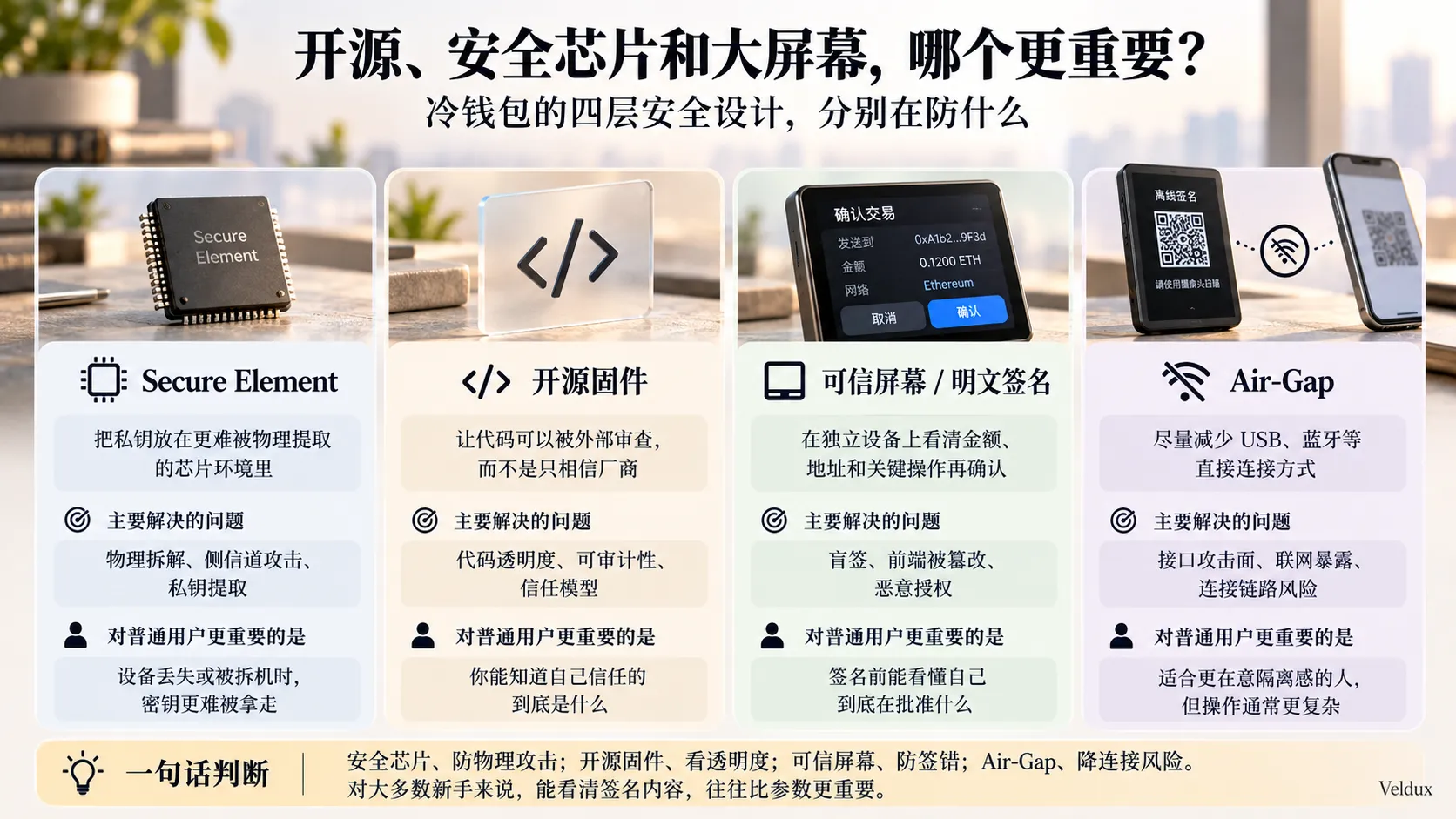
Secure Element, open-source firmware, a trusted screen and Air-Gap address different risks; you can't judge which cold wallet is safer with a single parameter.
They are not substitutes for each other.
EAL6+ ≠ you will never sign the wrong transaction.
Likewise:
fully open source ≠ your private key can never leak.
8. Why does the 2025 Bybit incident make "trusted screen" more important?
The key reminder the 2025 Bybit cold-wallet security incident left for hardware-wallet users is:
don't trust only what the computer or web interface shows you.
Follow-up investigations of that incident showed that attackers gained access to Safe-related infrastructure and tampered with the web interface's transaction display, tricking signers into approving a malicious transaction.
It can't be summed up simply as:
Bybit was hacked because it "used blind signing".
What actually happened was:
the information the signer saw on the front end could be manipulated by attackers, so what really matters is establishing an independent, trusted path for verifying transactions.
That's why "Clear Signing" and "Trusted Display" are becoming increasingly important when evaluating hardware wallets.
For example, when you're about to send 2 BTC, the ideal state isn't the computer telling you:
Send transaction?
but the device itself clearly showing:
Amount Recipient address Network Key contract operations
and then you confirm.
For ordinary users, "can I understand what I'm approving before I sign" is often more practical than a one-grade difference on a chip certificate.
9. Do your holdings need a cold wallet yet?
Not everyone needs to buy a cold wallet.
The real first question is:
are your holdings already worth taking on the complexity of self-custody?
| Asset situation | More sensible approach |
|---|---|
| Small test amounts, frequent trading | Get exchange account security right first |
| Long-term holding, a loss would clearly affect your life | Start considering a hardware wallet |
| Large long-term holdings | Consider spreading across devices or using multisig |
| Very high-value assets | Don't rely on a single device or a single backup |
There's no point giving a rule like:
above $1,000 you must have a cold wallet.
Because everyone defines "an important amount" differently.
$1,000 might be experimental money to one person and already very important to another.
A more useful test is:
if losing this asset would clearly change your financial situation, and you don't plan to trade it in the short term, you should seriously consider moving from an exchange to self-custody.
If you're still trading frequently, getting your exchange account's password, 2FA and anti-phishing code right is usually more important than rushing to move funds into a hardware wallet you don't know how to use. Once you're sure you'll hold long term, then consider moving some long-term assets into a self-custody wallet — and if you don't even have an exchange account yet, the Binance registration tutorial covers those first steps.
10. So how do you choose among the four?
Case 1: only BTC and ETH, untouched for years
Prioritize:
Trezor / OneKey.
Because this scenario doesn't really need a complex ecosystem; it values:
- Recovery method;
- Open-source transparency;
- Long-term device maintenance;
- Independent signing confirmation.
Case 2: frequent MetaMask, DeFi and multi-chain use
Prioritize:
Ledger / OneKey.
Because these users have higher demands for third-party wallets, multi-chain support and the signing experience.
Case 3: first cold wallet, afraid of complicated steps
Prioritize:
Tangem.
The phone + NFC card route is clearly simpler.
But you have to accept:
the Tangem card has no independent screen.
Case 4: care a lot about open-source firmware
Prioritize:
Trezor / OneKey.
Don't treat Ledger or Tangem as being on the same fully open-source path.
Case 5: frequently sign smart contracts, worried about signing wrong
Focus on:
a large screen + Clear Signing.
For example:
- Ledger Flex / Stax;
- Trezor Safe 5 / Safe 7;
- OneKey Pro.
At this point, don't just look at the brand.
Compare the specific model.
11. What should international buyers watch for when buying a cold wallet?
When choosing a hardware wallet, there are three things that many reviews from the US and Europe rarely cover:
- Local-language support;
- Official purchase channels;
- After-sales service and shipping.
Above all, don't buy a used hardware wallet of unknown origin just to save money.
Which purchase methods carry more risk?
| Purchase method | Risk |
|---|---|
| Brand's official site | Relatively controlled |
| Authorised official reseller | Need to verify the authorisation |
| Third-party stores on general marketplaces | Origin and handling history are hard to confirm |
| Second-hand platforms | Not recommended for storing important assets |
One point deserves its own paragraph:
don't treat "is it shrink-wrapped" or "does it have a tamper sticker" as your only criterion.
Packaging can be faked.
What really matters is:
- Use the official software;
- Run the device authenticity check;
- Initialise it yourself;
- Let the device generate a fresh key;
- Never use a recovery phrase that was already written down in the box.
If you open the box and find a piece of paper that already says:
recovery phrase / seed phrase
don't send any coins to it.
12. The 6 most common cold-wallet mistakes
1. Using a recovery phrase someone gave you
This is the most dangerous situation.
If the recovery phrase wasn't generated by you during a secure initialisation process, don't use it.
2. Photographing your recovery phrase with your phone
Don't:
- Take a photo;
- Take a screenshot;
- Send it in a chat app;
- Send it on Telegram;
- Store it in email;
- Store it in cloud storage;
- Store it in a notes app.
Once the recovery phrase touches an internet-connected device, the cold wallet's isolation of the private key is significantly weakened.
3. Buying a second-hand device to save money
A hardware wallet is a device that stores private keys.
It is not a good product to buy second-hand.
A saving of a few dozen dollars isn't worth taking on supply-chain risk.
4. Looking only at the coin, not the network
USDT especially.
USDT can exist on:
- Ethereum;
- Tron;
- BNB Smart Chain;
- Arbitrum;
- Solana;
- Other networks.
A hardware wallet "supporting USDT" doesn't mean USDT on every chain works the same way.
Before sending, you must confirm both the asset and the network.
5. Sending your whole balance the first time
The correct approach is:
small test deposit → confirm it arrives → small test withdrawal → get familiar with the flow → then increase the amount.
Don't test a newly bought wallet with your entire holdings.
6. Signing carelessly just because you bought a hardware wallet
The biggest misconception about hardware wallets is:
the private key is in the cold wallet anyway, so it doesn't matter if I tap confirm.
In reality, as long as you actively approve a malicious transaction in a valid format, the hardware wallet may still sign it exactly as instructed.
A hardware wallet protects the key; it does not judge whether the counterparty is a scammer for you.
13. After buying: backup matters more than brand
For wallets that use a traditional recovery phrase:
the device breaking ≠ your coins are gone.
As long as the recovery information still exists, the wallet can usually be restored.
What's genuinely dangerous is:
losing the recovery phrase.
Or:
someone else obtaining the recovery phrase.
Recommended process
- Initialise the device in a trusted environment;
- Let the device generate the recovery information;
- Write it down offline;
- Check the words and their order;
- Don't photograph it;
- Don't upload it to the cloud;
- Complete the official backup check;
- Send a small amount first;
- Test one withdrawal;
- Only increase the assets after confirming the recovery works.
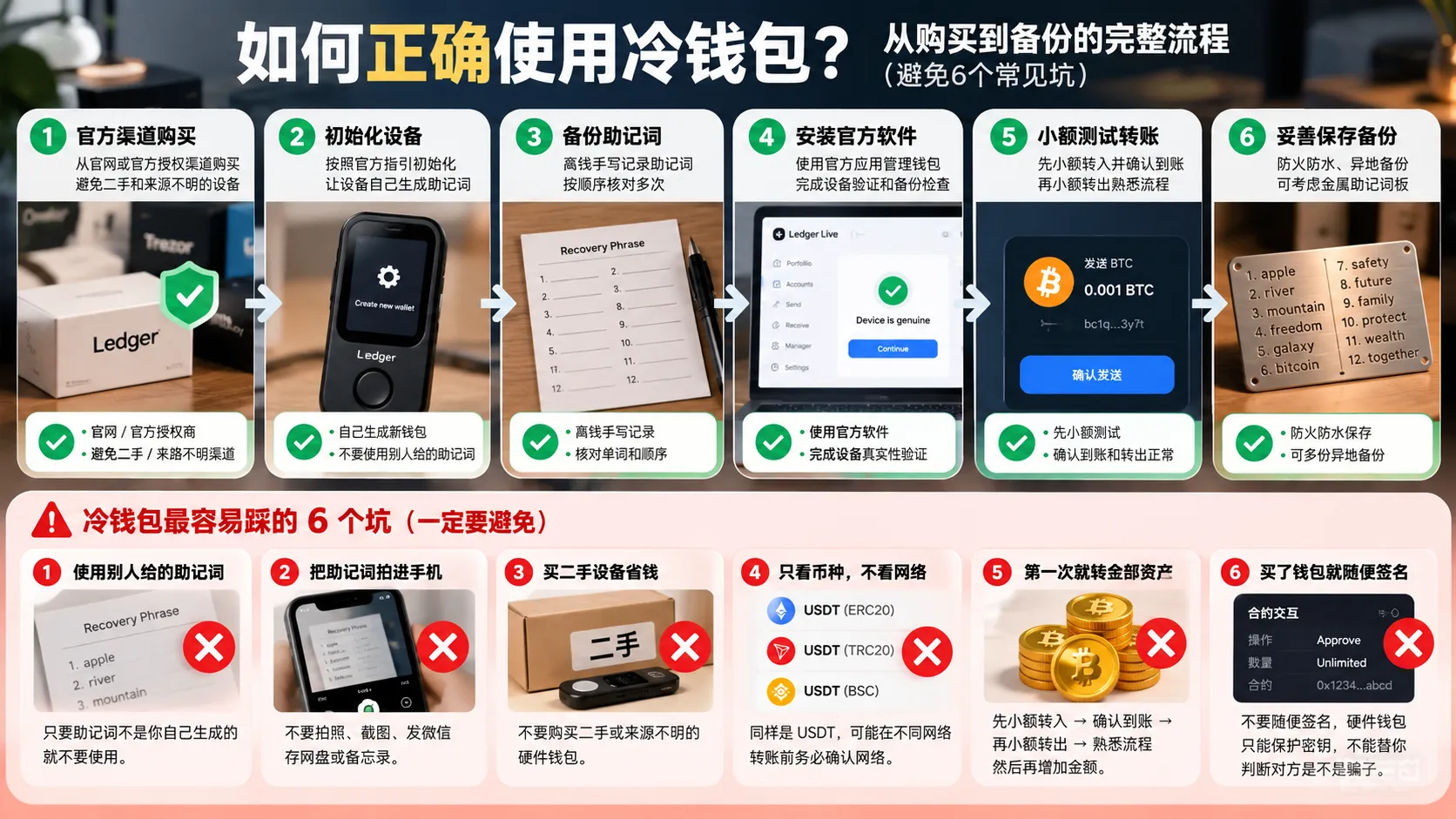
Cold-wallet security depends not only on the device itself: buying from an official channel, initialising it yourself, backing up the phrase offline and testing with a small transfer all affect the final outcome.
For large long-term holdings, you can go further with:
- Metal recovery-phrase plates;
- Multiple backups in different locations;
- A passphrase;
- Multi-share backup;
- Multisig.
But the more complex the setup, the easier it is to lock yourself out through your own operational error.
So don't pile on features just to look "professional".
The best backup scheme is the one you still know how to restore five years from now.
When sending coins to a cold wallet, the most common error is choosing the wrong network; see how to transfer USDT for that step. If you're storing Bitcoin, how to buy Bitcoin covers the full flow.
14. Final answer: Ledger, Trezor, OneKey or Tangem?
Compressed into one table:
| What you care about most | Look at |
|---|---|
| Ecosystem and third-party compatibility | Ledger |
| Open source and transparency | Trezor |
| Local-language support, open source, large screen and Air-Gap | OneKey |
| Simple, phone-based, NFC card | Tangem |
If you still can't decide, go back to the original question: what worries you most — opaque software, poor multi-chain compatibility, operations that are too complex, or signing the wrong transaction? Getting that clear is far more useful than finding "the number one hardware wallet of 2026".
15. FAQ
Q1: Buying my first cold wallet — should I look at Ledger, Trezor, OneKey or Tangem first?
If you have no experience at all, you can narrow it down by usage style:
if you want a traditional hardware-wallet experience and will later connect to MetaMask or DeFi, look at Ledger, Trezor and OneKey first; if complicated operations are what you fear most and you just want to tap a card with your phone to sign, Tangem is easier to start with.
What really decides your purchase isn't the word "beginner" but how you plan to use it later.
Q2: Is a cold wallet always safer than an exchange?
Not necessarily.
A cold wallet mainly reduces the risk of an exchange account being hacked, platform failure, and the private key being exposed to the internet long term — but it shifts responsibility for safeguarding the recovery phrase, choosing the transfer network and confirming signatures onto you.
If you can't back up a recovery phrase at all and keep clicking the wrong links, self-custody can itself become a new risk.
Q3: What's the biggest difference between Ledger and Trezor?
In simple terms:
Ledger leans toward ecosystem and a hardware security model; Trezor leans toward open source and auditability.
If you often use multi-chain, third-party wallets and Web3, look more at Ledger; if firmware transparency and long-term cold storage matter most, focus on Trezor.
Don't just ask "which is safer", because the two companies' security designs are not the same.
Q4: Is OneKey worth buying? Is it mainly for Chinese-speaking users?
A local-language interface is indeed one of OneKey's advantages, but it isn't worth considering only because "it has Chinese".
OneKey also offers open-source firmware, large-screen models, QR Air-Gap and multi-chain support, so if you want a localised interface and also care about open source and the signing experience, it's more appealing than simply chasing a low price.
Q5: Tangem has no screen — is that unsafe?
You can't judge it that simply.
Tangem uses a Secure Element and NFC card to sign, and its advantages are a simple structure, no battery and multi-card backup.
Its trade-off is that transaction details are mainly viewed through the phone app rather than re-confirmed on an independent screen on the card.
So if you insist that "every transaction must be verified on an independent hardware screen for address and amount", Tangem isn't the right route for you.
Q6: Do cold wallets support USDT?
Most mainstream hardware wallets can manage USDT on some networks, but before buying, don't just confirm "supports USDT".
Also confirm the specific network, for example:
- ERC20 USDT;
- TRC20 USDT;
- BNB Smart Chain USDT;
- Solana USDT.
The same name "USDT" doesn't mean the same network. Choosing the wrong network when transferring is more likely to cause real losses than choosing the wrong wallet brand.
Q7: If the device breaks after I buy a cold wallet, are my coins gone?
Usually not.
The coins aren't stored inside the hardware wallet machine; the device stores the keys needed to control on-chain assets.
If the device is damaged or lost but the recovery information is still safe, you can usually restore access on a compatible device or wallet.
What you really must not lose is the recovery information.
Q8: How much do I need to hold before a cold wallet is worth it?
There is no amount that fits everyone.
A more practical test is:
if losing this asset entirely would clearly affect your life, and you plan to hold long term, it's worth starting to think about self-custody.
If it's just a small experimental amount of a few hundred or a few thousand dollars and you're still trading frequently, getting your exchange password, 2FA and anti-phishing code right may be more practical than buying a hardware wallet right away.
One-sentence summary
When choosing a cold wallet, don't start by looking for "the number one of 2026".
Answer four questions first:
How much do you hold, does open source matter, do you need independent screen confirmation, and do you prefer a traditional recovery phrase or a simpler backup method?
Then choose:
- Ledger: ecosystem and multi-chain use;
- Trezor: open-source transparency and long-term cold storage;
- OneKey: local-language support, open source, a large screen and Air-Gap;
- Tangem: phone-first, NFC card and simple operation.
What really determines your asset security isn't which brand is printed on the box.
It's:
where you bought the device, how the private key was generated, how the recovery information is stored, and whether you confirmed what you were signing before every signature.
What to read next
- Where is the safest place to store crypto after buying? Exchange, hot wallet or cold wallet (2026) — if you haven't decided whether you really need a cold wallet, start with its four-step test
- How to withdraw from Binance to a wallet: steps, fees and network choice (2026) — the first operation after buying a device is usually withdrawing coins from the exchange
- How to transfer USDT: TRC20 / ERC20 / BEP20, which chain to use (2026) — the expanded version of this article's "looking only at the coin, not the network" pitfall
- Sent USDT on the wrong chain? Whether it can be recovered, self-help steps and costs (2026) — if the network is already wrong, this covers what you can still do
- How to buy Bitcoin: a complete first-purchase tutorial (2026) — before storing BTC in a cold wallet, get the buying flow right first
Data verification note
The key facts in this article were checked on 2026-10-16, one by one:
- Ledger's product line and security model: Ledger Live, the device apps, the SDK and some system components are open source or publicly auditable, but Ledger OS and the underlying Secure Element components are not fully open source; the lineup has expanded from Nano to larger-screen Flex and Stax, and Ledger Recover is an optional recovery service. Source: Ledger official site.
- Trezor Safe series: the current generation is Safe 3 / Safe 5 / Safe 7, and Safe 7 adds a colour touchscreen, wireless connectivity and an auditable Secure Element; quantum-ready applies to device boot, authentication and firmware-update processes and does not mean BTC already needs a quantum-resistant wallet. Source: Trezor official site.
- OneKey's models and open-source approach: Classic 1S Pure, Classic 1S and Pro are clearly differentiated, the Pro offers a large screen and QR Air-Gap signing, and the company publishes its firmware source code plus a way to verify that the public code matches the released firmware. Source: OneKey official site.
- Tangem's backup methods and open-source scope: seedless mode (no traditional recovery phrase) is available by default, and you can also generate or import a 12/24-word phrase; card firmware is not open source and trust is built through third-party security audits, while the phone app and SDK are open source. Source: Tangem official site.
Exchange operations · USDT · Wallet security
Responsible for researching and organizing content on Binance, OKX, USDT transfers, withdrawals and wallet security. The steps and key data in this article are verified according to the content type, using real operation records, official platform documentation and public sources. Interfaces, fees and regional rules may change, so the article is reviewed and updated continuously.
Status: manual review · Last verified 2026-10-16
Reviewed by: Veldux editorial team
- Ledger official siteVerifies the Ledger section: the product line has expanded from Nano to Flex and Stax; Ledger Live, the device apps and the SDK are open source, while Ledger OS and the underlying Secure Element components are not fully open source; Ledger Recover is optional
- Trezor official siteVerifies the Trezor section: the current generation is Safe 3 / Safe 5 / Safe 7, and Safe 7 introduces a colour touchscreen, wireless connectivity, an auditable Secure Element and a quantum-ready architecture
- OneKey official siteVerifies the OneKey section: the Classic 1S Pure / Classic 1S / Pro positioning, the Pro large screen and QR Air-Gap, and the officially published firmware source code and consistency-verification method
- Tangem official siteVerifies the Tangem section: NFC cards with multi-card backup, an optional seedless mode (no traditional recovery phrase) or importing a 12/24-word phrase; card firmware is closed source (relying on third-party audits), while the app and SDK are open source
- 2026-10-16UpdateAdded the evidence-chain superscripts and the "Data verification note", moved the official links from the old "Sources" section into sources, and updated the fact-check date.
Editorial principles ineditorial policy,corrections policy。