
USDT sent on the wrong network: can you recover it, and how (2026)
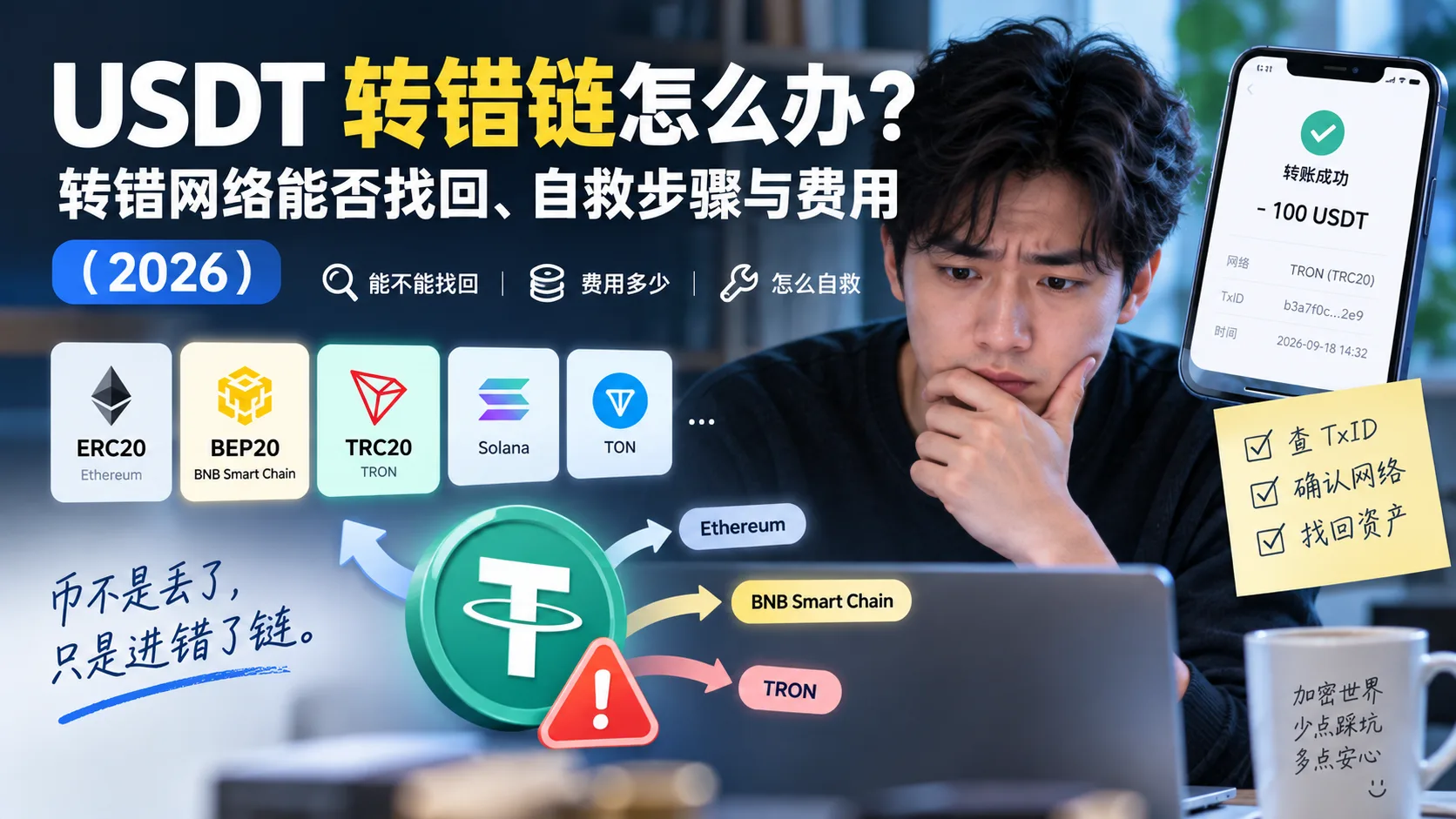
Table of contents

Binance new-user benefit
20% fee rebate
Official Binance sign-up · You must complete identity verification (KYC) to trade and withdraw
Sending USDT on the wrong network doesn't necessarily mean it's lost forever, but you also shouldn't assume it can always be recovered. Whether it can depends on one thing: where the coins ended up, and who controls the private key of that address. If the funds land in a compatible address whose private key you control, you usually have a chance to recover them yourself; once they reach an exchange, a custodial platform or someone else's address, recovery depends on whether the receiver supports it.
If you have the transaction hash, working out where the coins went takes a few minutes. The two things that hurt most are sending to a compatible-looking address on the wrong network and trusting a paid "recovery service".
Note: this article shares experience about recovering USDT sent on the wrong network and is not investment advice. On-chain transfers are irreversible and recovery is not 100% successful; check everything before you send, and be wary of any paid service that "guarantees recovery".
Quick overview
The conclusion first — find your case by "where the transfer went wrong":
| Where it went wrong | Chance of recovery | What to do |
|---|---|---|
| A wallet whose private key you control, and the destination address is yours on that network | Usually a chance | Confirm the actual network, then access it with a wallet that supports that network |
| An exchange / custodial platform | Uncertain, not guaranteed | Contact the receiver with the TxID, address, coin, network and amount |
| Someone else's address | Very low | Contact whoever controls the address |
| Exchange withdrawal to your own wallet, already confirmed on-chain | Depends on whether you control the destination address | Look up the TxID and proceed according to the actual network |
In one sentence: first locate "which address the coins ended up in and whose private key controls it" — a compatible address whose key you hold usually means self-rescue; everything else depends on the receiver. Before you start, save the transaction hash (TxID), destination address, coin, amount and actual network. The TxID is one of the most important pieces of information for locating an on-chain transaction, and it's usually what support asks for.
Who needs this / who doesn't
| Your situation | Suggestion |
|---|---|
| The transfer never arrived and you suspect the wrong network | Yes; start with "First, clear this up: a wrong network ≠ lost coins" below to locate the funds |
| You want to know in advance what to do if you get it wrong | Yes; focus on "The 4 cases" and "Self-rescue steps" |
| It's just slow and the block is still "pending" | Don't panic yet — it may simply not be confirmed; wait a few minutes and check the block confirmations |
| Someone messages you offering to "roll back the chain and get the coins back" | Be on guard immediately and jump to "Security risks" — this is almost always a scam |
Table of contents
- First, clear this up: a wrong network ≠ lost coins
- The 4 cases, each handled completely differently
- Self-rescue steps
- How much does recovery cost
- When to stop trying
- The 3 mistakes beginners make most often
- Security risks
- FAQ
First, clear this up: a wrong network ≠ lost coins
USDT lives on dozens of networks at the same time — TRC20 (TRON), ERC20 (Ethereum), BEP20 (BNB Smart Chain), Solana, TON and more.[1] The "network / chain" you select when transferring decides which chain the coins are sent to.
A wrong network doesn't make the coins vanish — it sends them into the wrong chain. For example, your wallet address is 0x..., you meant to use ERC20, but at withdrawal you selected BEP20 by mistake. Because Ethereum and BNB Smart Chain are both EVM-compatible networks with the same address format, the transaction can confirm on-chain, but the asset actually appears on BNB Smart Chain, not Ethereum — your wallet looks at Ethereum by default, so it "can't see" the coins, even though they are on BNB Smart Chain, in your corresponding address.[2]
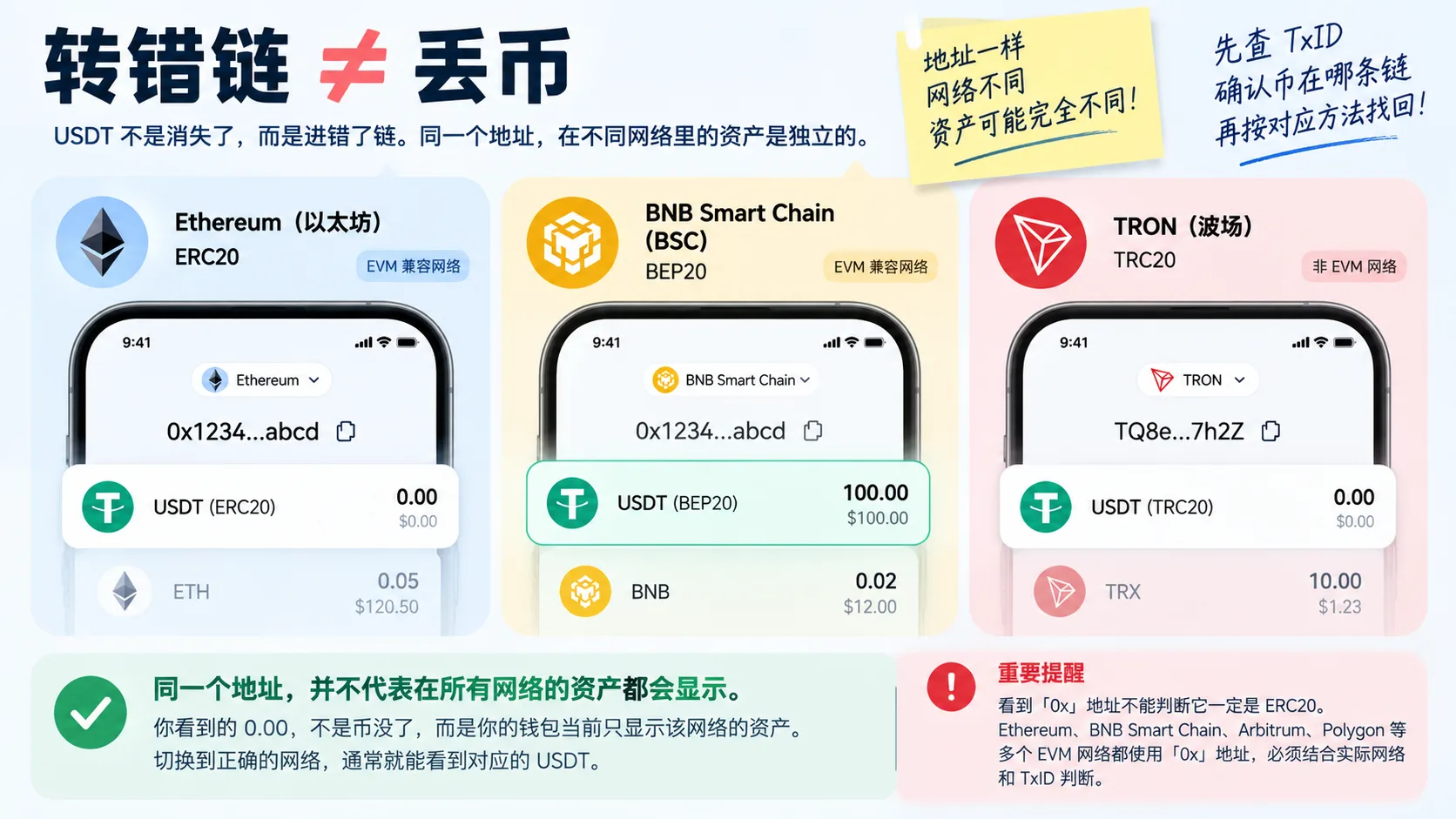
Figure: the same 0x address has independent assets on different EVM networks. Seeing a zero balance doesn't mean the USDT is gone; confirm the TxID and the actual network first.
So the first step is always locating "which chain and which address the coins are on now", not rushing to find someone. How to locate them:
- Get the transaction hash (TxID) of that transfer (it's in the transfer record);
- Look the TxID up in a block explorer (Tronscan for TRON, Etherscan for Ethereum, etc.);
- Check its "destination address" and "network" — that tells you where the coins actually went.
Which chain the coins are on and who owns the private key of the address decide how the 4 cases below are handled. Get this right and the rest is mostly following the manual.
The 4 cases, each handled completely differently
Case 1: to your own wallet (wrong network, but the address is yours)
This is usually the case with the best chance of self-rescue — provided that private key really does control the receiving address. The key is to first work out whether this is an EVM network or a different address system:
- A wrong network between EVM-compatible networks (Ethereum / BNB Smart Chain / Polygon / Arbitrum, etc., all
0xaddresses): the same wallet account usually uses the same0xaddress on those networks; switch the network in the wallet (say, to BNB Smart Chain), add the USDT contract manually, and the balance usually appears.[3] - Non-EVM networks such as TRON, Solana and TON: don't blindly apply "import the seed phrase and it comes back". First confirm the destination address format, whether the wallet supports that network, and whether your seed phrase / private key can actually derive the on-chain receiving address. If you can't be sure, don't import the key over and over, and never hand your seed phrase to a third party.
The key point: what matters isn't whether you have the seed phrase of some wallet, but whether that private key actually controls the on-chain address that received the USDT. Between EVM networks this is usually easy to judge; across different address systems you must verify the destination address and the key-control relationship first.
Case 2: to an exchange (wrong network, the address belongs to the exchange)
The coins landed in an exchange deposit address, but the exchange may not support that network, or you didn't deposit on the network it asked for. This case may be recoverable, but depends entirely on whether the receiving exchange supports that coin, that network and its recovery process — success is not guaranteed:
- Screenshot and save the TxID, deposit address, coin, amount and network;
- In the receiving exchange's app, find the "deposit not credited / recovery" entry and open a ticket, or contact support;
- The platform will assess whether recovery is supported and may charge a fee. But don't assume the exchange always offers manual recovery — for example, Binance's official guide updated in 2026 explicitly warns that funds deposited to Binance on the wrong network may not be recoverable by Binance. Before opening a ticket, check the receiving platform's latest deposit-recovery policy for that coin and network.[4]
Be patient with the timing: this isn't processed instantly and can take several business days or longer. When the mistake went to another exchange / third-party platform, contact the receiving platform, not the one you sent from.[5]
Case 3: to someone else's address (the address itself was wrong)
This is the worst case: the coins are on-chain, inside someone else's address, the chain is irreversible, and there is no undo button on your side.
The only hope is contacting the recipient and hoping they're willing to send it back. If they don't cooperate, the coins are essentially gone. So anyone who "guarantees recovery from someone else's address" is a scammer.
Case 4: wrong network selected at withdrawal (exchange → your own wallet)
A wrong network at withdrawal from an exchange is judged in two steps:
- If the funds are still on the exchange (not actually on-chain yet): contact support; this is usually simpler than an on-chain recovery;
- If they are already on-chain and the destination address is yours: judge it as "Case 1" — between EVM networks, switch the network and add the token; on non-EVM networks, first check whether the private key really controls that address.
Self-rescue steps
Using the most common case — "to your own wallet, but the wrong network" — work through the steps in this order:
Step 1: confirm which network the coins are on
Take the TxID to the block explorer of the relevant network and confirm which chain the coins actually landed on and what the destination address is. Don't guess from memory. Common block explorers:
| Network | Common block explorer | Address format |
|---|---|---|
| Ethereum / ERC20 | Etherscan | 0x... |
| BNB Smart Chain / BEP20 | BscScan | 0x... |
| TRON / TRC20 | Tronscan | Usually T... |
| Solana | Solscan | Base58 address |
| TON | TON Explorer / Tonviewer, etc. | TON address format |
Seeing a 0x address doesn't prove it's ERC20. Ethereum, BNB Smart Chain, Arbitrum, Polygon and several other EVM networks all use 0x addresses; you have to judge by the actual network and the TxID.
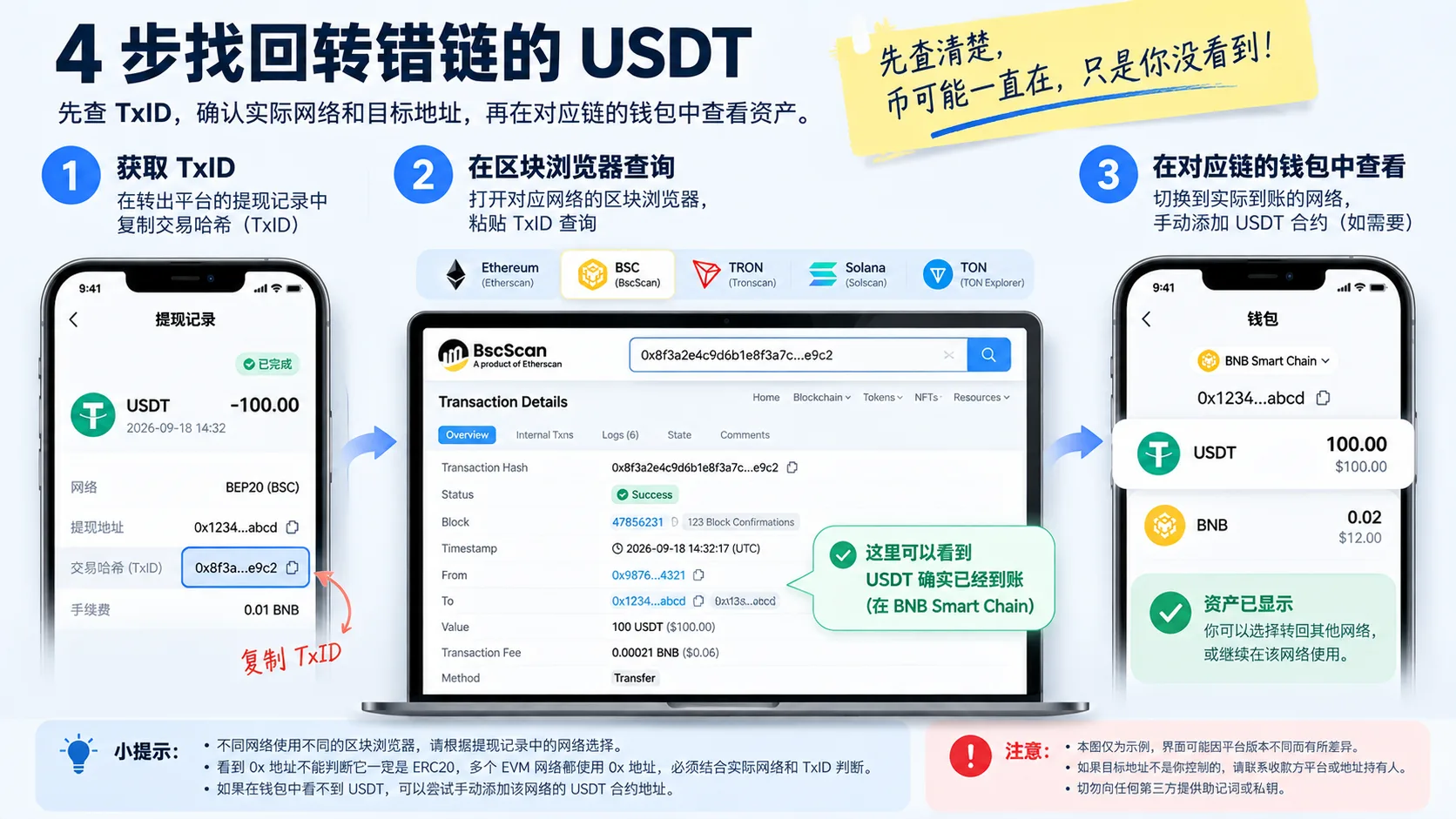
Figure: the basic self-rescue flow after a wrong-network USDT transfer — get the TxID from the withdrawal record, confirm the actual network and destination address in the block explorer, then switch the wallet to the matching network to view the asset.
Step 2: work out whether the destination address is yours
Check whether the address you entered was one of your own wallet addresses. If it was, go to the next step; if not, jump straight to "Case 3" and look for the recipient.
Step 3: recover on the matching network
- EVM networks (
0xaddresses): in the wallet, switch to the network where the coins actually are and add the USDT contract manually to see the balance; - Non-EVM networks (TRON / Solana / TON, etc.): first confirm the destination address format, whether the wallet supports that network and whether the private key really controls that address, then decide how to proceed; if you can't be sure, it's better not to import anything for now than to keep trying or hand over the seed phrase.
Step 4: once it arrives, decide whether to send it back or keep it
The coins are recovered. If you want to send them back to the original network, follow the flow in how to choose a network for a USDT transfer and first do a small test above the receiving platform's minimum deposit amount; if you keep them, make sure there's enough of that network's gas coin.
How much does recovery cost
The cost isn't a fixed number; it depends on network resources and platform policy:
| Scenario | Possible cost |
|---|---|
| Switching network / adding a token in an EVM wallet | Viewing the asset usually costs nothing |
| Sending the asset out again | Requires the network's native gas coin |
| Ethereum | Requires ETH; the cost moves with congestion |
| BNB Smart Chain | Requires BNB |
| TRON | Requires TRX / Energy / Bandwidth[6] |
| Manual recovery by an exchange | The fee and whether recovery is supported are decided by the platform |
The most overlooked cost: once the coins are on a network you didn't intend, sending them back requires that network's native coin for gas — Ethereum needs ETH, BNB Smart Chain needs BNB, TRON needs TRX (or Energy / Bandwidth). Without the matching gas coin, you can't even take the step of "sending the coins back" — it's the same trap as having USDT you can't send.
When to stop trying
Not every wrong transfer is worth recovering. Use this test:
| Your situation | Suggestion |
|---|---|
| The amount is small, and the gas / fees and waiting time could exceed the value of the coins | Stop, treat it as tuition and focus on prevention next time |
| The amount is large, and the coins are in a compatible address you control | Worth it; follow the self-rescue steps |
| The amount is large, but it went to someone else's address | The odds are very low; contact them first, and accept that it may not come back |
| Someone asks for an "escrow" or "fee" upfront to recover it | Stop immediately — it's a scam, see below |
A simple principle: if the cost and waiting time of recovery exceed the value of the coins, stop chasing it and put the effort into "how not to get it wrong next time" instead.
The 3 mistakes beginners make most often
Mistake 1: the first reaction is to search everywhere for a "rollback"
After a wrong network, many people panic and search "how to recover USDT sent on the wrong network", then get drawn in by the "professional recovery" ads mixed into the results — the ones that ask for an "escrow" or "technical fee" upfront. On-chain transfers have no rollback; anyone who asks you to send coins first is basically a scammer.
Lesson: when it goes wrong, first match your case against the "Quick overview" table in this article; don't let phishing links carry you away in the heat of the moment.
Mistake 2: treating "the address is right" as "the network is right"
The most common situation is copying the address correctly and selecting the wrong network; the coins never arrive, and you think "if the address is right it can't be wrong". In fact the address and the network are two different things — if the network is wrong, a perfect address doesn't help.
Lesson: on the transfer confirmation screen, check network, address and fee together; none of them can be skipped.
Mistake 3: skipping the test and sending a large amount all at once
Skipping the small test for convenience, then picking the wrong network and sending a large amount to another network. Even if it can eventually be recovered, you may have to re-confirm the network, prepare gas and add the token; if the receiver is an exchange or custodial platform, it can take even longer.
Lesson: new address, large amount — always do a small test above the receiving platform's minimum deposit amount and send the rest only after confirming it arrived.
Security risks
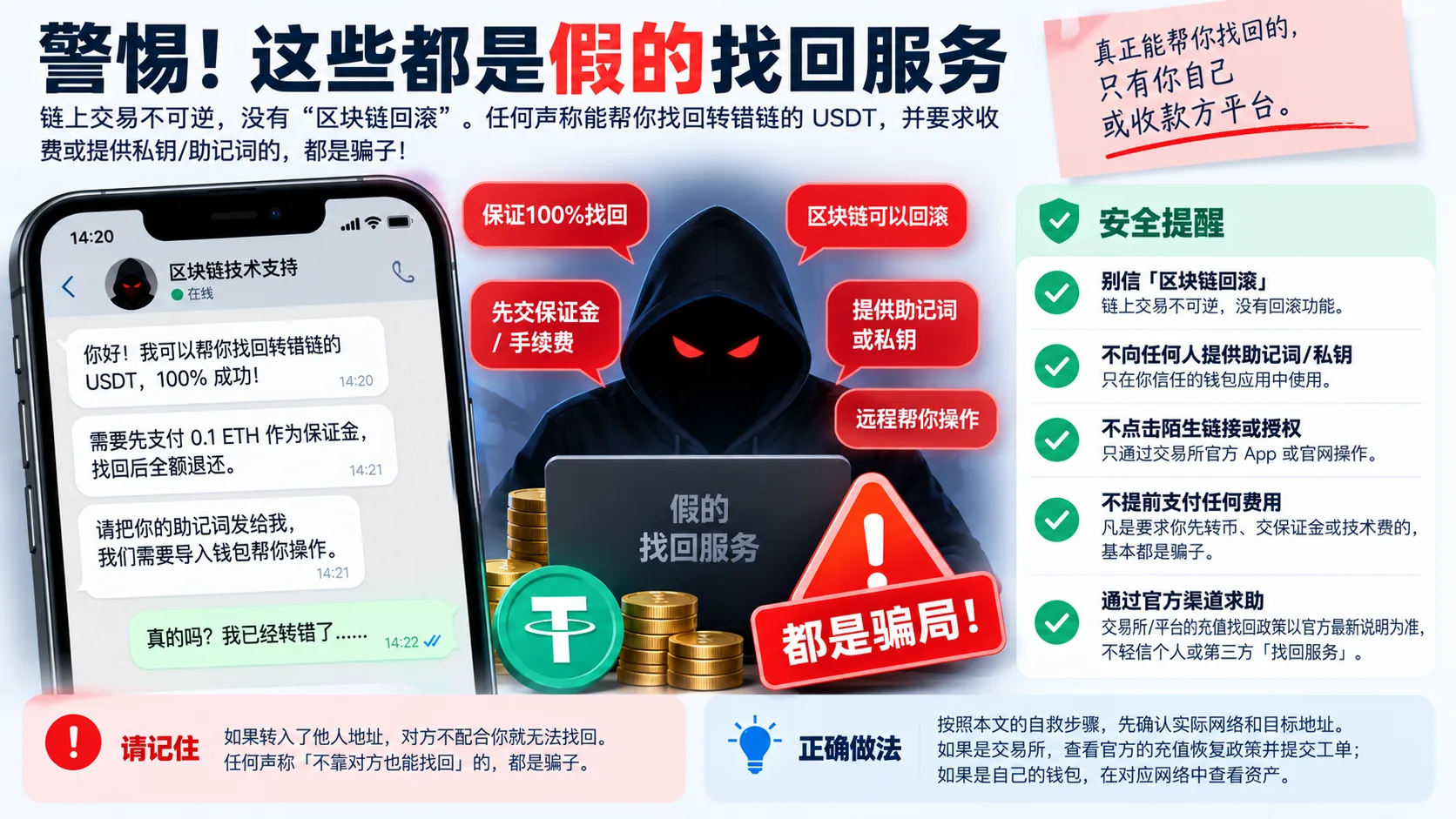
Figure: beware of so-called "USDT recovery services". Any third party claiming it can roll back the blockchain, asking for an escrow / technical fee upfront, or requesting your seed phrase or private key should be treated with maximum suspicion.
- Don't believe in "blockchain rollback": on-chain transactions are irreversible; anyone claiming they can "roll back and recover without the other side" is a scammer, and anyone who charges upfront or asks you to send coins "to verify" is even worse.
- Your seed phrase / private key only goes into your own wallet: recovery may involve importing a private key, and it should only ever go into a wallet app you trust — never to any "support agent" or "technician".
- Don't click unfamiliar links to "authorize" anything: during recovery, use only the exchange's official app or the wallet's official entry; beware of phishing sites and "one-click recovery" pop-ups.
- Not every wrong transfer can be recovered: if it went to an unsupported network, or the receiver doesn't support recovery or won't cooperate, the coins may truly be gone — don't be fooled by "guaranteed recovery" talk.
- Test with a small amount before sending a large one (not below the receiving platform's minimum deposit): this is the single most effective way to prevent a wrong transfer.
FAQ
Q1: If I sent USDT on the wrong network, will the coins disappear?
If the transaction already confirmed on-chain, the coins usually don't "disappear" — they're recorded on the network and destination address they were actually sent to. Whether you can access or recover them again depends on who controls the destination address, network compatibility, and whether the receiving platform supports it.
Q2: If I sent it to my own wallet on the wrong network, what's the fastest way to recover it?
First look up the TxID to determine which network the coins are on, then split into two cases: on an EVM network (0x address), switch to that network and add the USDT contract manually; on a non-EVM network, confirm whether the private key really controls that address first and then decide. If you can't be sure, don't import the key repeatedly.
Q3: If I sent it to an exchange on the wrong network, how long does recovery take?
There's no fixed time, and recovery is not guaranteed. Official channels usually run through a ticket and can take several business days or longer, depending on the platform, the coin and the network. Be patient, and don't believe "pay more to speed it up".
Q4: If it went to someone else's address, can I get it back?
Basically no, unless the recipient chooses to return it. On-chain is irreversible and you can't reverse it unilaterally. Anyone who "guarantees recovery from someone else's address" is running a scam.
Q5: How much does recovery cost?
There's no fixed number. Viewing the asset usually costs nothing; sending the coins back requires that network's native gas coin (Ethereum needs ETH, BNB Smart Chain needs BNB, TRON needs TRX/Energy/Bandwidth); the fee and whether manual recovery is supported are decided by the exchange.
Q6: How do I avoid getting it wrong next time?
Before transferring, check "coin, network, address" together; for a new address or a large amount, do a small test above the receiving platform's minimum deposit amount; and confirm the receiving platform supports the network you chose. Details in how to choose a network for a USDT transfer.
In one sentence
After sending USDT on the wrong network, look up the TxID first and confirm the actual network and destination address. If the funds land in a compatible address whose private key you control, you usually have a chance to recover them yourself; if they reached an exchange or custodial platform, recovery depends on the platform's support and is not guaranteed; if they went to an address someone else controls, usually all you can do is ask them to return it. Any recovery service claiming it can "roll back the blockchain" or asking for your seed phrase deserves immediate suspicion.
Next steps
- How to transfer USDT: TRC20 / ERC20 / BEP20, which network to choose — most wrong transfers start with the network; understand the choice logic first
- How to cash out USDT to your local currency (Binance / OKX P2P) — once the coins are back, this covers the cash-out
- How to choose a crypto wallet: hot or cold — work out which wallet should hold your seed phrase / private key
Data verification note
The key facts in this article were checked on 2026-10-16, one by one:
- Multi-network issuance of USDT: USDT exists on TRC20 (TRON), ERC20 (Ethereum), BEP20 (BNB Smart Chain), Solana, TON and several other networks at the same time, and the "network / chain" you select when transferring decides which chain the coins go to. Source: Tether official site.
- A wrong network ≠ lost coins: Ethereum and BNB Smart Chain are both EVM-compatible networks with the same address format; after picking the wrong network, the transaction can confirm on-chain but the asset appears in the same address on the other network, which the original wallet doesn't show by default. Source: Binance Academy.
- Self-rescue between EVM networks: between EVM-compatible networks, switching the wallet's network and adding the token contract usually makes the asset visible; on non-EVM networks (TRON / Solana / TON, etc.), because the seed phrase derives different addresses on each network, recovery is usually impossible, and the control relationship must be verified before importing a private key. Source: MetaMask Help Center.
- Exchange recovery is not guaranteed: Binance states officially that it generally does not provide a token recovery service and may only assist in specific situations (for example Smart Retrieval with a fixed fee and up to about 14 business days); a deposit made on the wrong network may not be recoverable. Source: Binance Help Center "Frequently Asked Questions on Incorrect Deposits".
- Contact the receiver, not the sender: when a withdrawal sent on the wrong network went to a third-party platform, contact the receiving platform's support; when it went to a third-party wallet, only the person who holds the private key or seed phrase of that address can recover it. Source: OKX Help Center.
- Gas cost on TRON: transferring on TRON requires TRX as the fee, and Energy / Bandwidth can also be used to offset it, so before sending the coins back from the wrong network you need the native coin ready. Source: TRON official documentation.
Disclaimer
This article is only an experience-based walkthrough of recovering from a wrong-network USDT transfer, and does not constitute any investment, financial or trading advice.
On-chain transfers are irreversible, and a wrong network or address can cause asset loss; not every case can be recovered. Users should act prudently according to their own situation, verify the network and address before transferring, test with a small amount first, be wary of any paid service that "guarantees recovery", and follow the laws of their jurisdiction. People under 18 should not trade crypto.
Exchange operations · USDT · Wallet security
Responsible for researching and organizing content on Binance, OKX, USDT transfers, withdrawals and wallet security. The steps and key data in this article are verified according to the content type, using real operation records, official platform documentation and public sources. Interfaces, fees and regional rules may change, so the article is reviewed and updated continuously.
Status: manual review · Last verified 2026-10-16
Reviewed by: Veldux editorial team
- Tether official site (USDT)Verifies the opening: USDT exists on TRC20, ERC20, BEP20, Solana, TON and several other networks at the same time, and the network you select decides which chain the coins are sent to
- Binance Academy: How to Recover Crypto Transferred to the Wrong Network on BinanceVerifies "wrong network ≠ lost coins": ERC20 and BEP20 are both EVM-compatible networks with the same address format, so a transaction can confirm on-chain while the asset lands on the other network, still inside the corresponding address
- MetaMask Help Center: I sent crypto to the wrong placeVerifies case 1: between EVM-compatible networks, switching to the matching network makes the asset visible; on non-EVM networks the seed phrase derives a different address on each network, so recovery is usually impossible
- Binance Help Center: Frequently Asked Questions on Incorrect DepositsVerifies case 2: Binance generally does not provide a token recovery service and may only assist in specific situations (such as Smart Retrieval, which charges a fixed fee and takes up to about 14 business days); a deposit made on the wrong network is not guaranteed to be recoverable
- OKX Help Center: What should I do if I mistakenly withdraw crypto via the wrong networkVerifies the timing and the counterparty in case 2: a withdrawal sent on the wrong network to a third-party platform requires contacting the receiving platform's support; to a third-party wallet, only whoever controls the private key or seed phrase of that address can recover it
- TRON official documentationVerifies "how much recovery costs": transfer costs on the TRON network are paid in TRX, and can also be offset with Energy / Bandwidth
- 2026-10-16UpdateAdded the evidence-chain superscripts and the "Data verification note"; the sources from the old "sources and notes" section (Binance / OKX / MetaMask / TRON) were completed with their official URLs and moved into sources, and the fact-check date was refreshed.
Editorial principles ineditorial policy,corrections policy。