
Where to keep crypto after buying: exchange, hot or cold wallet (2026)
Table of contents

Binance new-user benefit
20% fee rebate
Official Binance sign-up · You must complete identity verification (KYC) to trade and withdraw
After your first Bitcoin or USDT purchase, almost everyone gets stuck on the same question: where should this actually go? Exchange, hot wallet, cold wallet — there's a lot of advice out there and the more you search, the more confusing it gets. This article doesn't teach you to pick "the best wallet"; it first helps you decide one thing: given your situation, do you even need to move your coins off the exchange? If you want to get the "buying" step right first, start with Beginner.
Note: this article shares experience about asset storage and is not investment advice. Every storage method carries risk; there is no "absolutely safe" setup. Judge for yourself before acting, and be careful in the market.
Contents (click to jump)
- The essentials: start with this table
- First, understand: custody, self-custody, hot wallets and cold wallets
- A four-question test for which one fits you
- When to keep your coins on an exchange
- When to use a hot wallet
- When a hardware cold wallet is actually worth it
- Don't pick one: layered storage is the more mature approach
- If you use an exchange, check at least these 5 things
- If you self-custody: first understand how your wallet recovers
- USDT special note: a wallet supporting USDT ≠ supporting every network
- If your phone is lost, the app is deleted or the cold wallet breaks, are the coins gone?
- Veldux test: withdrawing 5 USDT from Binance to a Web3 Wallet
- The 7 risks beginners most need to guard against
- FAQ
The essentials
Here's a selection table first. Note that it uses how much loss you can absorb, not a specific amount:
| Your situation | More worth considering |
|---|---|
| Mainly for trading, and a loss wouldn't clearly affect your life | Exchange |
| Need on-chain transfers, DApps, DeFi | Hot wallet |
| Untouched for months or years, and the amount is too large to lose all at once | Cold wallet |
| The amount clearly exceeds what a single platform's risk can absorb | Split your holdings |
| Don't yet know how a wallet recovers, or can't back it up properly | Don't rush into self-custody yet |
In one sentence: where the coins go should follow "could you absorb losing all of this money", not "I heard cold wallets are safer". Don't mechanically use "$10,000" or "$100,000" as the hot/cold dividing line — the same $20,000 means completely different things to someone earning $5,000 a month and to someone with millions in assets.
First, understand: custody, self-custody, hot wallets and cold wallets are not the same axis
Many "wallet 101" articles compare exchanges, hot wallets and cold wallets on a single line, but they're mixing two different classification systems:
- By who controls the private key: custodial vs self-custody
- By whether the private key touches the internet: hot wallet vs cold wallet
So an exchange isn't the opposite of a hot wallet — exchanges themselves use both hot and cold wallets internally to manage assets. The more useful question for ordinary users is: who holds the assets, and how do you recover the wallet if the device is lost.
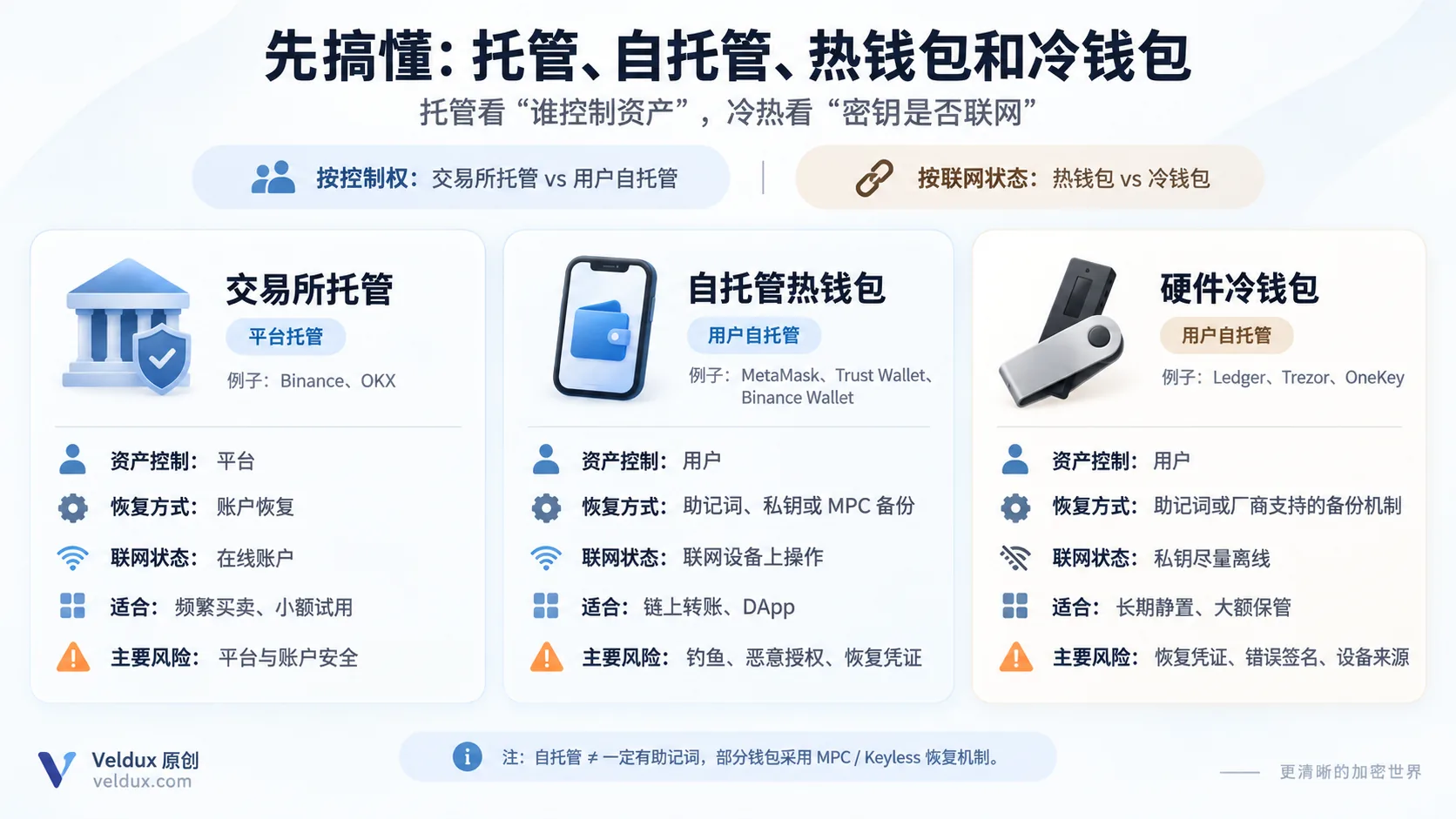
| Dimension | Exchange custody | Self-custody hot wallet | Hardware cold wallet |
|---|---|---|---|
| Asset control model | Platform custody | User self-custody | User self-custody |
| Typical examples | Binance, OKX | MetaMask, Trust Wallet | Ledger, Trezor, OneKey, Keystone |
| Common recovery method | Platform account recovery | Recovery phrase, private key or MPC backup | Recovery phrase or a vendor-supported backup mechanism |
| Connectivity | Online account | Usually operated on an internet-connected device | Private key kept offline as much as possible |
| Convenience | Highest | High | Relatively low |
| Main risk | Platform and account security | Phishing, malicious approvals, recovery credentials | Recovery credentials, signing mistakes, device supply chain |
With a self-custody wallet, you control the private key used to sign asset transfers; with exchange custody, the private key is usually controlled by the platform, and what you hold is a claim on assets in your platform account. Taking the private key back doesn't automatically reduce risk — it transfers risk from "platform risk" to "self-management risk". That's the point beginners misunderstand most.
A four-question test: which one actually fits you
Question 1: will you be buying and selling frequently over the next 1–3 months? Yes → exchange. No → next question.
Question 2: do you need to connect to DApps / DeFi? Yes → hot wallet. No → next question.
Question 3: would losing this money all at once be hard to absorb? Yes → consider a hardware wallet, or layered storage (see below). No → a hot wallet or an exchange is fine.
Question 4: do you understand what this wallet "recovers from" (a recovery phrase or an account backup), and can you back it up correctly? No → don't move large amounts into a self-custody wallet yet.
When to keep your coins on an exchange
This suits you if:
- The amount is small and you're still trading frequently or testing the waters;
- Your main activity is buying, selling and withdrawing between Binance / OKX;
- You haven't really understood "recovery phrase / private key / how a wallet recovers" yet.
A counter-intuitive but practical point: before you understand recovery phrases, private keys and network selection, rushing into a self-custody wallet adds new operational risk. For a beginner who is still learning, getting comfortable with account security and small transfers first, then deciding on self-custody, is usually the safer path. Self-custody shifts more security responsibility onto you — wallet recovery, signature confirmation, network choice and anti-phishing — while the wallet software, the device and the underlying protocols still carry their own risks.
For how to register and use Binance and OKX, see the Binance registration tutorial and the OKX registration tutorial; for which one to use when buying, see buying USDT on Binance vs OKX.
When to use a hot wallet
- You need to connect to DApps and take part in DeFi, NFTs and other on-chain activities;
- You often send and receive on-chain and want an address you fully control;
- The amount isn't large yet, but you want to experience "the private key is in my hands".
If you decide to use a hot wallet, start by learning about these types. The examples below are by use case only; they are not a safety ranking or a recommendation order. Wallet features, security mechanisms and supported networks can change, so check the official page before downloading:
| Need | Worth looking into |
|---|---|
| Ethereum / EVM / DeFi | MetaMask |
| Multi-chain mobile wallet | Trust Wallet |
| OKX ecosystem / multi-chain Web3 | OKX Wallet |
| Web3 self-custody inside the Binance app | Binance Wallet |
| Long-term large holdings | Hardware wallets such as Ledger / Trezor / OneKey / Keystone |
When a hardware cold wallet is actually worth it
A hardware wallet's value is "the private key stays offline", and it shows mainly with large assets that stay still for a long time:
- The amount is large enough that "losing it would clearly affect your life", and you don't plan to touch it for months or years;
- You already know how to back up a recovery phrase and sign transactions.
If it's just a few hundred dollars of experimental money, buying a $1,000+ hardware wallet doesn't make sense. The cold-wallet device itself isn't the asset — a damaged or lost device doesn't necessarily mean lost assets; what really matters is the recovery credential (the recovery phrase). Conversely, if someone else gets your recovery phrase, you can lose the assets even while the hardware wallet is still in your hand.
Hardware wallets such as Ledger, Trezor, OneKey and Keystone all aim to keep signing keys from being exposed long term on ordinary internet-connected devices; but their security architectures, backup methods and recovery mechanisms differ. Before buying, check the brand's official documentation and prefer the official site or authorised channels.
Don't pick one: layered storage is the more mature approach
Most people don't actually end up choosing one of exchange, hot wallet or cold wallet — they layer them, splitting assets by purpose to reduce single-point-of-failure risk.
For example (a purely educational example, not an allocation recommendation): suppose you hold a long-term USDT position — you don't necessarily keep it all in one place:
| Purpose | Storage |
|---|---|
| A small portion you plan to trade soon | Exchange |
| Funds for everyday on-chain transfers | Hot wallet |
| Core assets you won't touch long term | Cold wallet |
This isn't advice on "how to split the percentages", but a storage approach that reduces single-point-of-failure risk. The goal is to avoid exposing all your assets to the same platform, the same wallet or the same operational risk at once.
If you use an exchange, check at least these 5 things
Choosing an exchange is fine, but before you do, check whether the platform offers these account-protection capabilities:
- Does it support passkeys / 2FA (two-factor authentication)?
- Does it offer a withdrawal address whitelist (withdrawals only to whitelisted addresses)?
- Does it publish Proof of Reserves?
- Does it offer anti-phishing codes, withdrawal risk controls and similar account protection?
- Don't concentrate all your long-term savings and active trading funds in one account.
On Proof of Reserves: as of September 2026, Binance provides a Proof of Reserves balance-verification mechanism based on a Merkle Tree and zero-knowledge proofs, and users can verify whether their account balance is included in the reserve proof;[1] OKX currently publishes its 46th Proof of Reserves edition, using zk-STARK v2, and publishes reserve and liability verification files for users to download and check.[2]
But one thing must be stressed: PoR is a transparency tool, not a "security certification". It mainly helps users verify the platform's reserves at a particular point in time — a point-in-time snapshot — and cannot eliminate operational, legal, technical or other platform risks. "PoR passed" doesn't mean the platform won't fail; it's only one reference point.
If you self-custody: first understand how your wallet recovers
Self-custody wallets don't all work by "write down your recovery phrase". First work out which type you have — the recovery methods are completely different:
Traditional recovery-phrase wallets usually provide 12 or 24 words as the recovery credential. MetaMask, Trust Wallet and many hardware wallets support this method, but the exact backup and recovery mechanics depend on each wallet's official documentation.[3] The recovery phrase is one of your most important recovery credentials; if it's lost and you have no other valid backup, recovery is usually impossible. Three points on backup:
- Back up offline. For beginners, the simplest method is usually writing it on paper; for long-term or larger holdings, some people use metal recovery-phrase plates to reduce fire, water and other physical damage. Whatever medium you use, don't upload it to the cloud and don't keep screenshots in your photo library.
- Multiple copies, stored separately. Avoid losing everything when one copy is damaged or lost.
- Confirm it really restores. After creating a new wallet and before moving large assets in, use the wallet's official "backup verification" flow to confirm the words and their order are correct. Never enter your recovery phrase into an unfamiliar website, a support chat window or a so-called "verification tool".
MPC / Keyless wallets (such as Binance Wallet's Keyless Wallet): these don't necessarily provide a traditional 12- or 24-word phrase; instead MPC splits the key material into multiple key shares stored separately on the device, in cloud backups and elsewhere. The exact storage locations and recovery methods can change with the product version, device platform and user settings. Recovery still requires completing verification according to the wallet's backup method — cloud backup, a recovery password or a QR backup, for example.[4]
So "no recovery phrase" doesn't mean "no backup needed". With Binance Wallet, for example, if the recovery password is lost, even Binance cannot recover it for you. (Binance)
In one sentence: first ask "what does this wallet recover from", then decide how to back it up. Don't assume every self-custody wallet uses 12 words.
USDT special note: a wallet supporting USDT ≠ supporting every network
This point matters especially here, because USDT isn't "one coin on one chain": the same USDT exists on Ethereum, Tron, BNB Smart Chain, Arbitrum, Solana and several other networks.[5]
So "the wallet says it supports USDT" doesn't mean it supports the USDT network you plan to use. Before transferring, confirm two things: does the receiving wallet support the USDT network you plan to use, and does the network selected on the exchange's withdrawal page match the receiving side. Don't judge the network from the address format alone — addresses on Ethereum, BNB Smart Chain, Arbitrum and similar networks can look very similar. Choosing the wrong network is one of the key risks beginners need to guard against when transferring; see the USDT network selection guide.
If your phone is lost, the app is deleted or the cold wallet breaks, are the coins gone?
This is the scenario beginners panic about most. It splits into two cases:
On an exchange: losing your phone usually doesn't mean losing your coins. As long as you can regain access to the account through account recovery and security checks (such as KYC and 2FA recovery), the assets remain managed under the platform's records.
In a self-custody wallet: deleting the app or breaking the phone usually doesn't mean the coins disappear either — the coins are recorded on-chain. For a traditional recovery-phrase wallet, as long as the recovery phrase still exists, you can restore access in a compatible wallet; for an MPC / Keyless wallet, recovery uses cloud backup, a recovery password or similar mechanisms instead of a phrase. So first confirm which type you have.
What's genuinely dangerous is: losing the phone and the recovery phrase together. If the recovery phrase exists only on that phone (a screenshot, for example), losing the phone can make the assets unrecoverable. If you suspect the phone was stolen and the wallet may still be unlocked, don't just think about "reinstalling the app" — move the assets from a secure device first. If the device is simply damaged with no exposure risk, follow the official recovery process.
Veldux test: withdrawing 5 USDT from Binance to Binance Web3 Wallet
We actually ran the test below on September 10, 2026, to walk through "exchange to self-custody wallet" end to end and see whether the amount, fee and arrival time matched the platform preview. The receiving wallet was Binance Wallet's Keyless Wallet — it uses MPC to split the key material into multiple key shares and completes signing and recovery through the device, backups and a recovery password, without relying on a single traditional recovery phrase.
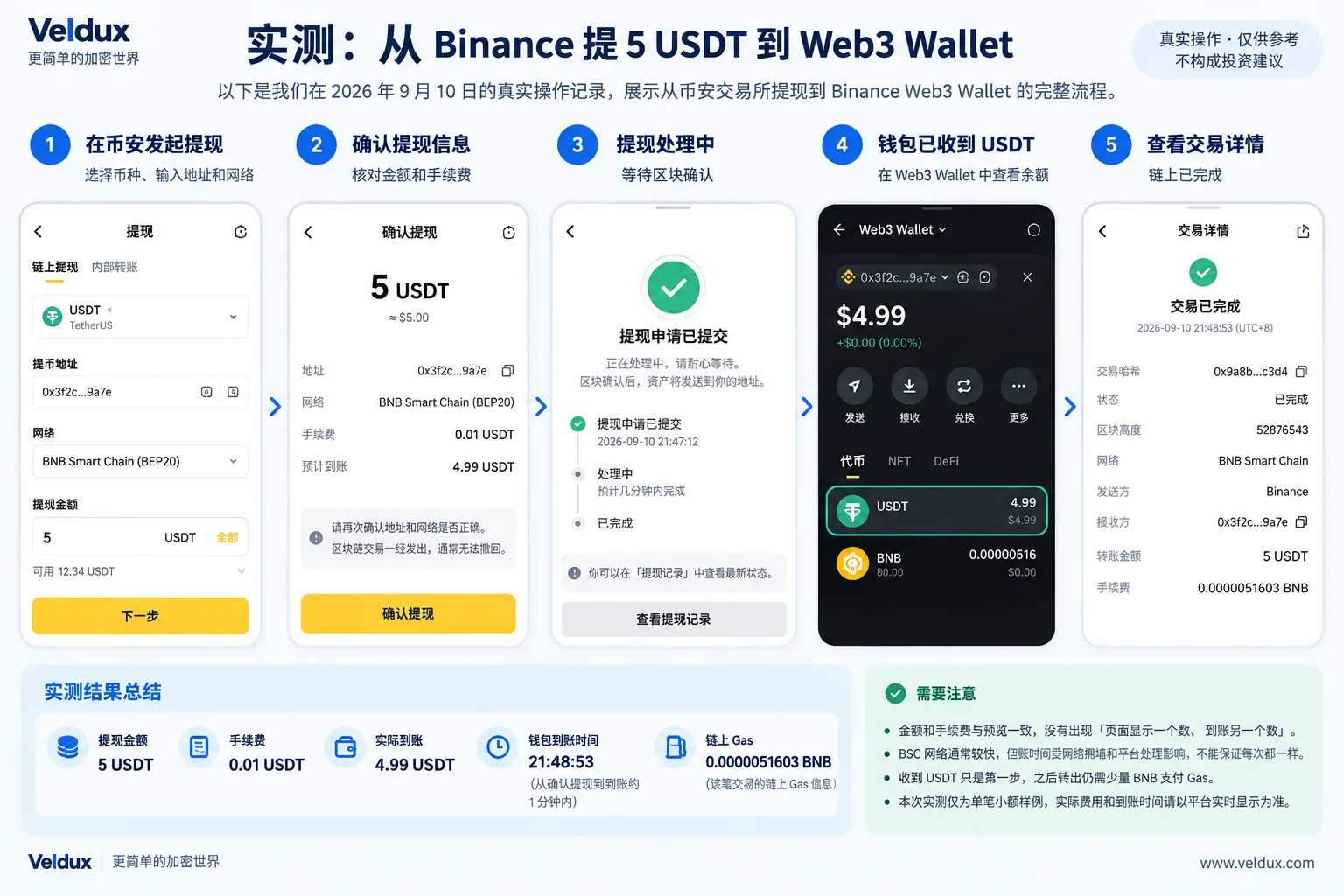
Figure 2: Veldux completed a small test withdrawal from Binance to Binance Web3 Wallet on September 10, 2026; the image summarises the full flow and the final result.
Before actually submitting a withdrawal, what beginners get wrong most isn't tapping "confirm" — it's the earlier address, network and fee check. This test used BNB Smart Chain (BEP20), withdrawing 5 USDT; the platform preview showed a 0.01 USDT fee and an estimated 4.99 USDT received.[6]
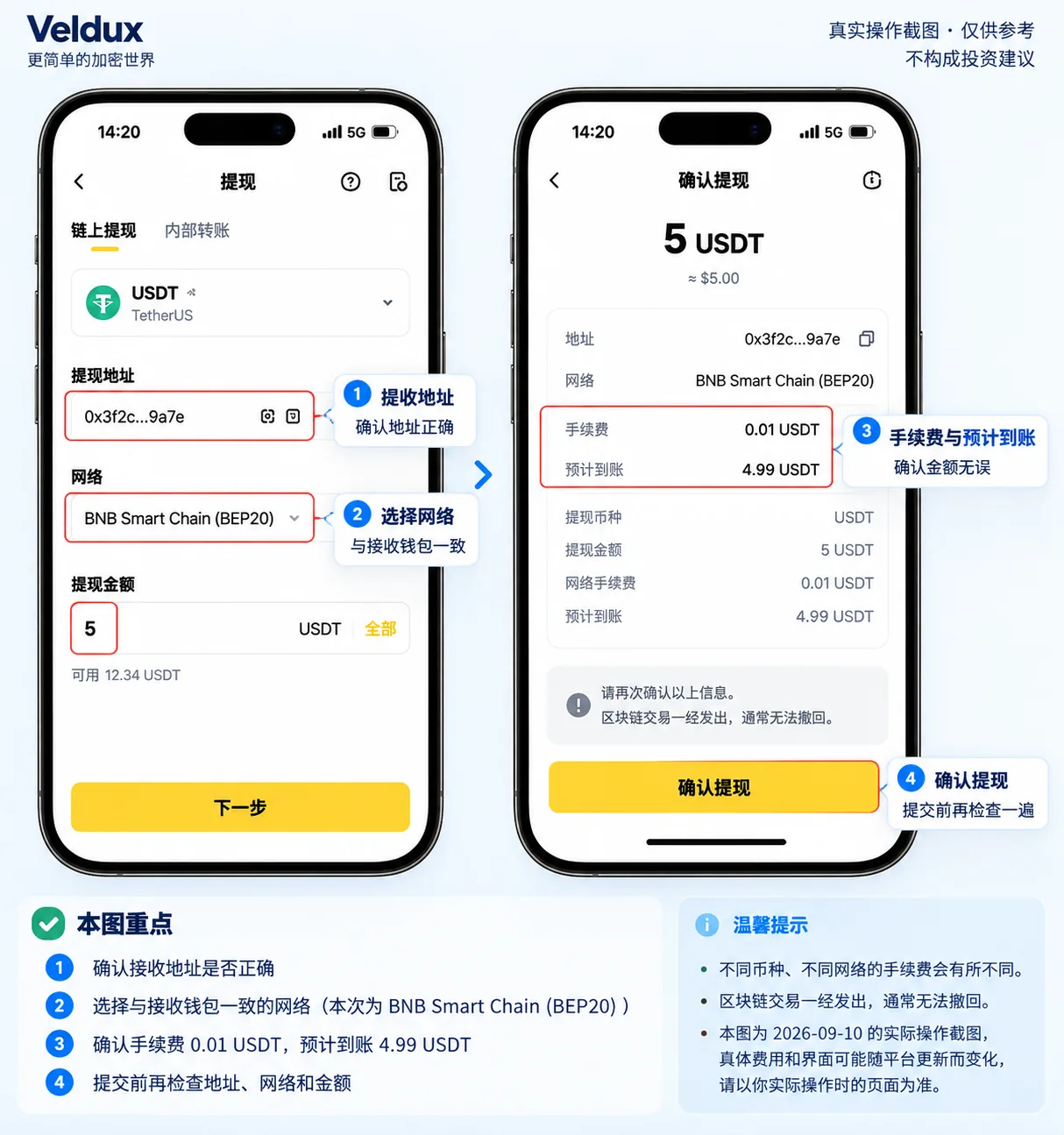
Figure 3: checking the receiving address, the BNB Smart Chain (BEP20) network, the 5 USDT amount, the 0.01 USDT fee and the estimated 4.99 USDT before withdrawing. When you do it, rely on the platform's live page.
| Test item | Actual record |
|---|---|
| Test date | 2026-09-10 |
| Sending platform | Binance |
| Receiving wallet | Binance Web3 Wallet |
| Asset | USDT |
| Withdrawal network | BNB Smart Chain (BEP20) |
| Withdrawal amount | 5 USDT |
| Binance withdrawal fee shown | 0.01 USDT |
| Estimated received | 4.99 USDT |
| Actually received | 4.99 USDT |
| Wallet arrival time | 21:48:53 |
| Wallet service fee shown | Free |
| On-chain gas shown in wallet details | 0.0000051603 BNB |
| Transaction status | Completed |
Three things are worth noting from this test:
1. The amount and fee matched the preview. The withdrawal confirmation page showed a 0.01 USDT fee and an estimated 4.99 USDT, and the wallet actually received 4.99 USDT — no case of "the page shows one number and a different one arrives".
2. Arrival was faster than expected, but we won't claim an exact number of seconds. We didn't time it to the second; we can only confirm that from confirming the withdrawal to seeing the 4.99 USDT in the wallet took roughly under a minute. Arrival time is affected by platform processing, block confirmations and network conditions, so don't assume every future transfer will be the same.
3. Receiving USDT is only the first step; sending it out later requires BNB for gas. The wallet details showed that this BSC on-chain transaction corresponded to about 0.0000051603 BNB in gas. Note: this is the network gas consumed by the on-chain transaction itself; it doesn't mean the receiving wallet deducted that BNB again. For this withdrawal, your visible cost is still the 0.01 USDT shown on Binance's withdrawal page — 5 USDT ended up as 4.99 USDT.
However, if you later send USDT out of this Web3 Wallet yourself, the wallet needs a small amount of BNB to pay BSC gas, otherwise it will say gas is insufficient and the transfer won't go through. That's one reason many people find "the coins arrived but I can't send them out" (see the FAQ below).
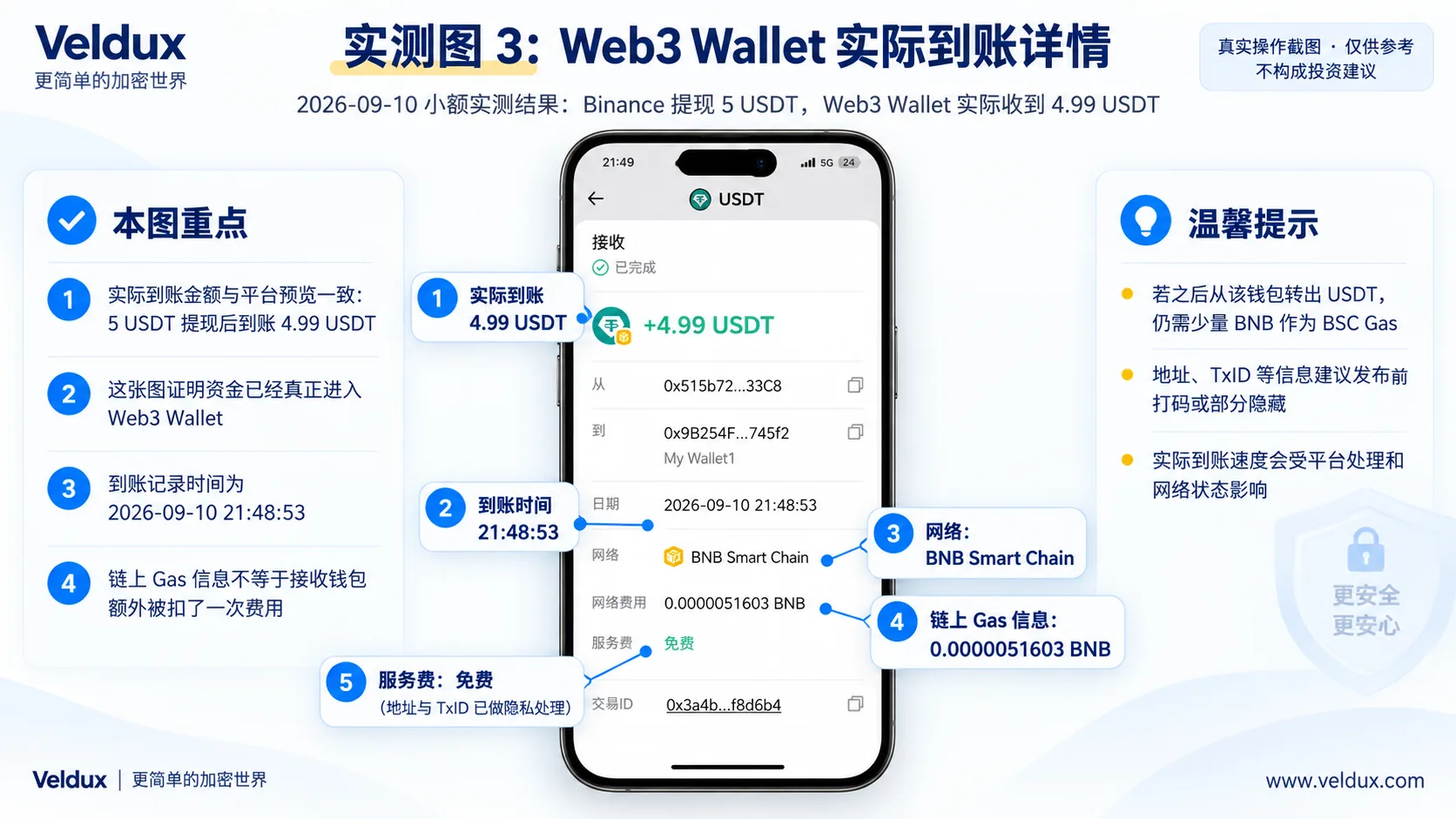
Figure 4: Binance Web3 Wallet finally received 4.99 USDT, recorded at 2026-09-10 21:48:53.
This test is a single small-amount sample used to demonstrate the flow; it doesn't represent the speed and fees of every transfer. Your actual amount, fees and arrival time depend on what the platform shows in real time when you transfer.
The 7 risks beginners most need to guard against
These are high-frequency wallet risks, and almost all of them come from "your own operations":
- Keeping a recovery-phrase screenshot in your phone's photo library or cloud drive — the photo library may be synced to the cloud and read by malicious apps, and if your cloud account is compromised the phrase is effectively handed over.
- Downloading a fake wallet app with the same name — "same-name wallets" in search ads or third-party links can be phishing versions; enter your recovery phrase and the assets are gone. Only use the official site or official app stores.
- Writing the recovery phrase in the wrong order or missing a word — the words and their order must be complete and accurate; one missing word, one typo or the wrong order can make the wallet impossible to restore. Check at least twice after writing it down.
- Choosing the wrong network / entering the wrong address — a correct address on the wrong chain, or an address swapped by clipboard malware during copy-paste, can make assets "disappear".
- Buying a second-hand hardware wallet — the device may have been opened or pre-loaded with the attacker's own recovery phrase; using it hands over your assets.
- Concentrating all long-term assets on one exchange — exchange custody is convenient, but platform operations, technical failures and account restrictions aren't fully within your control. If losing this asset all at once would be unbearable, consider whether to spread the risk.
- "Verifying" your recovery phrase on an unfamiliar website or support chat — anywhere that asks you to enter your recovery phrase is very likely phishing.
FAQ
What's the actual difference between a cold wallet and a hot wallet?
The core difference is whether the private key is offline. A hot wallet usually means the private key exists in an internet-connected environment or can sign directly on a connected device — convenient, but exposed to phishing and malware. A cold wallet (hardware wallet) keeps the private key offline and signs through the device only when transferring, giving stronger resistance to online attacks. But both require you to safeguard the recovery credential — a cold wallet protects against "being stolen online", not against "you leaking your own recovery phrase".
If I lose or forget my recovery phrase, can it be recovered?
With a traditional recovery-phrase wallet, if the phrase is lost and there is no other valid backup, recovery is usually impossible, and the wallet vendor cannot regenerate your original private key. That's why "backing up the recovery phrase" matters far more than "which wallet you choose". With an MPC / Keyless wallet, a phrase may not be used at all; recovery relies on cloud backup, a recovery password and similar mechanisms — check the official documentation to see what your wallet recovers from.
Is it safe to keep coins on an exchange? Can the exchange run off with them?
No storage method is "absolutely safe". Exchange risk lies in the platform's own operations, technology and compliance, and there have been historical cases of exchanges failing and users losing money; wallet risk shifts onto your own operations. Keeping small amounts and active trading funds on a large exchange is common practice; for long-term assets you couldn't afford to lose all at once, self-custody or splitting the holdings is worth considering.
Do beginners need a hardware wallet? How much does one cost?
It depends on your amount and your ability to absorb loss. For a few hundred dollars of experimental money, a $1,000+ hardware wallet doesn't make sense; it becomes worthwhile when the amount reaches "losing it would clearly affect my life" and stays untouched long term. Common brands range from a few hundred to over a thousand dollars, and prices vary by model, region and promotions.
Do I earn anything by holding coins in a wallet?
A wallet itself is only a storage tool and doesn't generate returns. Whether you earn anything depends on what protocol or product you put the coins into (staking, lending, yield products), and each carries its own risks that need separate assessment; this article makes no recommendation.
Is an exchange's deposit address the same thing as a wallet address?
They're not the same level of concept. The "deposit address" an exchange gives you is an address the platform holds for you, with the private key in the platform's hands; your own wallet address has its private key in your hands. Both are constrained by the "network / chain", and address formats differ by chain, so always double-check before transferring.
Is Binance Web3 Wallet a hot wallet or an exchange account?
It's a self-custody wallet (the key is maintained through multi-party computation and the assets are not held by the Binance exchange), but it's a different thing from your "exchange spot account". The balance in your spot account is your claim on assets on the Binance platform, while Web3 Wallet is an address whose keys you control yourself. In terms of connectivity it's a hot wallet (always online, usable on your phone); in terms of who owns the private key it's self-custody. So don't interpret "withdrew to Binance Web3 Wallet" as "still on the exchange" — it's already an address you control.
USDT has arrived in my wallet, so why can't I send it?
A very common reason is insufficient gas. Sending USDT on BSC requires BNB as the fuel fee, on Ethereum it requires ETH, on Tron it requires TRX. If the wallet holds only USDT and none of the network's native coin, you can't send it — top up a little of the corresponding native coin.
If, after reading this, you decide you're still in the "small test amounts, frequent trading, not ready for self-custody" stage
If the test above tells you you're still in the "small test amounts, frequent trading, not ready for self-custody" stage, keeping your assets on an exchange saves you operational steps. If you haven't registered yet, you can sign up through the links below:
- Register on Binance (referral code AMY568)
- Register on OKX (referral code AMY568)
The links above are affiliate links: registering through them may generate income for us, but it doesn't affect this article's objectivity. See the affiliate disclosure.
What to read next
- How to choose a cold wallet: Ledger, Trezor, OneKey or Tangem (2026) — once you've decided to self-custody, this covers which hardware wallet to pick
- Is Binance safe? 2026 licences, the SAFU fund and a realistic risk review — if you'll keep coins on an exchange, understand that layer of platform risk first
- Could USDT collapse? Is Tether actually safe? 2026 reserves, audits and freeze risk explained — the asset-level risk behind this article's "USDT multi-network" note
- How to withdraw from Binance to a wallet: steps, fees and network choice (2026) — once you decide to self-custody, the first step is moving coins off the exchange
- Sent USDT on the wrong chain? Whether it can be recovered, self-help steps and costs (2026) — what to do if the "wrong network" warning in this article actually happens
Data verification note
The key facts in this article were checked on 2026-10-16, one by one:
- Binance Proof of Reserves: Binance provides a Proof of Reserves balance-verification mechanism based on a Merkle Tree and zero-knowledge proofs, and users can verify whether their account balance is included in the reserve proof. Source: Binance Academy.
- OKX Proof of Reserves: OKX publishes reserve and liability verification files on its Proof of Reserves page for users to download and check (the article cites the 46th edition and zk-STARK v2; the edition number changes with updates). Source: OKX Proof of Reserves download page.
- How traditional recovery-phrase wallets recover: MetaMask, Trust Wallet and similar wallets provide a 12- or 24-word recovery phrase as the recovery credential; the exact backup and recovery mechanisms depend on each wallet's official documentation. Source: MetaMask official site.
- How Binance Keyless Wallet recovers: these MPC / Keyless wallets don't use a traditional recovery phrase; recovery is verified through cloud backup, a recovery password or a QR backup. With Binance Wallet, if the recovery password is lost, even the official team cannot restore it for you. Source: Binance Keyless Wallet official support document.
- USDT's multi-chain issuance: the same USDT is issued on multiple networks including Ethereum, Tron, BNB Smart Chain, Arbitrum and Solana, so "the wallet supports USDT" doesn't mean it supports the network you plan to use. Source: Tether official site.
- The 2026-09-10 small withdrawal test: in this test we withdrew 5 USDT from Binance to Binance Web3 Wallet on BNB Smart Chain (BEP20); the platform preview showed a 0.01 USDT fee and an estimated 4.99 USDT received. Binance lists withdrawal fees by network, and the actual rate depends on the live page. Source: Binance official withdrawal fee page plus our own operation record.
Disclaimer
This article is for general education and experience-sharing about wallet selection and asset storage. It is not investment advice, financial advice or a trading recommendation.
No storage method can be absolutely safe: exchange custody carries platform and custody risk, while self-custody carries private-key loss, operational mistakes, phishing and hardware failure risk. Users should judge carefully based on their own risk tolerance and comply with local laws and regulations. People under 18 should not trade crypto.
Exchange operations · USDT · Wallet security
Responsible for researching and organizing content on Binance, OKX, USDT transfers, withdrawals and wallet security. The steps and key data in this article are verified according to the content type, using real operation records, official platform documentation and public sources. Interfaces, fees and regional rules may change, so the article is reviewed and updated continuously.
Status: manual review · Last verified 2026-10-16
Reviewed by: Veldux editorial team
- Binance Academy: What is Proof of Reserves (PoR)Verifies the "at least check these 5 things on an exchange" section: Binance provides Proof of Reserves using a Merkle Tree and zero-knowledge proof mechanism, and users can verify whether their balance is included in the reserve proof
- OKX Proof of Reserves download pageVerifies the OKX reserve-proof explanation: public reserve and liability verification files are available for users to download and check (the article cites the 46th edition, zk-STARK v2)
- MetaMask official siteVerifies the "how does your wallet recover" section: traditional recovery-phrase wallets such as MetaMask use a 12/24-word recovery phrase as the recovery credential
- Binance Keyless Wallet official support documentVerifies the MPC / Keyless wallet explanation: Binance Wallet's Keyless Wallet does not use a traditional recovery phrase; recovery relies on cloud backup and a recovery password, and if the recovery password is lost even Binance cannot restore it
- Tether official site (USDT)Verifies the "USDT special note" section: the same USDT is issued on multiple networks including Ethereum, Tron, BNB Smart Chain, Arbitrum and Solana
- Binance official withdrawal fee pageVerifies the 2026-09-10 test data: Binance lists withdrawal fees by network; in this test, withdrawing 5 USDT on BNB Smart Chain (BEP20) showed a 0.01 USDT fee and 4.99 USDT received
- 2026-10-16UpdateAdded the evidence-chain superscripts and the "Data verification note", moved the official links from the old "Sources and verification" section into sources, and updated the fact-check date.
Editorial principles ineditorial policy,corrections policy。