
Buying USDT on Binance or OKX: a P2P comparison (2026)
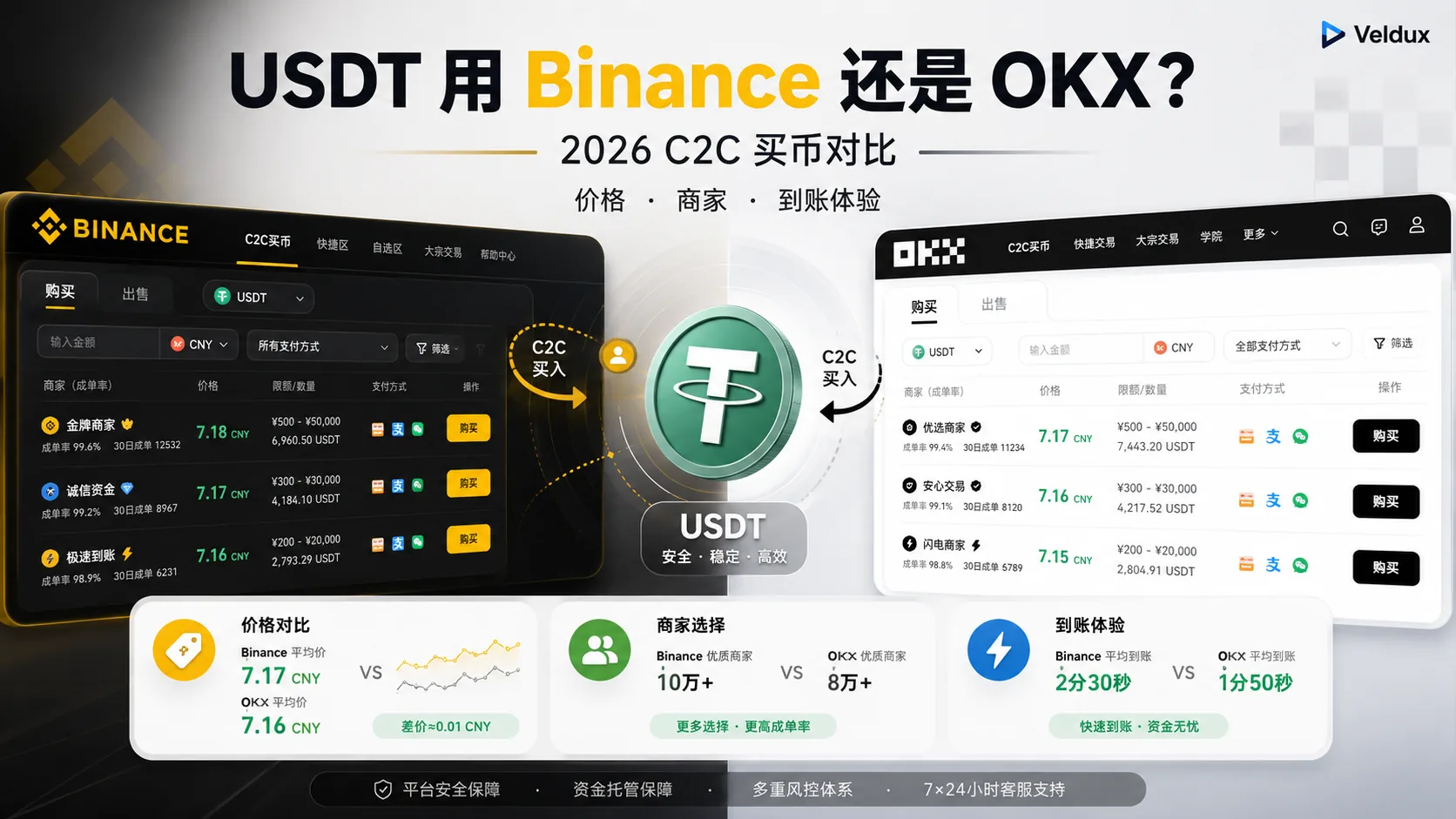
Table of contents

Binance new-user benefit
20% fee rebate
Official Binance sign-up · You must complete identity verification (KYC) to trade and withdraw
OKX new-user benefit
20% fee rebate
Official OKX sign-up · You must complete identity verification (KYC) to trade and withdraw
If you're about to buy USDT (a dollar stablecoin) and you're stuck on "Binance or OKX?", the real question isn't "which platform is better overall" but "for the same USDT purchase, which is cheaper, has better merchants to choose from and credits faster". This article focuses only on buying USDT — breaking down and comparing the P2P mechanism, price, merchants and arrival experience, without dragging in anything else.
Note: this article is an experience-based comparison of the buying process and is not investment advice. Crypto trading carries risk; fiat deposits especially require attention to bank risk controls. Be careful in the market.
The essentials
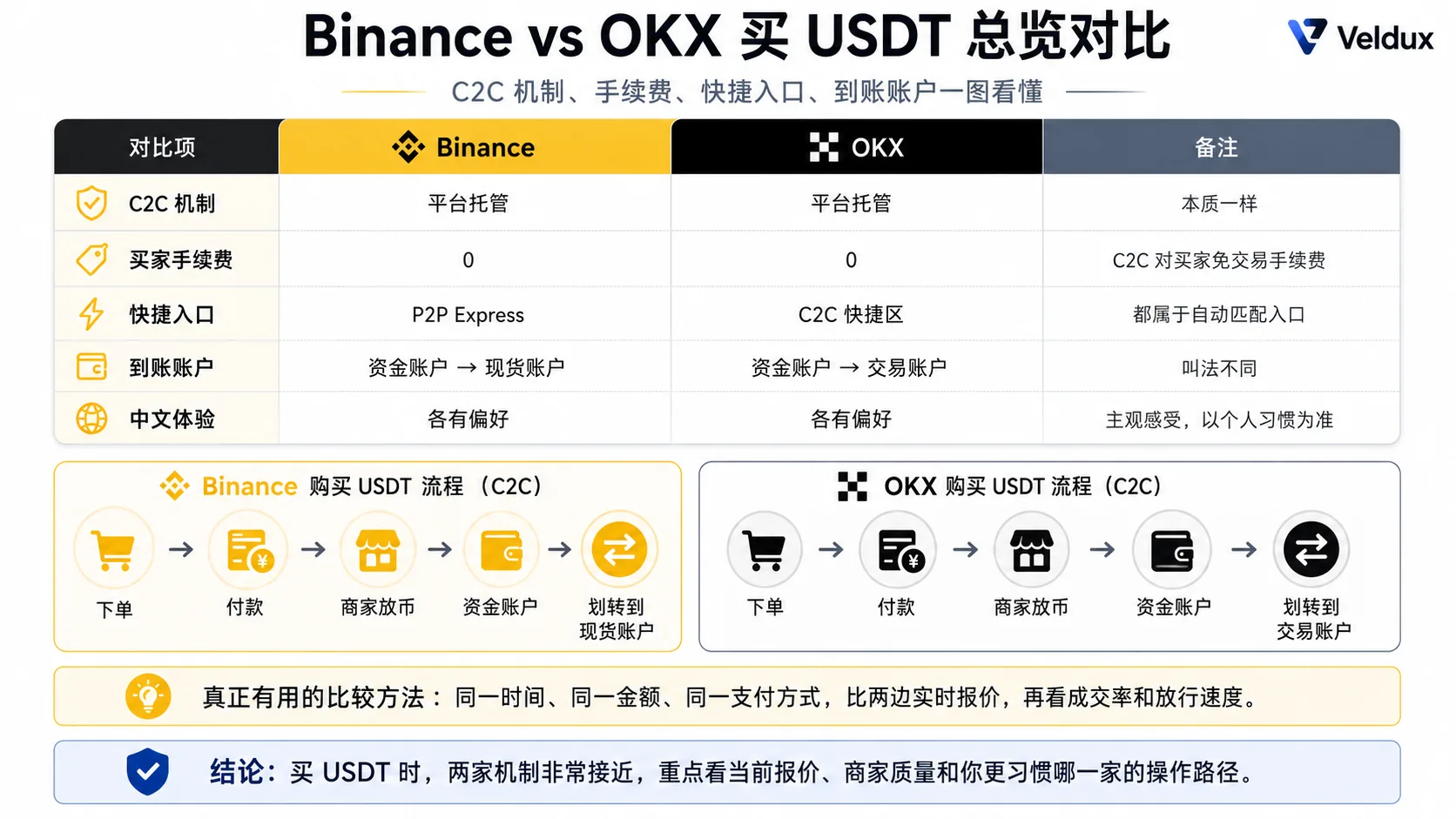
For buying USDT, Binance and OKX use almost the same P2P mechanism — both escrow through the platform, the merchant posts the order, you pay and the merchant releases; and neither charges the buyer a P2P trading fee. The differences really worth remembering are just a few:
| Dimension | Binance | OKX | Note |
|---|---|---|---|
| P2P mechanism | Platform escrow | Platform escrow | Same |
| Buyer fee | Free | Free | Same |
| Merchant quote | Live market price | Live market price | Close at the same moment |
| Express entry | P2P Express | Express zone | Both auto-match, slightly different UI |
| Credited account | Spot account (default) | Funding account → trading account | Different transfer rules |
| Interface and help docs | Preference | Preference | Subjective, depends on habit |
If you're only buying USDT, I won't assume Binance or OKX is always cheaper. The effective method is: at the same time, with the same amount and the same payment method, compare both P2P quotes, then order based on merchant completion rate and release speed. The two P2P mechanisms are very close; the differences show up more in entry-point design, how merchants are presented and the account structure after buying.
Who needs it / who doesn't
| Your situation | Recommendation |
|---|---|
| No account yet, about to buy USDT for the first time | You need it; look at the dimensions below before deciding |
| You already buy USDT on Binance and wonder whether to switch to OKX | No need to switch; the mechanism is the same and the difference isn't worth the hassle |
| You already buy USDT on OKX and wonder whether to switch to Binance | No need to switch; same reason |
| Large USDT purchase and you want to optimize every cent | You need it; focus on "how to compare the real cost of both at the same moment" |
Table of contents
- First, to be clear: the two P2P systems are essentially the same
- Price comparison: don't assume who's cheaper — learn to compare
- Merchant comparison: same logic, different availability
- Arrival experience compared
- My recommendation: how to choose
- FAQ
First, to be clear: the two P2P systems are essentially the same
Many people assume Binance and OKX P2P are two different things, but the underlying mechanism is identical:
- After you place an order, the platform freezes (escrows) the merchant's USDT
- You transfer payment to the merchant's designated account (bank transfer, Apple Pay, bank card or another supported method)
- The merchant confirms receipt and the platform releases the frozen USDT to you
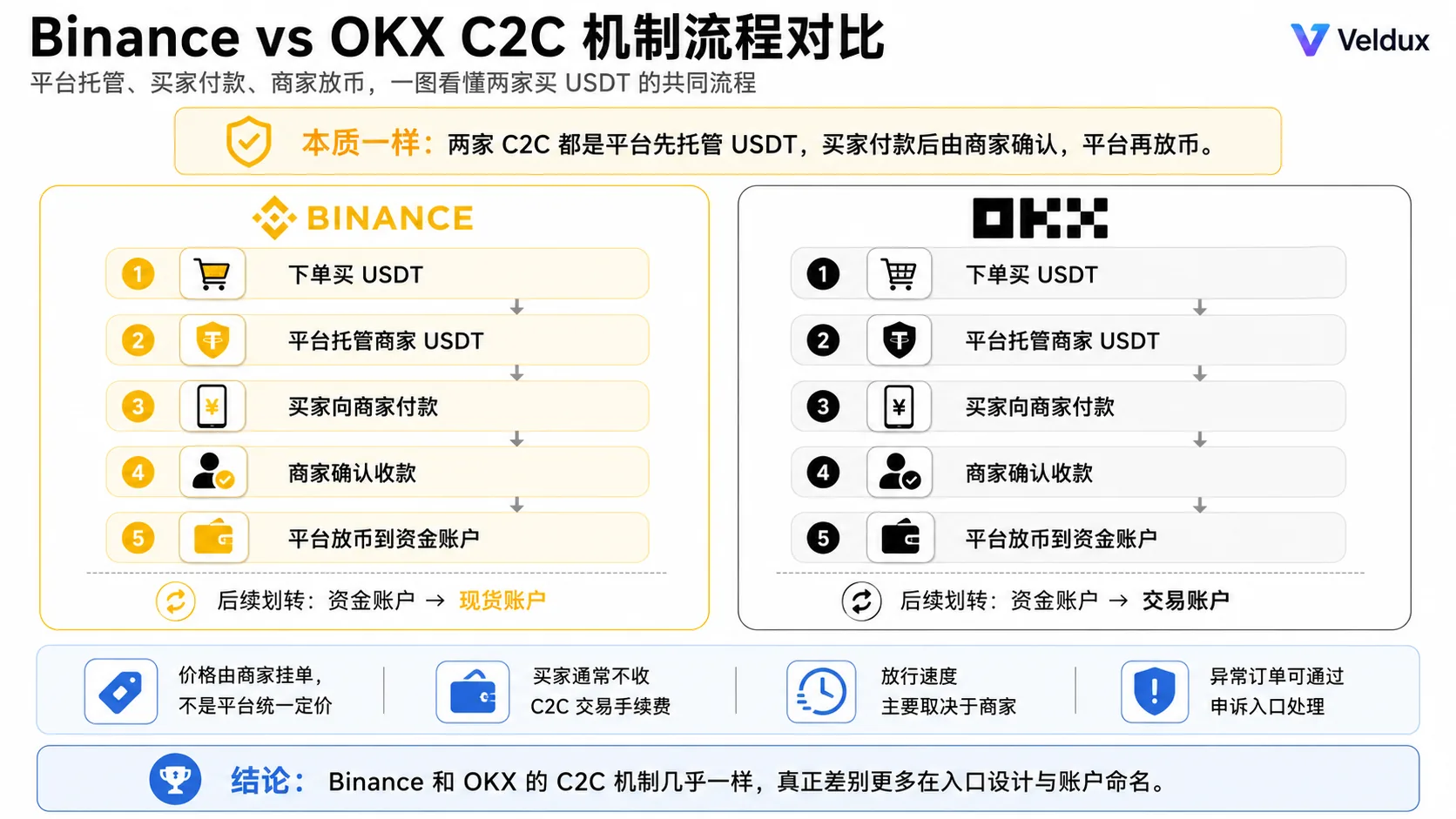
Prices are set by the merchants themselves, not by the platform; release speed depends on the merchant, not the platform. Neither charges the buyer a P2P trading fee (the payment provider or bank may charge its own fee).[1] So the difference in "which one to buy from" isn't in the platform mechanism, but in the merchant ecosystem and a bit of structural design. The dimensions below compare exactly those real differences.
The specific P2P rules are governed by the latest guidance on the Binance site and the OKX site.
Price comparison: don't assume who's cheaper — learn to compare
First, understand where the "premium" comes from
In P2P, the USDT price is set by the merchant and is usually a little higher than the live spot price — that gap is the premium. Merchants need to earn a spread and also bear the cost of fiat risk controls, so the premium is generally positive. It isn't fixed and moves with the market:
- When everyone is scrambling for USDT (for example, buying the dip during a crash), the premium gets pushed up
- When demand is quiet, the premium narrows and occasionally even turns into a discount
Which is cheaper? There's no fixed answer
At the same moment, the two quotes are usually very close — arbitrage smooths out obvious price gaps. But "who is cheaper" has no fixed conclusion:
- The actual number of merchants available changes with region, currency, payment method and time, and it's hard to reliably get a complete, like-for-like merchant count for both from public pages, so don't treat "one is always cheaper" as a long-term fact
- My advice isn't to assume which is cheaper, but to compare both current quotes directly with the same amount and the same payment method
Payment methods: both support the main options — don't memorize "who charges how much more"
Binance and OKX P2P both support bank transfer, Apple Pay and other local payment methods, and require the fiat currency and payment method of your registered region.[2] Quotes differ by payment method, but that changes with merchant and time of day, so don't memorize "Apple Pay is always X more expensive, bank transfer is always cheaper" — before ordering, look at the same amount under each payment method and judge from the price actually displayed.
How to compare the real cost of both at the same moment
The effective method is to open both accounts at the same time, fix the trading conditions and compare only the result:
| Item | Binance | OKX |
|---|---|---|
| Time | Same moment | Same moment |
| Purchase amount | $1,000 | $1,000 |
| Payment method | Bank transfer | Bank transfer |
| Merchant unit price | As shown on the order page | As shown on the order page |
| Estimated USDT received | As shown on the order page | As shown on the order page |
| Merchant completion rate | Actual | Actual |
| Average release time | Actual | Actual |
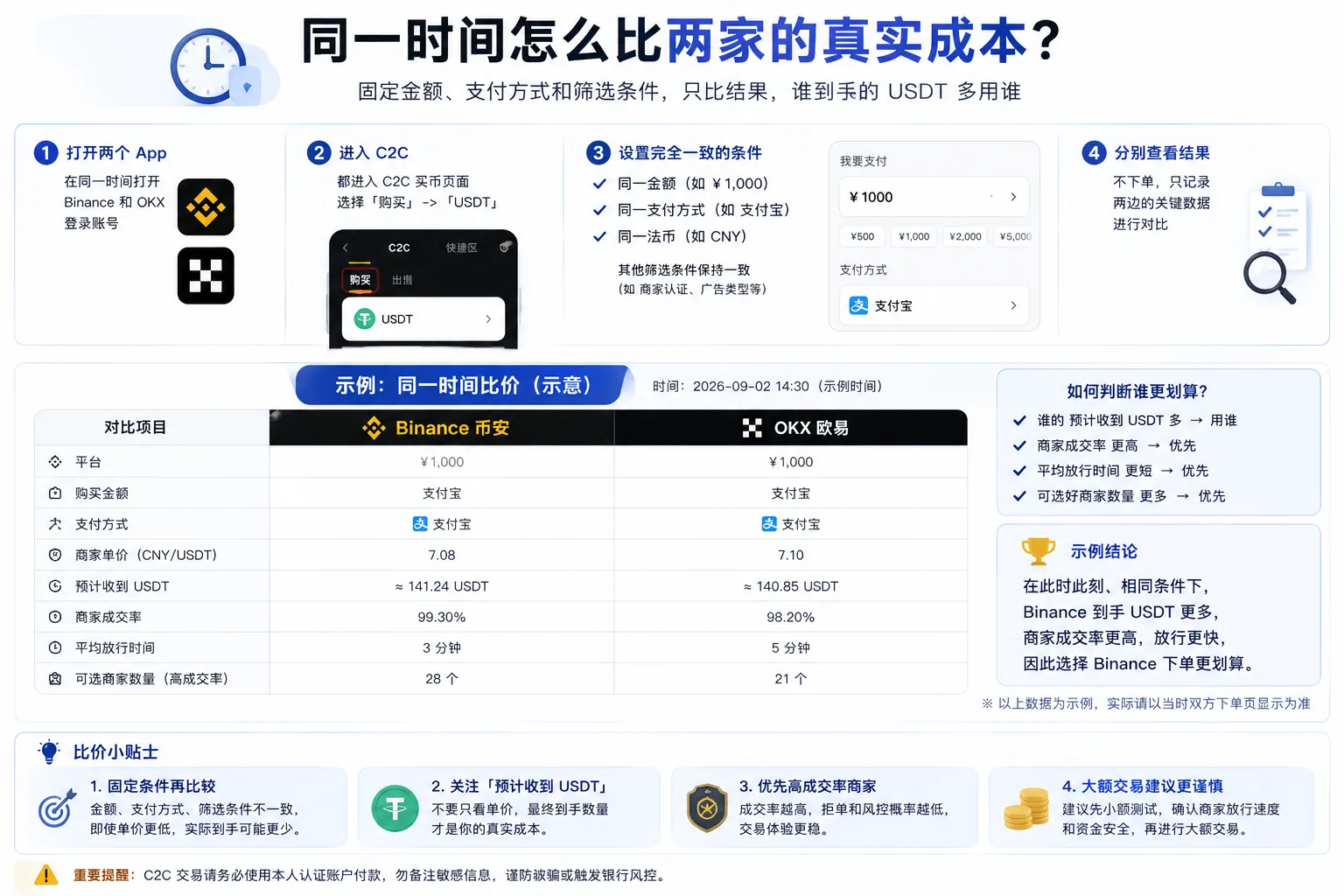
With the amount and payment method fixed, use whichever gives you more USDT, a higher merchant completion rate and faster release. That's what "comparison" in this article really means — not a set of stale fixed numbers, but a repeatable method for comparing prices.
Merchant comparison: same logic, different availability
What to check in a merchant: identical on both platforms
Learn one method and you can use it on both; check four metrics:
| Metric | What to look at |
|---|---|
| Completion rate | The closer to 100% the better; a low rate = frequent rejections and slow release |
| Completed orders | Thousands or tens of thousands is steadier; established merchants are less likely to disappear |
| Average release time | The shorter the better (minutes) |
| Verification level | Binance "Gold/Silver" badges, OKX "Verified/Preferred merchant" — higher levels post larger platform deposits |
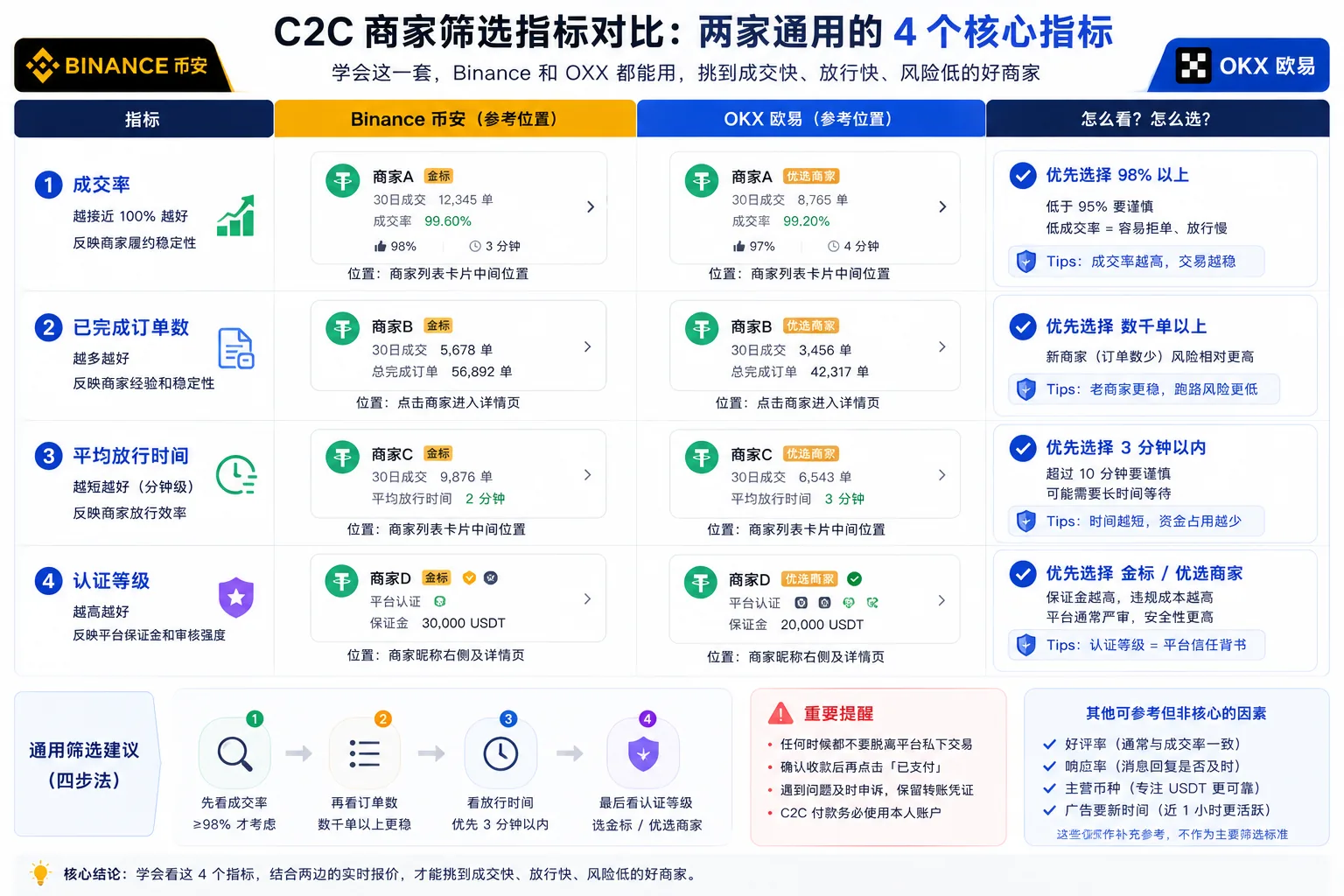
Merchant count: compare the good merchants you can filter now, not the total
The actual number of merchants available on either side changes with region, currency, amount, payment method and time. Rather than comparing a "total merchant count" that can't be fixed over time, it's more meaningful to compare how many high-completion, low-wait merchants you can filter under current conditions when you're ready to order.
Arrival experience compared
Release speed: both in the minutes range, depending on the merchant
Both follow "you pay → merchant confirms → platform releases", and most merchants release within a few minutes. How fast depends on the merchant you choose (look at the "average release time" metric) and has little to do with which platform you use. If release takes too long, both have an "appeal" entry on the order page to escalate to the platform.
The account after arrival: different naming
This is the easiest pitfall when switching platforms, and the only point that really counts as an "arrival experience" difference:
- Binance: since 2026-09-29 it defaults to the spot account, and USDT bought through P2P usually lands there directly with no transfer needed
- OKX: USDT bought through P2P goes into the "funding account" and must be transferred to the trading account before you can buy crypto
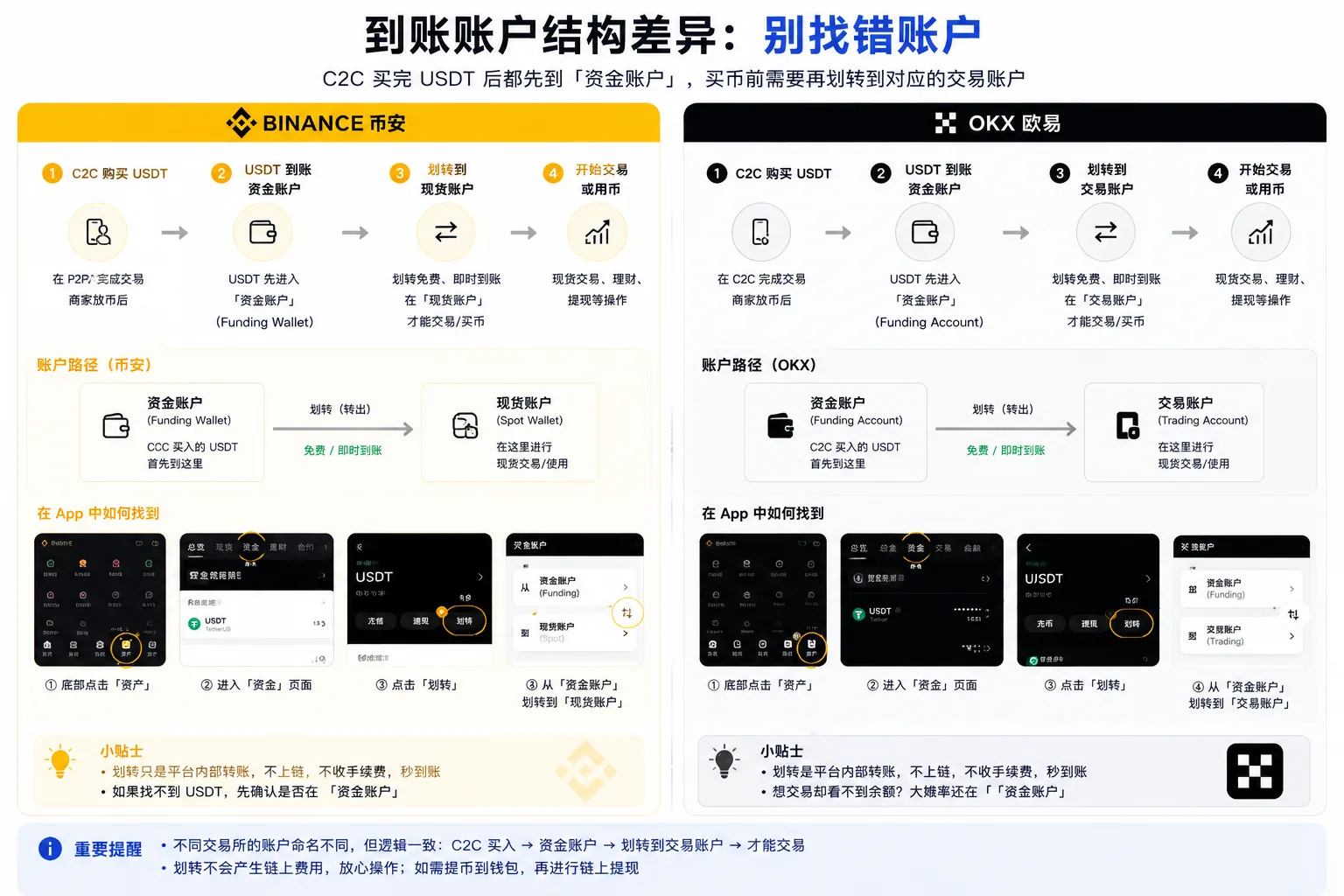
On Binance, bought USDT usually lands in the spot account and needs no transfer; on OKX you must transfer it to the trading account, and the transfer is free and instant. When switching from Binance to OKX, don't look for a "spot account" by the old name.
Appeals and support: interface and help docs are subjective
If something really goes wrong (the merchant doesn't release, the order gets stuck), you need platform support. In terms of interface and help documentation, I personally prefer OKX; but response speed varies with the type of issue and the queue at the time.
Express zones: the auto-matching entry on both sides
OKX and Binance both have "auto-match, skip merchant selection" express entries. Both work by having the system automatically match P2P orders — they are not a separate "direct purchase channel":
- OKX's Express zone: still part of the P2P system; based on the amount and payment method you enter, the system automatically matches suitable P2P orders, saving you the manual merchant filtering. The execution price still depends on the current P2P market quote, and what the order page shows is what applies. P2P itself charges the buyer no trading fee.
- Binance's P2P Express: a similar one-tap buying entry, also auto-matching P2P orders.
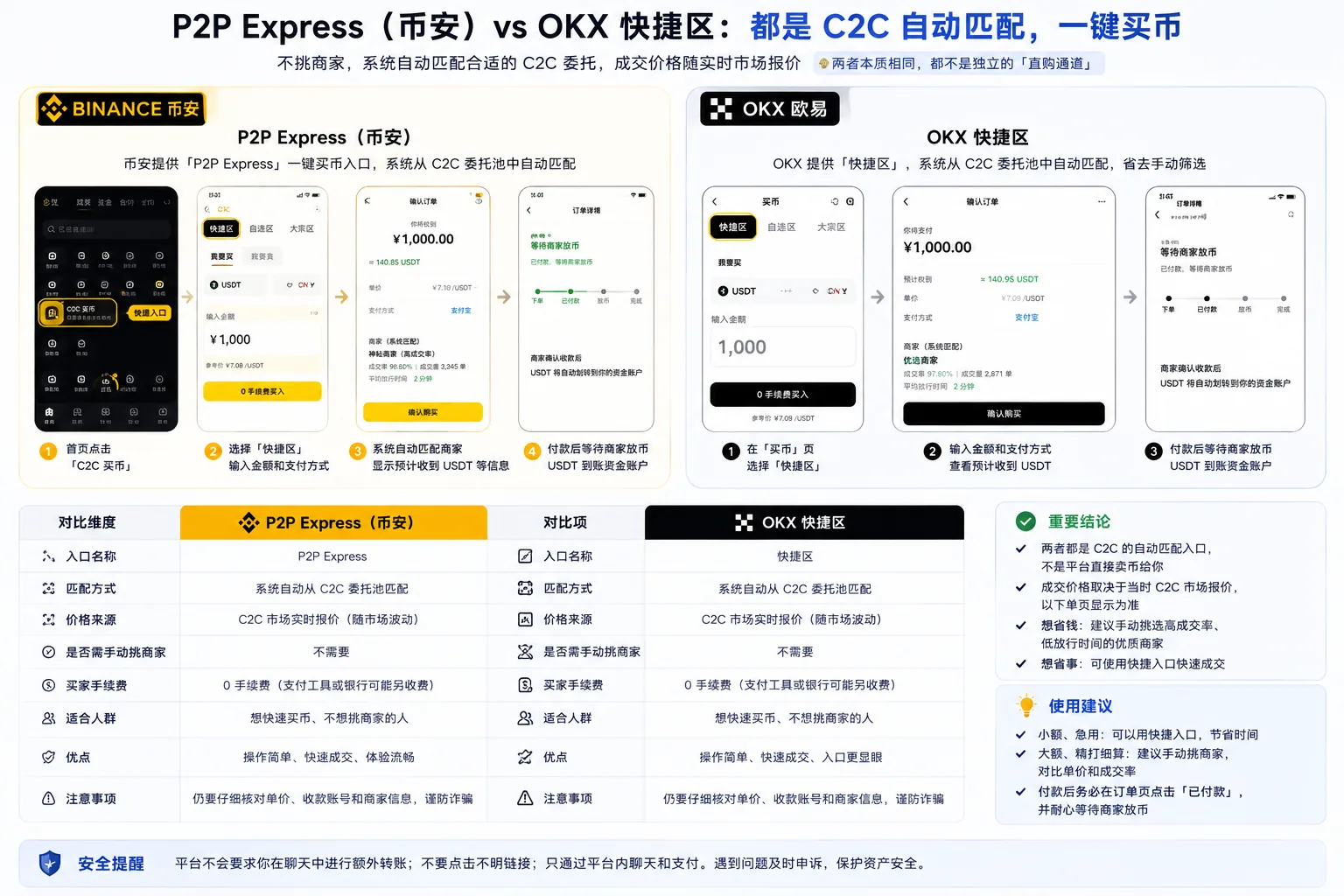
The difference is mainly UI: OKX's express entry is prominent on the "Buy Crypto" page, so beginners often tap straight into it. But functionally the two are the same — both "pick a merchant for you" rather than "bypass P2P". If you want to save money, filter merchants yourself by the metrics; if you want convenience, use the Express zone, but always check the actual unit price on the order page first.
My recommendation: how to choose
| Your situation | Recommendation | Reason |
|---|---|---|
| Want to save money and optimize | Compare both at the same time | Same amount and payment method; use whichever delivers more USDT |
| Want convenience, no merchant selection | Either Express zone works | Binance P2P Express and the OKX Express zone both auto-match |
| Prefer a particular interface and help docs | OKX | I personally prefer OKX's |
| Already comfortable with one | Keep using it | Same mechanism; the difference isn't worth switching |
| Deciding which platform to use overall | Binance | Most merchants, most tutorials, steadiest for beginners |
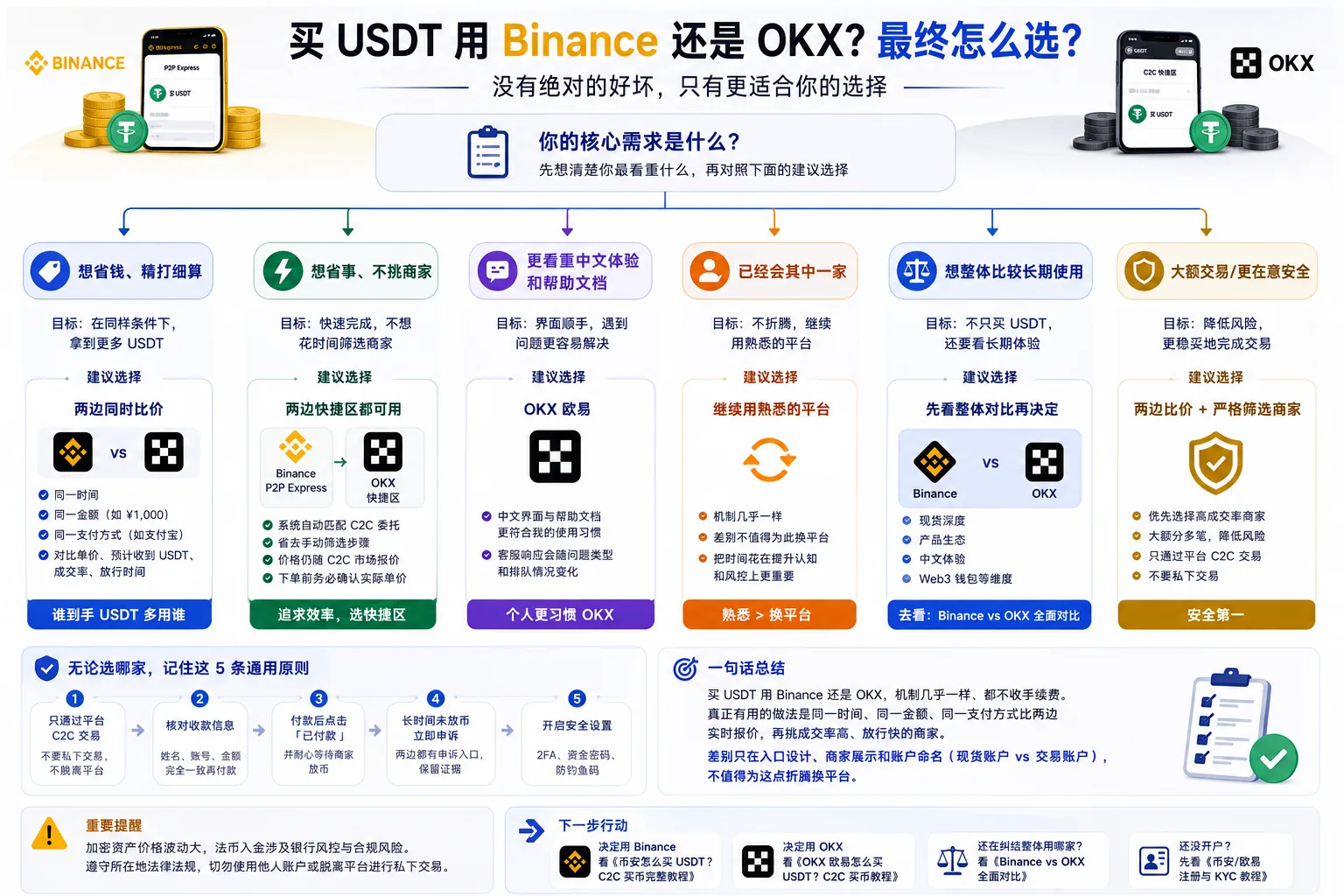
Core conclusion: for buying USDT itself, both work smoothly, and the gap in mechanism and arrival is too small to be a reason to choose one platform on its own. If you're still deciding which platform to use overall, read the full Binance vs OKX comparison, which lays out long-term dimensions such as spot depth, local-language support and Web3 wallets.
FAQ
Q1: Is USDT cheaper on Binance or OKX?
There's no fixed answer. At the same moment the two quotes are usually close, and the actual number of merchants available changes with region, currency, payment method and time. Don't assume which is cheaper; compare both live quotes with the same amount and payment method, and use whichever delivers more USDT.
Q2: Which platform has more reliable merchants?
The mechanism is the same, and both are judged on four metrics: completion rate, order count, release time and verification level. Reliability depends on the specific merchant, not the platform. Merchant numbers on both sides change with region, currency, payment method and time; when ordering, go by the good merchants you can filter at that moment.
Q3: Which one credits faster?
Both are in the minutes range, and release speed depends on the merchant you choose, not the platform. If you want speed, pick merchants with a short "average release time".
Q4: Where do I find my USDT after buying?
Since 2026-09-29, Binance defaults to the spot account, and bought USDT usually arrives directly with no transfer needed; on OKX it goes into the funding account and must be transferred to the trading account before you can buy crypto.
Q5: Is it worth opening both?
If you want to compare prices or have a backup, you can open both and check each before ordering. Keep the passwords separate and enable 2FA on both.
Q6: Express zone (quick buy) vs manually choosing a P2P merchant — which is better?
The Express zone is P2P auto-matching, not a separate direct-purchase channel; the price still follows the P2P market quote. If you want to save money, filter merchants yourself by the metrics; if you want convenience, use the Express zone — but either way, check the actual unit price on the order page first.
One-sentence summary
For buying USDT on Binance or OKX, the mechanism is almost identical and neither charges a fee, so don't assume one is cheaper. What actually works is comparing both live quotes at the same time, amount and payment method, then choosing merchants with a high completion rate and fast release. The real differences are only entry-point design, merchant display and account structure (Binance defaults to the spot account, while OKX requires a transfer to the trading account) — not worth switching platforms over.
If you're ready to register
| Your choice | What to do |
|---|---|
| Register on Binance through this site (20% rebate) | Register on Binance — the referral code AMY568 auto-fills |
| Register on OKX through this site (20% rebate) | Register on OKX — the referral code AMY568 auto-fills |
| No referral code | Go directly to binance.com / okx.com and register |
The first two rows are affiliate links: registering through them may generate income for us, but it doesn't affect this article's objective conclusions. See the advertising and affiliate disclosure.
What to read next
- How to buy USDT on Binance: a complete P2P tutorial — if you choose Binance, follow this walkthrough
- How to buy USDT on OKX: a complete P2P tutorial — if you choose OKX, follow this walkthrough
- Binance registration tutorial: the latest 2026 account opening and KYC steps — no account yet? Start here
Data verification note
The key facts in this article were checked on 2026-10-16, one by one:
- P2P mechanism and buyer fee: Binance P2P escrows the merchant's crypto; the buyer pays according to the order details and the platform releases once the merchant confirms receipt; the buyer is not charged an extra P2P trading fee, though the payment provider or bank may charge separately. Source: Binance P2P Help Center.
- Payment methods and identity requirements: OKX P2P supports bank transfer and other fiat payment methods and requires the fiat currency of your registered region and a payment account in your own verified name; payment details must match the account identity. Source: OKX explanation of P2P payment methods and identity requirements.
Disclaimer
This article is for information and experience-sharing about the USDT buying process. It is not investment advice, financial advice or a trading recommendation.
Crypto asset prices are highly volatile, and fiat deposits involve bank risk controls and compliance risk. Users should judge carefully based on their own risk tolerance and comply with local laws and regulations; never use someone else's account or trade privately outside the platform. People under 18 should not trade crypto.
Exchange operations · USDT · Wallet security
Responsible for researching and organizing content on Binance, OKX, USDT transfers, withdrawals and wallet security. The steps and key data in this article are verified according to the content type, using real operation records, official platform documentation and public sources. Interfaces, fees and regional rules may change, so the article is reviewed and updated continuously.
Status: manual review · Last verified 2026-10-16
Reviewed by: Veldux editorial team
- Binance P2P Help CenterBinance P2P trading rules — the platform escrows the merchant's crypto, the merchant releases after the buyer pays, and the buyer is not charged an extra P2P trading fee
- OKX explanation of P2P payment methods and identity requirementsOKX P2P requires the fiat currency and payment method of your registered region, in your own verified name; payment details must match the account identity
- 2026-10-16UpdateAdded the evidence-chain superscripts and the "Data verification note", and updated the fact-check date.
Editorial principles ineditorial policy,corrections policy。