
How to choose a Binance P2P merchant (2026): rates and volume
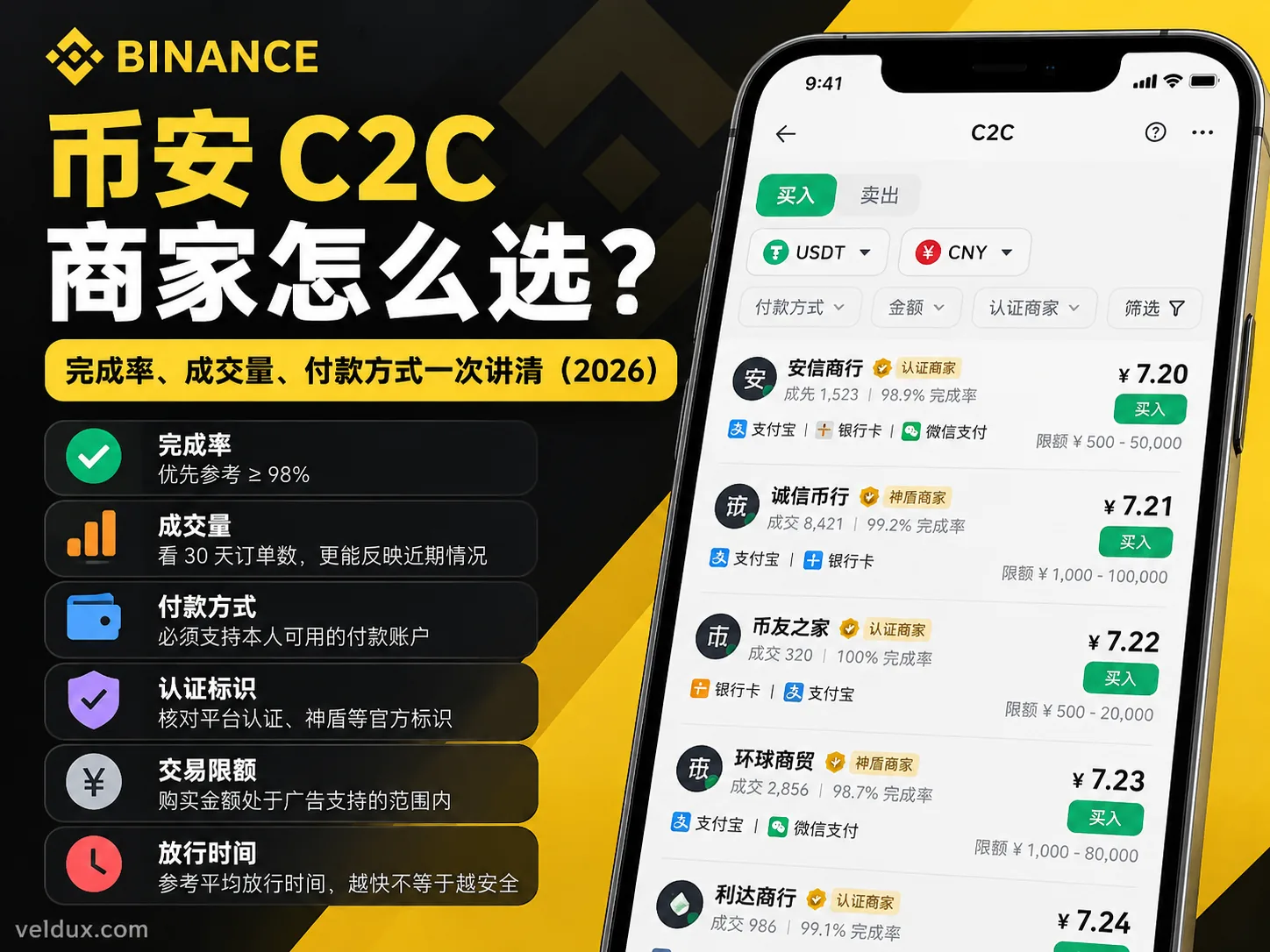
Table of contents

Binance new-user benefit
20% fee rebate
Official Binance sign-up · You must complete identity verification (KYC) to trade and withdraw
How do you choose a Binance P2P merchant? The first time you buy USDT, don't just pick the cheapest advertiser, and don't stare only at a 100% completion rate.
Filter by payment method and order size first, then look for verified merchants with a high completion rate and a recent, continuous trading record, and only then compare price. You can prioritise 98% or above, but always read it together with the order count.
A merchant showing 100% completion with only 8 orders is not necessarily a better pick than one at 98.7% with 1,500 orders. The filtering itself takes about 30 seconds once you know which fields matter — most of the damage comes from skipping the two shortcuts above. Here is how to do it step by step in the Binance app.
How to choose a Binance P2P merchant: check these 6 indicators first
| Indicator | How to use it |
|---|---|
| Completion rate | Prioritise merchants at 98% or above, read together with order count |
| Orders in the last 30 days | Prefer merchants with a recent, continuous trading record |
| Verification badges | Check the platform verification badge, the Shield badge and the rules that apply |
| Payment method | Must support a payment account you can actually use yourself |
| Order limits | Your purchase amount must fall inside the range the ad supports |
| Release time | Look at the average release time and the order terms; faster does not mean safer |
These six do not carry equal weight. Payment method and limits decide whether you can trade at all; completion rate and order count compare the fulfilment record; verification badges, trading terms and unusual behaviour need a separate check.
Don't treat a 99% completion rate alone as proof that a merchant is safe.
What is a Binance P2P merchant, and who are you actually paying?
Binance P2P is a way to buy and sell crypto directly between users.
The merchant is a counterparty posting buy and sell advertisements through the Binance platform — it is not Binance selling you USDT directly. Some advertisers are verified by the platform and carry the corresponding verification badge.
Taking a fiat purchase of USDT as an example:
- You choose a merchant on the Binance P2P page and submit an order.
- The platform holds the seller's crypto under the order mechanism.
- You pay the merchant using the details shown on the order page.
- The merchant confirms receipt and releases the USDT through the platform.
- You see the credited assets in your Binance account.
Binance's escrow mechanism reduces the risk that a counterparty walks away, but it cannot guarantee that a bank payment won't be disputed, and it does not mean every trade is free of fraud, account freezes or other compliance risk.
The most important distinction here: picking the merchant who releases fastest is not the same as picking the merchant with the lowest funding risk.
What's the difference between a verified merchant and a regular one?
Binance's official documentation says a verified merchant shows a verification badge next to the nickname.[1] Verification means the merchant met the platform's application and review conditions — not that Binance guarantees every trade they do is safe.
A beginner doesn't need to memorise every merchant tier; just learn to recognise the real badges on the official page and understand what each guarantee covers.
How to filter P2P merchants in the Binance app (in 30 seconds)
To buy USDT you don't need to open every merchant's profile one by one.
Use Binance's built-in filters to remove clearly unsuitable ads first, then compare what's left.
Step 1: open the P2P section
Open the Binance app and sign in.
Follow this path:
Home → Add funds → Buy crypto with P2P → P2P section
The entry name or position may differ between app versions; go by what your app currently shows.
Once inside:
- Set the direction to "Buy".
- Choose the coin "USDT".
- Choose the fiat currency available to your account.
- Enter the amount you plan to spend.
If you haven't completed identity verification, or the service isn't available in your region, you need to resolve the account eligibility question first.
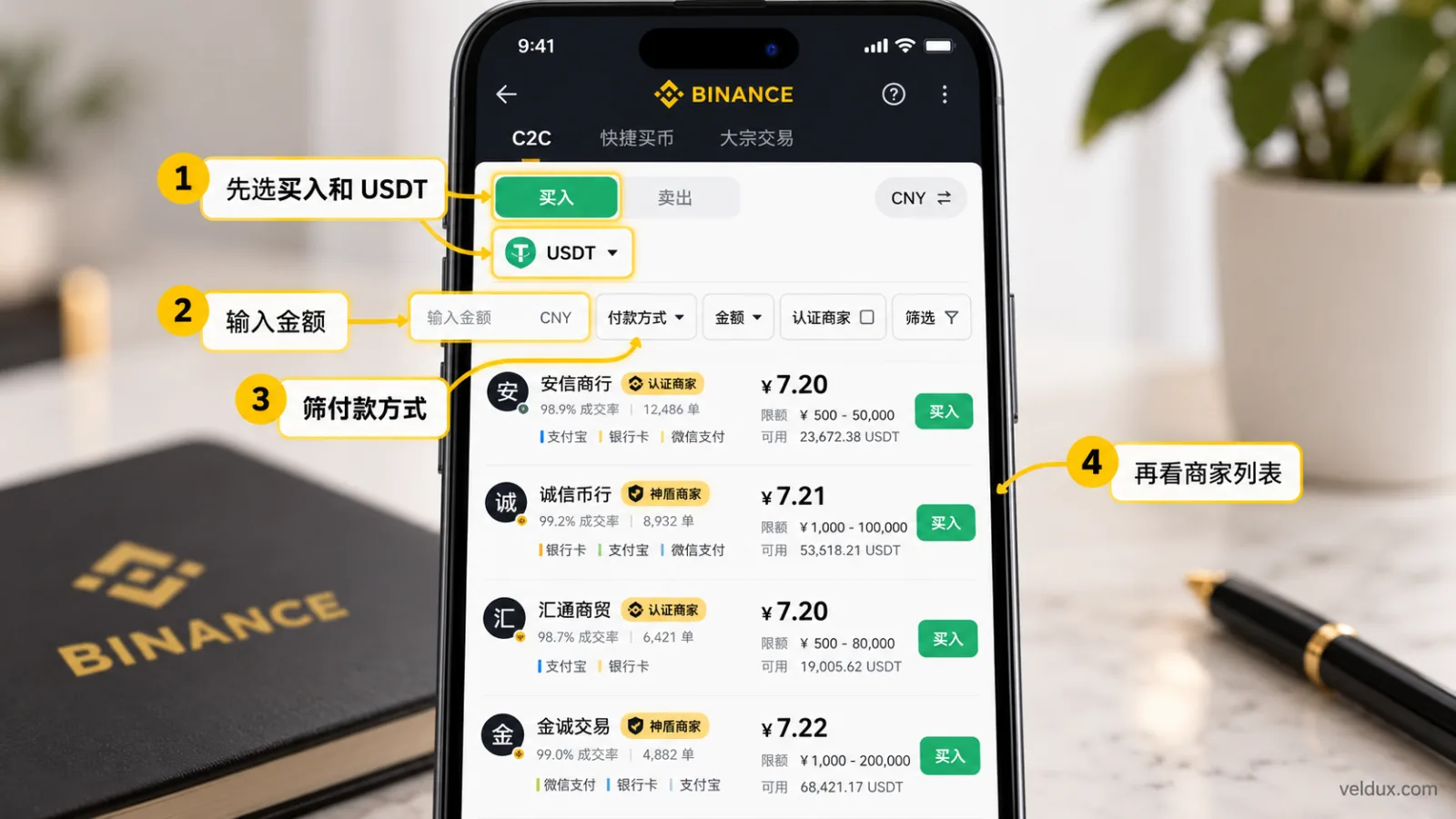
A P2P buy filter on Binance: choose USDT and the amount first, then filter by payment method, and finally compare completion rate and order count. (Merchant names, prices and trade data in the image are illustrative and do not represent Binance's live trading page.)
Step 2: filter by payment method and amount first
For example, you want to buy $500 worth of USDT and you only use your own bank card or bank transfer.
The merchant must then meet all of these at once:
- The ad supports that payment method.
- The minimum per order is not above $500.
- The maximum per order is not below $500.
- The payment requirements match your actual situation.
If any one of these fails, there is no point comparing completion rates.
Don't raise your budget from $500 to $2,000 just to reach a merchant's minimum.
Step 3: compare completion rate and recent trading record
After filtering, look at the completion rate, the number of completed orders and the statistical period the merchant displays.
Prioritise merchants that combine a high completion rate, a large enough order sample and a recent, continuous trading record.
Don't ignore the fact that a 100% merchant may have only a handful of orders.
Step 4: check verification badges and order terms
Open the merchant profile or ad details and check the platform verification badge, payment requirements, time limit and any extra restrictions.
If you're asked to use a third party's account, trade outside Binance, or pay through an external contact channel, stop and handle it through the platform's own channels.
Step 5: compare price last
Only compare among merchants that passed the earlier filters.
When buying USDT, a lower unit price theoretically buys more USDT for the same budget — but you also have to look at the amount actually fillable, the terms and any other costs.
In one sentence: rule out ads you can't trade with, then compare fulfilment data, and only then compare price.
How do you read the completion rate? 95%, 98% and 100% explained
The completion rate is one of the most-checked indicators when choosing a Binance P2P merchant.
It reflects how many historical orders a merchant completed within a given statistical period. It is not a safety score, and it is not a promise about future orders.
Generally, the higher the rate, the higher the share of historical orders completed successfully.
But you always have to read it together with the order count.
Is the difference between 95% and 98% big?
| Completion rate | How to read it when filtering |
|---|---|
| 100% | Check the order sample; a few orders prove nothing about long-term stability |
| 98%–99.9% | Worth prioritising, while checking recent volume |
| 95%–97.9% | Can be included in the comparison; focus on order count and terms |
| 90%–94.9% | A beginner can look first for an alternative with a steadier record |
| Below 90% | Be cautious; usually not a beginner's first choice |
These ranges are this article's empirical filtering guideline, not an official Binance merchant rating.
For example, two merchants show:
- Merchant A: 100% completion, only 8 recent orders.
- Merchant B: 98.7% completion, 1,500 recent orders.
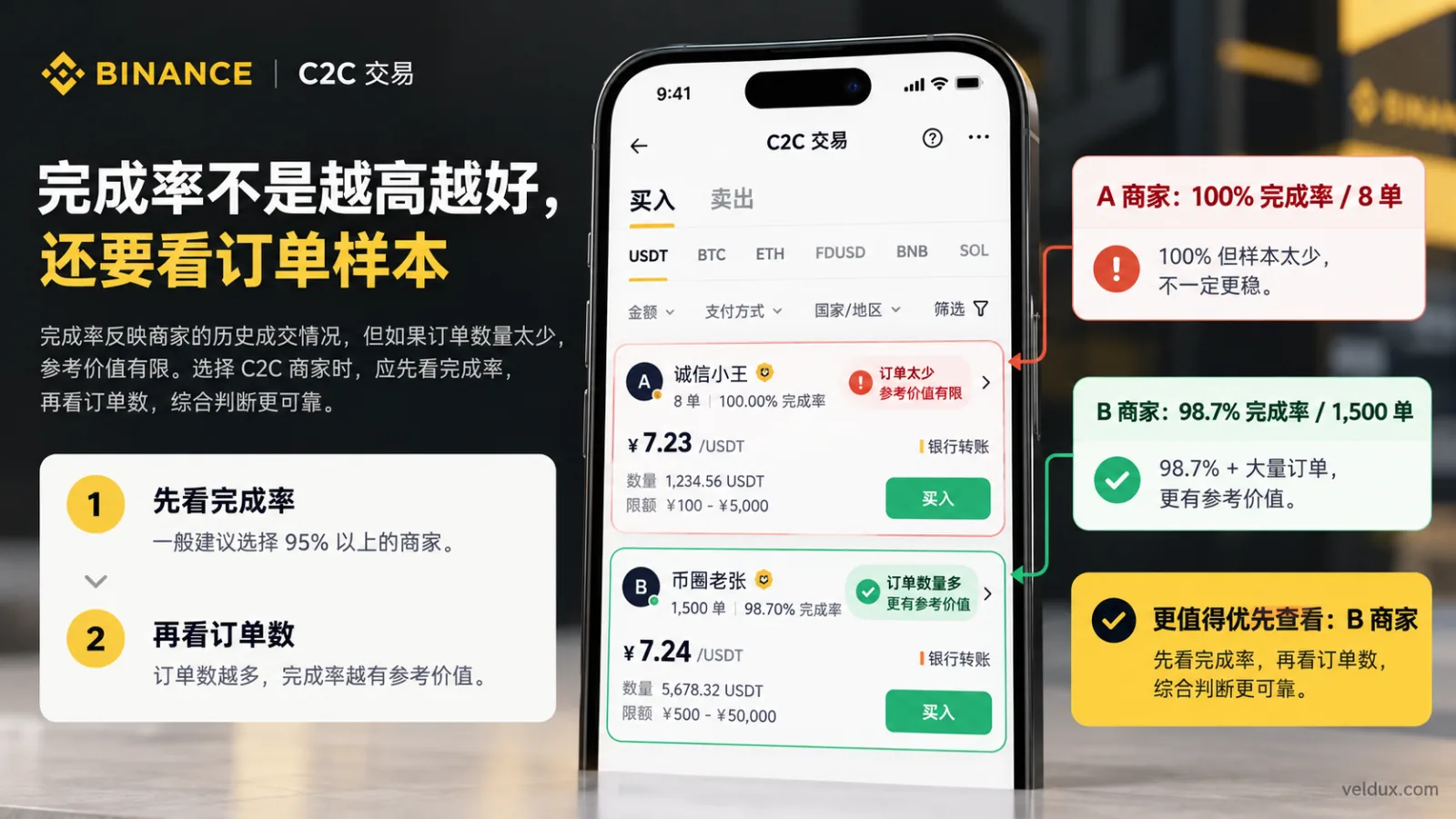
Choosing a P2P merchant on Binance: the completion rate alone cannot judge reliability; combine it with the recent order count, payment conditions and verification information. (Merchants and order data in the image are a teaching example, not live Binance merchant information.)
If the other conditions are similar, merchant B has the richer sample of historical fulfilment and is usually worth a closer look.
But that does not mean B is definitely safer. You still need to check the badge, the terms, the payment account and any recent anomalies.
Why can problems still happen with a high completion rate?
Because the rate mainly tracks whether orders completed, and cannot fully identify these risks:
- Whether the payment account itself is problematic.
- Whether the funds are involved in a dispute.
- Whether the current order will time out.
- Whether the counterparty suddenly makes irregular demands.
- Whether the bank or payment provider triggers a risk review.
The completion rate is good for comparing historical reliability, not for judging where the money came from.
How do you read volume? Does the 30-day order count matter more than the total?
Volume and completion rate have to be read together.
The rate reflects the historical fulfilment ratio; the order count reflects the sample size; the recent trading record helps you understand how active the merchant is right now.
Looking only at cumulative orders can hide how the merchant has been trading lately.
How do 30-day orders compare with cumulative orders?
| Metric | Main reference value |
|---|---|
| Cumulative completed orders | Understand the long-term history and sample size |
| Orders in the last 30 days | Observe recent activity and fulfilment record |
| Average release time | Reference for historical speed; no guarantee for this order's arrival |
| Recent reviews | Helps reveal recent disputes and service issues, if the page shows them |
For a beginner, prioritise merchants with hundreds of recent orders, a high completion rate and clear terms.
"Hundreds" is only a reference, not a mandatory threshold. In markets with different activity levels, a reasonable sample size can differ a lot.
Also note: some app versions only display cumulative completed orders or another metric — don't treat cumulative orders as 30-day orders. If the page doesn't show a number, don't infer it.
Is more volume always better?
Not necessarily.
A merchant at 97% with many recent orders is not automatically better than one at 99% with a moderate order count.
High volume can mean the merchant is active, but it can also come with heavier order-processing pressure.
When judging, focus on three questions:
- Is the completion rate stable?
- Are there enough orders in the current statistical period?
- Do the terms match your payment conditions?
Order count is a supporting indicator, not "the bigger the safer".
Verified, regular and Shield merchants: what's the difference?
Binance P2P badges are not decoration.
Different badges can represent different eligibility requirements and service rules, but verified, Shield and curated should not be read as unconditional safety in every trading scenario.
How should you understand the merchant types?
| Merchant or service type | What to confirm |
|---|---|
| Regular advertiser | Account fulfilment record, trading terms and actual availability |
| Verified merchant | The official verification badge and the merchant rules behind it |
| Shield advertiser | The shield badge, what the guarantee covers and its conditions |
| Curated merchant | Curated service eligibility and the compensation rules for specific trades |
These types are not always mutually exclusive; a curated merchant may also meet the conditions of a Shield advertiser. So don't treat them as four independent safety levels.
Binance states that verified advertisers carry the corresponding verification badge, and Shield advertisers have a specific shield badge. Actual names, filter entries and benefits depend on the current trading page.
Does a Shield merchant guarantee your account won't be frozen?
No.
According to Binance announcements still in force in 2026, qualifying Shield and curated trades may enjoy a specific judicial-freeze compensation guarantee — but that doesn't mean every account freeze is compensated, and it doesn't mean freezes won't happen.[2]
Make this distinction clear:
When you buy USDT, you pay the merchant; when you sell USDT, you receive payment from the counterparty.
The banking risk and the guarantee conditions are not the same in those two directions.
A Binance announcement updated in August 2026 says the curated-zone judicial-freeze compensation rule is aimed mainly at eligible users who sell and receive payment; it cannot be advertised as a general "protection for beginners buying USDT".[3]
If your goal is selling USDT back into fiat, check the latest curated-zone and Shield service rules separately at the time.
This article's recommendation: when buying, compare fulfilment data and actual payment conditions; when selling, you must also scrutinise the receiving-side risk and the guarantee rules that apply.
Bank card, Apple Pay or bank transfer: which payment method should you use?
The payment method is the baseline filter for a P2P merchant.
No payment method guarantees that a Binance P2P trade won't be flagged or frozen. Whether a bank card, Apple Pay or bank transfer works also depends on your account's region, the trading currency, the options the platform offers and the payment provider's rules.
How do the payment methods compare?
| Payment method | What to check before ordering |
|---|---|
| Bank transfer | Payee, bank account details, limits and payment requirements |
| Bank card | Whether the order supports it, account name matching, transaction limits |
| Apple Pay | Whether it's currently available, payment details and any restrictions |
This table is not a risk ranking of the three methods.
Using a bank transfer doesn't earn you a freeze exemption just because the merchant has a higher verification tier; using Apple Pay doesn't make a small trade automatically safe either.
What must you check when paying?
After placing the order, the official payment information shown on the Binance order page is what counts.
Check closely:
- Whether the order amount matches the amount you actually pay.
- Whether the receiving account details match what the order requires.
- Whether you're paying from an account in your own name.
- Whether the merchant suddenly asks you to change accounts.
- Whether there is any request for a third party to pay or receive, or to trade offline.
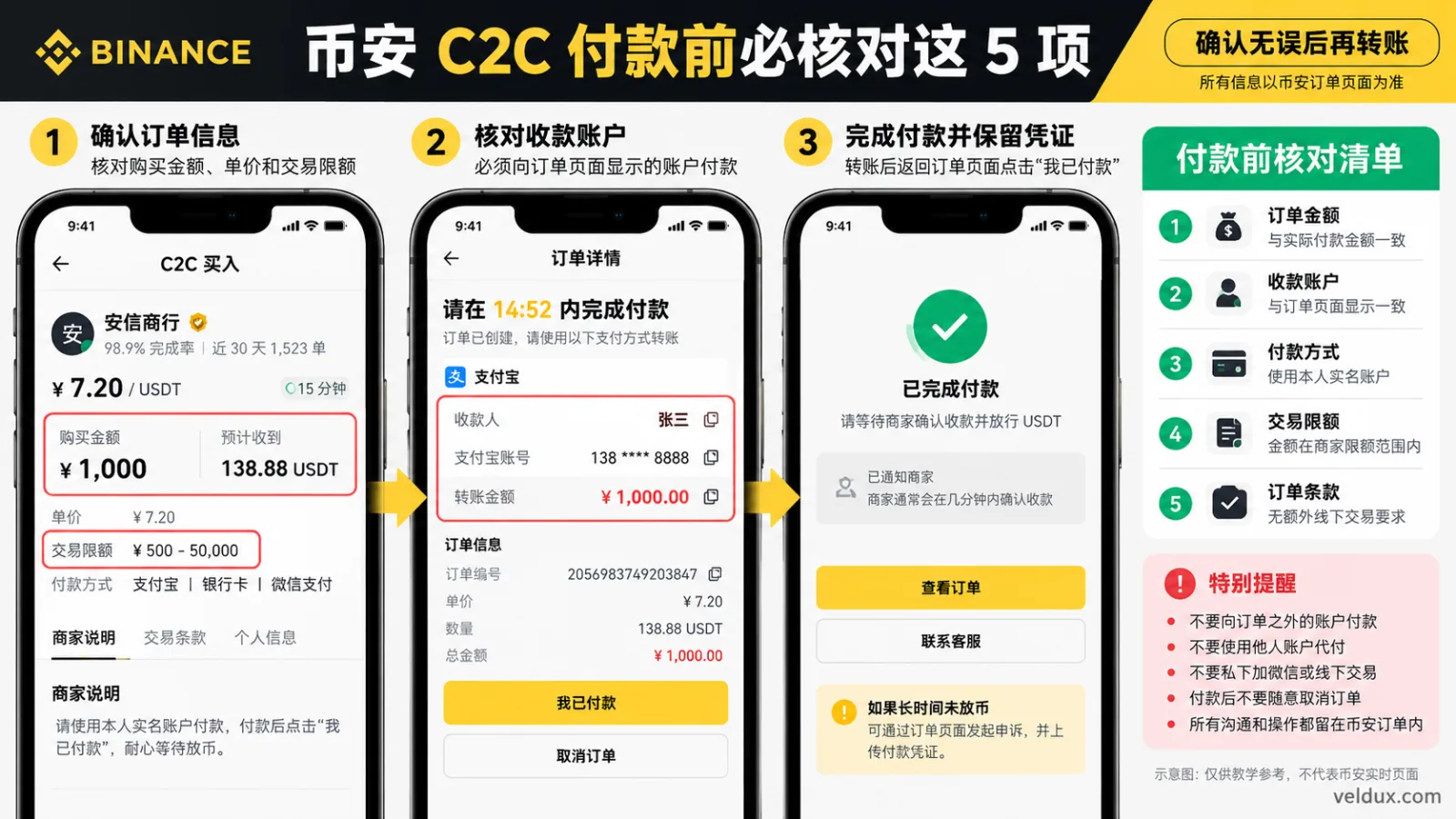
Pre-payment check on Binance P2P: confirm the amount, the receiving account, a payment method in your own name and the terms, so you don't transfer to an account outside the order. (Account, merchant and order data in the image are a teaching example, not a real Binance order; the "I have paid" button shown is the action after payment — actually pay, confirm receipt, and only then mark it as instructed by the order.)
If anything about the payment details is unclear, confirm first through the order chat or support; don't transfer directly.
The most important thing before paying is not which account the merchant asks for, but whether that payment method complies with platform rules and the payment provider's rules.
Be especially wary of a merchant who asks you in chat to move to a messaging app, change the receiving account, or confirm receipt in advance. Once you do that, you're outside Binance's order protection and it becomes hard to appeal. Keep all communication and payment inside the order, and pay only the account shown on the order page.
Binance P2P merchant comparison: 92% or 99% — who should you pick?
Suppose you want to buy $1,000 worth of USDT through Binance P2P.
After filtering, you see three merchants.
The data below is a teaching example, not a live Binance market ad.
| Indicator | Merchant A | Merchant B |
|---|---|---|
| USDT unit price | 1.000 | 1.002 |
| Completion rate | 92% | 99.1% |
| Orders in the last 30 days | 65 | 1,280 |
| Verification badge | No | Yes |
| Payment method | Supported | Supported |
A quotes lower, but B has the stronger fulfilment record.
Provided the payment conditions, limits and ad terms all match, B is the one to prioritise, rather than choosing A just for a slightly lower unit price.
Now a third merchant:
| Indicator | Merchant C |
|---|---|
| USDT unit price | 1.001 |
| Completion rate | 100% |
| Orders in the last 30 days | 6 |
| Verification badge | Yes |
| Payment method | Supported |
C shows 100%, but the order sample is too small to prove long-term fulfilment.
So you can't just sort by the completion-rate number.
Buying $1,000 of USDT: how much does a small price gap matter?
Using the quotes above:
- Buying at 1.000 gets you about 1,000 USDT.
- Buying at 1.002 gets you about 998.00 USDT.
- The real difference is about 2.00 USDT.
That's a simple calculation ignoring extra fees and quote changes.
It usually isn't worth ignoring a clearly different fulfilment record to save about 2 USDT.
But the reverse is also true: don't assume that because you picked the merchant with the higher completion rate, any premium is justified.
The reasonable approach is to compare price only among merchants whose payment conditions match and whose fulfilment records are similar.
First purchase, large amount or fast release: how to choose in each case
Different situations call for different indicators.
Case 1: your first USDT purchase
If it's your first time, focus on:
- Whether the amount is within what you can afford to lose.
- Whether the payment method and limits match.
- Whether the merchant has a sufficiently large order record.
- Whether the completion rate is high.
- Whether the order terms are easy to understand.
Don't chase the lowest price by choosing a merchant with complicated terms, too small a sample, or demands for extra offline steps.
Case 2: a larger trade
With a large amount, don't assume "gold badge plus bank transfer" is automatically safe.
Beyond fulfilment data, confirm:
- Whether the platform and your region allow the trade.
- Whether your payment account has transaction limits.
- Whether the merchant's ad covers that amount.
- Whether extra identity checks or compliance review apply.
- Whether the source of funds and supporting documents can be reasonably explained.
If you don't understand the trading and funding risk, don't scale up just because the merchant has high volume.
Case 3: you want the USDT as fast as possible
The average release time is a useful reference.
For example, if two merchants are otherwise similar, one releases in 3 minutes on average and the other in 12, you can lean towards the first.
But average release time is not a promise for this order: bank settlement, payment verification or a temporary risk check can all delay it.
Case 4: you want to sell USDT and receive payment
When selling, the risk of the receiving account moves to the foreground.
Even a very high completion rate doesn't guarantee that the money arriving is clean.
Check the payer's details, whether the payment account complies with platform rules, and the specific conditions of the Shield or curated service.
If your account is frozen because of a trade, keep the bank notice, order record, chat log and payment proof, and handle it through official channels.
The 3 most common P2P merchant-selection mistakes
Mistake 1: looking only at the lowest price
The lowest quote doesn't always correspond to the ad that suits you.
If the merchant has a low completion rate, little recent history or payment requirements that don't match, the low price alone has little value.
Do this instead: filter suitable merchants first, then compare price.
Mistake 2: treating 100% as absolute safety
A 100% completion rate can come from very few orders.
For example, a merchant with only 5 completed orders and one with a large order count at a high sustained rate are not equally credible.
Do this instead: read the rate together with the order count.
Mistake 3: cancelling the order right after paying
If you have already paid, don't treat cancellation as a simple undo.
Cancelling a paid order can complicate the refund, the release and the appeal.
Do this instead: keep the payment proof and use the official help or appeal function inside the order.
What to do if the merchant doesn't release the USDT after you pay
USDT not arriving after payment doesn't necessarily mean the merchant is scamming you.
There may be a bank transfer delay, payment verification, a merchant who is temporarily unresponsive, or a dispute on the order.
But you should proceed in the right order, and not wait indefinitely.
Step 1: confirm the payment actually went through
Check the transaction status in your bank or payment app.
Don't assume the other side received the money based only on a "payment initiated" screenshot.
Step 2: confirm the order's payment status
If you paid as the order required and followed the platform's rules, mark "I have paid" promptly as the order page instructs.
If you haven't actually paid, never click "I have paid" falsely.
Step 3: contact the merchant in the order chat
Communicate through the Binance order page and state the payment time, amount and status.
Don't accept any extra payment request outside the platform.
Step 4: open an appeal if needed
According to Binance's official help center, you can go from the relevant P2P order to the appeal or help page.[4]
Choose the reason, explain the situation and submit payment proof as the system requires.
The appeal process helps resolve disputes, but it does not guarantee an immediate release or a full recovery in every case.
Step 5: keep complete evidence
Keep the following:
- The P2P order number.
- The chat log inside the order.
- The actual payment proof.
- The payment account and receiving details.
- The platform appeal record.
If a bank account anomaly or judicial freeze is involved, cooperate as required by the bank, the payment provider or the relevant authority.
FAQ
Q1: What completion rate is good for a Binance P2P merchant?
For a beginner, prioritise merchants at 98% or above with a sufficiently large trading record. Those at 95% or above can also be included, but judge them together with order count, statistical period and terms.
These percentages are an empirical reference, not Binance's official safety rating.
Q2: Is a merchant with 100% completion the safest?
No. 100% only says that, within the corresponding statistical range, historical orders were completed. If the sample is small, you can't infer long-term stability, and even less that the funds carry no risk.
Q3: How much volume should a Binance P2P merchant have?
There is no fixed number that works for every region and amount.
Generally, prioritise merchants with a recent, continuous record and a sufficiently large sample. In active markets, hundreds of recent orders can serve as a reference, but never choose a merchant on volume alone.
Q4: Is a verified merchant always safer than a regular one?
Don't assume so. First confirm which official verification the badge represents and what rules sit behind it.
Verification is one filtering factor, but it cannot rule out payment disputes, fraud or account risk on any individual trade.
Q5: What's the difference between a Shield merchant and a curated merchant?
Shield advertisers have their specific badge and service rules; the curated service targets merchants and trading scenarios that meet more specific eligibility requirements.
The two may be related in eligibility, and compensation has conditions. Especially for judicial freezes when selling and receiving payment, check the latest curated and Shield service rules.
Q6: On Binance P2P, is Apple Pay or a bank transfer better?
Prioritise whichever method the platform and merchant actually support and you can use lawfully, and check the account details, limits and order terms.
Don't assume Apple Pay is safer, or that a bank transfer is less likely to be frozen.
Q7: What if the merchant doesn't release after I pay?
First verify the payment went through, then check the order status, and contact the merchant through the order chat. If it's still unresolved after a reasonable time, use the official appeal entry in the order and submit payment proof and an explanation.
Don't settle the dispute off-platform, and don't cancel an order after you've paid.
Q8: Can buying USDT on Binance P2P freeze my bank account?
There is a possibility that a bank or payment provider applies a risk check, restricts the transaction or freezes the account, for reasons ranging from trading behaviour to unusual funds or legal requirements.
A high completion rate, a verification badge, the Shield badge or any particular payment method cannot guarantee you avoid that entirely.
Summary: the order to follow when choosing a P2P merchant
How do you choose a Binance P2P merchant? The most practical method is not chasing 100% or the lowest ad price, but filtering layer by layer according to your actual trading conditions.
Follow this order:
- Payment method and order limits first: rule out ads you can't complete a trade with.
- Then completion rate and order count: prioritise merchants with a solid recent fulfilment record.
- Check the badges and terms: understand what the official badge and each guarantee actually covers.
- Compare price and release time last: choose among merchants with similar conditions.
For a first purchase, 98% or above is a reasonable priority reference, but it is not an official safety threshold you must meet.
Remember: a high completion rate means a good historical record, not that your bank account won't be frozen, and not that the trade carries no risk.
Next step
- How to buy USDT on Binance: a complete P2P tutorial — the exact steps from choosing an ad to paying and confirming the credit
- How to convert USDT to local currency: P2P selling and freeze risk — focus on receiving payments and bank-account freezes when selling
- How much does Binance charge? Spot, futures and deposit/withdrawal fees — understand the trading costs after you buy
- Is Binance safe? Licences, the SAFU fund and real risks (2026) — the platform-level safety mechanisms and risks
Data verification note
The key facts in this article were checked on 2026-10-16, one by one:
- Verified-merchant badge: Binance states that a verified merchant shows a verification badge next to the nickname, meaning it meets the platform's application and review conditions, but this does not mean Binance guarantees every trade is safe. Source: Binance Help Center — How to become a Binance P2P merchant.
- Shield badge and compensation scope: Shield advertisers carry a specific shield badge; qualifying Shield and curated trades may enjoy a judicial-freeze compensation guarantee, but not every freeze falls within its scope. Source: Binance Help Center — How to trade with Shield advertisers.
- Who the curated-zone compensation rule applies to: a Binance announcement updated in August 2026 says the curated-zone judicial-freeze compensation rule targets mainly eligible users who sell and receive payment, and should not be read as general protection for a beginner buying USDT. Source: Binance Help Center — P2P Curated Zone and service rules.
- P2P order appeal process: when a merchant does not release after payment, you can go from the relevant P2P order to the appeal or help page, select the reason and submit payment proof as the system requires. Source: Binance Help Center — P2P order appeal guide.
Disclaimer
This article only explains how to choose Binance P2P merchants and the risks involved in trading; it is not investment, financial or legal advice.
Crypto trading involves price, counterparty, payment, account-freeze and legal-compliance risks. Users should follow the laws of their jurisdiction and the rules of their payment provider, use their own lawful accounts, and avoid third-party payments or private deals outside the platform.
Some Binance products and services may not be available in certain regions or to certain users. People under 18 should not trade crypto assets.
Exchange operations · USDT · Wallet security
Responsible for researching and organizing content on Binance, OKX, USDT transfers, withdrawals and wallet security. The steps and key data in this article are verified according to the content type, using real operation records, official platform documentation and public sources. Interfaces, fees and regional rules may change, so the article is reviewed and updated continuously.
Status: manual review · Last verified 2026-10-16
Reviewed by: Veldux editorial team
- Binance Help Center — How to become a Binance P2P merchantWhat the verified-merchant badge means, plus the application and review conditions for becoming a verified advertiser
- Binance Help Center — How to trade with Shield advertisersThe shield badge, the trading rules, and the conditions under which judicial-freeze compensation applies
- Binance Help Center — P2P Curated Zone and service rulesEligibility for curated merchants and when the compensation rule applies, mainly for eligible users who sell and receive payment
- Binance Help Center — P2P order appeal guideThe official process for opening an appeal or help page from the P2P order and submitting payment proof when a merchant does not release
- 2026-10-16UpdateAdded the evidence-chain superscripts and the "Data verification note", and updated the key-fact verification date.
Editorial principles ineditorial policy,corrections policy。