
How to buy USDT in 2026: Binance and OKX P2P tutorial
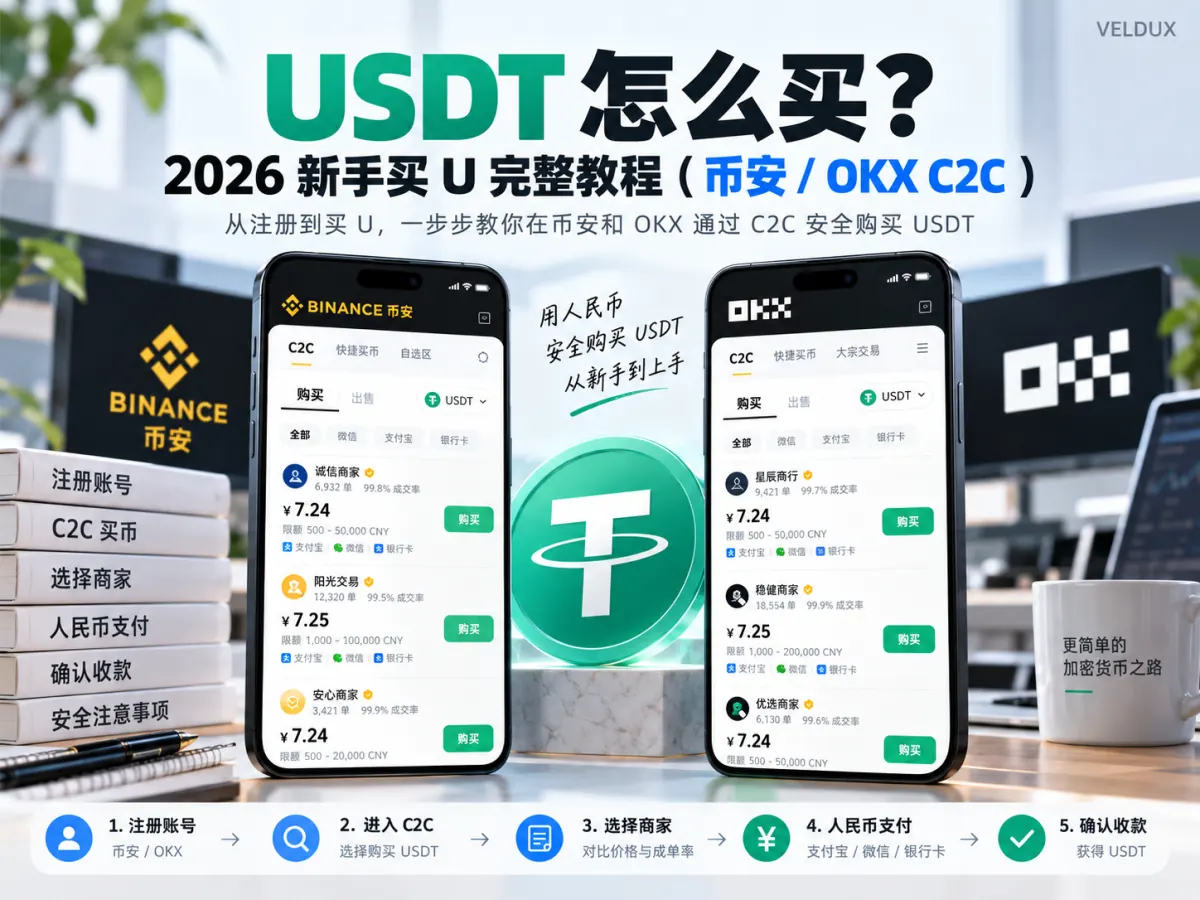
Table of contents

Binance new-user benefit
20% fee rebate
Official Binance sign-up · You must complete identity verification (KYC) to trade and withdraw
How do you buy USDT? Where trading is permitted in your region, a beginner can buy USDT through the P2P function on Binance or OKX. After completing identity verification, select USDT, enter the amount, pick a merchant, pay according to the order details, and you receive the USDT once the seller confirms.
The first time you buy USDT, watch three things: whether the merchant's quote is reasonable, whether the payment account is correct, and whether you tapped "I've paid" after transferring the money. If the order and the payment go smoothly, the whole flow takes roughly 10–15 minutes from creating the order to seeing the balance. The two traps that account for most beginner losses are paying without confirming the order, and canceling an order that has already been paid.
Below I walk through the purchase steps on Binance and OKX, and explain how to check that the USDT arrived and how to handle an order the seller won't release.
Before you trade: P2P availability, fiat currencies and payment channels depend on your account's registration region, your identity details, platform rules and local law. Some jurisdictions restrict or prohibit crypto trading, and banks may block payments linked to crypto. What follows is a platform walkthrough for users in regions where this is permitted; it does not mean every resident can legally carry out these transactions. Don't trade with a false identity, across regions, or in ways that evade payment regulation.
1. First USDT purchase: Binance or OKX?
If you already have a Binance or OKX account that has passed identity verification and can use P2P normally, there's no need to register on the other platform just to buy USDT once.
If both are legally available to you, what's actually worth comparing is the real execution price, the merchants available, the order limits and the payment methods — not just the platform name.
| Buying scenario | What to choose |
|---|---|
| First purchase, unfamiliar merchants | Check the final quote and order conditions in Express first |
| You want to compare merchant quotes | Use the manual merchant selection on Binance or OKX P2P |
| You already have a Binance account | Look at the orders available on Binance first |
| You already have an OKX account | Look at the orders available on OKX first |
| The two quotes differ clearly | Compare the actual USDT you receive for the same amount and payment conditions |
Bottom line: no platform guarantees that every order is cheaper or faster. When both are available, choose the one you know, with transparent order conditions and a reasonable quote.
2. Before buying USDT, confirm 3 things
1. Can your account use P2P normally?
Having an account doesn't guarantee you can buy crypto.
Check that:
- You have completed the identity verification the platform requires.
- Your account's region supports the relevant P2P service.
- The fiat currency and payment method you plan to use comply with platform and local rules.
- You use a lawful payment account in your own name, not a third-party payer.
If the P2P page doesn't list a certain fiat currency, or the system says the account isn't eligible, don't borrow someone else's identity just to place an order.
2. How much USDT to buy, and how to calculate it
P2P merchants usually show the fiat price per USDT.
Estimated USDT = amount actually paid ÷ execution price per USDT.
A hypothetical example: an order quotes 7.25 local-currency units per USDT and you plan to pay 500 units.
500 ÷ 7.25 ≈ 68.97 USDT.
That is, if the order has no other charges, you would buy about 68.97 USDT.
This is a demonstration calculation, not today's exchange rate. When you buy, the order confirmation page is what counts.
Don't look only at the "zero fees" label. Even if the platform charges the buyer no extra P2P trading fee, different merchants' buy and sell quotes can still differ.
3. Express or manual selection?
| Trading mode | How to choose |
|---|---|
| Express | The platform matches an available quote; fewer steps |
| Manual selection | You compare merchants, prices, completion rates and payment terms |
The first time, start with Express to learn the flow and see the final quote. If you want to check merchants' trading history and filter different quotes, move to manual selection.
Only after you have seen the final price, the payment terms and the receiving details should you move to actual payment.
3. How to buy USDT on Binance: the complete P2P flow
The following follows Binance's official app P2P tutorial. Buttons may differ slightly by region and app version. For Binance's exact entry points and button positions, see the detailed how to buy USDT on Binance tutorial.
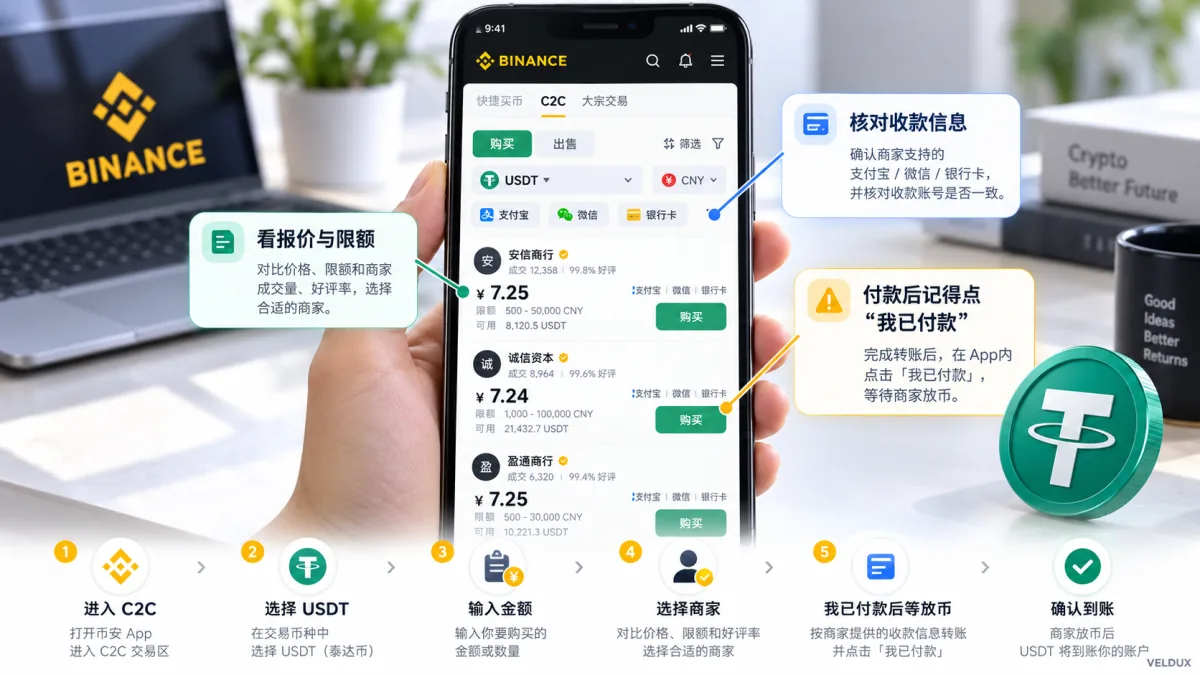
Figure 1: Binance P2P USDT purchase flow. The interface and quote are illustrative; the Binance app is the authority.
Step 1: open the Binance app and go to P2P
Log in to the Binance app, find "Add Funds" on the home screen and choose "P2P" (some versions label the section "Buy Crypto").
Inside, you can switch between Express and manual selection.
Select USDT as the coin to buy, then choose the fiat currency and payment method from the options your account shows.
If the P2P entry doesn't appear, check your identity verification, account region and feature availability first — instead of looking for an unofficial installer.
Step 2: enter the purchase amount
In Express, enter the amount you plan to pay; the system will offer matching quotes.
In manual selection, enter the amount and payment method first, then look at the seller's quote and the minimum and maximum order limits.
For example, if you plan to pay 500 units, don't choose an ad whose minimum order limit is above 500.
Before ordering, always confirm: how much fiat you pay, how much USDT you get, who you pay, and what the payment deadline is.
Step 3: choose a merchant, don't just tap the lowest price
In manual selection, beginners are drawn to the cheapest merchant, but price doesn't capture all the trading risk. For the full merchant screening checklist, see how to choose a Binance P2P merchant.
| What to check | What matters most |
|---|---|
| Execution price | Whether it clearly deviates from other quotes on the same terms |
| Completion rate | Whether recent order completion is stable |
| Trading record | Whether there's enough history to judge |
| Payment terms | Whether your own account and the amount are accepted |
Rule out orders with mismatched limits, vague terms or unusual receiving methods first, then compare prices.
A verified merchant badge and a high completion rate are useful references, but they don't mean your funds are absolutely safe, nor that the platform will compensate any loss unconditionally.
Step 4: create the order and check the receiving details before paying
After choosing a merchant, tap buy and confirm the order.
The platform usually escrows the seller's corresponding amount of USDT once the order is created.[1]
At this point check:
- Whether the actual amount payable on the order is correct.
- Whether the recipient, account number and payment method match the order details.
- Whether the order is still within the valid payment window.
- Whether the payment complies with your bank, the payment provider and local law.
If the merchant asks you to trade through an external chat app, pay to an account other than the one on the order, or provide a password and verification code, stop.
Step 5: after paying, return to Binance and tap "I've paid"
Where it's legal and complies with the payment service terms, complete the payment the order requires, then return to the Binance order page.
Tap "I've paid, notify the seller".
Don't skip this button.
Bank transfers and the platform's order system are different systems, so the seller may not instantly receive the order's payment confirmation after you leave your payment app.
Watch out for two operations that commonly cause losses:
If you haven't actually paid, don't tap "I've paid".
If you have actually paid, don't cancel the order outright.
If the payment went wrong, keep the evidence and resolve it through the platform's in-order chat and help functions; don't cancel freely before a refund is confirmed.
Step 6: wait for release and confirm the balance
Once the seller confirms receipt, the platform releases the USDT according to the order flow.
The time to credit isn't fixed; it depends mainly on payment processing, seller confirmation and the platform's risk controls.
When the order shows completed, go to the assets page and confirm that the USDT amount matches the order record.
2026 account change: from 29 September 2026, Binance is phasing in the spot account as the default trading account for regular P2P users.[2] After updating the app, eligible users generally no longer need to manually transfer from the funding account the way older tutorials described.
After buying USDT, check the spot account balance first; if the assets still show in the funding account, follow the current on-page instructions. Merchant accounts follow a different transition schedule.
4. How to buy USDT on OKX: the P2P steps
OKX works on the same principle as Binance, but the entry names and the order confirmation differ. For the full screenshot walkthrough, see how to buy USDT on OKX.
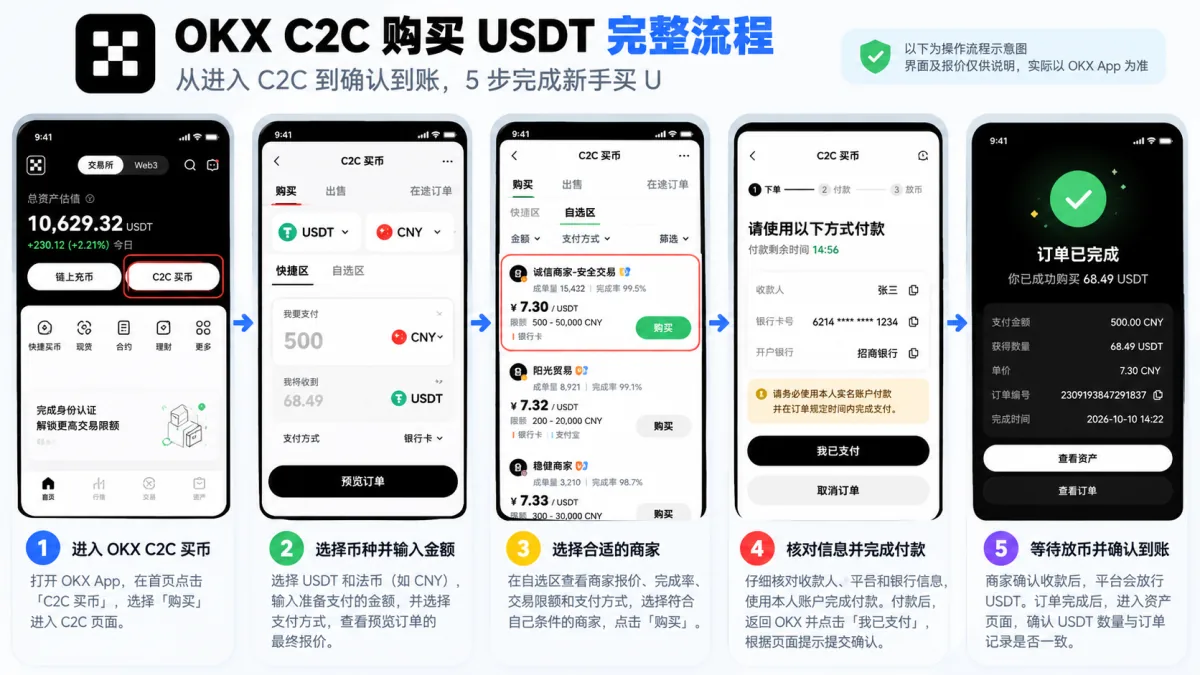
Figure 2: the five-step OKX P2P USDT purchase flow, including entering the buy page, choosing the amount, screening merchants, confirming payment and checking the credit. The image is illustrative; the app's interface and quotes are the authority.
Step 1: enter OKX P2P buying
Open the OKX app, find "P2P trading" and choose "Buy".
The first time, you can start with Express; if you want to screen merchants yourself, go to manual selection.
Choose USDT, plus the fiat currency and payment method your account actually supports.
Step 2: choose a merchant or match a quote
Express: enter the amount, choose the payment method and check the final quote in the order preview.
Manual selection: in the merchant list, review the quote, trading limits and available payment methods, and pick an order that fits your conditions.
If the quote doesn't match your expectations, go back and choose again before paying.
Before paying: if the order page mentions T+3, T+7 or T+15 security protection, the asset may be locked from withdrawal, P2P selling or DEX trading for that period. If you're buying USDT to move it to another wallet right away, check for a restriction before ordering.
Step 3: create the order and verify the payment details
Tap buy, read the risk notice and the order conditions.
Go to "Get payment details" and verify the merchant's receiving information on the order.
Don't treat an account someone sends you in chat as the designated receiving account for the order.
Step 4: complete the payment and submit confirmation
After completing the payment according to the order flow, return to OKX.
Tap "I've paid", and confirm the transfer or upload the payment receipt as the page requires.[3]
The payment receipt must match the actual payment; don't use fake screenshots.
Step 5: wait for the merchant to release
Once the merchant confirms receipt, the platform releases the USDT for the order.
After the order completes, check the asset balance and the order details.
Note that some OKX P2P trades can trigger T+N security protection, which temporarily prevents the purchased asset from being sold or withdrawn. Whether a restriction applies and how long it lasts depends on what the current order page shows.
Bottom line: if you know Binance, there's no need to switch to OKX for the steps; if you already use OKX, you can follow its official P2P flow. What actually matters is the order conditions and the safety checks.
5. How to tell whether a USDT quote is expensive
Many beginners only ask "how much is 1 USDT" without comparing the actual amount they'd receive on orders of the same size.
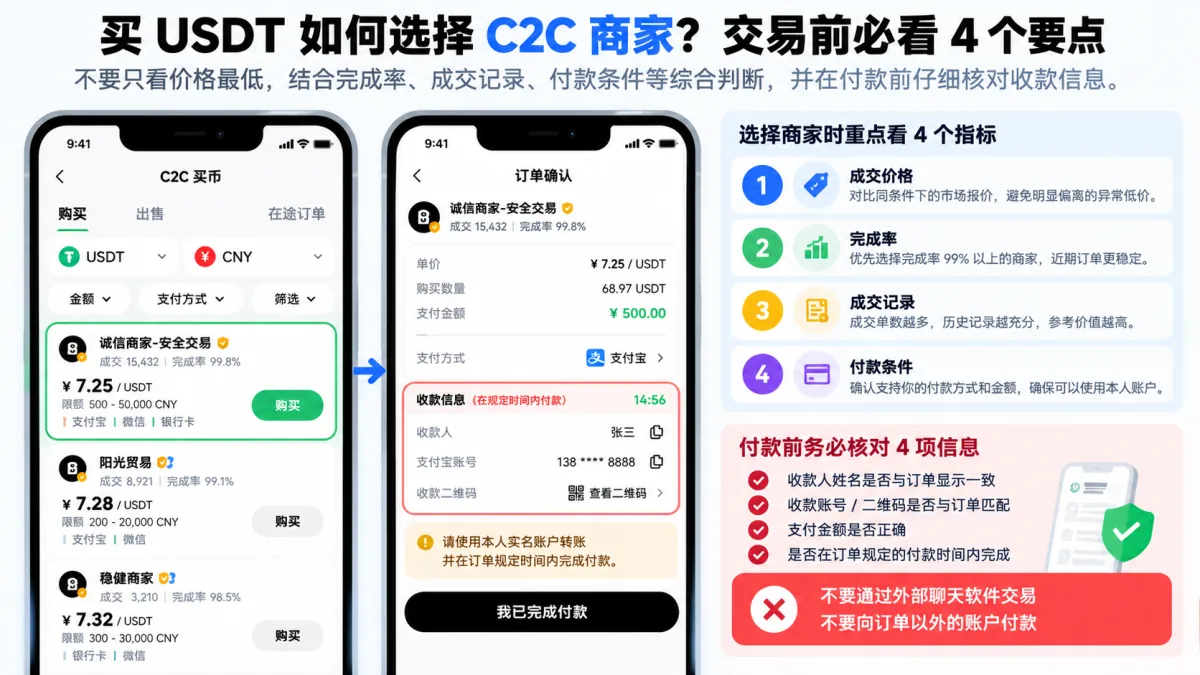
Figure 3: P2P merchant screening and payment safety checks when buying USDT; prices and data are examples only.
Suppose you plan to pay 1,000 units of local currency and there are two merchants:
| Merchant quote | Estimated USDT received |
|---|---|
| 7.20 local-currency units per USDT | 138.89 USDT |
| 7.28 local-currency units per USDT | 137.36 USDT |
The two orders differ by about 1.53 USDT. This is an example based on hypothetical prices, not the platform's live sell price.
But that doesn't mean you should just pick the 7.20 merchant. You also need to check their order limits, payment terms, trading record and whether the quote is abnormal.
Selection principle: first rule out orders that don't fit or look suspicious, then compare the real cost among the acceptable ones.
Also, USDT targets the dollar but doesn't guarantee that its market price always equals exactly $1. The buy quote is affected by supply and demand, local exchange rates and other factors.
6. Paid but no USDT? What to do
This part matters more than repeating the registration steps.
Don't rush to pay again. Judge by the order's current status.
| Order situation | What to do |
|---|---|
| You haven't paid yet | Don't tap "I've paid" early |
| Paid but not confirmed | Return to the order immediately and submit the real payment record through the platform flow |
| Paid, waiting for release | Keep the order, contact the merchant, and ask the platform to step in if needed |
| The order was canceled after you paid | Keep the bank statement and the order number, and contact platform support immediately |
| Order completed but no balance | Check the spot and funding account balances against the order record |
You paid and the merchant asks you to cancel
Don't cancel just because the merchant says so.
Especially if they propose "cancel first, then settle elsewhere", "transfer again" or a "private refund", insist on using the platform's order and support process.
After payment, the money and the USDT may be at different confirmation stages. An incorrect cancellation can make any later dispute harder to resolve.
What if you paid the wrong amount?
If you paid too little, too much, or from an account that doesn't match, don't guess at the next step.
Keep the real payment record, explain what happened in the platform order, and contact official support.
There's no guarantee that every mistaken payment can be recovered.
7. Money risks when buying USDT: frozen bank accounts and off-platform payment
P2P uses the platform's order flow and digital-asset escrow, but that doesn't mean a bank or payment provider guarantees the transaction.
Pay particular attention to:
- Use only a payment account you lawfully hold, and comply with the payment service terms.
- Don't accept off-platform trades, unknown QR codes or a receiving account swapped at the last minute.
- Never provide account passwords, SMS codes, 2FA codes or wallet seed phrases.
- Don't try to evade risk controls with false payment notes, split payments or someone else's account.
- Keep the real order, the payment record and your messages with the merchant.
- Don't let a verified-merchant badge make you ignore payment and legal risk.
In some regions financial institutions may restrict or refuse crypto-related payments. A frozen bank card can also involve fraud prevention, anti-money-laundering rules or a law-enforcement investigation; don't reduce the problem to "I chose the wrong merchant".
If your jurisdiction doesn't allow these transactions, stop trading instead of looking for workarounds.
For selling USDT into local currency and what to do if a bank account is frozen, see how to cash out USDT to your bank.
8. After buying USDT, do you need to choose TRC20?
When you buy USDT through Binance or OKX P2P, you normally don't choose TRC20, ERC20 or BEP20.
That's because USDT bought through P2P is delivered inside your exchange account, not transferred directly to an external on-chain wallet.
You only need to check the on-chain network when you plan to withdraw USDT to another exchange or your own wallet.
At that point you must use the same network the receiving platform supports; don't pick one at random just because a chain has lower fees.
If you're only buying to use the USDT inside your exchange account, there's no need for an extra on-chain transfer. To choose a network when withdrawing, see which network to use for USDT transfers.
9. FAQ
Q1: What's the easiest way to buy USDT?
Where trading is permitted and your account is eligible, start with the Express area on Binance or OKX, enter the amount and check the final quote. If you want to choose merchants yourself, switch to manual selection. No single method fits every region and user.
Q2: Can I buy just $100 of USDT?
It depends on the merchant's minimum order limit, platform rules and the payment methods available. Some orders accept smaller amounts; others set a higher minimum. The trading page is the authority.
Q3: Do I need to complete KYC to buy USDT?
Binance and OKX P2P trading usually requires identity verification. Which documents you need depends on your account's region and the current requirements. You can't use someone else's identity documents.
Q4: Can I buy USDT with a bank card or a local payment app?
Whether that's supported depends on your region, the platform, the merchant and the payment service terms. Even if an order shows a certain payment method, that doesn't mean the method is permitted for crypto transactions everywhere.
Q5: Does buying USDT through P2P charge a fee?
The platform may charge eligible buyers no extra P2P trading fee, but the merchant's sell price already reflects their quote. Compare what you actually pay with the USDT you end up with, rather than looking only at a zero-fee label.
Q6: I paid but the merchant won't release. What now?
First confirm you marked the payment correctly on the original order, keep the bank or payment provider record, and contact the merchant through the order chat. If that doesn't resolve it, request help through the platform's support or dispute entry.[4] Don't cancel a paid order at will before you've received a refund.
Q7: Why can't I withdraw the USDT I just bought?
It could be incomplete account verification, an asset still restricted by trading or risk controls, or the platform's T+N protection on the order. OKX has said officially that some purchase orders may carry a 3, 7 or 15-day restriction; what the order shows is the authority. No one can promise you can transfer it out immediately after buying.
Q8: Why is my purchased USDT not visible in the spot account?
First check whether the order completed, then check the actual balances in the spot and funding accounts. Binance has been phasing in the P2P default account change since 29 September 2026, so you can't assume every purchase lands in the funding account.
Q9: Can buying USDT lose money?
It can. USDT carries depeg, issuer, liquidity, counterparty and custody risk; P2P adds quote differences, payment disputes and the risk of frozen funds. Don't treat a stablecoin as a principal-protected deposit.
10. First USDT purchase: 4 things to remember
Buying USDT isn't hard, but don't focus only on whether you can place the order.
First, confirm that your region and your account meet the legal and eligibility requirements.
Second, when choosing between Binance and OKX, compare the actual quote, order limits and merchant conditions.
Third, verify the order details before paying and confirm through the platform flow after paying; never cancel a paid order casually.
Fourth, confirm the order completed and the assets arrived before planning the next use; if you don't need to withdraw, don't add an extra on-chain transfer.
This article explains digital-asset basics and platform operations only. It is not investment, legal or trading advice. Crypto asset prices are highly volatile and fiat deposits carry bank risk-control and compliance risk; virtual assets can produce significant losses, so all operations should comply with local law and the payment service rules that apply to you. Never use someone else's account or trade outside the platform. People under 18 should not trade crypto.
What to read next
- How to buy USDT on Binance: complete P2P tutorial (2026) — the screenshot-level version of the Binance steps here, with more detail on entries and buttons
- How to buy USDT on OKX: complete P2P tutorial (2026) — the screenshot-level version of the OKX steps here
- Buying USDT: Binance or OKX? A 2026 P2P comparison — which of the two to choose, comparing quotes and crediting with measured data
- Can USDT collapse? Is Tether actually safe? Reserves, audits and freeze risk (2026) — understand USDT's own reserve and freeze risk before you buy
- How to cash out USDT to your bank: P2P selling, payment apps and frozen-account risk (2026) — the next step after buying is usually selling
Official reference sources
- Binance: how to buy crypto with P2P on the app
- Binance: announcement on migrating the funding account to the spot account
- OKX: how to buy crypto with P2P
- OKX: I've paid but the seller hasn't released
Editorial note: this article checks the operating steps against official public documentation and does not claim the editor completed a real payment test. Platform buttons, quotes, limits and eligibility can change with account region and app version.
Data verification note
The key facts in this article were checked on 2026-10-16, one by one:
- P2P order escrow: on Binance P2P, once an order is created the platform escrows the seller's corresponding crypto; the buyer pays according to the order, the merchant confirms receipt and the platform releases, with no extra P2P trading fee charged to the buyer. Source: Binance Help Center — How to buy crypto with P2P on the app.
- Binance default account adjustment: from 29 September 2026, Binance has been phasing in a change to the default trading account for regular P2P users; eligible users generally no longer need to transfer manually from the funding account to the spot account after buying USDT. Source: Binance announcement — funding account migration to the spot account.
- OKX payment confirmation steps: OKX's official P2P purchase flow is: get the payment details → pay according to the order → return to the page and tap "I've paid" and upload the receipt as required. Source: OKX Help Center — How to buy crypto with P2P.
- Handling a paid but unreleased order: if you paid according to the order and the merchant hasn't released, keep the payment record and the order number and contact the merchant through the order chat; if that fails, submit the payment proof through the platform's help or dispute entry. Source: OKX Help Center — I paid but the seller hasn't released.
Exchange operations · USDT · Wallet security
Responsible for researching and organizing content on Binance, OKX, USDT transfers, withdrawals and wallet security. The steps and key data in this article are verified according to the content type, using real operation records, official platform documentation and public sources. Interfaces, fees and regional rules may change, so the article is reviewed and updated continuously.
Status: manual review · Last verified 2026-10-16
Reviewed by: Veldux editorial team
- Binance Help Center — How to buy crypto with P2P on the appWhen a Binance P2P order is created, the platform escrows the seller's corresponding crypto; the buyer pays, the merchant confirms and the platform releases
- Binance announcement — funding account migration to the spot accountFrom 29 September 2026, Binance is phasing in the spot account as the default trading account for regular P2P users
- OKX Help Center — How to buy crypto with P2POKX's official P2P purchase steps, including getting the payment details, tapping "I've paid" after paying and uploading the payment receipt
- OKX Help Center — I paid but the seller hasn't releasedThe official path for a paid order that hasn't been released — submit payment proof through the order help or dispute entry
- 2026-10-16UpdateAdded the evidence-chain superscripts and the "Data verification note", and updated the key-fact verification date.
Editorial principles ineditorial policy,corrections policy。